---
title: "Enhance email notifications with tables"
canonical_url: "https://www.nutrient.io/guides/workflow-automation/faq/adding-tables-to-email-notifications/"
md_url: "https://www.nutrient.io/guides/workflow-automation/faq/adding-tables-to-email-notifications.md"
last_updated: "2026-06-09T10:25:14.576Z"
description: "Learn two simple methods to add tables to your email notifications for better organization and readability."
---
# Add tables to email notifications easily
If you'd like to add a table to your email notifications you can do it two different ways, which we outline below.
Here's an example of a table in an email notification. It can help structure content like labels and fields: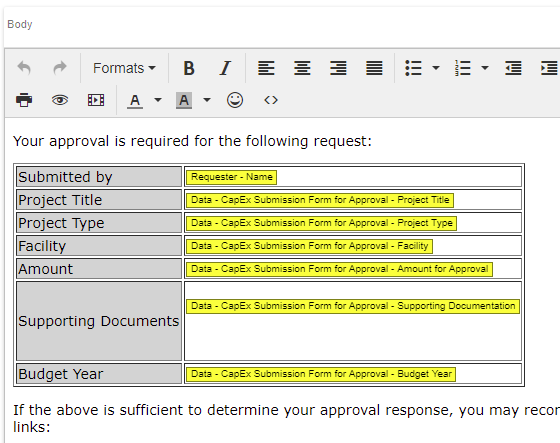
## Method #1 - Using the visual editor
1. Go to a blank spot in your email and right-click. You will see a number of options appear.
2. Select "Table" and then drag across the grid to select the number of columns and rows you want.
3. In the example above there are two columns and seven rows so that's what we've selected.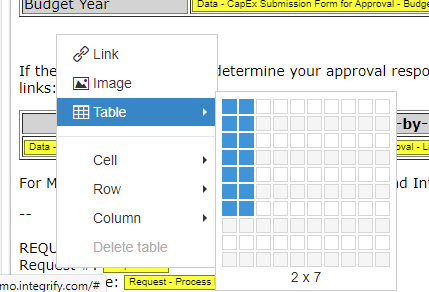
The table will appear but it will be collapsed, making it a bit hard to see. Click somewhere on the table and start typing to spread out the columns and make it easier to place your cursor.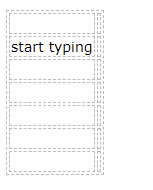
## Method #2 - HTML code
Another way to add a table is to use the HTML Code Editor which you can access by clicking on the <> icon in the toolbar.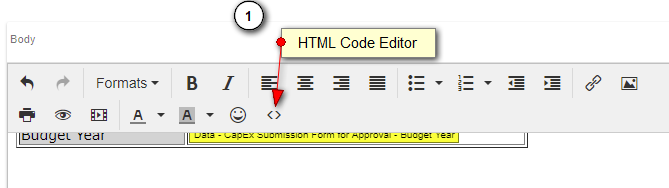
This will open up a "Source Code" window that reveals all of the HTML Code behind the email. You can then find the place in the code where you want your table and copy/paste the example below into the HTML Code Editor.
```html
| Submitted by |
REPLACE WITH FIELD |
| Project Title |
REPLACE WITH FIELD |
| Project Type |
REPLACE WITH FIELD |
| Facility |
|
| Amount |
REPLACE WITH FIELD |
| Supporting Documents |
REPLACE WITH FIELD
|
| Budget Year |
REPLACE WITH FIELD |
```
When you click on "OK to close the HTML Code Editor, you will see a table appear and you can begin editing it.
---
> Part of [Frequently asked questions](/guides/workflow-automation/faq.md)
## Related pages
- [Connect Nutrient Workflow to an external SQL Server database](/guides/workflow-automation/faq/adding-sql-server-db-to-nutrient-workflow.md)
- [Streamline task management with the Form Assigner](/guides/workflow-automation/faq/assign-future-tasks-with-the-form-assigner.md)
- [Changing milestone task names in project management](/guides/workflow-automation/faq/can-i-change-the-name-of-a-milestone-task-on-a-process-in-production.md)
- [Customize your login screen with these easy tips](/guides/workflow-automation/faq/can-i-change-the-login-screen.md)
- [Migrating requests in workflow automation processes](/guides/workflow-automation/faq/can-i-migrate-a-group-of-requests-from-one-version-of-a-process-to-an-updated-version.md)
- [Preventing request ID creation until task completion](/guides/workflow-automation/faq/can-we-prevent-a-new-request-id-from-being-created-until-a-task-completed.md)
- [Authenticate HTML forms with SAML securely](/guides/workflow-automation/faq/can-we-authenticate-with-saml-when-hosting-html-forms-outside-the-nutrient-workflow-portal.md)
- [Streamline file uploads to SharePoint with Nutrient Workflow](/guides/workflow-automation/faq/can-nutrient-workflow-pass-files-into-sharepoint.md)
- [Mastering the coalesce technique for workflows](/guides/workflow-automation/faq/coalescing-data-ai-an-advanced-nutrient-workflow-technique.md)
- [Streamline onboarding with ad-hoc related requests](/guides/workflow-automation/faq/creating-ad-hoc-related-requests.md)
- [Master table maintenance with Nutrient Workflow processes](/guides/workflow-automation/faq/creating-a-table-maintenance-process.md)
- [Customize your Nutrient Workflow logo with ease](/guides/workflow-automation/faq/custom-logo.md)
- [Do disabled users receive notifications in Nutrient Workflow?](/guides/workflow-automation/faq/do-notifications-get-sent-out-to-users-that-have-been-disabled.md)
- [Document generation vs. PDF generator in workflow automation](/guides/workflow-automation/faq/document-generation-vs-pdf-generator.md)
- [Maximize task management with Nutrient Workflow's solutions](/guides/workflow-automation/faq/does-nutrient-workflow-support-leap-year-dates.md)
- [Understanding task resets and user reassignments](/guides/workflow-automation/faq/does-the-user_recent_activity-store-data-when-a-user-resets-or-re-assign-a-task.md)
- [Embed Outlook and Google calendars in your dashboard](/guides/workflow-automation/faq/embedding-calendars-in-dashboards.md)
- [Efficiently extract grid data for custom tables](/guides/workflow-automation/faq/how-can-i-extract-grid-data-to-add-it-to-custom-tables.md)
- [Enhance Nutrient Workflow security with two-factor authentication](/guides/workflow-automation/faq/does-nutrient-workflow-support-two-factor-authentication.md)
- [Paste spreadsheet rows into a grid](/guides/workflow-automation/faq/how-can-i-paste-spreadsheet-rows-into-line-items.md)
- [Access your private database server easily](/guides/workflow-automation/faq/how-do-i-access-my-private-database-server.md)
- [Enable AUTH for secure Nutrient Workflow and Redis setup](/guides/workflow-automation/faq/how-do-i-enable-auth-for-nutrient-workflow-to-redis-communication.md)
- [Submit a help ticket at the Nutrient Workflow support site](/guides/workflow-automation/faq/how-do-i-submit-a-support-ticket.md)
- [Force users to change passwords on next login](/guides/workflow-automation/faq/how-do-i-force-a-user-to-change-their-password-on-the-next-login.md)
- [Easily prefill contact search fields in forms](/guides/workflow-automation/faq/how-do-i-prefill-in-a-contact-search.md)
- [Schedule a process](/guides/workflow-automation/faq/how-do-i-schedule-a-process.md)
- [Make your process lines straight with grid option](/guides/workflow-automation/faq/how-do-i-make-the-lines-in-a-process-straight.md)
- [Enhance local communication in your application](/guides/workflow-automation/faq/how-do-i-force-local-communication-within-the-application.md)
- [How to limit file attachment size in Nutrient Workflow](/guides/workflow-automation/faq/how-do-i-limit-the-allowed-max-file-attachment-size.md)
- [Editing request details in active workflows](/guides/workflow-automation/faq/how-do-you-edit-request-description-and-other-fields-after-the-workflow-has-started.md)
- [Clear browser cache for smooth workflow](/guides/workflow-automation/faq/how-to-clear-your-browser-cache.md)
- [Import active directory users with ADSync easily](/guides/workflow-automation/faq/how-do-i-import-active-directory-users-into-nutrient-workflow-using-adsync.md)
- [Master dynamic task and request naming effectively](/guides/workflow-automation/faq/how-to-configure-dynamic-task-and-request-names.md)
- [Edit request names seamlessly with dynamic names](/guides/workflow-automation/faq/is-there-a-way-to-edit-the-name-of-a-request-after-it-has-been-submitted.md)
- [Understanding user concurrency in Nutrient Workflow](/guides/workflow-automation/faq/how-is-user-concurrency-determined-for-my-installation.md)
- [How to reset your Nutrient Workflow password easily](/guides/workflow-automation/faq/i-forgot-my-password.md)
- [Automate your report from a set starting date](/guides/workflow-automation/faq/i-would-like-to-set-a-report-to-run-from-a-set-date-say-1-1-15-through-the-current-day-today-how-can-i-set-my-report-to-do.md)
- [Understanding time_out configuration in workflow automation](/guides/workflow-automation/faq/is-there-any-negative-impact-if-we-change-the-time_out-configuration-on-a-task-in-a-process-in-status-production.md)
- [Understanding account lockout rules in Nutrient Workflow](/guides/workflow-automation/faq/is-there-any-way-to-configure-account-lockout-rules.md)
- [Understanding the Nutrient Workflow and PSPDFKit acquisition](/guides/workflow-automation/faq/pspdfkit-acquisition.md)
- [Streamline task assignments with Assigner tasks](/guides/workflow-automation/faq/using-assigner-tasks.md)
- [Understanding requesters vs. recipients in workflows](/guides/workflow-automation/faq/the-difference-between-a-requester-and-a-recipient.md)
- [Optimize your workflows with Excel integration](/guides/workflow-automation/faq/using-excel-to-enhance-your-automation.md)
- [Upgrade your select list fields for better forms](/guides/workflow-automation/faq/upgrading-select-list-fields.md)
- [Best practices for testing workflows in Nutrient Workflow](/guides/workflow-automation/faq/what-are-best-practices-for-testing-in-nutrient-workflow.md)
- [Optimize your workflow with Microsoft Nutrient Workflow integration](/guides/workflow-automation/faq/nutrient-workflow-integrate-microsoft-products.md)
- [Key steps for successful Nutrient Workflow load balancing](/guides/workflow-automation/faq/what-do-i-need-to-change-when-i-load-balance-nutrient-workflow.md)
- [Enhance your subscription with admin coaching support](/guides/workflow-automation/faq/what-is-admin-coaching.md)
- [Understanding character limits for form inputs](/guides/workflow-automation/faq/what-character-limits-apply-to-the-form-input-fields.md)
- [Discover Nutrient Workflow's browser compatibility](/guides/workflow-automation/faq/what-browsers-does-nutrient-workflow-support.md)
- [What Does 'Create a Copy of this Request' Do?](/guides/workflow-automation/faq/what-does-aucreate-a-copy-of-this-request-au-do.md)
- [What is 'Submit on Behalf of:' when starting a new request?](/guides/workflow-automation/faq/what-is-submit-on-behalf-of-when-starting-a-new-request.md)
- [Best practices for archiving request data](/guides/workflow-automation/faq/what-is-the-best-practice-for-archiving-request-data-eg-attachments.md)
- [Fixing missing fields in form data settings](/guides/workflow-automation/faq/why-are-fields-from-my-form-not-showing-up-in-data-configurations.md)
- [Expert advanced technical support for Nutrient Workflow](/guides/workflow-automation/faq/what-is-advanced-technical-support-ats.md)
- [Future logging features for workflow automation](/guides/workflow-automation/faq/when-a-nutrient-workflow-administrator-performs-a-task-resets-or-redo-completion-is-there-a-logging-table-where-this-information-is-st.md)
- [Understanding the iapprove master root account](/guides/workflow-automation/faq/what-is-the-iapprove-account.md)
- [Streamline workflows with the PDF Generator Task](/guides/workflow-automation/faq/what-is-the-pdf-generator-task.md)
- [What is the difference between Monitor and Manage Requests?](/guides/workflow-automation/faq/what-is-the-difference-between-monitor-and-manage-requests.md)
- [Understanding Nutrient Workflow log files for troubleshooting](/guides/workflow-automation/faq/where-are-the-logs-for-my-onpremise-installation-what-do-they-contain-and-what-should-i-look-out-for.md)
- [Essential guide to workflow versioning](/guides/workflow-automation/faq/when-to-version-a-production-workflow.md)