Client/server coming and going with custom actions
Before starting, complete the your first DocuVieware MVC Razor page guide.
This guide shows how to implement a button whose action will be to draw a QR code on the current document with a specified value that will be prompted to the user in a C# MVC project with Razor view engine.
Requirements — .NET Framework 4.6 or above
Note — Screenshots were taken using Visual Studio 2015 and GdPicture.NET 14. They may differ from the current release.
Preparing your action client-side
Add a button on the page (for example, above the DocuVieware control) and attach an
onclickevent to it that will execute a JavaScript function in theIndex.cshtmlview file.HTML <div style="margin-top: 15px;"><button onclick="drawQRCode(); return false;">Draw QR code</button></div>Add and implement the JavaScript function that will call the
PostCustomServerActionfunction from the DocuVieware JavaScript public API that’s documented in thePostCustomServerActionAPI reference.JavaScript <script>function drawQRCode() {var codeValue = prompt("Enter the text to encode", "DocuVieware");if (codeValue != null) {DocuViewareAPI.PostCustomServerAction("DocuVieware1", true, "drawQRCode", codeValue);}}</script>
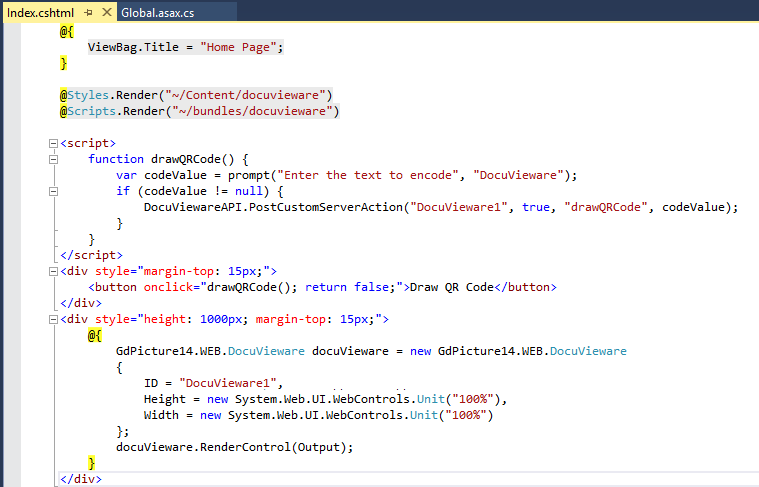
The following screenshot shows what you have now.
Preparing your action server-side
The client-side part is done, so now you’ll properly route the DocuVieware custom action event in the Global.asax.cs file and implement the corresponding handler.
In
Application_Start, subscribe to theCustomActionevent and redirect it to a private handler namedCustomActionHandler. This naming is used for the sake of clarity, but it could be named differently.C# DocuViewareEventsHandler.CustomAction += CustomActionsHandler;Now, each time the
PostCustomServerActionJavaScript function is called on the client side, it’ll fire the server-side event that will go into theCustomActionsHandlermethod. Then, theactionNamewill be checked and dispatched accordingly.Implement
CustomActionsHandler. This doesn’t exist yet, so it won’t compile. Because this uses GdPicture.NET to draw the barcode, add someusingstatements first. Then add the event handler that draws the QR code on the documents:C# using GdPicture14.WEB;using GdPicture14;using System.Drawing;private void CustomActionsHandler(object sender, CustomActionEventArgs e){// if we are in the drawQRCode action and we have parametersif ((e.actionName == "drawQRCode") && (e.args != null)){string barcodeValue = e.args.ToString();if (e.docuVieware.PageCount > 0){// we need to check if the document is an image...if (e.docuVieware.GetDocumentType() == DocumentType.DocumentTypeBitmap){int ImageID;GdPictureStatus status = e.docuVieware.GetNativeImage(out ImageID);if (status == GdPictureStatus.OK){GdPictureImaging oGdPictureImaging = new GdPictureImaging();oGdPictureImaging.BarcodeQRWrite(ImageID, barcodeValue,BarcodeQREncodingMode.BarcodeQREncodingModeUndefined,BarcodeQRErrorCorrectionLevel.BarcodeQRErrorCorrectionLevelH,0, 5, 4, 10, 10, 0, Color.Black, Color.Transparent);}else{e.message = new DocuViewareMessage("Error during get native image : " + status.ToString() + ".","#ff5656", 2500, 300, 300, false, "130%", "normal","#ffffff", "none", "none", "48px", DocuViewareMessageIcon.Error);}}else{// ...or a PDF documentif (e.docuVieware.GetDocumentType() == DocumentType.DocumentTypePDF){GdPicturePDF oGdPicturePDF = new GdPicturePDF();GdPictureStatus status = e.docuVieware.GetNativePDF(out oGdPicturePDF);if (status == GdPictureStatus.OK){oGdPicturePDF.SetOrigin(PdfOrigin.PdfOriginTopLeft);oGdPicturePDF.SetMeasurementUnit(PdfMeasurementUnit.PdfMeasurementUnitCentimeter);oGdPicturePDF.DrawBarcodeQrCode(barcodeValue,BarcodeQREncodingMode.BarcodeQREncodingModeUndefined,BarcodeQRErrorCorrectionLevel.BarcodeQRErrorCorrectionLevelH,0, 4, 1, 1, Color.Black);}else{e.message = new DocuViewareMessage("Error during get native PDF : " + status.ToString() + ".","#ff5656", 2500, 300, 300, false, "130%", "normal","#ffffff", "none", "none", "48px", DocuViewareMessageIcon.Error);}}}e.docuVieware.RedrawPage();}else{e.message = new DocuViewareMessage("Load a document first.","#ff5656", 2500, 300, 300, false, "130%", "normal","#ffffff", "none", "none", "48px", DocuViewareMessageIcon.Error);}}}
Sending and receiving data with a custom action
This part is demonstrated in the barcode recognition(opens in a new tab) sample that’s provided within the SDK installer (in the barcode_recognition_demo.aspx page). It’s strongly recommended that you refer to it to fully understand how it should be used.
Now, take a closer look at the PostCustomServerAction JavaScript function:
function PostCustomServerAction: function (docuViewareID, async, actionName, params, success, error)There are two extra parameters that you didn’t use in the previous example: success and error. These two callbacks are used to run your own code on success or on error, and they’re optional functions you need to write on your own, depending on what you want to achieve.
The important part here is the success callback, which is needed to retrieve a result from the server action.
Define your success callback function in the
Index.cshtmlfile:JavaScript function onBarcodeDrawingSuccess(result) {alert("result: " + JSON.stringify(result));}In
Index.cshtml, change the parameters you’re sending to include both the code value and a result field. Name this objectjson. Then you can use it in thePostCustomServerActioncall, together with the success callback defined earlier, as shown in the following example:JavaScript function drawQRCode() {var codeValue = prompt("Enter the text to encode", "DocuVieware");if (codeValue != null) {var json = {value: codeValue,example: false};DocuViewareAPI.PostCustomServerAction("DocuVieware1", true, "drawQRCode", json, onBarcodeDrawingSuccess);}}From now on, each time the custom action is called and successful, the
onBarcodeDrawingSuccessfunction will be triggered.Declare the structure of the new parameter you’re passing. Ensure it matches with the JavaScript object you defined earlier in the
drawQRCodefunction.C# internal class myCustomActionParameters{public string value { get; set; }public bool example { get; set; }}Set up the server-side handler. Change the
exampleBoolean value fromfalsetotrue:C# private void CustomActionsHandler(object sender, CustomActionEventArgs e) {// we need to properly cast the parameters according to the internal class we have defined...myCustomActionParameters myParameters = JsonConvert.DeserializeObject<myCustomActionParameters>(e.args.ToString());// ...so we can access to its contentstring barcodeValue = myParameters.value;if (e.docuVieware.PageCount > 0){// we need to check if the document is an image...if (e.docuVieware.GetDocumentType() == DocumentType.DocumentTypeBitmap){int ImageID;GdPictureStatus status = e.docuVieware.GetNativeImage(out ImageID);if (status == GdPictureStatus.OK){GdPictureImaging oGdPictureImaging = new GdPictureImaging();oGdPictureImaging.BarcodeQRWrite(ImageID, barcodeValue,BarcodeQREncodingMode.BarcodeQREncodingModeUndefined,BarcodeQRErrorCorrectionLevel.BarcodeQRErrorCorrectionLevelH,0, 5, 4, 10, 10, 0, Color.Black, Color.Transparent);}else{e.message = new DocuViewareMessage("Error during get native image : " + status.ToString() + ".","#ff5656", 2500, 300, 300, false, "130%", "normal","#ffffff", "none", "none", "48px", DocuViewareMessageIcon.Error);}}else{// ...or a PDF documentif (e.docuVieware.GetDocumentType() == DocumentType.DocumentTypePDF){GdPicturePDF oGdPicturePDF = new GdPicturePDF();GdPictureStatus status = e.docuVieware.GetNativePDF(out oGdPicturePDF);if (status == GdPictureStatus.OK){oGdPicturePDF.SetOrigin(PdfOrigin.PdfOriginTopLeft);oGdPicturePDF.SetMeasurementUnit(PdfMeasurementUnit.PdfMeasurementUnitCentimeter);oGdPicturePDF.DrawBarcodeQrCode(barcodeValue,BarcodeQREncodingMode.BarcodeQREncodingModeUndefined,BarcodeQRErrorCorrectionLevel.BarcodeQRErrorCorrectionLevelH,0, 4, 1, 1, Color.Black);}else{e.message = new DocuViewareMessage("Error during get native PDF : " + status.ToString() + ".","#ff5656", 2500, 300, 300, false, "130%", "normal","#ffffff", "none", "none", "48px", DocuViewareMessageIcon.Error);}}}// now we change the example value we want to send back to client sidemyParameters.example = true;// and we put our parameter object into the proper onee.result = myParameters;e.docuVieware.RedrawPage();}else{e.message = new DocuViewareMessage("Load a document first.","#ff5656", 2500, 300, 300, false, "130%", "normal","#ffffff", "none", "none", "48px", DocuViewareMessageIcon.Error);}}Each time the client-side button is clicked, the
resultparameter is sent server-side withfalsevalue. It’s then changed totrueand sent back to the client-side to be displayed.