Use and handling of the selection area
Before starting, complete the your first DocuVieware MVC Razor page and client/server coming and going with custom actions guides.
This guide shows how to work with selection area (also known as the region of interest, or ROI) in a sample MVC Razor application that will apply a negative filter on a particular area.
Requirements — .NET Framework 4.6 or above
Note — Screenshots were taken using Visual Studio 2015 and GdPicture.NET 14. They may differ from the current release.
This guide adds three buttons above the DocuVieware control: one outputs the coordinates of the selection area (if any), another clears it, and the last applies a negative filter on the selected area.
Displaying the ROI coordinates
Add a button that calls a JavaScript function on the click event. Place the following code in Index.cshtml:
<div style="margin-top: 15px;"> <button onclick="getROICoordinates(); return false;">Display ROI coordinates</button> </div>Below is the JavaScript function that retrieves the coordinates and displays them in an alert box.
function getROICoordinates() { var coords = DocuViewareAPI.GetSelectionAreaCoordinates("DocuVieware1"); if ((coords.width == 0) && (coords.height == 0)) { alert("No selection area set."); } else { alert("Selection area coordinates (in inches):\nLeft: " + coords.left + "\nTop: " + coords.top + "\nWidth: " + coords.width + "\nHeight: " + coords.height); } }Clearing the ROI
It’s often useful to have a button to clear the ROI (reset the selection area), and it’s done the same way. Add a button that calls a JavaScript function on a click event:
<button onclick="clearROI(); return false;">Clear ROI</button>Below is the JavaScript function that clears the selection area:
function clearROI() { DocuViewareAPI.ClearSelectionArea("DocuVieware1");}Applying a negative filter to the ROI
Use a CustomAction to apply the negative filter on the selected area. This requires sending the ROI coordinates to the server, setting an ROI on the actual image, and applying the filter.
Add the button and the JavaScript function that executes on the click event:
HTML <button onclick="Negative(); return false;">Apply Negative filter on the ROI</button>Below is the JavaScript function that retrieves the coordinates of the selection area and sends them to the server using a
CustomAction:JavaScript function Negative() {var coords = DocuViewareAPI.GetSelectionAreaCoordinates("DocuVieware1");if ((coords.width != 0) && (coords.height != 0)) {DocuViewareAPI.PostCustomServerAction("DocuVieware1", false, "Negative", coords);}}At this point, your client source code looks like what’s shown in the screenshot below.
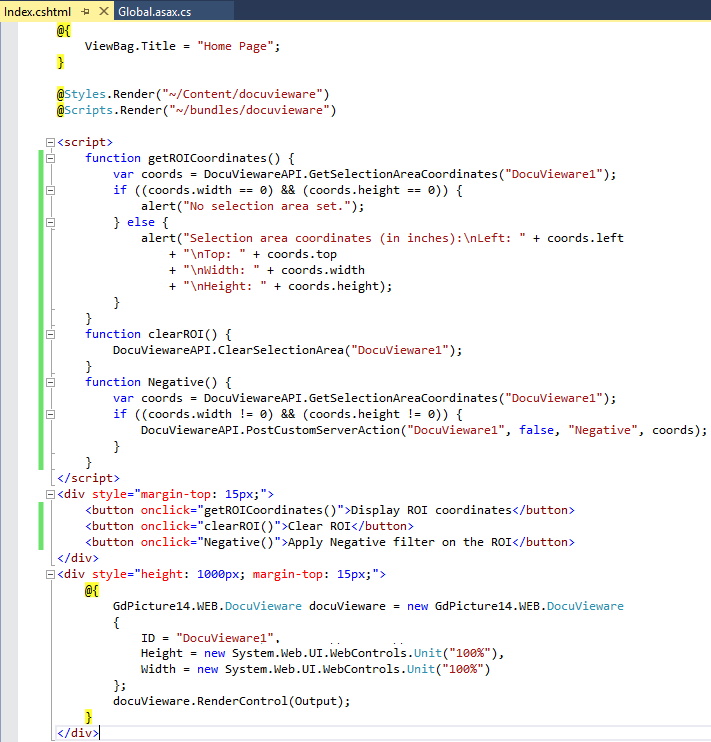
You’ll require a class to retrieve the parameters (i.e. the ROI coordinates). Add this one to your
Global.asax.csfile:C# public class roi{public double left { get; set; }public double top { get; set; }public double width { get; set; }public double height { get; set; }}Subscribe to the
CustomActionevent and set up the structure of your event handler (refer to client/server coming and going with custom actions for more information):C# protected void Application_Start(object sender, EventArgs e){DocuViewareLicensing.RegisterKEY("XXXX"); //Unlocking DocuViewareDocuViewareEventsHandler.CustomAction += CustomActionsHandler;}private void CustomActionsHandler(object sender, CustomActionEventArgs e){if ((e.actionName == "Negative") && (e.args != null)){//Custom action implementation will go here}}Implement the custom action handler in the
Global.asax.csfile. This retrieves the image object, sets the ROI based on the coordinates received from the client, and applies the filter:C# private void CustomActionsHandler(object sender, CustomActionEventArgs e){if ((e.actionName == "Negative") && (e.args != null)){using (GdPictureImaging gdPictureImaging = new GdPictureImaging()){int imageId;GdPictureStatus status = e.docuVieware.GetNativeImage(out imageId);if (status == GdPictureStatus.OK){status = GdPictureStatus.GenericError;roi roi = (roi)JsonConvert.DeserializeObject<roi>(e.args.ToString());gdPictureImaging.SetROI((int)Math.Round(roi.left * gdPictureImaging.GetHorizontalResolution(imageId), 0),(int)Math.Round(roi.top * gdPictureImaging.GetVerticalResolution(imageId), 0),(int)Math.Round(roi.width * gdPictureImaging.GetHorizontalResolution(imageId), 0),(int)Math.Round(roi.height * gdPictureImaging.GetVerticalResolution(imageId), 0));status = gdPictureImaging.FxNegative(imageId);if (status != GdPictureStatus.OK){e.message = SendErrorMessage("Error during Negative filter: " + status.ToString());}if (status == GdPictureStatus.OK){status = e.docuVieware.RedrawPage();if (status == GdPictureStatus.OK){e.message = new DocuViewareMessage("Filter successfully applied.");}else{e.message = SendErrorMessage("Error during redraw : " + status.ToString() + ".");}}}}}}private static DocuViewareMessage SendErrorMessage(string message){return new DocuViewareMessage(message, "#ff5656", 2500, 300, 300, false, "130%", "normal", "#FFFFFF", "none", "none", "48px", DocuViewareMessageIcon.Error);}