Protect privacy and compliance at cloud speed with an AI redaction API that pinpoints and permanently removes sensitive content in PDFs — no regex tuning, no DevOps, and far less guesswork.
Use a simple API to detect and permanently redact sensitive content in your own platform, or automate AI redaction workflows with tools like Zapier, without building custom AI classification pipelines.
No code? No problem. Connect Nutrient DWS Processor API to your favorite apps with Zapier to automate AI redaction and document privacy workflows.
Select a package that suits your needs according to the number of credits you wish to spend. Each AI redaction workflow has a clear credit cost so teams can evaluate privacy and compliance automation before scaling to production.
This sample showcases smart redaction, instantly spotting and removing sensitive data from your document with AI.
Try it out in three steps
document.pdf into your project folder.result.pdf to see the output.curl -X POST https://api.nutrient.io/ai/redact \ -H "Authorization: Bearer your_api_key_here" \ -o result.pdf \ --fail \ -F file1=@document.pdf \ -F data='{ "documents": [ { "documentId": "file1" } ], "criteria": "All personally identifiable information" }'curl -X POST https://api.nutrient.io/ai/redact ^ -H "Authorization: Bearer your_api_key_here" ^ -o result.pdf ^ --fail ^ -F file1=@document.pdf ^ -F data="{\"documents\": [{\"documentId\": \"file1\"}], \"criteria\": \"All personally identifiable information\"}"package com.example.pspdfkit;
import java.io.File;import java.io.IOException;import java.nio.file.FileSystems;import java.nio.file.Files;import java.nio.file.StandardCopyOption;
import org.json.JSONArray;import org.json.JSONObject;
import okhttp3.MediaType;import okhttp3.MultipartBody;import okhttp3.OkHttpClient;import okhttp3.Request;import okhttp3.RequestBody;import okhttp3.Response;
public final class PspdfkitApiExample { public static void main(final String[] args) throws IOException { final RequestBody body = new MultipartBody.Builder() .setType(MultipartBody.FORM) .addFormDataPart( "file1", "document.pdf", RequestBody.create( MediaType.parse("application/pdf"), new File("document.pdf") ) ) .addFormDataPart( "data", new JSONObject() .put("documents", new JSONArray() .put(new JSONObject() .put("documentId", "file1") ) ) .put("criteria", "All personally identifiable information").toString() ) .build();
final Request request = new Request.Builder() .url("https://api.nutrient.io/ai/redact") .method("POST", body) .addHeader("Authorization", "Bearer your_api_key_here") .build();
final OkHttpClient client = new OkHttpClient() .newBuilder() .build();
final Response response = client.newCall(request).execute();
if (response.isSuccessful()) { Files.copy( response.body().byteStream(), FileSystems.getDefault().getPath("result.pdf"), StandardCopyOption.REPLACE_EXISTING ); } else { // Handle the error throw new IOException(response.body().string()); } }}using System;using System.IO;using System.Net;using RestSharp;
namespace PspdfkitApiDemo{ class Program { static void Main(string[] args) { var client = new RestClient("https://api.nutrient.io/ai/redact");
var request = new RestRequest(Method.POST) .AddHeader("Authorization", "Bearer your_api_key_here") .AddFile("file1", "document.pdf") .AddParameter("data", new JsonObject { ["documents"] = new JsonArray { new JsonObject { ["documentId"] = "file1" } }, ["criteria"] = "All personally identifiable information" }.ToString());
request.AdvancedResponseWriter = (responseStream, response) => { if (response.StatusCode == HttpStatusCode.OK) { using (responseStream) { using var outputFileWriter = File.OpenWrite("result.pdf"); responseStream.CopyTo(outputFileWriter); } } else { var responseStreamReader = new StreamReader(responseStream); Console.Write(responseStreamReader.ReadToEnd()); } };
client.Execute(request); } }}// This code requires Node.js. Do not run this code directly in a web browser.
const axios = require('axios')const FormData = require('form-data')const fs = require('fs')
const formData = new FormData()formData.append('data', JSON.stringify({ documents: [ { documentId: "file1" } ], criteria: "All personally identifiable information"}))formData.append('file1', fs.createReadStream('document.pdf'))
;(async () => { try { const response = await axios.post('https://api.nutrient.io/ai/redact', formData, { headers: formData.getHeaders({ 'Authorization': 'Bearer your_api_key_here' }), responseType: "stream" })
response.data.pipe(fs.createWriteStream("result.pdf")) } catch (e) { const errorString = await streamToString(e.response.data) console.log(errorString) }})()
function streamToString(stream) { const chunks = [] return new Promise((resolve, reject) => { stream.on("data", (chunk) => chunks.push(Buffer.from(chunk))) stream.on("error", (err) => reject(err)) stream.on("end", () => resolve(Buffer.concat(chunks).toString("utf8"))) })}import requestsimport json
response = requests.request( 'POST', 'https://api.nutrient.io/ai/redact', headers = { 'Authorization': 'Bearer your_api_key_here' }, files = { 'file1': open('document.pdf', 'rb') }, data = { 'data': json.dumps({ 'documents': [ { 'documentId': 'file1' } ], 'criteria': 'All personally identifiable information' }) }, stream = True)
if response.ok: with open('result.pdf', 'wb') as fd: for chunk in response.iter_content(chunk_size=8096): fd.write(chunk)else: print(response.text) exit()<?php
$FileHandle = fopen('result.pdf', 'w+');
$curl = curl_init();
curl_setopt_array($curl, array( CURLOPT_URL => 'https://api.nutrient.io/ai/redact', CURLOPT_CUSTOMREQUEST => 'POST', CURLOPT_RETURNTRANSFER => true, CURLOPT_ENCODING => '', CURLOPT_POSTFIELDS => array( 'data' => '{ "documents": [ { "documentId": "file1" } ], "criteria": "All personally identifiable information" }', 'file1' => new CURLFILE('document.pdf') ), CURLOPT_HTTPHEADER => array( 'Authorization: Bearer your_api_key_here' ), CURLOPT_FILE => $FileHandle,));
$response = curl_exec($curl);
curl_close($curl);
fclose($FileHandle);POST https://api.nutrient.io/ai/redact HTTP/1.1Content-Type: multipart/form-data; boundary=--customboundaryAuthorization: Bearer your_api_key_here
--customboundaryContent-Disposition: form-data; name="data"Content-Type: application/json
{ "documents": [ { "documentId": "file1" } ], "criteria": "All personally identifiable information"}--customboundaryContent-Disposition: form-data; name="file1"; filename="document.pdf"Content-Type: application/pdf
(file data)--customboundary--Most common next steps
Get started:
Platform resources:
Traditional pattern matching can find formats, but it can’t understand meaning.
The AI redaction API detects sensitive data in context — not just matching strings, but real-world entities like names, financial details, medical terminology, and custom domain-specific terms. Every redaction is permanently applied, audit-ready, and compliant with GDPR, HIPAA, and SOC 2 controls.
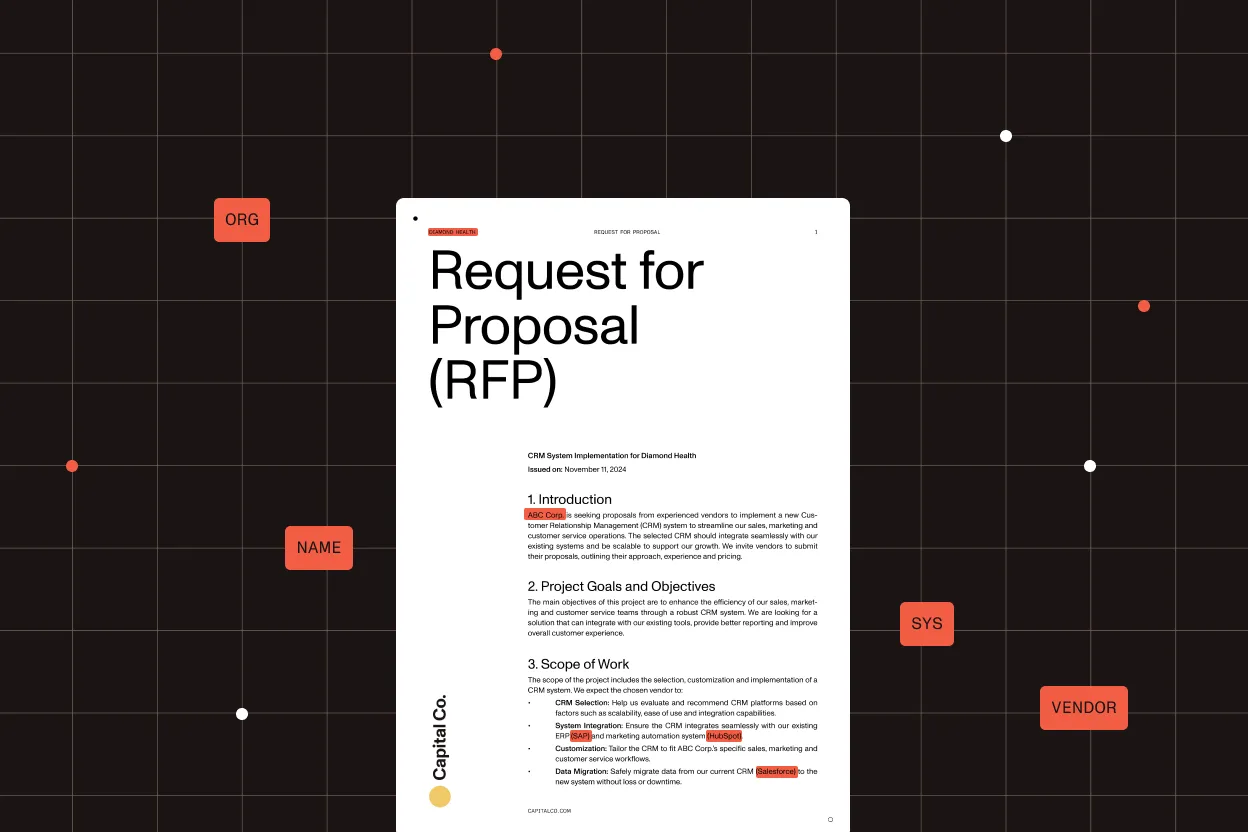
Names, email addresses, phone numbers, national IDs, and other PII
Credit cards, bank account numbers, transaction identifiers
PHI, diagnoses, and ICD-coded references
Train models to recognize industry-specific terminology and internal data structures
Choose fully automated removal or human-in-the-loop review. In both cases, sensitive data is permanently removed — not masked, not recoverable.
Analyze every page for contextual sensitive data using AI entity detection.
Approve findings manually or apply rules programmatically.
Burn redactions into a PDF, removing underlying content at the object level.
Nutrient’s infrastructure is SOC 2 Type 2 audited and GDPR-compliant. See our privacy policy and security documentation for details on data handling.
All communication between your application and Nutrient is done via HTTPS to ensure your data is encrypted when it’s sent to us.
All payments are handled by Paddle. Nutrient DWS Processor API never has direct access to any of your payment data.
Create an account to get your DWS Processor API key and start making API calls.




