1B+ documents processed a year — for 3,000+ teams
Stop parsing documents by hand
One API to extract, generate, convert, and review documents — built so agents can act on the output and people can verify it.
Lufthansa
Disney
Autodesk
UBS
Dropbox
IBM
Lufthansa
Disney
Autodesk
UBS
Dropbox
IBM
Products
Four APIs for the whole document lifecycle
Data Extraction API
Parse documents into clean structured output, extract exactly the fields a schema defines, or classify documents against your own labels.
Processor API
One credit-based API for every server-side document job.
Accessibility API
Auto-tag PDFs and validate PDF/UA conformance, so every document is accessible and audit-ready.
Viewer API
Viewing, annotation, form filling, and signing, embedded in the browser.
Use case finder
What do you want to do with your documents?
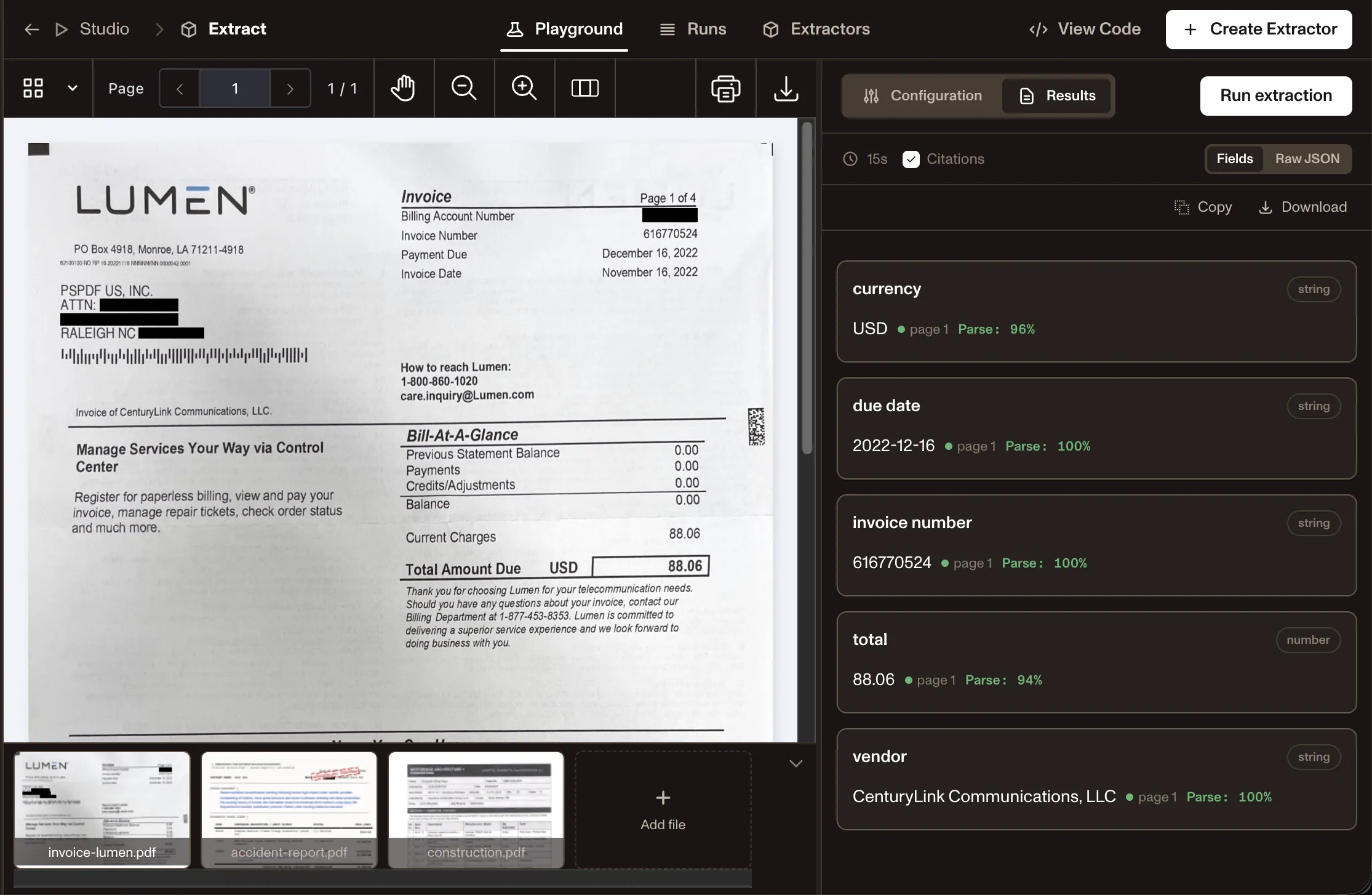
Turn PDFs, scans, forms, invoices, contracts, and Office files into typed JSON or LLM-ready Markdown. Preserve tables, key-value pairs, line items, coordinates, and confidence signals so downstream agents can validate before acting.
Explore data extractionCreate PDFs from HTML, templates, Markdown, or structured data. Add headers, footers, dynamic content, and accessibility-ready output for reports, agreements, statements, and customer-facing documents.
Explore PDF generationConvert between PDF, Word, Excel, PowerPoint, HTML, images, and Markdown while preserving layout and structure. Prepare documents for review, storage, automation, or AI ingestion.
Explore conversionMake scans, images, and photographed pages searchable, extractable, and ready for automation. Use OCR as the first step in document intake, classification, extraction, and review workflows.
Explore OCREmbed a production-ready document viewer for human review. Let users view, annotate, fill forms, compare, collaborate, and approve documents inside your product.
Explore document viewerAdd signing and approval flows to generated or uploaded documents. Support governed completion with audit trails and downstream workflow handoff.
Explore eSignaturesFind and remove sensitive information such as names, emails, SSNs, account numbers, and custom patterns. Build secure, audit-ready workflows for regulated document handling.
Explore redactionCheck PDF/A and PDF/UA requirements, accessibility readiness, archival formats, and compliance-sensitive outputs before documents move forward.
Explore compliancecurl -X POST https://api.nutrient.io/extraction/extract \ -H "Authorization: Bearer your_api_key_here" \ -o result.json \ --fail \ -F file=@invoice.pdf \ -F instructions='{ "schema": { "type": "object", "properties": { "invoice_number": { "type": "string" }, "due_date": { "type": "string" }, "total": { "type": "number" }, "vendor": { "type": "string" } } } }'curl -X POST https://api.nutrient.io/processor/generate_pdf \ -H "Authorization: Bearer your_api_key_here" \ -o result.pdf \ --fail \ -F html=@index.htmlcurl -X POST https://api.nutrient.io/processor/generate_pdf ^ -H "Authorization: Bearer your_api_key_here" ^ -o result.pdf ^ --fail ^ -F html=@index.htmlpackage com.example.pspdfkit;
import java.io.File;import java.io.IOException;import java.nio.file.FileSystems;import java.nio.file.Files;import java.nio.file.StandardCopyOption;
import org.json.JSONArray;import org.json.JSONObject;
import okhttp3.MediaType;import okhttp3.MultipartBody;import okhttp3.OkHttpClient;import okhttp3.Request;import okhttp3.RequestBody;import okhttp3.Response;
public final class PspdfkitApiExample { public static void main(final String[] args) throws IOException { final RequestBody body = new MultipartBody.Builder() .setType(MultipartBody.FORM) .addFormDataPart( "html", "index.html", RequestBody.create( MediaType.parse("text/html"), new File("index.html") ) ) .build();
final Request request = new Request.Builder() .url("https://api.nutrient.io/processor/generate_pdf") .method("POST", body) .addHeader("Authorization", "Bearer your_api_key_here") .build();
final OkHttpClient client = new OkHttpClient() .newBuilder() .build();
final Response response = client.newCall(request).execute();
if (response.isSuccessful()) { Files.copy( response.body().byteStream(), FileSystems.getDefault().getPath("result.pdf"), StandardCopyOption.REPLACE_EXISTING ); } else { // Handle the error throw new IOException(response.body().string()); } }}using System;using System.IO;using System.Net;using RestSharp;
namespace PspdfkitApiDemo{ class Program { static void Main(string[] args) { var client = new RestClient("https://api.nutrient.io/processor/generate_pdf");
var request = new RestRequest(Method.POST) .AddHeader("Authorization", "Bearer your_api_key_here") .AddFile("html", "index.html");
request.AdvancedResponseWriter = (responseStream, response) => { if (response.StatusCode == HttpStatusCode.OK) { using (responseStream) { using var outputFileWriter = File.OpenWrite("result.pdf"); responseStream.CopyTo(outputFileWriter); } } else { var responseStreamReader = new StreamReader(responseStream); Console.Write(responseStreamReader.ReadToEnd()); } };
client.Execute(request); } }}// This code requires Node.js. Do not run this code directly in a web browser.
const axios = require('axios')const FormData = require('form-data')const fs = require('fs')
const formData = new FormData()formData.append('html', fs.createReadStream('index.html'))
;(async () => { try { const response = await axios.post('https://api.nutrient.io/processor/generate_pdf', formData, { headers: formData.getHeaders({ 'Authorization': 'Bearer your_api_key_here' }), responseType: "stream" })
response.data.pipe(fs.createWriteStream("result.pdf")) } catch (e) { const errorString = await streamToString(e.response.data) console.log(errorString) }})()
function streamToString(stream) { const chunks = [] return new Promise((resolve, reject) => { stream.on("data", (chunk) => chunks.push(Buffer.from(chunk))) stream.on("error", (err) => reject(err)) stream.on("end", () => resolve(Buffer.concat(chunks).toString("utf8"))) })}import requestsimport json
response = requests.request( 'POST', 'https://api.nutrient.io/processor/generate_pdf', headers = { 'Authorization': 'Bearer your_api_key_here' }, files = { 'html': open('index.html', 'rb') }, stream = True)
if response.ok: with open('result.pdf', 'wb') as fd: for chunk in response.iter_content(chunk_size=8096): fd.write(chunk)else: print(response.text) exit()<?php
$FileHandle = fopen('result.pdf', 'w+');
$curl = curl_init();
curl_setopt_array($curl, array( CURLOPT_URL => 'https://api.nutrient.io/processor/generate_pdf', CURLOPT_CUSTOMREQUEST => 'POST', CURLOPT_RETURNTRANSFER => true, CURLOPT_ENCODING => '', CURLOPT_POSTFIELDS => array( 'html' => new CURLFILE('index.html') ), CURLOPT_HTTPHEADER => array( 'Authorization: Bearer your_api_key_here' ), CURLOPT_FILE => $FileHandle,));
$response = curl_exec($curl);
curl_close($curl);
fclose($FileHandle);POST https://api.nutrient.io/processor/generate_pdf HTTP/1.1Content-Type: multipart/form-data; boundary=--customboundaryAuthorization: Bearer your_api_key_here
--customboundaryContent-Disposition: form-data; name="html"; filename="index.html"Content-Type: text/html
(html data)--customboundary--curl -X POST https://api.nutrient.io/processor/convert_to_pdf \ -H "Content-Type: application/vnd.openxmlformats-officedocument.wordprocessingml.document" \ -H "Authorization: Bearer your_api_key_here" \ -o result.pdf \ --fail \ --data-binary @document.docxcurl -X POST https://api.nutrient.io/processor/convert_to_pdf ^ -H "Content-Type: application/vnd.openxmlformats-officedocument.wordprocessingml.document" ^ -H "Authorization: Bearer your_api_key_here" ^ -o result.pdf ^ --fail ^ --data-binary @document.docxpackage com.example.pspdfkit;
import java.io.File;import java.io.IOException;import java.nio.file.FileSystems;import java.nio.file.Files;import java.nio.file.StandardCopyOption;
import org.json.JSONArray;import org.json.JSONObject;
import okhttp3.MediaType;import okhttp3.MultipartBody;import okhttp3.OkHttpClient;import okhttp3.Request;import okhttp3.RequestBody;import okhttp3.Response;
public final class PspdfkitApiExample { public static void main(final String[] args) throws IOException { final MediaType mediaType = MediaType.parse("application/vnd.openxmlformats-officedocument.wordprocessingml.document"); final RequestBody body = RequestBody.create( mediaType, new File("document.docx") );
final Request request = new Request.Builder() .url("https://api.nutrient.io/processor/convert_to_pdf") .method("POST", body) .addHeader("Content-Type", "application/vnd.openxmlformats-officedocument.wordprocessingml.document") .addHeader("Authorization", "Bearer your_api_key_here") .build();
final OkHttpClient client = new OkHttpClient() .newBuilder() .build();
final Response response = client.newCall(request).execute();
if (response.isSuccessful()) { Files.copy( response.body().byteStream(), FileSystems.getDefault().getPath("result.pdf"), StandardCopyOption.REPLACE_EXISTING ); } else { // Handle the error throw new IOException(response.body().string()); } }}using System;using System.IO;using System.Net;using RestSharp;
namespace PspdfkitApiDemo{ class Program { static void Main(string[] args) { var client = new RestClient("https://api.nutrient.io/processor/convert_to_pdf");
var request = new RestRequest(Method.POST) .AddHeader("Authorization", "Bearer your_api_key_here") .AddFile("document.docx", "document.docx");
request.AdvancedResponseWriter = (responseStream, response) => { if (response.StatusCode == HttpStatusCode.OK) { using (responseStream) { using var outputFileWriter = File.OpenWrite("result.pdf"); responseStream.CopyTo(outputFileWriter); } } else { var responseStreamReader = new StreamReader(responseStream); Console.Write(responseStreamReader.ReadToEnd()); } };
client.Execute(request); } }}// This code requires Node.js. Do not run this code directly in a web browser.
const axios = require('axios')const FormData = require('form-data')const fs = require('fs')
const body = fs.createReadStream('document.docx')
;(async () => { try { const response = await axios.post('https://api.nutrient.io/processor/convert_to_pdf', body, { headers: { 'Content-Type': 'application/vnd.openxmlformats-officedocument.wordprocessingml.document', 'Authorization': 'Bearer your_api_key_here' }, responseType: "stream" })
response.data.pipe(fs.createWriteStream("result.pdf")) } catch (e) { const errorString = await streamToString(e.response.data) console.log(errorString) }})()
function streamToString(stream) { const chunks = [] return new Promise((resolve, reject) => { stream.on("data", (chunk) => chunks.push(Buffer.from(chunk))) stream.on("error", (err) => reject(err)) stream.on("end", () => resolve(Buffer.concat(chunks).toString("utf8"))) })}import requestsimport json
body = open('document.docx', 'rb')
response = requests.request( 'POST', 'https://api.nutrient.io/processor/convert_to_pdf', headers = { 'Content-Type': 'application/vnd.openxmlformats-officedocument.wordprocessingml.document', 'Authorization': 'Bearer your_api_key_here' }, data = body, stream = True)
if response.ok: with open('result.pdf', 'wb') as fd: for chunk in response.iter_content(chunk_size=8096): fd.write(chunk)else: print(response.text) exit()<?php
$FileHandle = fopen('result.pdf', 'w+');
$curl = curl_init();
$body = file_get_contents('document.docx');
curl_setopt_array($curl, array( CURLOPT_URL => 'https://api.nutrient.io/processor/convert_to_pdf', CURLOPT_CUSTOMREQUEST => 'POST', CURLOPT_RETURNTRANSFER => true, CURLOPT_ENCODING => '', CURLOPT_POSTFIELDS => $body, CURLOPT_HTTPHEADER => array( 'Content-Type: application/vnd.openxmlformats-officedocument.wordprocessingml.document', 'Authorization: Bearer your_api_key_here' ), CURLOPT_FILE => $FileHandle,));
$response = curl_exec($curl);
curl_close($curl);
fclose($FileHandle);POST https://api.nutrient.io/processor/convert_to_pdf HTTP/1.1Content-Type: application/vnd.openxmlformats-officedocument.wordprocessingml.documentAuthorization: Bearer your_api_key_here
<document.docx contents>curl -X POST https://api.nutrient.io/processor/ocr \ -H "Authorization: Bearer your_api_key_here" \ -o result.pdf \ --fail \ -F file=@document.pdf \ -F data='{ "language": "english" }'curl -X POST https://api.nutrient.io/processor/ocr ^ -H "Authorization: Bearer your_api_key_here" ^ -o result.pdf ^ --fail ^ -F file=@document.pdf ^ -F data="{\"language\": \"english\"}"package com.example.pspdfkit;
import java.io.File;import java.io.IOException;import java.nio.file.FileSystems;import java.nio.file.Files;import java.nio.file.StandardCopyOption;
import org.json.JSONArray;import org.json.JSONObject;
import okhttp3.MediaType;import okhttp3.MultipartBody;import okhttp3.OkHttpClient;import okhttp3.Request;import okhttp3.RequestBody;import okhttp3.Response;
public final class PspdfkitApiExample { public static void main(final String[] args) throws IOException { final RequestBody body = new MultipartBody.Builder() .setType(MultipartBody.FORM) .addFormDataPart( "file", "document.pdf", RequestBody.create( MediaType.parse("application/pdf"), new File("document.pdf") ) ) .addFormDataPart( "data", new JSONObject() .put("language", "english").toString() ) .build();
final Request request = new Request.Builder() .url("https://api.nutrient.io/processor/ocr") .method("POST", body) .addHeader("Authorization", "Bearer your_api_key_here") .build();
final OkHttpClient client = new OkHttpClient() .newBuilder() .build();
final Response response = client.newCall(request).execute();
if (response.isSuccessful()) { Files.copy( response.body().byteStream(), FileSystems.getDefault().getPath("result.pdf"), StandardCopyOption.REPLACE_EXISTING ); } else { // Handle the error throw new IOException(response.body().string()); } }}using System;using System.IO;using System.Net;using RestSharp;
namespace PspdfkitApiDemo{ class Program { static void Main(string[] args) { var client = new RestClient("https://api.nutrient.io/processor/ocr");
var request = new RestRequest(Method.POST) .AddHeader("Authorization", "Bearer your_api_key_here") .AddFile("file", "document.pdf") .AddParameter("data", new JsonObject { ["language"] = "english" }.ToString());
request.AdvancedResponseWriter = (responseStream, response) => { if (response.StatusCode == HttpStatusCode.OK) { using (responseStream) { using var outputFileWriter = File.OpenWrite("result.pdf"); responseStream.CopyTo(outputFileWriter); } } else { var responseStreamReader = new StreamReader(responseStream); Console.Write(responseStreamReader.ReadToEnd()); } };
client.Execute(request); } }}// This code requires Node.js. Do not run this code directly in a web browser.
const axios = require('axios')const FormData = require('form-data')const fs = require('fs')
const formData = new FormData()formData.append('data', JSON.stringify({ language: "english"}))formData.append('file', fs.createReadStream('document.pdf'))
;(async () => { try { const response = await axios.post('https://api.nutrient.io/processor/ocr', formData, { headers: formData.getHeaders({ 'Authorization': 'Bearer your_api_key_here' }), responseType: "stream" })
response.data.pipe(fs.createWriteStream("result.pdf")) } catch (e) { const errorString = await streamToString(e.response.data) console.log(errorString) }})()
function streamToString(stream) { const chunks = [] return new Promise((resolve, reject) => { stream.on("data", (chunk) => chunks.push(Buffer.from(chunk))) stream.on("error", (err) => reject(err)) stream.on("end", () => resolve(Buffer.concat(chunks).toString("utf8"))) })}import requestsimport json
response = requests.request( 'POST', 'https://api.nutrient.io/processor/ocr', headers = { 'Authorization': 'Bearer your_api_key_here' }, files = { 'file': open('document.pdf', 'rb') }, data = { 'data': json.dumps({ 'language': 'english' }) }, stream = True)
if response.ok: with open('result.pdf', 'wb') as fd: for chunk in response.iter_content(chunk_size=8096): fd.write(chunk)else: print(response.text) exit()<?php
$FileHandle = fopen('result.pdf', 'w+');
$curl = curl_init();
curl_setopt_array($curl, array( CURLOPT_URL => 'https://api.nutrient.io/processor/ocr', CURLOPT_CUSTOMREQUEST => 'POST', CURLOPT_RETURNTRANSFER => true, CURLOPT_ENCODING => '', CURLOPT_POSTFIELDS => array( 'data' => '{ "language": "english" }', 'file' => new CURLFILE('document.pdf') ), CURLOPT_HTTPHEADER => array( 'Authorization: Bearer your_api_key_here' ), CURLOPT_FILE => $FileHandle,));
$response = curl_exec($curl);
curl_close($curl);
fclose($FileHandle);POST https://api.nutrient.io/processor/ocr HTTP/1.1Content-Type: multipart/form-data; boundary=--customboundaryAuthorization: Bearer your_api_key_here
--customboundaryContent-Disposition: form-data; name="data"Content-Type: application/json
{ "language": "english"}--customboundaryContent-Disposition: form-data; name="file"; filename="document.pdf"Content-Type: application/pdf
(file data)--customboundary--NutrientViewer.load({ container: "#viewer", session: "<Your session token>",});curl -X POST https://api.nutrient.io/sign \ -H "Authorization: Bearer your_api_key_here" \ -o result.pdf \ --fail \ -F file=@document.pdfcurl -X POST https://api.nutrient.io/sign ^ -H "Authorization: Bearer your_api_key_here" ^ -o result.pdf ^ --fail ^ -F file=@document.pdfpackage com.example.pspdfkit;
import java.io.File;import java.io.IOException;import java.nio.file.FileSystems;import java.nio.file.Files;import java.nio.file.StandardCopyOption;
import okhttp3.MediaType;import okhttp3.MultipartBody;import okhttp3.OkHttpClient;import okhttp3.Request;import okhttp3.RequestBody;import okhttp3.Response;
public final class PspdfkitApiExample { public static void main(final String[] args) throws IOException { final RequestBody body = new MultipartBody.Builder() .setType(MultipartBody.FORM) .addFormDataPart( "file", "document.pdf", RequestBody.create( MediaType.parse("application/pdf"), new File("document.pdf") ) ) .build();
final Request request = new Request.Builder() .url("https://api.nutrient.io/sign") .method("POST", body) .addHeader("Authorization", "Bearer your_api_key_here") .build();
final OkHttpClient client = new OkHttpClient() .newBuilder() .build();
final Response response = client.newCall(request).execute();
if (response.isSuccessful()) { Files.copy( response.body().byteStream(), FileSystems.getDefault().getPath("result.pdf"), StandardCopyOption.REPLACE_EXISTING ); } else { // Handle the error throw new IOException(response.body().string()); } }}using System;using System.IO;using System.Net;using RestSharp;
namespace PspdfkitApiDemo{ class Program { static void Main(string[] args) { var client = new RestClient("https://api.nutrient.io/sign");
var request = new RestRequest(Method.POST) .AddHeader("Authorization", "Bearer your_api_key_here") .AddFile("file", "document.pdf");
request.AdvancedResponseWriter = (responseStream, response) => { if (response.StatusCode == HttpStatusCode.OK) { using (responseStream) { using var outputFileWriter = File.OpenWrite("result.pdf"); responseStream.CopyTo(outputFileWriter); } } else { var responseStreamReader = new StreamReader(responseStream); Console.Write(responseStreamReader.ReadToEnd()); } };
client.Execute(request); } }}// This code requires Node.js. Do not run this code directly in a web browser.
const axios = require('axios')const FormData = require('form-data')const fs = require('fs')
const formData = new FormData()formData.append('file', fs.createReadStream('document.pdf'))
;(async () => { try { const response = await axios.post('https://api.nutrient.io/sign', formData, { headers: formData.getHeaders({ 'Authorization': 'Bearer your_api_key_here' }), responseType: "stream" })
response.data.pipe(fs.createWriteStream("result.pdf")) } catch (e) { const errorString = await streamToString(e.response.data) console.log(errorString) }})()
function streamToString(stream) { const chunks = [] return new Promise((resolve, reject) => { stream.on("data", (chunk) => chunks.push(Buffer.from(chunk))) stream.on("error", (err) => reject(err)) stream.on("end", () => resolve(Buffer.concat(chunks).toString("utf8"))) })}import requests
response = requests.request( 'POST', 'https://api.nutrient.io/sign', headers = { 'Authorization': 'Bearer your_api_key_here' }, files = { 'file': open('document.pdf', 'rb') }, stream = True)
if response.ok: with open('result.pdf', 'wb') as fd: for chunk in response.iter_content(chunk_size=8096): fd.write(chunk)else: print(response.text) exit()<?php
$FileHandle = fopen('result.pdf', 'w+');
$curl = curl_init();
curl_setopt_array($curl, array( CURLOPT_URL => 'https://api.nutrient.io/sign', CURLOPT_CUSTOMREQUEST => 'POST', CURLOPT_RETURNTRANSFER => true, CURLOPT_ENCODING => '', CURLOPT_POSTFIELDS => array( 'file' => new CURLFILE('document.pdf') ), CURLOPT_HTTPHEADER => array( 'Authorization: Bearer your_api_key_here' ), CURLOPT_FILE => $FileHandle,));
$response = curl_exec($curl);
curl_close($curl);
fclose($FileHandle);POST https://api.nutrient.io/sign HTTP/1.1Content-Type: multipart/form-data; boundary=--customboundaryAuthorization: Bearer your_api_key_here
--customboundaryContent-Disposition: form-data; name="file"; filename="document.pdf"Content-Type: application/pdf
(file data)--customboundary--curl -X POST https://api.nutrient.io/processor/redact \ -H "Authorization: Bearer your_api_key_here" \ -o result.pdf \ --fail \ -F file=@document.pdf \ -F data='{ "strategy": "text", "strategyOptions": { "text": "macaque", "caseSensitive": false }, "redactionState": "apply" }'curl -X POST https://api.nutrient.io/processor/redact ^ -H "Authorization: Bearer your_api_key_here" ^ -o result.pdf ^ --fail ^ -F file=@document.pdf ^ -F data="{\"strategy\": \"text\", \"strategyOptions\": {\"text\": \"macaque\", \"caseSensitive\": false}, \"redactionState\": \"apply\"}"package com.example.pspdfkit;
import java.io.File;import java.io.IOException;import java.nio.file.FileSystems;import java.nio.file.Files;import java.nio.file.StandardCopyOption;
import org.json.JSONArray;import org.json.JSONObject;
import okhttp3.MediaType;import okhttp3.MultipartBody;import okhttp3.OkHttpClient;import okhttp3.Request;import okhttp3.RequestBody;import okhttp3.Response;
public final class PspdfkitApiExample { public static void main(final String[] args) throws IOException { final RequestBody body = new MultipartBody.Builder() .setType(MultipartBody.FORM) .addFormDataPart( "file", "document.pdf", RequestBody.create( MediaType.parse("application/pdf"), new File("document.pdf") ) ) .addFormDataPart( "data", new JSONObject() .put("strategy", "text") .put("strategyOptions", new JSONObject() .put("text", "macaque") .put("caseSensitive", false)) .put("redactionState", "apply").toString() ) .build();
final Request request = new Request.Builder() .url("https://api.nutrient.io/processor/redact") .method("POST", body) .addHeader("Authorization", "Bearer your_api_key_here") .build();
final OkHttpClient client = new OkHttpClient() .newBuilder() .build();
final Response response = client.newCall(request).execute();
if (response.isSuccessful()) { Files.copy( response.body().byteStream(), FileSystems.getDefault().getPath("result.pdf"), StandardCopyOption.REPLACE_EXISTING ); } else { // Handle the error throw new IOException(response.body().string()); } }}using System;using System.IO;using System.Net;using RestSharp;
namespace PspdfkitApiDemo{ class Program { static void Main(string[] args) { var client = new RestClient("https://api.nutrient.io/processor/redact");
var request = new RestRequest(Method.POST) .AddHeader("Authorization", "Bearer your_api_key_here") .AddFile("file", "document.pdf") .AddParameter("data", new JsonObject { ["strategy"] = "text", ["strategyOptions"] = new JsonObject { ["text"] = "macaque", ["caseSensitive"] = false }, ["redactionState"] = "apply" }.ToString());
request.AdvancedResponseWriter = (responseStream, response) => { if (response.StatusCode == HttpStatusCode.OK) { using (responseStream) { using var outputFileWriter = File.OpenWrite("result.pdf"); responseStream.CopyTo(outputFileWriter); } } else { var responseStreamReader = new StreamReader(responseStream); Console.Write(responseStreamReader.ReadToEnd()); } };
client.Execute(request); } }}// This code requires Node.js. Do not run this code directly in a web browser.
const axios = require('axios')const FormData = require('form-data')const fs = require('fs')
const formData = new FormData()formData.append('data', JSON.stringify({ strategy: "text", strategyOptions: { text: "macaque", caseSensitive: false }, redactionState: "apply"}))formData.append('file', fs.createReadStream('document.pdf'))
;(async () => { try { const response = await axios.post('https://api.nutrient.io/processor/redact', formData, { headers: formData.getHeaders({ 'Authorization': 'Bearer your_api_key_here' }), responseType: "stream" })
response.data.pipe(fs.createWriteStream("result.pdf")) } catch (e) { const errorString = await streamToString(e.response.data) console.log(errorString) }})()
function streamToString(stream) { const chunks = [] return new Promise((resolve, reject) => { stream.on("data", (chunk) => chunks.push(Buffer.from(chunk))) stream.on("error", (err) => reject(err)) stream.on("end", () => resolve(Buffer.concat(chunks).toString("utf8"))) })}import requestsimport json
response = requests.request( 'POST', 'https://api.nutrient.io/processor/redact', headers = { 'Authorization': 'Bearer your_api_key_here' }, files = { 'file': open('document.pdf', 'rb') }, data = { 'data': json.dumps({ 'strategy': 'text', 'strategyOptions': { 'text': 'macaque', 'caseSensitive': False }, 'redactionState': 'apply' }) }, stream = True)
if response.ok: with open('result.pdf', 'wb') as fd: for chunk in response.iter_content(chunk_size=8096): fd.write(chunk)else: print(response.text) exit()<?php
$FileHandle = fopen('result.pdf', 'w+');
$curl = curl_init();
curl_setopt_array($curl, array( CURLOPT_URL => 'https://api.nutrient.io/processor/redact', CURLOPT_CUSTOMREQUEST => 'POST', CURLOPT_RETURNTRANSFER => true, CURLOPT_ENCODING => '', CURLOPT_POSTFIELDS => array( 'data' => '{ "strategy": "text", "strategyOptions": { "text": "macaque", "caseSensitive": false }, "redactionState": "apply" }', 'file' => new CURLFILE('document.pdf') ), CURLOPT_HTTPHEADER => array( 'Authorization: Bearer your_api_key_here' ), CURLOPT_FILE => $FileHandle,));
$response = curl_exec($curl);
curl_close($curl);
fclose($FileHandle);POST https://api.nutrient.io/processor/redact HTTP/1.1Content-Type: multipart/form-data; boundary=--customboundaryAuthorization: Bearer your_api_key_here
--customboundaryContent-Disposition: form-data; name="data"Content-Type: application/json
{ "strategy": "text", "strategyOptions": { "text": "macaque", "caseSensitive": false }, "redactionState": "apply"}--customboundaryContent-Disposition: form-data; name="file"; filename="document.pdf"Content-Type: application/pdf
(file data)--customboundary--curl -X POST https://api.nutrient.io/validate_pdfa \ -H "Authorization: Bearer your_api_key_here" \ -o result.json \ --fail \ -F file=@pdfa.pdfcurl -X POST https://api.nutrient.io/validate_pdfa ^ -H "Authorization: Bearer your_api_key_here" ^ -o result.json ^ --fail ^ -F file=@pdfa.pdfPOST https://api.nutrient.io/validate_pdfa HTTP/1.1Content-Type: multipart/form-data; boundary=--customboundaryAuthorization: Bearer your_api_key_here
--customboundaryContent-Disposition: form-data; name="file"; filename="pdfa.pdf"Content-Type: application/pdf
(file data)--customboundary--curl -X POST https://api.nutrient.io/extraction/extract \ -H "Authorization: Bearer your_api_key_here" \ -o result.json \ --fail \ -F file=@invoice.pdf \ -F instructions='{ "schema": { "type": "object", "properties": { "invoice_number": { "type": "string" }, "due_date": { "type": "string" }, "total": { "type": "number" }, "vendor": { "type": "string" } } } }'curl -X POST https://api.nutrient.io/processor/generate_pdf \ -H "Authorization: Bearer your_api_key_here" \ -o result.pdf \ --fail \ -F html=@index.htmlcurl -X POST https://api.nutrient.io/processor/generate_pdf ^ -H "Authorization: Bearer your_api_key_here" ^ -o result.pdf ^ --fail ^ -F html=@index.htmlpackage com.example.pspdfkit;
import java.io.File;import java.io.IOException;import java.nio.file.FileSystems;import java.nio.file.Files;import java.nio.file.StandardCopyOption;
import org.json.JSONArray;import org.json.JSONObject;
import okhttp3.MediaType;import okhttp3.MultipartBody;import okhttp3.OkHttpClient;import okhttp3.Request;import okhttp3.RequestBody;import okhttp3.Response;
public final class PspdfkitApiExample { public static void main(final String[] args) throws IOException { final RequestBody body = new MultipartBody.Builder() .setType(MultipartBody.FORM) .addFormDataPart( "html", "index.html", RequestBody.create( MediaType.parse("text/html"), new File("index.html") ) ) .build();
final Request request = new Request.Builder() .url("https://api.nutrient.io/processor/generate_pdf") .method("POST", body) .addHeader("Authorization", "Bearer your_api_key_here") .build();
final OkHttpClient client = new OkHttpClient() .newBuilder() .build();
final Response response = client.newCall(request).execute();
if (response.isSuccessful()) { Files.copy( response.body().byteStream(), FileSystems.getDefault().getPath("result.pdf"), StandardCopyOption.REPLACE_EXISTING ); } else { // Handle the error throw new IOException(response.body().string()); } }}using System;using System.IO;using System.Net;using RestSharp;
namespace PspdfkitApiDemo{ class Program { static void Main(string[] args) { var client = new RestClient("https://api.nutrient.io/processor/generate_pdf");
var request = new RestRequest(Method.POST) .AddHeader("Authorization", "Bearer your_api_key_here") .AddFile("html", "index.html");
request.AdvancedResponseWriter = (responseStream, response) => { if (response.StatusCode == HttpStatusCode.OK) { using (responseStream) { using var outputFileWriter = File.OpenWrite("result.pdf"); responseStream.CopyTo(outputFileWriter); } } else { var responseStreamReader = new StreamReader(responseStream); Console.Write(responseStreamReader.ReadToEnd()); } };
client.Execute(request); } }}// This code requires Node.js. Do not run this code directly in a web browser.
const axios = require('axios')const FormData = require('form-data')const fs = require('fs')
const formData = new FormData()formData.append('html', fs.createReadStream('index.html'))
;(async () => { try { const response = await axios.post('https://api.nutrient.io/processor/generate_pdf', formData, { headers: formData.getHeaders({ 'Authorization': 'Bearer your_api_key_here' }), responseType: "stream" })
response.data.pipe(fs.createWriteStream("result.pdf")) } catch (e) { const errorString = await streamToString(e.response.data) console.log(errorString) }})()
function streamToString(stream) { const chunks = [] return new Promise((resolve, reject) => { stream.on("data", (chunk) => chunks.push(Buffer.from(chunk))) stream.on("error", (err) => reject(err)) stream.on("end", () => resolve(Buffer.concat(chunks).toString("utf8"))) })}import requestsimport json
response = requests.request( 'POST', 'https://api.nutrient.io/processor/generate_pdf', headers = { 'Authorization': 'Bearer your_api_key_here' }, files = { 'html': open('index.html', 'rb') }, stream = True)
if response.ok: with open('result.pdf', 'wb') as fd: for chunk in response.iter_content(chunk_size=8096): fd.write(chunk)else: print(response.text) exit()<?php
$FileHandle = fopen('result.pdf', 'w+');
$curl = curl_init();
curl_setopt_array($curl, array( CURLOPT_URL => 'https://api.nutrient.io/processor/generate_pdf', CURLOPT_CUSTOMREQUEST => 'POST', CURLOPT_RETURNTRANSFER => true, CURLOPT_ENCODING => '', CURLOPT_POSTFIELDS => array( 'html' => new CURLFILE('index.html') ), CURLOPT_HTTPHEADER => array( 'Authorization: Bearer your_api_key_here' ), CURLOPT_FILE => $FileHandle,));
$response = curl_exec($curl);
curl_close($curl);
fclose($FileHandle);POST https://api.nutrient.io/processor/generate_pdf HTTP/1.1Content-Type: multipart/form-data; boundary=--customboundaryAuthorization: Bearer your_api_key_here
--customboundaryContent-Disposition: form-data; name="html"; filename="index.html"Content-Type: text/html
(html data)--customboundary--curl -X POST https://api.nutrient.io/processor/convert_to_pdf \ -H "Content-Type: application/vnd.openxmlformats-officedocument.wordprocessingml.document" \ -H "Authorization: Bearer your_api_key_here" \ -o result.pdf \ --fail \ --data-binary @document.docxcurl -X POST https://api.nutrient.io/processor/convert_to_pdf ^ -H "Content-Type: application/vnd.openxmlformats-officedocument.wordprocessingml.document" ^ -H "Authorization: Bearer your_api_key_here" ^ -o result.pdf ^ --fail ^ --data-binary @document.docxpackage com.example.pspdfkit;
import java.io.File;import java.io.IOException;import java.nio.file.FileSystems;import java.nio.file.Files;import java.nio.file.StandardCopyOption;
import org.json.JSONArray;import org.json.JSONObject;
import okhttp3.MediaType;import okhttp3.MultipartBody;import okhttp3.OkHttpClient;import okhttp3.Request;import okhttp3.RequestBody;import okhttp3.Response;
public final class PspdfkitApiExample { public static void main(final String[] args) throws IOException { final MediaType mediaType = MediaType.parse("application/vnd.openxmlformats-officedocument.wordprocessingml.document"); final RequestBody body = RequestBody.create( mediaType, new File("document.docx") );
final Request request = new Request.Builder() .url("https://api.nutrient.io/processor/convert_to_pdf") .method("POST", body) .addHeader("Content-Type", "application/vnd.openxmlformats-officedocument.wordprocessingml.document") .addHeader("Authorization", "Bearer your_api_key_here") .build();
final OkHttpClient client = new OkHttpClient() .newBuilder() .build();
final Response response = client.newCall(request).execute();
if (response.isSuccessful()) { Files.copy( response.body().byteStream(), FileSystems.getDefault().getPath("result.pdf"), StandardCopyOption.REPLACE_EXISTING ); } else { // Handle the error throw new IOException(response.body().string()); } }}using System;using System.IO;using System.Net;using RestSharp;
namespace PspdfkitApiDemo{ class Program { static void Main(string[] args) { var client = new RestClient("https://api.nutrient.io/processor/convert_to_pdf");
var request = new RestRequest(Method.POST) .AddHeader("Authorization", "Bearer your_api_key_here") .AddFile("document.docx", "document.docx");
request.AdvancedResponseWriter = (responseStream, response) => { if (response.StatusCode == HttpStatusCode.OK) { using (responseStream) { using var outputFileWriter = File.OpenWrite("result.pdf"); responseStream.CopyTo(outputFileWriter); } } else { var responseStreamReader = new StreamReader(responseStream); Console.Write(responseStreamReader.ReadToEnd()); } };
client.Execute(request); } }}// This code requires Node.js. Do not run this code directly in a web browser.
const axios = require('axios')const FormData = require('form-data')const fs = require('fs')
const body = fs.createReadStream('document.docx')
;(async () => { try { const response = await axios.post('https://api.nutrient.io/processor/convert_to_pdf', body, { headers: { 'Content-Type': 'application/vnd.openxmlformats-officedocument.wordprocessingml.document', 'Authorization': 'Bearer your_api_key_here' }, responseType: "stream" })
response.data.pipe(fs.createWriteStream("result.pdf")) } catch (e) { const errorString = await streamToString(e.response.data) console.log(errorString) }})()
function streamToString(stream) { const chunks = [] return new Promise((resolve, reject) => { stream.on("data", (chunk) => chunks.push(Buffer.from(chunk))) stream.on("error", (err) => reject(err)) stream.on("end", () => resolve(Buffer.concat(chunks).toString("utf8"))) })}import requestsimport json
body = open('document.docx', 'rb')
response = requests.request( 'POST', 'https://api.nutrient.io/processor/convert_to_pdf', headers = { 'Content-Type': 'application/vnd.openxmlformats-officedocument.wordprocessingml.document', 'Authorization': 'Bearer your_api_key_here' }, data = body, stream = True)
if response.ok: with open('result.pdf', 'wb') as fd: for chunk in response.iter_content(chunk_size=8096): fd.write(chunk)else: print(response.text) exit()<?php
$FileHandle = fopen('result.pdf', 'w+');
$curl = curl_init();
$body = file_get_contents('document.docx');
curl_setopt_array($curl, array( CURLOPT_URL => 'https://api.nutrient.io/processor/convert_to_pdf', CURLOPT_CUSTOMREQUEST => 'POST', CURLOPT_RETURNTRANSFER => true, CURLOPT_ENCODING => '', CURLOPT_POSTFIELDS => $body, CURLOPT_HTTPHEADER => array( 'Content-Type: application/vnd.openxmlformats-officedocument.wordprocessingml.document', 'Authorization: Bearer your_api_key_here' ), CURLOPT_FILE => $FileHandle,));
$response = curl_exec($curl);
curl_close($curl);
fclose($FileHandle);POST https://api.nutrient.io/processor/convert_to_pdf HTTP/1.1Content-Type: application/vnd.openxmlformats-officedocument.wordprocessingml.documentAuthorization: Bearer your_api_key_here
<document.docx contents>curl -X POST https://api.nutrient.io/processor/ocr \ -H "Authorization: Bearer your_api_key_here" \ -o result.pdf \ --fail \ -F file=@document.pdf \ -F data='{ "language": "english" }'curl -X POST https://api.nutrient.io/processor/ocr ^ -H "Authorization: Bearer your_api_key_here" ^ -o result.pdf ^ --fail ^ -F file=@document.pdf ^ -F data="{\"language\": \"english\"}"package com.example.pspdfkit;
import java.io.File;import java.io.IOException;import java.nio.file.FileSystems;import java.nio.file.Files;import java.nio.file.StandardCopyOption;
import org.json.JSONArray;import org.json.JSONObject;
import okhttp3.MediaType;import okhttp3.MultipartBody;import okhttp3.OkHttpClient;import okhttp3.Request;import okhttp3.RequestBody;import okhttp3.Response;
public final class PspdfkitApiExample { public static void main(final String[] args) throws IOException { final RequestBody body = new MultipartBody.Builder() .setType(MultipartBody.FORM) .addFormDataPart( "file", "document.pdf", RequestBody.create( MediaType.parse("application/pdf"), new File("document.pdf") ) ) .addFormDataPart( "data", new JSONObject() .put("language", "english").toString() ) .build();
final Request request = new Request.Builder() .url("https://api.nutrient.io/processor/ocr") .method("POST", body) .addHeader("Authorization", "Bearer your_api_key_here") .build();
final OkHttpClient client = new OkHttpClient() .newBuilder() .build();
final Response response = client.newCall(request).execute();
if (response.isSuccessful()) { Files.copy( response.body().byteStream(), FileSystems.getDefault().getPath("result.pdf"), StandardCopyOption.REPLACE_EXISTING ); } else { // Handle the error throw new IOException(response.body().string()); } }}using System;using System.IO;using System.Net;using RestSharp;
namespace PspdfkitApiDemo{ class Program { static void Main(string[] args) { var client = new RestClient("https://api.nutrient.io/processor/ocr");
var request = new RestRequest(Method.POST) .AddHeader("Authorization", "Bearer your_api_key_here") .AddFile("file", "document.pdf") .AddParameter("data", new JsonObject { ["language"] = "english" }.ToString());
request.AdvancedResponseWriter = (responseStream, response) => { if (response.StatusCode == HttpStatusCode.OK) { using (responseStream) { using var outputFileWriter = File.OpenWrite("result.pdf"); responseStream.CopyTo(outputFileWriter); } } else { var responseStreamReader = new StreamReader(responseStream); Console.Write(responseStreamReader.ReadToEnd()); } };
client.Execute(request); } }}// This code requires Node.js. Do not run this code directly in a web browser.
const axios = require('axios')const FormData = require('form-data')const fs = require('fs')
const formData = new FormData()formData.append('data', JSON.stringify({ language: "english"}))formData.append('file', fs.createReadStream('document.pdf'))
;(async () => { try { const response = await axios.post('https://api.nutrient.io/processor/ocr', formData, { headers: formData.getHeaders({ 'Authorization': 'Bearer your_api_key_here' }), responseType: "stream" })
response.data.pipe(fs.createWriteStream("result.pdf")) } catch (e) { const errorString = await streamToString(e.response.data) console.log(errorString) }})()
function streamToString(stream) { const chunks = [] return new Promise((resolve, reject) => { stream.on("data", (chunk) => chunks.push(Buffer.from(chunk))) stream.on("error", (err) => reject(err)) stream.on("end", () => resolve(Buffer.concat(chunks).toString("utf8"))) })}import requestsimport json
response = requests.request( 'POST', 'https://api.nutrient.io/processor/ocr', headers = { 'Authorization': 'Bearer your_api_key_here' }, files = { 'file': open('document.pdf', 'rb') }, data = { 'data': json.dumps({ 'language': 'english' }) }, stream = True)
if response.ok: with open('result.pdf', 'wb') as fd: for chunk in response.iter_content(chunk_size=8096): fd.write(chunk)else: print(response.text) exit()<?php
$FileHandle = fopen('result.pdf', 'w+');
$curl = curl_init();
curl_setopt_array($curl, array( CURLOPT_URL => 'https://api.nutrient.io/processor/ocr', CURLOPT_CUSTOMREQUEST => 'POST', CURLOPT_RETURNTRANSFER => true, CURLOPT_ENCODING => '', CURLOPT_POSTFIELDS => array( 'data' => '{ "language": "english" }', 'file' => new CURLFILE('document.pdf') ), CURLOPT_HTTPHEADER => array( 'Authorization: Bearer your_api_key_here' ), CURLOPT_FILE => $FileHandle,));
$response = curl_exec($curl);
curl_close($curl);
fclose($FileHandle);POST https://api.nutrient.io/processor/ocr HTTP/1.1Content-Type: multipart/form-data; boundary=--customboundaryAuthorization: Bearer your_api_key_here
--customboundaryContent-Disposition: form-data; name="data"Content-Type: application/json
{ "language": "english"}--customboundaryContent-Disposition: form-data; name="file"; filename="document.pdf"Content-Type: application/pdf
(file data)--customboundary--NutrientViewer.load({ container: "#viewer", session: "<Your session token>",});curl -X POST https://api.nutrient.io/sign \ -H "Authorization: Bearer your_api_key_here" \ -o result.pdf \ --fail \ -F file=@document.pdfcurl -X POST https://api.nutrient.io/sign ^ -H "Authorization: Bearer your_api_key_here" ^ -o result.pdf ^ --fail ^ -F file=@document.pdfpackage com.example.pspdfkit;
import java.io.File;import java.io.IOException;import java.nio.file.FileSystems;import java.nio.file.Files;import java.nio.file.StandardCopyOption;
import okhttp3.MediaType;import okhttp3.MultipartBody;import okhttp3.OkHttpClient;import okhttp3.Request;import okhttp3.RequestBody;import okhttp3.Response;
public final class PspdfkitApiExample { public static void main(final String[] args) throws IOException { final RequestBody body = new MultipartBody.Builder() .setType(MultipartBody.FORM) .addFormDataPart( "file", "document.pdf", RequestBody.create( MediaType.parse("application/pdf"), new File("document.pdf") ) ) .build();
final Request request = new Request.Builder() .url("https://api.nutrient.io/sign") .method("POST", body) .addHeader("Authorization", "Bearer your_api_key_here") .build();
final OkHttpClient client = new OkHttpClient() .newBuilder() .build();
final Response response = client.newCall(request).execute();
if (response.isSuccessful()) { Files.copy( response.body().byteStream(), FileSystems.getDefault().getPath("result.pdf"), StandardCopyOption.REPLACE_EXISTING ); } else { // Handle the error throw new IOException(response.body().string()); } }}using System;using System.IO;using System.Net;using RestSharp;
namespace PspdfkitApiDemo{ class Program { static void Main(string[] args) { var client = new RestClient("https://api.nutrient.io/sign");
var request = new RestRequest(Method.POST) .AddHeader("Authorization", "Bearer your_api_key_here") .AddFile("file", "document.pdf");
request.AdvancedResponseWriter = (responseStream, response) => { if (response.StatusCode == HttpStatusCode.OK) { using (responseStream) { using var outputFileWriter = File.OpenWrite("result.pdf"); responseStream.CopyTo(outputFileWriter); } } else { var responseStreamReader = new StreamReader(responseStream); Console.Write(responseStreamReader.ReadToEnd()); } };
client.Execute(request); } }}// This code requires Node.js. Do not run this code directly in a web browser.
const axios = require('axios')const FormData = require('form-data')const fs = require('fs')
const formData = new FormData()formData.append('file', fs.createReadStream('document.pdf'))
;(async () => { try { const response = await axios.post('https://api.nutrient.io/sign', formData, { headers: formData.getHeaders({ 'Authorization': 'Bearer your_api_key_here' }), responseType: "stream" })
response.data.pipe(fs.createWriteStream("result.pdf")) } catch (e) { const errorString = await streamToString(e.response.data) console.log(errorString) }})()
function streamToString(stream) { const chunks = [] return new Promise((resolve, reject) => { stream.on("data", (chunk) => chunks.push(Buffer.from(chunk))) stream.on("error", (err) => reject(err)) stream.on("end", () => resolve(Buffer.concat(chunks).toString("utf8"))) })}import requests
response = requests.request( 'POST', 'https://api.nutrient.io/sign', headers = { 'Authorization': 'Bearer your_api_key_here' }, files = { 'file': open('document.pdf', 'rb') }, stream = True)
if response.ok: with open('result.pdf', 'wb') as fd: for chunk in response.iter_content(chunk_size=8096): fd.write(chunk)else: print(response.text) exit()<?php
$FileHandle = fopen('result.pdf', 'w+');
$curl = curl_init();
curl_setopt_array($curl, array( CURLOPT_URL => 'https://api.nutrient.io/sign', CURLOPT_CUSTOMREQUEST => 'POST', CURLOPT_RETURNTRANSFER => true, CURLOPT_ENCODING => '', CURLOPT_POSTFIELDS => array( 'file' => new CURLFILE('document.pdf') ), CURLOPT_HTTPHEADER => array( 'Authorization: Bearer your_api_key_here' ), CURLOPT_FILE => $FileHandle,));
$response = curl_exec($curl);
curl_close($curl);
fclose($FileHandle);POST https://api.nutrient.io/sign HTTP/1.1Content-Type: multipart/form-data; boundary=--customboundaryAuthorization: Bearer your_api_key_here
--customboundaryContent-Disposition: form-data; name="file"; filename="document.pdf"Content-Type: application/pdf
(file data)--customboundary--curl -X POST https://api.nutrient.io/processor/redact \ -H "Authorization: Bearer your_api_key_here" \ -o result.pdf \ --fail \ -F file=@document.pdf \ -F data='{ "strategy": "text", "strategyOptions": { "text": "macaque", "caseSensitive": false }, "redactionState": "apply" }'curl -X POST https://api.nutrient.io/processor/redact ^ -H "Authorization: Bearer your_api_key_here" ^ -o result.pdf ^ --fail ^ -F file=@document.pdf ^ -F data="{\"strategy\": \"text\", \"strategyOptions\": {\"text\": \"macaque\", \"caseSensitive\": false}, \"redactionState\": \"apply\"}"package com.example.pspdfkit;
import java.io.File;import java.io.IOException;import java.nio.file.FileSystems;import java.nio.file.Files;import java.nio.file.StandardCopyOption;
import org.json.JSONArray;import org.json.JSONObject;
import okhttp3.MediaType;import okhttp3.MultipartBody;import okhttp3.OkHttpClient;import okhttp3.Request;import okhttp3.RequestBody;import okhttp3.Response;
public final class PspdfkitApiExample { public static void main(final String[] args) throws IOException { final RequestBody body = new MultipartBody.Builder() .setType(MultipartBody.FORM) .addFormDataPart( "file", "document.pdf", RequestBody.create( MediaType.parse("application/pdf"), new File("document.pdf") ) ) .addFormDataPart( "data", new JSONObject() .put("strategy", "text") .put("strategyOptions", new JSONObject() .put("text", "macaque") .put("caseSensitive", false)) .put("redactionState", "apply").toString() ) .build();
final Request request = new Request.Builder() .url("https://api.nutrient.io/processor/redact") .method("POST", body) .addHeader("Authorization", "Bearer your_api_key_here") .build();
final OkHttpClient client = new OkHttpClient() .newBuilder() .build();
final Response response = client.newCall(request).execute();
if (response.isSuccessful()) { Files.copy( response.body().byteStream(), FileSystems.getDefault().getPath("result.pdf"), StandardCopyOption.REPLACE_EXISTING ); } else { // Handle the error throw new IOException(response.body().string()); } }}using System;using System.IO;using System.Net;using RestSharp;
namespace PspdfkitApiDemo{ class Program { static void Main(string[] args) { var client = new RestClient("https://api.nutrient.io/processor/redact");
var request = new RestRequest(Method.POST) .AddHeader("Authorization", "Bearer your_api_key_here") .AddFile("file", "document.pdf") .AddParameter("data", new JsonObject { ["strategy"] = "text", ["strategyOptions"] = new JsonObject { ["text"] = "macaque", ["caseSensitive"] = false }, ["redactionState"] = "apply" }.ToString());
request.AdvancedResponseWriter = (responseStream, response) => { if (response.StatusCode == HttpStatusCode.OK) { using (responseStream) { using var outputFileWriter = File.OpenWrite("result.pdf"); responseStream.CopyTo(outputFileWriter); } } else { var responseStreamReader = new StreamReader(responseStream); Console.Write(responseStreamReader.ReadToEnd()); } };
client.Execute(request); } }}// This code requires Node.js. Do not run this code directly in a web browser.
const axios = require('axios')const FormData = require('form-data')const fs = require('fs')
const formData = new FormData()formData.append('data', JSON.stringify({ strategy: "text", strategyOptions: { text: "macaque", caseSensitive: false }, redactionState: "apply"}))formData.append('file', fs.createReadStream('document.pdf'))
;(async () => { try { const response = await axios.post('https://api.nutrient.io/processor/redact', formData, { headers: formData.getHeaders({ 'Authorization': 'Bearer your_api_key_here' }), responseType: "stream" })
response.data.pipe(fs.createWriteStream("result.pdf")) } catch (e) { const errorString = await streamToString(e.response.data) console.log(errorString) }})()
function streamToString(stream) { const chunks = [] return new Promise((resolve, reject) => { stream.on("data", (chunk) => chunks.push(Buffer.from(chunk))) stream.on("error", (err) => reject(err)) stream.on("end", () => resolve(Buffer.concat(chunks).toString("utf8"))) })}import requestsimport json
response = requests.request( 'POST', 'https://api.nutrient.io/processor/redact', headers = { 'Authorization': 'Bearer your_api_key_here' }, files = { 'file': open('document.pdf', 'rb') }, data = { 'data': json.dumps({ 'strategy': 'text', 'strategyOptions': { 'text': 'macaque', 'caseSensitive': False }, 'redactionState': 'apply' }) }, stream = True)
if response.ok: with open('result.pdf', 'wb') as fd: for chunk in response.iter_content(chunk_size=8096): fd.write(chunk)else: print(response.text) exit()<?php
$FileHandle = fopen('result.pdf', 'w+');
$curl = curl_init();
curl_setopt_array($curl, array( CURLOPT_URL => 'https://api.nutrient.io/processor/redact', CURLOPT_CUSTOMREQUEST => 'POST', CURLOPT_RETURNTRANSFER => true, CURLOPT_ENCODING => '', CURLOPT_POSTFIELDS => array( 'data' => '{ "strategy": "text", "strategyOptions": { "text": "macaque", "caseSensitive": false }, "redactionState": "apply" }', 'file' => new CURLFILE('document.pdf') ), CURLOPT_HTTPHEADER => array( 'Authorization: Bearer your_api_key_here' ), CURLOPT_FILE => $FileHandle,));
$response = curl_exec($curl);
curl_close($curl);
fclose($FileHandle);POST https://api.nutrient.io/processor/redact HTTP/1.1Content-Type: multipart/form-data; boundary=--customboundaryAuthorization: Bearer your_api_key_here
--customboundaryContent-Disposition: form-data; name="data"Content-Type: application/json
{ "strategy": "text", "strategyOptions": { "text": "macaque", "caseSensitive": false }, "redactionState": "apply"}--customboundaryContent-Disposition: form-data; name="file"; filename="document.pdf"Content-Type: application/pdf
(file data)--customboundary--curl -X POST https://api.nutrient.io/validate_pdfa \ -H "Authorization: Bearer your_api_key_here" \ -o result.json \ --fail \ -F file=@pdfa.pdfcurl -X POST https://api.nutrient.io/validate_pdfa ^ -H "Authorization: Bearer your_api_key_here" ^ -o result.json ^ --fail ^ -F file=@pdfa.pdfPOST https://api.nutrient.io/validate_pdfa HTTP/1.1Content-Type: multipart/form-data; boundary=--customboundaryAuthorization: Bearer your_api_key_here
--customboundaryContent-Disposition: form-data; name="file"; filename="pdfa.pdf"Content-Type: application/pdf
(file data)--customboundary--Turn PDFs, scans, forms, invoices, contracts, and Office files into typed JSON or LLM-ready Markdown. Preserve tables, key-value pairs, line items, coordinates, and confidence signals so downstream agents can validate before acting.
Explore data extractionCreate PDFs from HTML, templates, Markdown, or structured data. Add headers, footers, dynamic content, and accessibility-ready output for reports, agreements, statements, and customer-facing documents.
Explore PDF generationConvert between PDF, Word, Excel, PowerPoint, HTML, images, and Markdown while preserving layout and structure. Prepare documents for review, storage, automation, or AI ingestion.
Explore conversionMake scans, images, and photographed pages searchable, extractable, and ready for automation. Use OCR as the first step in document intake, classification, extraction, and review workflows.
Explore OCREmbed a production-ready document viewer for human review. Let users view, annotate, fill forms, compare, collaborate, and approve documents inside your product.
Explore document viewerAdd signing and approval flows to generated or uploaded documents. Support governed completion with audit trails and downstream workflow handoff.
Explore eSignaturesFind and remove sensitive information such as names, emails, SSNs, account numbers, and custom patterns. Build secure, audit-ready workflows for regulated document handling.
Explore redactionCheck PDF/A and PDF/UA requirements, accessibility readiness, archival formats, and compliance-sensitive outputs before documents move forward.
Explore complianceExtract data
Turn PDFs, scans, forms, invoices, contracts, and Office files into typed JSON or LLM-ready Markdown. Preserve tables, key-value pairs, line items, coordinates, and confidence signals so downstream agents can validate before acting.
Explore data extractioncurl -X POST https://api.nutrient.io/extraction/extract \ -H "Authorization: Bearer your_api_key_here" \ -o result.json \ --fail \ -F file=@invoice.pdf \ -F instructions='{ "schema": { "type": "object", "properties": { "invoice_number": { "type": "string" }, "due_date": { "type": "string" }, "total": { "type": "number" }, "vendor": { "type": "string" } } } }'Generate PDFs
Create PDFs from HTML, templates, Markdown, or structured data. Add headers, footers, dynamic content, and accessibility-ready output for reports, agreements, statements, and customer-facing documents.
Explore PDF generationcurl -X POST https://api.nutrient.io/processor/generate_pdf \ -H "Authorization: Bearer your_api_key_here" \ -o result.pdf \ --fail \ -F html=@index.htmlcurl -X POST https://api.nutrient.io/processor/generate_pdf ^ -H "Authorization: Bearer your_api_key_here" ^ -o result.pdf ^ --fail ^ -F html=@index.htmlpackage com.example.pspdfkit;
import java.io.File;import java.io.IOException;import java.nio.file.FileSystems;import java.nio.file.Files;import java.nio.file.StandardCopyOption;
import org.json.JSONArray;import org.json.JSONObject;
import okhttp3.MediaType;import okhttp3.MultipartBody;import okhttp3.OkHttpClient;import okhttp3.Request;import okhttp3.RequestBody;import okhttp3.Response;
public final class PspdfkitApiExample { public static void main(final String[] args) throws IOException { final RequestBody body = new MultipartBody.Builder() .setType(MultipartBody.FORM) .addFormDataPart( "html", "index.html", RequestBody.create( MediaType.parse("text/html"), new File("index.html") ) ) .build();
final Request request = new Request.Builder() .url("https://api.nutrient.io/processor/generate_pdf") .method("POST", body) .addHeader("Authorization", "Bearer your_api_key_here") .build();
final OkHttpClient client = new OkHttpClient() .newBuilder() .build();
final Response response = client.newCall(request).execute();
if (response.isSuccessful()) { Files.copy( response.body().byteStream(), FileSystems.getDefault().getPath("result.pdf"), StandardCopyOption.REPLACE_EXISTING ); } else { // Handle the error throw new IOException(response.body().string()); } }}using System;using System.IO;using System.Net;using RestSharp;
namespace PspdfkitApiDemo{ class Program { static void Main(string[] args) { var client = new RestClient("https://api.nutrient.io/processor/generate_pdf");
var request = new RestRequest(Method.POST) .AddHeader("Authorization", "Bearer your_api_key_here") .AddFile("html", "index.html");
request.AdvancedResponseWriter = (responseStream, response) => { if (response.StatusCode == HttpStatusCode.OK) { using (responseStream) { using var outputFileWriter = File.OpenWrite("result.pdf"); responseStream.CopyTo(outputFileWriter); } } else { var responseStreamReader = new StreamReader(responseStream); Console.Write(responseStreamReader.ReadToEnd()); } };
client.Execute(request); } }}// This code requires Node.js. Do not run this code directly in a web browser.
const axios = require('axios')const FormData = require('form-data')const fs = require('fs')
const formData = new FormData()formData.append('html', fs.createReadStream('index.html'))
;(async () => { try { const response = await axios.post('https://api.nutrient.io/processor/generate_pdf', formData, { headers: formData.getHeaders({ 'Authorization': 'Bearer your_api_key_here' }), responseType: "stream" })
response.data.pipe(fs.createWriteStream("result.pdf")) } catch (e) { const errorString = await streamToString(e.response.data) console.log(errorString) }})()
function streamToString(stream) { const chunks = [] return new Promise((resolve, reject) => { stream.on("data", (chunk) => chunks.push(Buffer.from(chunk))) stream.on("error", (err) => reject(err)) stream.on("end", () => resolve(Buffer.concat(chunks).toString("utf8"))) })}import requestsimport json
response = requests.request( 'POST', 'https://api.nutrient.io/processor/generate_pdf', headers = { 'Authorization': 'Bearer your_api_key_here' }, files = { 'html': open('index.html', 'rb') }, stream = True)
if response.ok: with open('result.pdf', 'wb') as fd: for chunk in response.iter_content(chunk_size=8096): fd.write(chunk)else: print(response.text) exit()<?php
$FileHandle = fopen('result.pdf', 'w+');
$curl = curl_init();
curl_setopt_array($curl, array( CURLOPT_URL => 'https://api.nutrient.io/processor/generate_pdf', CURLOPT_CUSTOMREQUEST => 'POST', CURLOPT_RETURNTRANSFER => true, CURLOPT_ENCODING => '', CURLOPT_POSTFIELDS => array( 'html' => new CURLFILE('index.html') ), CURLOPT_HTTPHEADER => array( 'Authorization: Bearer your_api_key_here' ), CURLOPT_FILE => $FileHandle,));
$response = curl_exec($curl);
curl_close($curl);
fclose($FileHandle);POST https://api.nutrient.io/processor/generate_pdf HTTP/1.1Content-Type: multipart/form-data; boundary=--customboundaryAuthorization: Bearer your_api_key_here
--customboundaryContent-Disposition: form-data; name="html"; filename="index.html"Content-Type: text/html
(html data)--customboundary--Convert documents
Convert between PDF, Word, Excel, PowerPoint, HTML, images, and Markdown while preserving layout and structure. Prepare documents for review, storage, automation, or AI ingestion.
Explore conversioncurl -X POST https://api.nutrient.io/processor/convert_to_pdf \ -H "Content-Type: application/vnd.openxmlformats-officedocument.wordprocessingml.document" \ -H "Authorization: Bearer your_api_key_here" \ -o result.pdf \ --fail \ --data-binary @document.docxcurl -X POST https://api.nutrient.io/processor/convert_to_pdf ^ -H "Content-Type: application/vnd.openxmlformats-officedocument.wordprocessingml.document" ^ -H "Authorization: Bearer your_api_key_here" ^ -o result.pdf ^ --fail ^ --data-binary @document.docxpackage com.example.pspdfkit;
import java.io.File;import java.io.IOException;import java.nio.file.FileSystems;import java.nio.file.Files;import java.nio.file.StandardCopyOption;
import org.json.JSONArray;import org.json.JSONObject;
import okhttp3.MediaType;import okhttp3.MultipartBody;import okhttp3.OkHttpClient;import okhttp3.Request;import okhttp3.RequestBody;import okhttp3.Response;
public final class PspdfkitApiExample { public static void main(final String[] args) throws IOException { final MediaType mediaType = MediaType.parse("application/vnd.openxmlformats-officedocument.wordprocessingml.document"); final RequestBody body = RequestBody.create( mediaType, new File("document.docx") );
final Request request = new Request.Builder() .url("https://api.nutrient.io/processor/convert_to_pdf") .method("POST", body) .addHeader("Content-Type", "application/vnd.openxmlformats-officedocument.wordprocessingml.document") .addHeader("Authorization", "Bearer your_api_key_here") .build();
final OkHttpClient client = new OkHttpClient() .newBuilder() .build();
final Response response = client.newCall(request).execute();
if (response.isSuccessful()) { Files.copy( response.body().byteStream(), FileSystems.getDefault().getPath("result.pdf"), StandardCopyOption.REPLACE_EXISTING ); } else { // Handle the error throw new IOException(response.body().string()); } }}using System;using System.IO;using System.Net;using RestSharp;
namespace PspdfkitApiDemo{ class Program { static void Main(string[] args) { var client = new RestClient("https://api.nutrient.io/processor/convert_to_pdf");
var request = new RestRequest(Method.POST) .AddHeader("Authorization", "Bearer your_api_key_here") .AddFile("document.docx", "document.docx");
request.AdvancedResponseWriter = (responseStream, response) => { if (response.StatusCode == HttpStatusCode.OK) { using (responseStream) { using var outputFileWriter = File.OpenWrite("result.pdf"); responseStream.CopyTo(outputFileWriter); } } else { var responseStreamReader = new StreamReader(responseStream); Console.Write(responseStreamReader.ReadToEnd()); } };
client.Execute(request); } }}// This code requires Node.js. Do not run this code directly in a web browser.
const axios = require('axios')const FormData = require('form-data')const fs = require('fs')
const body = fs.createReadStream('document.docx')
;(async () => { try { const response = await axios.post('https://api.nutrient.io/processor/convert_to_pdf', body, { headers: { 'Content-Type': 'application/vnd.openxmlformats-officedocument.wordprocessingml.document', 'Authorization': 'Bearer your_api_key_here' }, responseType: "stream" })
response.data.pipe(fs.createWriteStream("result.pdf")) } catch (e) { const errorString = await streamToString(e.response.data) console.log(errorString) }})()
function streamToString(stream) { const chunks = [] return new Promise((resolve, reject) => { stream.on("data", (chunk) => chunks.push(Buffer.from(chunk))) stream.on("error", (err) => reject(err)) stream.on("end", () => resolve(Buffer.concat(chunks).toString("utf8"))) })}import requestsimport json
body = open('document.docx', 'rb')
response = requests.request( 'POST', 'https://api.nutrient.io/processor/convert_to_pdf', headers = { 'Content-Type': 'application/vnd.openxmlformats-officedocument.wordprocessingml.document', 'Authorization': 'Bearer your_api_key_here' }, data = body, stream = True)
if response.ok: with open('result.pdf', 'wb') as fd: for chunk in response.iter_content(chunk_size=8096): fd.write(chunk)else: print(response.text) exit()<?php
$FileHandle = fopen('result.pdf', 'w+');
$curl = curl_init();
$body = file_get_contents('document.docx');
curl_setopt_array($curl, array( CURLOPT_URL => 'https://api.nutrient.io/processor/convert_to_pdf', CURLOPT_CUSTOMREQUEST => 'POST', CURLOPT_RETURNTRANSFER => true, CURLOPT_ENCODING => '', CURLOPT_POSTFIELDS => $body, CURLOPT_HTTPHEADER => array( 'Content-Type: application/vnd.openxmlformats-officedocument.wordprocessingml.document', 'Authorization: Bearer your_api_key_here' ), CURLOPT_FILE => $FileHandle,));
$response = curl_exec($curl);
curl_close($curl);
fclose($FileHandle);POST https://api.nutrient.io/processor/convert_to_pdf HTTP/1.1Content-Type: application/vnd.openxmlformats-officedocument.wordprocessingml.documentAuthorization: Bearer your_api_key_here
<document.docx contents>OCR scanned files
Make scans, images, and photographed pages searchable, extractable, and ready for automation. Use OCR as the first step in document intake, classification, extraction, and review workflows.
Explore OCRcurl -X POST https://api.nutrient.io/processor/ocr \ -H "Authorization: Bearer your_api_key_here" \ -o result.pdf \ --fail \ -F file=@document.pdf \ -F data='{ "language": "english" }'curl -X POST https://api.nutrient.io/processor/ocr ^ -H "Authorization: Bearer your_api_key_here" ^ -o result.pdf ^ --fail ^ -F file=@document.pdf ^ -F data="{\"language\": \"english\"}"package com.example.pspdfkit;
import java.io.File;import java.io.IOException;import java.nio.file.FileSystems;import java.nio.file.Files;import java.nio.file.StandardCopyOption;
import org.json.JSONArray;import org.json.JSONObject;
import okhttp3.MediaType;import okhttp3.MultipartBody;import okhttp3.OkHttpClient;import okhttp3.Request;import okhttp3.RequestBody;import okhttp3.Response;
public final class PspdfkitApiExample { public static void main(final String[] args) throws IOException { final RequestBody body = new MultipartBody.Builder() .setType(MultipartBody.FORM) .addFormDataPart( "file", "document.pdf", RequestBody.create( MediaType.parse("application/pdf"), new File("document.pdf") ) ) .addFormDataPart( "data", new JSONObject() .put("language", "english").toString() ) .build();
final Request request = new Request.Builder() .url("https://api.nutrient.io/processor/ocr") .method("POST", body) .addHeader("Authorization", "Bearer your_api_key_here") .build();
final OkHttpClient client = new OkHttpClient() .newBuilder() .build();
final Response response = client.newCall(request).execute();
if (response.isSuccessful()) { Files.copy( response.body().byteStream(), FileSystems.getDefault().getPath("result.pdf"), StandardCopyOption.REPLACE_EXISTING ); } else { // Handle the error throw new IOException(response.body().string()); } }}using System;using System.IO;using System.Net;using RestSharp;
namespace PspdfkitApiDemo{ class Program { static void Main(string[] args) { var client = new RestClient("https://api.nutrient.io/processor/ocr");
var request = new RestRequest(Method.POST) .AddHeader("Authorization", "Bearer your_api_key_here") .AddFile("file", "document.pdf") .AddParameter("data", new JsonObject { ["language"] = "english" }.ToString());
request.AdvancedResponseWriter = (responseStream, response) => { if (response.StatusCode == HttpStatusCode.OK) { using (responseStream) { using var outputFileWriter = File.OpenWrite("result.pdf"); responseStream.CopyTo(outputFileWriter); } } else { var responseStreamReader = new StreamReader(responseStream); Console.Write(responseStreamReader.ReadToEnd()); } };
client.Execute(request); } }}// This code requires Node.js. Do not run this code directly in a web browser.
const axios = require('axios')const FormData = require('form-data')const fs = require('fs')
const formData = new FormData()formData.append('data', JSON.stringify({ language: "english"}))formData.append('file', fs.createReadStream('document.pdf'))
;(async () => { try { const response = await axios.post('https://api.nutrient.io/processor/ocr', formData, { headers: formData.getHeaders({ 'Authorization': 'Bearer your_api_key_here' }), responseType: "stream" })
response.data.pipe(fs.createWriteStream("result.pdf")) } catch (e) { const errorString = await streamToString(e.response.data) console.log(errorString) }})()
function streamToString(stream) { const chunks = [] return new Promise((resolve, reject) => { stream.on("data", (chunk) => chunks.push(Buffer.from(chunk))) stream.on("error", (err) => reject(err)) stream.on("end", () => resolve(Buffer.concat(chunks).toString("utf8"))) })}import requestsimport json
response = requests.request( 'POST', 'https://api.nutrient.io/processor/ocr', headers = { 'Authorization': 'Bearer your_api_key_here' }, files = { 'file': open('document.pdf', 'rb') }, data = { 'data': json.dumps({ 'language': 'english' }) }, stream = True)
if response.ok: with open('result.pdf', 'wb') as fd: for chunk in response.iter_content(chunk_size=8096): fd.write(chunk)else: print(response.text) exit()<?php
$FileHandle = fopen('result.pdf', 'w+');
$curl = curl_init();
curl_setopt_array($curl, array( CURLOPT_URL => 'https://api.nutrient.io/processor/ocr', CURLOPT_CUSTOMREQUEST => 'POST', CURLOPT_RETURNTRANSFER => true, CURLOPT_ENCODING => '', CURLOPT_POSTFIELDS => array( 'data' => '{ "language": "english" }', 'file' => new CURLFILE('document.pdf') ), CURLOPT_HTTPHEADER => array( 'Authorization: Bearer your_api_key_here' ), CURLOPT_FILE => $FileHandle,));
$response = curl_exec($curl);
curl_close($curl);
fclose($FileHandle);POST https://api.nutrient.io/processor/ocr HTTP/1.1Content-Type: multipart/form-data; boundary=--customboundaryAuthorization: Bearer your_api_key_here
--customboundaryContent-Disposition: form-data; name="data"Content-Type: application/json
{ "language": "english"}--customboundaryContent-Disposition: form-data; name="file"; filename="document.pdf"Content-Type: application/pdf
(file data)--customboundary--View documents in my app
Embed a production-ready document viewer for human review. Let users view, annotate, fill forms, compare, collaborate, and approve documents inside your product.
Explore document viewerNutrientViewer.load({ container: "#viewer", session: "<Your session token>",});Sign documents
Add signing and approval flows to generated or uploaded documents. Support governed completion with audit trails and downstream workflow handoff.
Explore eSignaturescurl -X POST https://api.nutrient.io/sign \ -H "Authorization: Bearer your_api_key_here" \ -o result.pdf \ --fail \ -F file=@document.pdfcurl -X POST https://api.nutrient.io/sign ^ -H "Authorization: Bearer your_api_key_here" ^ -o result.pdf ^ --fail ^ -F file=@document.pdfpackage com.example.pspdfkit;
import java.io.File;import java.io.IOException;import java.nio.file.FileSystems;import java.nio.file.Files;import java.nio.file.StandardCopyOption;
import okhttp3.MediaType;import okhttp3.MultipartBody;import okhttp3.OkHttpClient;import okhttp3.Request;import okhttp3.RequestBody;import okhttp3.Response;
public final class PspdfkitApiExample { public static void main(final String[] args) throws IOException { final RequestBody body = new MultipartBody.Builder() .setType(MultipartBody.FORM) .addFormDataPart( "file", "document.pdf", RequestBody.create( MediaType.parse("application/pdf"), new File("document.pdf") ) ) .build();
final Request request = new Request.Builder() .url("https://api.nutrient.io/sign") .method("POST", body) .addHeader("Authorization", "Bearer your_api_key_here") .build();
final OkHttpClient client = new OkHttpClient() .newBuilder() .build();
final Response response = client.newCall(request).execute();
if (response.isSuccessful()) { Files.copy( response.body().byteStream(), FileSystems.getDefault().getPath("result.pdf"), StandardCopyOption.REPLACE_EXISTING ); } else { // Handle the error throw new IOException(response.body().string()); } }}using System;using System.IO;using System.Net;using RestSharp;
namespace PspdfkitApiDemo{ class Program { static void Main(string[] args) { var client = new RestClient("https://api.nutrient.io/sign");
var request = new RestRequest(Method.POST) .AddHeader("Authorization", "Bearer your_api_key_here") .AddFile("file", "document.pdf");
request.AdvancedResponseWriter = (responseStream, response) => { if (response.StatusCode == HttpStatusCode.OK) { using (responseStream) { using var outputFileWriter = File.OpenWrite("result.pdf"); responseStream.CopyTo(outputFileWriter); } } else { var responseStreamReader = new StreamReader(responseStream); Console.Write(responseStreamReader.ReadToEnd()); } };
client.Execute(request); } }}// This code requires Node.js. Do not run this code directly in a web browser.
const axios = require('axios')const FormData = require('form-data')const fs = require('fs')
const formData = new FormData()formData.append('file', fs.createReadStream('document.pdf'))
;(async () => { try { const response = await axios.post('https://api.nutrient.io/sign', formData, { headers: formData.getHeaders({ 'Authorization': 'Bearer your_api_key_here' }), responseType: "stream" })
response.data.pipe(fs.createWriteStream("result.pdf")) } catch (e) { const errorString = await streamToString(e.response.data) console.log(errorString) }})()
function streamToString(stream) { const chunks = [] return new Promise((resolve, reject) => { stream.on("data", (chunk) => chunks.push(Buffer.from(chunk))) stream.on("error", (err) => reject(err)) stream.on("end", () => resolve(Buffer.concat(chunks).toString("utf8"))) })}import requests
response = requests.request( 'POST', 'https://api.nutrient.io/sign', headers = { 'Authorization': 'Bearer your_api_key_here' }, files = { 'file': open('document.pdf', 'rb') }, stream = True)
if response.ok: with open('result.pdf', 'wb') as fd: for chunk in response.iter_content(chunk_size=8096): fd.write(chunk)else: print(response.text) exit()<?php
$FileHandle = fopen('result.pdf', 'w+');
$curl = curl_init();
curl_setopt_array($curl, array( CURLOPT_URL => 'https://api.nutrient.io/sign', CURLOPT_CUSTOMREQUEST => 'POST', CURLOPT_RETURNTRANSFER => true, CURLOPT_ENCODING => '', CURLOPT_POSTFIELDS => array( 'file' => new CURLFILE('document.pdf') ), CURLOPT_HTTPHEADER => array( 'Authorization: Bearer your_api_key_here' ), CURLOPT_FILE => $FileHandle,));
$response = curl_exec($curl);
curl_close($curl);
fclose($FileHandle);POST https://api.nutrient.io/sign HTTP/1.1Content-Type: multipart/form-data; boundary=--customboundaryAuthorization: Bearer your_api_key_here
--customboundaryContent-Disposition: form-data; name="file"; filename="document.pdf"Content-Type: application/pdf
(file data)--customboundary--Redact sensitive data
Find and remove sensitive information such as names, emails, SSNs, account numbers, and custom patterns. Build secure, audit-ready workflows for regulated document handling.
Explore redactioncurl -X POST https://api.nutrient.io/processor/redact \ -H "Authorization: Bearer your_api_key_here" \ -o result.pdf \ --fail \ -F file=@document.pdf \ -F data='{ "strategy": "text", "strategyOptions": { "text": "macaque", "caseSensitive": false }, "redactionState": "apply" }'curl -X POST https://api.nutrient.io/processor/redact ^ -H "Authorization: Bearer your_api_key_here" ^ -o result.pdf ^ --fail ^ -F file=@document.pdf ^ -F data="{\"strategy\": \"text\", \"strategyOptions\": {\"text\": \"macaque\", \"caseSensitive\": false}, \"redactionState\": \"apply\"}"package com.example.pspdfkit;
import java.io.File;import java.io.IOException;import java.nio.file.FileSystems;import java.nio.file.Files;import java.nio.file.StandardCopyOption;
import org.json.JSONArray;import org.json.JSONObject;
import okhttp3.MediaType;import okhttp3.MultipartBody;import okhttp3.OkHttpClient;import okhttp3.Request;import okhttp3.RequestBody;import okhttp3.Response;
public final class PspdfkitApiExample { public static void main(final String[] args) throws IOException { final RequestBody body = new MultipartBody.Builder() .setType(MultipartBody.FORM) .addFormDataPart( "file", "document.pdf", RequestBody.create( MediaType.parse("application/pdf"), new File("document.pdf") ) ) .addFormDataPart( "data", new JSONObject() .put("strategy", "text") .put("strategyOptions", new JSONObject() .put("text", "macaque") .put("caseSensitive", false)) .put("redactionState", "apply").toString() ) .build();
final Request request = new Request.Builder() .url("https://api.nutrient.io/processor/redact") .method("POST", body) .addHeader("Authorization", "Bearer your_api_key_here") .build();
final OkHttpClient client = new OkHttpClient() .newBuilder() .build();
final Response response = client.newCall(request).execute();
if (response.isSuccessful()) { Files.copy( response.body().byteStream(), FileSystems.getDefault().getPath("result.pdf"), StandardCopyOption.REPLACE_EXISTING ); } else { // Handle the error throw new IOException(response.body().string()); } }}using System;using System.IO;using System.Net;using RestSharp;
namespace PspdfkitApiDemo{ class Program { static void Main(string[] args) { var client = new RestClient("https://api.nutrient.io/processor/redact");
var request = new RestRequest(Method.POST) .AddHeader("Authorization", "Bearer your_api_key_here") .AddFile("file", "document.pdf") .AddParameter("data", new JsonObject { ["strategy"] = "text", ["strategyOptions"] = new JsonObject { ["text"] = "macaque", ["caseSensitive"] = false }, ["redactionState"] = "apply" }.ToString());
request.AdvancedResponseWriter = (responseStream, response) => { if (response.StatusCode == HttpStatusCode.OK) { using (responseStream) { using var outputFileWriter = File.OpenWrite("result.pdf"); responseStream.CopyTo(outputFileWriter); } } else { var responseStreamReader = new StreamReader(responseStream); Console.Write(responseStreamReader.ReadToEnd()); } };
client.Execute(request); } }}// This code requires Node.js. Do not run this code directly in a web browser.
const axios = require('axios')const FormData = require('form-data')const fs = require('fs')
const formData = new FormData()formData.append('data', JSON.stringify({ strategy: "text", strategyOptions: { text: "macaque", caseSensitive: false }, redactionState: "apply"}))formData.append('file', fs.createReadStream('document.pdf'))
;(async () => { try { const response = await axios.post('https://api.nutrient.io/processor/redact', formData, { headers: formData.getHeaders({ 'Authorization': 'Bearer your_api_key_here' }), responseType: "stream" })
response.data.pipe(fs.createWriteStream("result.pdf")) } catch (e) { const errorString = await streamToString(e.response.data) console.log(errorString) }})()
function streamToString(stream) { const chunks = [] return new Promise((resolve, reject) => { stream.on("data", (chunk) => chunks.push(Buffer.from(chunk))) stream.on("error", (err) => reject(err)) stream.on("end", () => resolve(Buffer.concat(chunks).toString("utf8"))) })}import requestsimport json
response = requests.request( 'POST', 'https://api.nutrient.io/processor/redact', headers = { 'Authorization': 'Bearer your_api_key_here' }, files = { 'file': open('document.pdf', 'rb') }, data = { 'data': json.dumps({ 'strategy': 'text', 'strategyOptions': { 'text': 'macaque', 'caseSensitive': False }, 'redactionState': 'apply' }) }, stream = True)
if response.ok: with open('result.pdf', 'wb') as fd: for chunk in response.iter_content(chunk_size=8096): fd.write(chunk)else: print(response.text) exit()<?php
$FileHandle = fopen('result.pdf', 'w+');
$curl = curl_init();
curl_setopt_array($curl, array( CURLOPT_URL => 'https://api.nutrient.io/processor/redact', CURLOPT_CUSTOMREQUEST => 'POST', CURLOPT_RETURNTRANSFER => true, CURLOPT_ENCODING => '', CURLOPT_POSTFIELDS => array( 'data' => '{ "strategy": "text", "strategyOptions": { "text": "macaque", "caseSensitive": false }, "redactionState": "apply" }', 'file' => new CURLFILE('document.pdf') ), CURLOPT_HTTPHEADER => array( 'Authorization: Bearer your_api_key_here' ), CURLOPT_FILE => $FileHandle,));
$response = curl_exec($curl);
curl_close($curl);
fclose($FileHandle);POST https://api.nutrient.io/processor/redact HTTP/1.1Content-Type: multipart/form-data; boundary=--customboundaryAuthorization: Bearer your_api_key_here
--customboundaryContent-Disposition: form-data; name="data"Content-Type: application/json
{ "strategy": "text", "strategyOptions": { "text": "macaque", "caseSensitive": false }, "redactionState": "apply"}--customboundaryContent-Disposition: form-data; name="file"; filename="document.pdf"Content-Type: application/pdf
(file data)--customboundary--Validate compliance
Check PDF/A and PDF/UA requirements, accessibility readiness, archival formats, and compliance-sensitive outputs before documents move forward.
Explore compliancecurl -X POST https://api.nutrient.io/validate_pdfa \ -H "Authorization: Bearer your_api_key_here" \ -o result.json \ --fail \ -F file=@pdfa.pdfcurl -X POST https://api.nutrient.io/validate_pdfa ^ -H "Authorization: Bearer your_api_key_here" ^ -o result.json ^ --fail ^ -F file=@pdfa.pdfPOST https://api.nutrient.io/validate_pdfa HTTP/1.1Content-Type: multipart/form-data; boundary=--customboundaryAuthorization: Bearer your_api_key_here
--customboundaryContent-Disposition: form-data; name="file"; filename="pdfa.pdf"Content-Type: application/pdf
(file data)--customboundary--Try it live
Drop in a document — get structured data back. No signup required.
Switch processing modes and inspect live output from a sample invoice as rendered Markdown, raw Markdown, or spatial JSON.
Benchmarked in the open
Accurate parsing you can reproduce, run after run
On opendataloader-bench, Vision has the highest score in every accuracy measure shown below and still runs faster than Docling. Standard is free and has the best reading-order score among the non-Vision tools.
Overall extraction accuracy opendataloader-bench · 200 docs · DP-Bench · Score 0–1
PDF to Markdown runs on your computer. Standard is free. Vision improves scans, handwriting, formulas, and complex layouts. Each input page uses one Vision page from your monthly allowance.
Scores use the DP-Bench measures. Vision scored 0.96 for reading order, 0.94 for table structure, and 0.87 for heading levels. It ran at 0.35 seconds per page on an Apple M3 Ultra in July 2026.
Showcase
Built with Nutrient
Scaled legal document workflows 50 percent month over month
Replaced a patchwork of open source PDF tooling with Nutrient’s Web SDK and Document Engine — absorbing Harvey’s growth without adding internal infrastructure.
Open governance
Verify what the AI says — before you act on it
AI can read a document. Knowing whether its answer is actually backed by the source — especially a number in a table — is the hard part, so we open sourced grounding-en (Apache-2.0), a model that scores whether a claim is entailed by its source document, benchmarked on the open grounding leaderboard.
#1 and #2
Ranked on the open grounding leaderboard (July 2026)
16×
Context length — 8,192 tokens vs. the usual 512
0.4B
Parameters — small enough to self-host
0.92–0.97
Number grounding, vs. 0.45–0.66 for general NLI
Start here
Find the right API for your workflow
Popular APIs
Start building
Frequently asked questions
What is Nutrient Document Web Services (DWS)?
Nutrient DWS is a cloud platform of document APIs: Processor for headless document workflows (generation, conversion, OCR, redaction), Data Extraction for structured data from any document, Viewer for embedding document viewing and review in your app, and Accessibility for PDF/UA tagging and validation — all without managing infrastructure.
How does pricing work?
Do I need to manage any infrastructure or servers?
No. Every DWS API is fully hosted and managed — you integrate with a few lines of code and Nutrient handles scaling, security, updates, and maintenance. For teams with data-residency requirements, on-premises and dedicated deployments are available.
Is the API SOC 2 compliant? HIPAA?
Yes — It’s SOC 2 Type 2 audited, HIPAA-eligible, and GDPR-compliant. All API traffic is TLS-encrypted. Hosted in US and EU regions, with on-premises and dedicated deployments available.
Can Nutrient support agentic document workflows?
Yes. Nutrient APIs help agents and applications work with documents in predictable ways: extracting structured data, converting files, generating documents, OCRing scans, redacting sensitive content, validating compliance, and preparing documents for human review. Responses can include structured data, Markdown, coordinates, and confidence signals so downstream systems can check outputs before acting.
What programming languages and frameworks are supported?
The APIs are language-agnostic and work from any stack that can make an HTTP request — Node.js, Python, Java, .NET, PHP, Ruby, Go, and more. Client SDKs and code samples are available in the documentation, and no framework-specific integration is required.
What file formats do Nutrient APIs support?
Nutrient APIs support common document formats, including PDFs, images, Microsoft Office files, HTML, and Markdown. Supported formats vary by API, so check the relevant API documentation for exact input and output options.
What kind of support do you provide?
All paid plans include technical support from the Nutrient team, with priority response times for enterprise customers. Every plan gets documentation and integration guides, code examples, and the Discord community.
Build your first document workflow today
Get your API key. Make your first call in 60 seconds. Scale when you’re ready.