




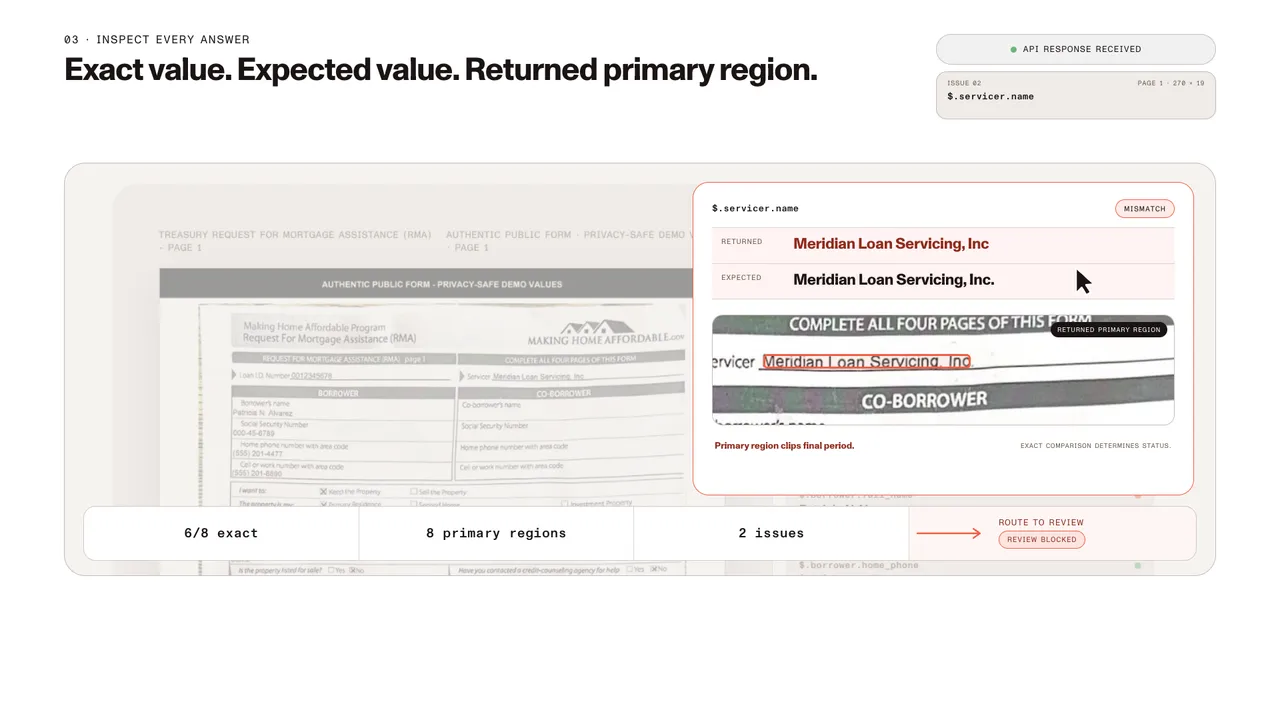
Mortgage verification
A selected public mortgage-assistance form populated with privacy-safe demo values.
- Exact
- 6/8 selected fields
- Source
- 8 returned primary source regions
- Review
- 2 issues retained
Parse PDFs, scans, images, and Office files into spatial JSON or Markdown, returning text, tables, and key-value pairs with coordinates, confidence, and page context. Deterministic output for agents, RAG, search, automation, and human review.
Trusted by enterprises, governments, and AI-native teams building document workflows at scale.
Capabilities
Detect every document element
Identify tables, forms, formulas, images, charts, handwriting, key-value regions, headings, lists, and reading order across complex files.
Preserve page context
Keep elements connected to page position, confidence, and reading order so teams can validate, highlight, and use results downstream.
Choose speed, cost, or depth
Select the processing mode that fits the document — from low-cost Markdown to AI-augmented parsing for complex visual layouts.
Handle real-world files
Process PDFs, images, Office files, scans, and multilingual documents through one API. Scans are read with OCR as part of the same request; to make a scan searchable without extracting fields, use the PDF OCR API.
Score against labels you define
Send at least two labels with the request, or the ID of a classifier saved in Studio. Zero-shot: no training data or templates required.
Get a ranked list, not one guess
Every candidate label comes back with an independent confidence score from 0 to 1, highest first, so close calls are easy to spot.
Route before you extract
Send each document to the correct queue, schema, or team based on its top label, and hold ambiguous or low-scoring documents for manual review.
Flat per-page pricing
A new document type just needs a new label list, not a new model. Priced per page, independent of parse mode.
Map data to your schema
Define a JSON Schema for the fields you need, or scaffold one from example documents using the schema generator in Studio. Every extracted value comes back with bounding boxes, match labels, and confidence scores.
Extract complex tables
Extract tables, forms, images, and handwriting with rows, columns, spans, captions, and footnotes preserved. For tables alone, the table extraction API converts them straight to Excel, and the key-value pair extraction API handles form-like fields on their own.
Trace every value
Keep values connected to page position, confidence scores, reading order, and source evidence for review.
Send downstream
Return output ready to map into databases, ERPs, CRMs, review queues, and document workflows.
Spatial JSON for structured operations
Use spatial JSON for layout-aware elements, tables, key-value regions, coordinates, confidence scores, and page context.
Markdown for AI and search
Use Markdown for fast, cost-efficient content for RAG, search indexing, knowledge bases, and content migration. When Markdown is the only output needed, the PDF-to-Markdown API and PDF-to-markup API do just that.
Predictable output for the next step
Return results in predictable formats so downstream systems can validate, route, review, automate, or feed AI and search workflows.
Detect fields without a template
Find text fields and checkboxes in documents and scans without building a template for every layout.
Label fields with AI
Identify what each field represents — a name, date, or address — so it maps cleanly to your data.
Fill forms with your data
Return a filled document, or take the detected fields as JSON and fill them in a later request.
See what happened to every value
Scan and fill both return warnings naming each field that was adjusted or skipped, so nothing changes silently.
Pay only for the steps you use
Detection, AI labeling, and fill bill separately per page. Reusing detected fields skips detection.
Validate before automating
Use confidence scores, coordinates, and word-level details to review the output before sending it downstream.
Route exceptions
Move clean results forward and hold low-confidence, incomplete, or mismatched files for review.
Reconcile and map
Compare extracted values against business rules, records, or downstream systems before posting.
Support review and recovery
Keep results tied to the source so teams can trace, fix, and recover issues.
Automate downstream workflows
Send typed JSON to business systems and review queues, or send Markdown to AI, search, knowledge bases, and content pipelines.
Detect every document element
Identify tables, forms, formulas, images, charts, handwriting, key-value regions, headings, lists, and reading order across complex files.
Preserve page context
Keep elements connected to page position, confidence, and reading order so teams can validate, highlight, and use results downstream.
Choose speed, cost, or depth
Select the processing mode that fits the document — from low-cost Markdown to AI-augmented parsing for complex visual layouts.
Handle real-world files
Process PDFs, images, Office files, scans, and multilingual documents through one API. Scans are read with OCR as part of the same request; to make a scan searchable without extracting fields, use the PDF OCR API.
Score against labels you define
Send at least two labels with the request, or the ID of a classifier saved in Studio. Zero-shot: no training data or templates required.
Get a ranked list, not one guess
Every candidate label comes back with an independent confidence score from 0 to 1, highest first, so close calls are easy to spot.
Route before you extract
Send each document to the correct queue, schema, or team based on its top label, and hold ambiguous or low-scoring documents for manual review.
Flat per-page pricing
A new document type just needs a new label list, not a new model. Priced per page, independent of parse mode.
Map data to your schema
Define a JSON Schema for the fields you need, or scaffold one from example documents using the schema generator in Studio. Every extracted value comes back with bounding boxes, match labels, and confidence scores.
Extract complex tables
Extract tables, forms, images, and handwriting with rows, columns, spans, captions, and footnotes preserved. For tables alone, the table extraction API converts them straight to Excel, and the key-value pair extraction API handles form-like fields on their own.
Trace every value
Keep values connected to page position, confidence scores, reading order, and source evidence for review.
Send downstream
Return output ready to map into databases, ERPs, CRMs, review queues, and document workflows.
Spatial JSON for structured operations
Use spatial JSON for layout-aware elements, tables, key-value regions, coordinates, confidence scores, and page context.
Markdown for AI and search
Use Markdown for fast, cost-efficient content for RAG, search indexing, knowledge bases, and content migration. When Markdown is the only output needed, the PDF-to-Markdown API and PDF-to-markup API do just that.
Predictable output for the next step
Return results in predictable formats so downstream systems can validate, route, review, automate, or feed AI and search workflows.
Detect fields without a template
Find text fields and checkboxes in documents and scans without building a template for every layout.
Label fields with AI
Identify what each field represents — a name, date, or address — so it maps cleanly to your data.
Fill forms with your data
Return a filled document, or take the detected fields as JSON and fill them in a later request.
See what happened to every value
Scan and fill both return warnings naming each field that was adjusted or skipped, so nothing changes silently.
Pay only for the steps you use
Detection, AI labeling, and fill bill separately per page. Reusing detected fields skips detection.
Validate before automating
Use confidence scores, coordinates, and word-level details to review the output before sending it downstream.
Route exceptions
Move clean results forward and hold low-confidence, incomplete, or mismatched files for review.
Reconcile and map
Compare extracted values against business rules, records, or downstream systems before posting.
Support review and recovery
Keep results tied to the source so teams can trace, fix, and recover issues.
Automate downstream workflows
Send typed JSON to business systems and review queues, or send Markdown to AI, search, knowledge bases, and content pipelines.
Turn complex files into document structure
Detect every document element
Identify tables, forms, formulas, images, charts, handwriting, key-value regions, headings, lists, and reading order across complex files.
Preserve page context
Keep elements connected to page position, confidence, and reading order so teams can validate, highlight, and use results downstream.
Choose speed, cost, or depth
Select the processing mode that fits the document — from low-cost Markdown to AI-augmented parsing for complex visual layouts.
Handle real-world files
Process PDFs, images, Office files, scans, and multilingual documents through one API. Scans are read with OCR as part of the same request; to make a scan searchable without extracting fields, use the PDF OCR API.
Score documents against labels before you extract anything
Score against labels you define
Send at least two labels with the request, or the ID of a classifier saved in Studio. Zero-shot: no training data or templates required.
Get a ranked list, not one guess
Every candidate label comes back with an independent confidence score from 0 to 1, highest first, so close calls are easy to spot.
Route before you extract
Send each document to the correct queue, schema, or team based on its top label, and hold ambiguous or low-scoring documents for manual review.
Flat per-page pricing
A new document type just needs a new label list, not a new model. Priced per page, independent of parse mode.
Extract data for systems, agents, and review
Map data to your schema
Define a JSON Schema for the fields you need, or scaffold one from example documents using the schema generator in Studio. Every extracted value comes back with bounding boxes, match labels, and confidence scores.
Extract complex tables
Extract tables, forms, images, and handwriting with rows, columns, spans, captions, and footnotes preserved. For tables alone, the table extraction API converts them straight to Excel, and the key-value pair extraction API handles form-like fields on their own.
Trace every value
Keep values connected to page position, confidence scores, reading order, and source evidence for review.
Send downstream
Return output ready to map into databases, ERPs, CRMs, review queues, and document workflows.
Return predictable output your systems can use
Spatial JSON for structured operations
Use spatial JSON for layout-aware elements, tables, key-value regions, coordinates, confidence scores, and page context.
Markdown for AI and search
Use Markdown for fast, cost-efficient content for RAG, search indexing, knowledge bases, and content migration. When Markdown is the only output needed, the PDF-to-Markdown API and PDF-to-markup API do just that.
Predictable output for the next step
Return results in predictable formats so downstream systems can validate, route, review, automate, or feed AI and search workflows.
Detect and fill form fields without templates
Detect fields without a template
Find text fields and checkboxes in documents and scans without building a template for every layout.
Label fields with AI
Identify what each field represents — a name, date, or address — so it maps cleanly to your data.
Fill forms with your data
Return a filled document, or take the detected fields as JSON and fill them in a later request.
See what happened to every value
Scan and fill both return warnings naming each field that was adjusted or skipped, so nothing changes silently.
Pay only for the steps you use
Detection, AI labeling, and fill bill separately per page. Reusing detected fields skips detection.
Build governed document workflows, from extraction to downstream use
Validate before automating
Use confidence scores, coordinates, and word-level details to review the output before sending it downstream.
Route exceptions
Move clean results forward and hold low-confidence, incomplete, or mismatched files for review.
Reconcile and map
Compare extracted values against business rules, records, or downstream systems before posting.
Support review and recovery
Keep results tied to the source so teams can trace, fix, and recover issues.
Automate downstream workflows
Send typed JSON to business systems and review queues, or send Markdown to AI, search, knowledge bases, and content pipelines.
Try it live
Switch processing modes and inspect live output from a sample invoice as rendered Markdown, raw Markdown, or spatial JSON.
WALKTHROUGH
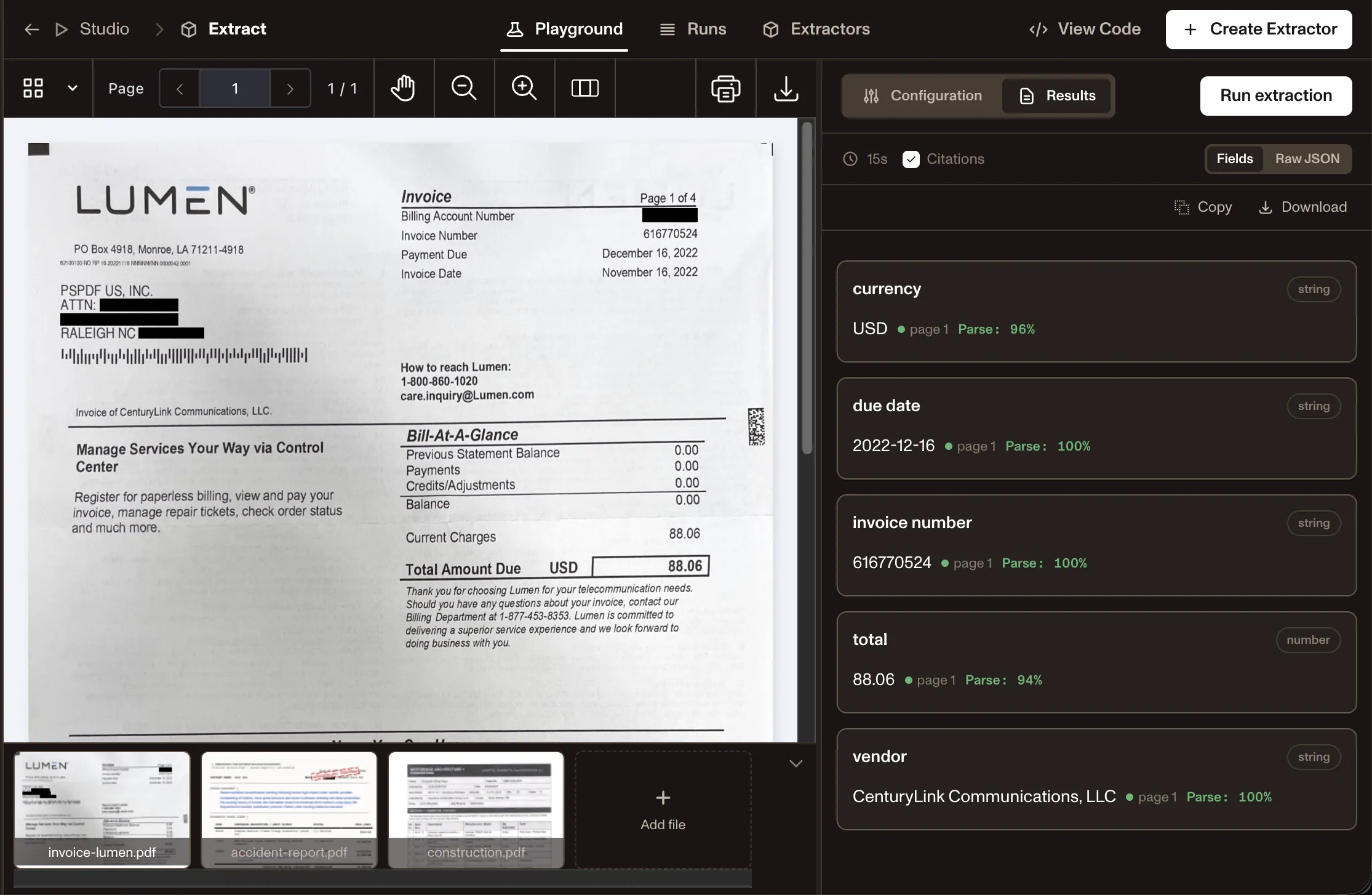
Extract Studio is a desktop app that runs this API’s engine on your Mac. With an AI model running locally through Ollama or LM Studio, your documents stay on the machine. It runs on Apple silicon Macs. You need a Nutrient account, and each run uses Data Extraction credits.
Processing modes
Choose speed, cost, or depth per workflow. Set mode per request.
Text
Low-cost Markdown for born-digital PDFs and Office files
Structure
Spatial JSON with OCR, tables, bounds, confidence, and page context for scans with simple layouts
Agentic
Agent-guided extraction for documents that need deeper reasoning, review, and recovery
All four processing modes tested independently. Results published with every release.
Side-by-side breakdowns on accuracy, deployment, output format, and price.
INDUSTRIES AND DOCUMENTS
Structured output for high-stakes teams.
Invoices · Purchase orders · Line items
Loan documents · Appraisals · Title reports
Receipts · Expense reports · Line items
ID cards · Passports · Driver’s licenses
Patient intake forms · Medical records · Claim forms
Contracts · Legal filings · Applications
Claims forms · Policies · ACORD forms · Loss runs
Bank statements · Pay stubs · Tax forms
Prior authorization forms · Referrals · Clinical packets
ROI requests · Patient records · Chart packets
Court filings · Deeds · Clerk records
Output formats
Elements, bounds, confidence, metadata, and usage. Chooseoutput: "json" or Markdown per request.
Spatial JSON
For extraction · validation · review
{ "elements": [ { "type": "keyValueRegion", "id": "kv_x1y2z3", "bounds": { "x": 82, "y": 128, "width": 202, "height": 24 }, "confidence": 0.98, "page": { "pageIndex": 0, "pageNumber": 1 }, "pairs": [ { "key": { "entityType": "QUESTION", "value": "Invoice number", "bounds": { "x": 82, "y": 128, "width": 92, "height": 24 }, "confidence": 0.99 }, "value": { "entityType": "ANSWER", "value": "INV-20241108", "bounds": { "x": 182, "y": 128, "width": 102, "height": 24 }, "confidence": 0.98 }, "relationshipConfidence": 0.97 } ] }, { "type": "table", "id": "tbl_a1b2c3", "bounds": { "x": 70, "y": 320, "width": 446, "height": 162 }, "confidence": 0.96, "rowCount": 3, "columnCount": 3, "page": { "pageIndex": 0, "pageNumber": 1 }, "cells": [ { "row": 0, "column": 0, "text": "Item", "confidence": 0.99, "bounds": { "x": 70, "y": 320, "width": 200, "height": 26 } }, { "row": 0, "column": 1, "text": "Qty", "confidence": 0.99, "bounds": { "x": 270, "y": 320, "width": 80, "height": 26 } }, { "row": 0, "column": 2, "text": "Total", "confidence": 0.99, "bounds": { "x": 350, "y": 320, "width": 100, "height": 26 } }, { "row": 1, "column": 0, "text": "Visual identity", "confidence": 0.97, "bounds": { "x": 70, "y": 350, "width": 200, "height": 26 } }, { "row": 1, "column": 1, "text": "1", "confidence": 0.98, "bounds": { "x": 270, "y": 350, "width": 80, "height": 26 } }, { "row": 1, "column": 2, "text": "$8,500", "confidence": 0.97, "bounds": { "x": 350, "y": 350, "width": 100, "height": 26 } } ] } ]}Markdown
For RAG · search · knowledge bases
# Invoice INV-20241108
**From** Acme Studios LLC**Issued** Nov 8, 2024
## Line items
| Item | Qty | Total || --- | ---: | ---: || Visual identity | 1 | $8,500 || Brand guidelines | 1 | $2,200 |
**Total · $13,500.00**
Built for production
Handle messy real-world files
Process PDFs, photos, scans, Office files, and archives without building a separate parser for each format.
Return source-grounded outputs
Return coordinates, confidence, page context, and review paths so AI outputs stay tied to source evidence.
Flag uncertainty before automation
Use confidence scores and page context to catch extraction issues before agents or automations rely on them.
Choose speed, cost, or depth
Pick the cheapest mode that meets your accuracy bar. Then increase depth only when documents require it.
Prepare schema-ready data
Use /extract to pull specific fields from any document — each value is returned with bounding boxes and match labels so you can validate, route to human review, or send directly downstream.
Connect the full workflow
Parse first. Then convert, redact, generate, sign, view, edit, or approve across Nutrient DWS and SDKs.
Reviewed extraction examples
One live response per selected public form exactly matched 26 of 30 predeclared fields. All 30 returned fields included page-bounded primary source regions. Four mismatches stayed visible for review. The forms contain privacy-safe demo values. This is a three-document demonstration, not an accuracy, production, or performance benchmark.
A selected public mortgage-assistance form populated with privacy-safe demo values.
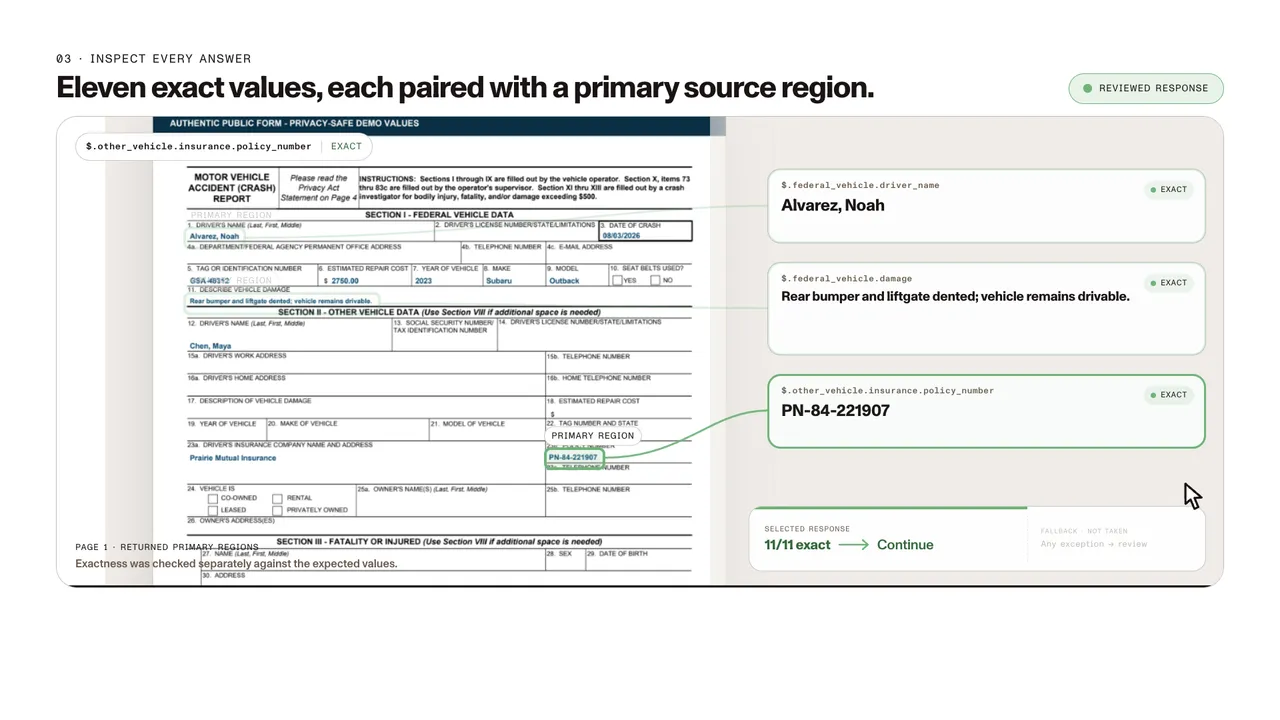
A selected public government crash report populated with privacy-safe demo values.
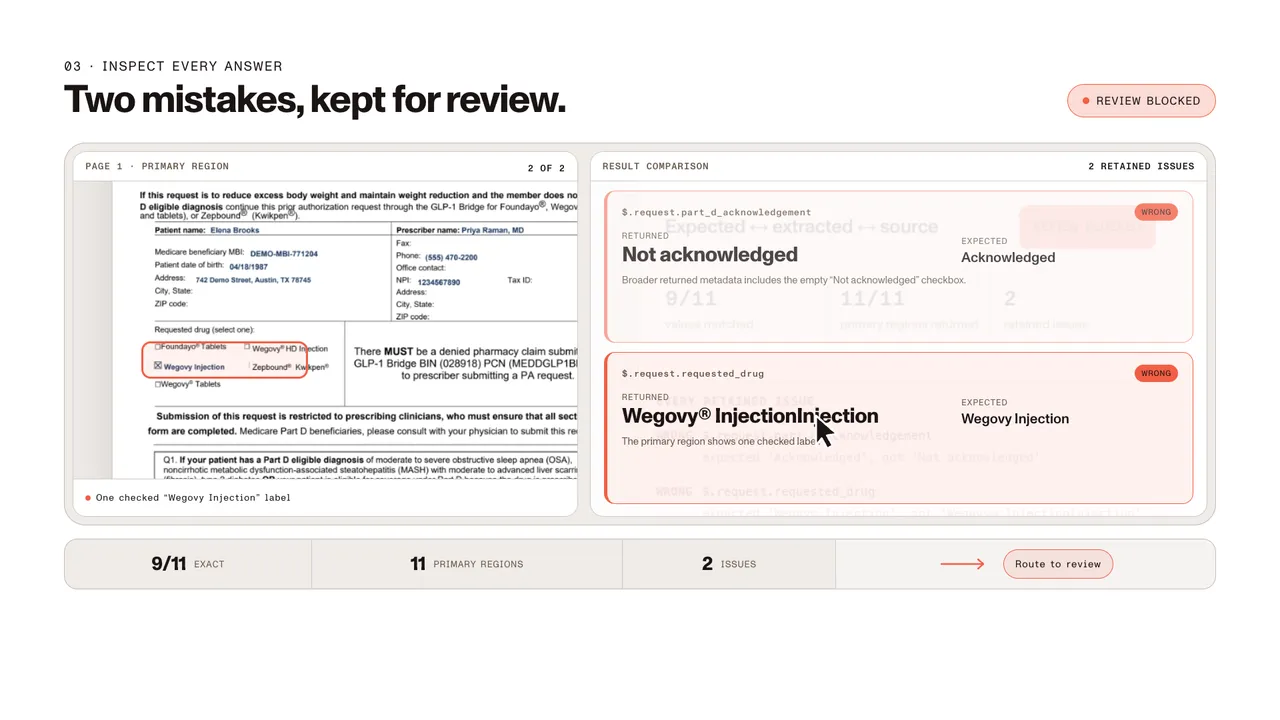
A selected public CMS prior-authorization form populated with privacy-safe demo values and no PHI.
Grounding makes mistakes reviewable. It does not make them correct.
The videos use an Extract → Source evidence → Decision gate schematic. It is a workflow concept, not shipped product UI.
“Reviewed” means the evidence audit was recorded. It does not mean a reviewer approved the result.
SOC 2 Type 2 audited
Audited annually. Reports available under NDA.
Regional processing options
Choose supported processing regions for enterprise deployments.
Trust and compliance
0.93 accuracy, independently benchmarked
200 real-world documents. Three metrics. Results published with every release.
HTTPS/TLS encryption
API communication is encrypted by default, and unencrypted requests are rejected.
A data extraction API is a service that parses documents — PDFs, scans, images, and Office files — and returns structured, usable data rather than just readable text. Instead of manually pulling values from documents or building custom parsers for each file format, you send a document to the API and get back structured output: spatial JSON with element types, coordinates, confidence scores, and page context, or Markdown for AI and search workflows. Nutrient Data Extraction API handles this across four processing modes — text, structure, understand, and agentic — so teams can choose speed, cost, or depth per workflow. See the what is intelligent data extraction blog for the broader concept, or how to extract data from a PDF for a hands-on developer walkthrough.
OCR makes scanned or image-based documents machine-readable by identifying text on a page. A data extraction API goes further: It identifies which values matter, where they sit in the document, how they relate to each other, and how to structure them for downstream use. OCR gives you a wall of text. A data extraction API gives you typed fields with coordinates, confidence scores, page references, and reading order — output that a system can validate, route, and act on without additional processing.
Most document formats used in business and regulated workflows are supported, including PDFs (digital, scanned, and image-based), images, and Office files such as Word, Excel, and PowerPoint. Within those formats, the API handles forms, tables, key-value regions, handwriting, revision histories, stamps, and mixed layouts. Different document types — invoices, contracts, RFIs, submittals, medical records, permits — carry different data in different formats, so extraction workflows often define document-specific schemas rather than applying a single generic approach.
The Data Extraction API processes PDFs, images, Word, Excel, PowerPoint, and other common document formats. Upload files directly, send raw binary content, or point the API at a hosted document URL. It handles scanned PDFs, fillable forms, and mixed digital/image-based documents without requiring a separate OCR pipeline.
Yes. The /extract API maps a document to your JSON Schema and returns the requested fields with per-field citations back to the source — so every value traces back to an exact location in the original document. It works with PDFs, scans, images, and Office files.
A general LLM can reason over document text, but it doesn’t give you a document processing layer by itself. The Data Extraction API returns layout-grounded elements with reading order, coordinates, confidence scores, and page references, so teams can validate, route, highlight, and automate with traceability.
Spatial JSON and Markdown are separate output formats on the same API. Choose spatial JSON when your workflow needs structured elements with layout context, or Markdown when you need clean structured content for RAG, search, or document Q&A. Send two requests if your pipeline needs both.
Every extracted element comes back with confidence scores, page references, coordinates, and word-level details, so you can compare outputs across sample documents, flag low-confidence fields for human review, highlight results on the original document, and route exceptions to a review queue. Because results stay connected to the source document, teams can trace outputs back to the original page and correct downstream records when needed.
Yes. Use the Data Extraction API as the parsing layer. Then connect the output to AI Document Processing for templates and validation; DWS Processor for conversion, redaction, generation, and signing; and Nutrient SDKs when humans need to review, edit, annotate, or approve documents in your application.
Yes. The API is backed by Nutrient’s broader security practices, including SOC 2 Type 2 audited infrastructure and TLS-encrypted transport — built for use in business-critical and regulated workflows.
Yes, with Nutrient Extract Studio, a desktop app for Apple silicon Macs on macOS Tahoe 26.4 or later. It runs the same engine as this API, so you can parse documents, extract fields, and classify files on your Mac instead of calling the API.
Classification needs no AI model. Extraction does. Connect one running on your Mac through Ollama, LM Studio, or vLLM, and your documents stay on the machine. If you use your own OpenAI or Anthropic key instead, page images and your schema go to that provider. In every setup, Nutrient receives only page counts, for billing.
You sign in with a free Nutrient account over the internet, and each run uses Data Extraction credits, as API calls do. When a result looks right, viewing the code in the app shows the Python code that runs the same extraction with the Data Extraction SDK on your own servers. Learn about Extract Studio for macOS.
New accounts get 5,000 free Data Extraction API credits per month with no credit card required. Beyond the free tier, you control cost by choosing the processing mode that fits each workflow: text for low-cost Markdown extraction, structure for spatial JSON, understand for AI-augmented parsing, and agentic for advanced extraction workflows.
Yes. The classify endpoint scores a document against labels you send with the request and returns a ranked list, so you can route each file before extracting from it. Classification is zero-shot, with no training data or templates, and costs a flat 1 credit per page.
Use the schema generator in Studio — upload up to five example documents and describe the document type, and it generates a JSON Schema you can use directly with /extract. You can also write the schema manually. Refer to the documentation for supported field types, constraints, and size limits.
Understand mode uses an AI-augmented extraction pipeline for complex documents that need richer layout understanding, OCR correction, printed-style handwriting support, formulas, and structure-aware output.
Nutrient offers the Data Extraction API for this. Upload a PDF, scan, image, or Office file to /extraction/extract with a JSON Schema describing the fields you want, and the response returns those fields typed, each carrying a confidence score and the region of the page it was read from. There is no template to build and no per-vendor setup, so the same request works across document layouts.
The Nutrient Data Extraction API returns a confidence score for every extracted field, not one score for the document. Each value also carries a match label and a bounding box pointing at where on the page it came from, so a workflow can accept high-confidence values automatically and route uncertain ones to a person before anything reaches a downstream system.
The Nutrient Data Extraction API maps to your schema rather than its own. You send a JSON Schema describing the field names, types, and constraints your system already expects, and the response comes back in that shape, so there is no translation layer between the API and your ERP, accounting system, or database.
Yes. The Nutrient Data Extraction API detects form fields and key-value regions without a template, and returns selected and unselected checkboxes as distinct element types, so a checked box is machine-readable rather than an image. Handwritten entries in form fields are read too, each with its own confidence score.
Developer resources
Prefer to self-host, or to try it on your own Mac first? The same engine runs as an embedded SDK and in the Nutrient Extract Studio desktop app.
5,000 free Data Extraction API credits per month — no credit card required. Parse PDFs, images, scans, and Office files into spatial JSON or Markdown for AI workflows, automation, and human review.