Extract invoice data from PDFs and scans — with page-level source grounding
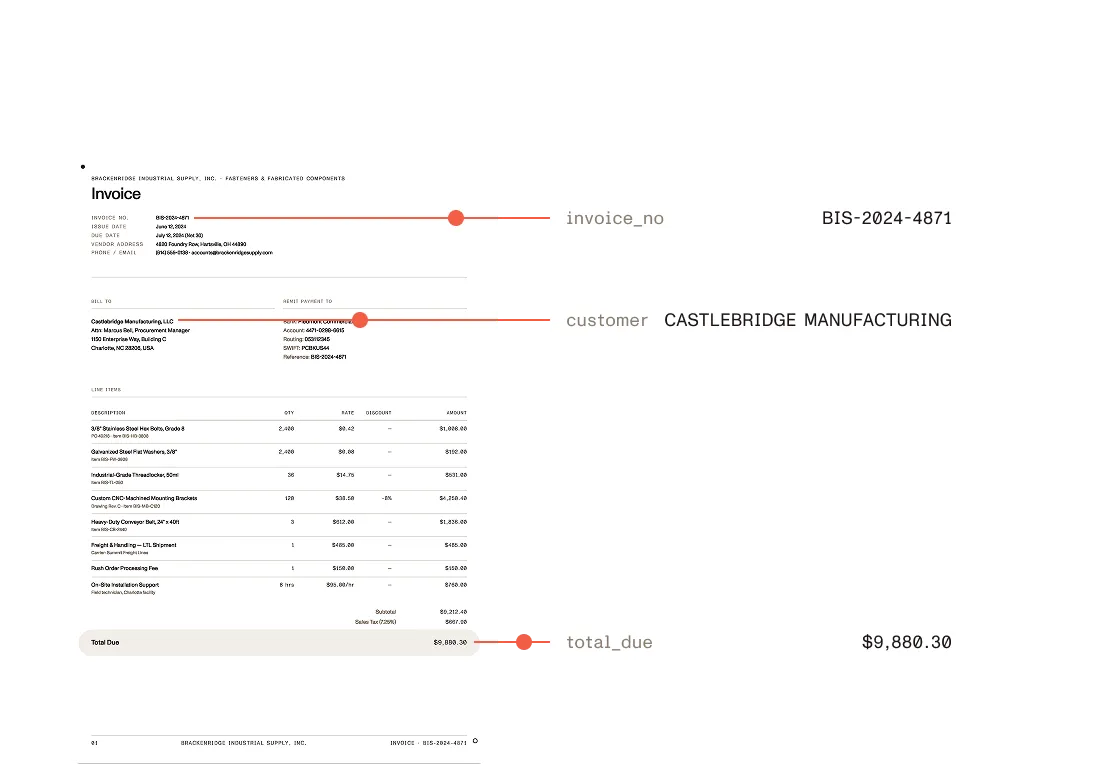
Vendor details, line items, totals, and PO numbers — extracted as typed, auditable JSON. Every value carries a source citation and confidence score, so nothing reaches your enterprise resource planning (ERP) system or accounting system unreviewed.
Trusted by enterprises, governments, and teams building document workflows at scale
Lufthansa
Disney
Autodesk
UBS
Dropbox
IBM
Lufthansa
Disney
Autodesk
UBS
Dropbox
IBM
USE CASES
Invoice data extraction use cases
GOVERNED EXTRACTION
Why not rely on LLM-only extraction for invoices?
LLMs can reason over an invoice — but accounts payable (AP) workflows need deterministic, auditable output grounded in the source file, not generated answers that vary between runs.
LLM-only prompting
Nutrient Data Extraction API
Output shape
LLM-only prompting
Generated answers that can change between runs.
Nutrient Data Extraction API
Predictable structured output — typed and tied to the source invoice.
Routing signal
LLM-only prompting
No signal for which values to trust.
Nutrient Data Extraction API
Confidence signals route uncertain values to human review before payment approval or ERP synchronization.
Traceability
LLM-only prompting
No way to point back at the page.
Nutrient Data Extraction API
Coordinates and page references anchor every value to its source location.
Line items
LLM-only prompting
Tables flattened into unstructured text.
Nutrient Data Extraction API
Layout-aware structure preserves line-item tables with row and column context.
Review step
LLM-only prompting
Values reach downstream systems unchecked.
Nutrient Data Extraction API
Human review and validation before matching logic, ERP, or payment systems.
Audit
LLM-only prompting
Nothing to show an auditor.
Nutrient Data Extraction API
Source context and page detail support traceable, audit-ready accounts payable workflows.
Try it live
See the parse API in action
Switch processing modes and inspect live output from a sample invoice as rendered Markdown, raw Markdown, or spatial JSON.
HOW IT WORKS
How invoice OCR turns a PDF invoice into JSON
Parse
Turn invoice PDFs, scans, images, and Office files into document structure.
Extract
Identify line-item tables, totals, and dates.
Map
Define the fields your workflow needs using the schema generator in Studio, or write a JSON Schema directly. Get back validated, typed output.
Structure
Return typed JSON for systems and validation, or Markdown for search and AI workflows.
Process
Send structured data into AP review queues, matching logic, or ERP and accounting systems.
ONE CALL
Define the fields, get invoice data back
POST an invoice and a JSON Schema to /extraction/extract. Every field comes back with a match type, a confidence score, and the region of the page it was read from.
Request
Invoice upload with a field schema
curl -X POST https://api.nutrient.io/extraction/extract \ -H "Authorization: Bearer your_api_key_goes_here" \ -F "file=@invoice.pdf" \ -F 'instructions={"schema":{"type":"object","properties":{"invoice_number":{"type":"string","description":"Invoice identifier"},"vendor_name":{"type":"string","description":"Supplier or vendor name"},"total_amount":{"type":"number","description":"Total amount including tax"}},"required":["invoice_number","total_amount"]},"parseConfig":{"mode":"understand"}}'Response
Typed fields, each with its source
{ "output": { "data": { "invoice_number": "INV-2024-0042", "vendor_name": "Acme Industrial Supplies Ltd.", "total_amount": 747.5 }, "metadata": { "invoice_number": { "match": "id_match", "confidence": 0.96, "bbox": { "x": 878, "y": 268, "width": 82, "height": 25 }, "pageIndex": 0, "pageNumber": 1 } } }}EXAMPLE APP
Check multilingual invoices against purchase orders
An example app on the Data Extraction API that checks each invoice against the purchase order and earlier bills. The same API calls work in any backend, workflow, or app.
OUTPUT FORMATS
PDF invoice to JSON or Markdown from one API.
Confidence scores, coordinates, and page context included.
Choose output: "json" or Markdown per request.
Spatial JSON
For extraction · validation · review
{ "type": "table", "id": "tbl_a1b2c3", "bounds": { "x": 82, "y": 320, "width": 640, "height": 132 }, "confidence": 0.97, "rowCount": 3, "columnCount": 4, "page": { "pageIndex": 0, "pageNumber": 1 }, "cells": [ { "row": 0, "column": 0, "text": "Description", "confidence": 0.99, "bounds": { "x": 82, "y": 320, "width": 220, "height": 28 } }, { "row": 0, "column": 1, "text": "Qty", "confidence": 0.99, "bounds": { "x": 302, "y": 320, "width": 60, "height": 28 } }, { "row": 0, "column": 2, "text": "Unit price", "confidence": 0.99, "bounds": { "x": 362, "y": 320, "width": 120, "height": 28 } }, { "row": 0, "column": 3, "text": "Total", "confidence": 0.99, "bounds": { "x": 482, "y": 320, "width": 120, "height": 28 } }, { "row": 1, "column": 0, "text": "Widget A", "confidence": 0.98, "bounds": { "x": 82, "y": 348, "width": 220, "height": 26 } }, { "row": 1, "column": 1, "text": "10", "confidence": 0.98, "bounds": { "x": 302, "y": 348, "width": 60, "height": 26 } }, { "row": 1, "column": 2, "text": "25.00", "confidence": 0.97, "bounds": { "x": 362, "y": 348, "width": 120, "height": 26 } }, { "row": 1, "column": 3, "text": "250.00", "confidence": 0.97, "bounds": { "x": 482, "y": 348, "width": 120, "height": 26 } } ]}Markdown
For RAG · search · knowledge bases
# Invoice INV-2024-0042
**Vendor** Acme Industrial Supplies Ltd.**Issue date** 2024-03-15**Currency** EUR
| Description | Qty | Unit price | Total || --- | --- | --- | --- || Widget A | 10 | 25.00 | 250.00 || Widget B | 5 | 99.50 | 497.50 |
**Total due** 1,547.50 EUR
ACCURACY
Invoice OCR accuracy benchmarks
Invoice-specific accuracy benchmarks are still being validated against a public gold-annotated dataset. In the meantime, the general Data Extraction API benchmark — reading order, table structure, and heading hierarchy, tested on a 200-document corpus with every release — is the current accuracy proof.
0.94
Table structure accuracy (TEDS), OpenDataLoader benchmark, understand mode
Regional processing options
Choose supported processing regions for enterprise deployments.
SOC 2 Type 2 audited
Audited annually. Reports available under NDA for enterprise customers.
Trust and compliance
Built for accounts payable workflows in production
TLS encryption by default
All API communication is encrypted. Unencrypted requests are rejected.
Configurable data retention
Encrypted transport and plan-level retention controls for financial document workflows.
Invoice data extraction questions
Can the API extract line items from invoice tables?
Yes. The API identifies table structure — rows, columns, and cells — from invoice line-item tables, with confidence scores and source coordinates per cell so line items can be validated before entering downstream systems.
What file formats are supported?
Data Extraction API processes PDFs, scanned documents, images, Word, Excel, and PowerPoint files. It handles scanned invoices, faxed invoices, and mixed digital/image-based documents without requiring a separate OCR pipeline.
Is this an accounts payable automation platform?
No. Nutrient Data Extraction API is an extraction layer, not an AP automation suite. It turns invoices into structured, typed data so that data can be reviewed, matched, and routed into the AP or ERP system your team already uses.
How do I validate extracted invoice data before it enters my ERP?
Every extracted field includes a match label, confidence score, page reference, and bounding box, so uncertain fields can be flagged for human review and traced back to the source invoice before entering payment approval or ERP synchronization.
How do I define the invoice fields to extract?
Use the schema generator in Studio — upload example invoices and describe the fields needed. It generates a JSON Schema for the /extract endpoint. Fields like invoice number, vendor, line items, and totals can also be defined manually. Refer to the documentation for supported field types and limits.
When should I use agentic mode for invoices?
Use agentic mode for degraded scans, faxed invoices, and handwritten annotations where understand mode produces insufficient results. Agentic mode adds a vision language model (VLM) on top of the understand pipeline. It costs 18 credits per page.
How do I extract invoice data from a PDF?
POST the PDF to the /extraction/extract endpoint with a JSON Schema describing the fields needed, such as invoice number, vendor, line items, and total. The response returns those fields typed, each with a confidence score and the region of the page it was read from. No template or per-vendor setup is required.
Is this an invoice OCR API?
It includes invoice OCR, but it does more than recognize characters. OCR turns a scanned invoice into text, but this API returns named fields and line-item tables as typed JSON, with each value tied back to its place on the page. Scanned and photographed invoices are read with OCR as part of the same request.