Nutrient Python SDK
Extract data from PDF in Python: Text, tables, and key-value pairs
- PDF, PNG, JPEG, and TIFF in — structured JSON with bounding boxes and confidence scores out
- Text, tables, key-value pairs, handwriting, and equations (LaTeX) with reading order
- OCR for speed, ICR for fully local AI, cloud vision language models for the toughest layouts
- pip install nutrient-sdk — minutes to first extraction
Need pricing or implementation help? Talk to Sales.
ICR EXTRACTION
from nutrient_sdk import Document, Vision, VisionEngine
with Document.open("scan.png") as document: # Local AI — no network calls document.settings.vision_settings.engine = VisionEngine.ICR
vision = Vision.set(document) content_json = vision.extract_content() # Structured JSON: text, tables, key-value # pairs, equations, bounding boxes Lufthansa
Disney
Autodesk
UBS
Dropbox
IBM
Lufthansa
Disney
Autodesk
UBS
Dropbox
IBM
Python PDF data extraction features
Tables with cell precision
Detect tables automatically and extract individual cell contents with row and column structure. Handles complex layouts with merged cells, irregular borders, and nested tables.
Key-value pair detection
Identify form-like key-value regions in invoices, receipts, and structured documents. No predefined templates required — the AI adapts to any document layout.
On-premises AI processing
ICR runs entirely on your infrastructure with zero external API calls. Sensitive documents never leave your servers. Meets HIPAA, GDPR, and air-gapped requirements.
Structured JSON output
Every extraction returns classified elements with bounding boxes, confidence scores, and hierarchical reading order. Parse results programmatically without post-processing.
Comprehensive extraction capabilities
Text extraction with OCR
High-speed text extraction with word-level bounding boxes for search indexing and digitization.
- Fast extraction optimized for throughput
- Word-level coordinates for every extracted term
- Multilanguage document support
AI-powered structured extraction
Extract tables, equations, and key-value regions with offline AI that understands document layout.
- Table detection with cell boundary extraction
- Key-value region and equation recognition
- 100 percent offline — no external API calls
VLM-enhanced extraction
Maximize accuracy on complex documents by combining local AI with vision language models.
- Superior accuracy on financial and legal documents
- Enhanced table boundaries and confidence scores
- Claude, OpenAI, or custom model endpoints
Image description with Claude
Generate natural language descriptions and WCAG-compliant alt text from document images.
- Contextual understanding of visual content
- Accessibility-ready alt text generation
- Customizable description detail levels
Image description with OpenAI
Cloud-scalable image understanding with enterprise SLA guarantees.
- Enterprise-grade scalability and availability
- Consistent output for automated pipelines
- Well-documented API behavior
Local AI image description
Run vision language models on your own infrastructure for complete data privacy.
- Ollama, LM Studio, or vLLM integration
- Zero per-image API costs at any scale
- Compatible with any OpenAI-compatible endpoint
What you can extract
Data Extraction detects and classifies document elements automatically. Each element comes with bounding boxes, confidence scores, and its position in the document reading order.
Structured data
- Tables
- Key-value pairs
- Equations
- Figures
Document elements
- Headings
- Paragraphs
- Reading order
- Sections
Processing engines
OCR ICR VLM-enhanced ICR Output formats
JSON Bounding boxes Confidence scores Element types INTELLIGENT DOCUMENT PROCESSING
Extraction that understands document structure
Traditional extraction tools parse text line by line. Nutrient Data Extraction sees the full document layout — tables, columns, headers, reading order — and returns classified, structured data ready for your Python application to consume.
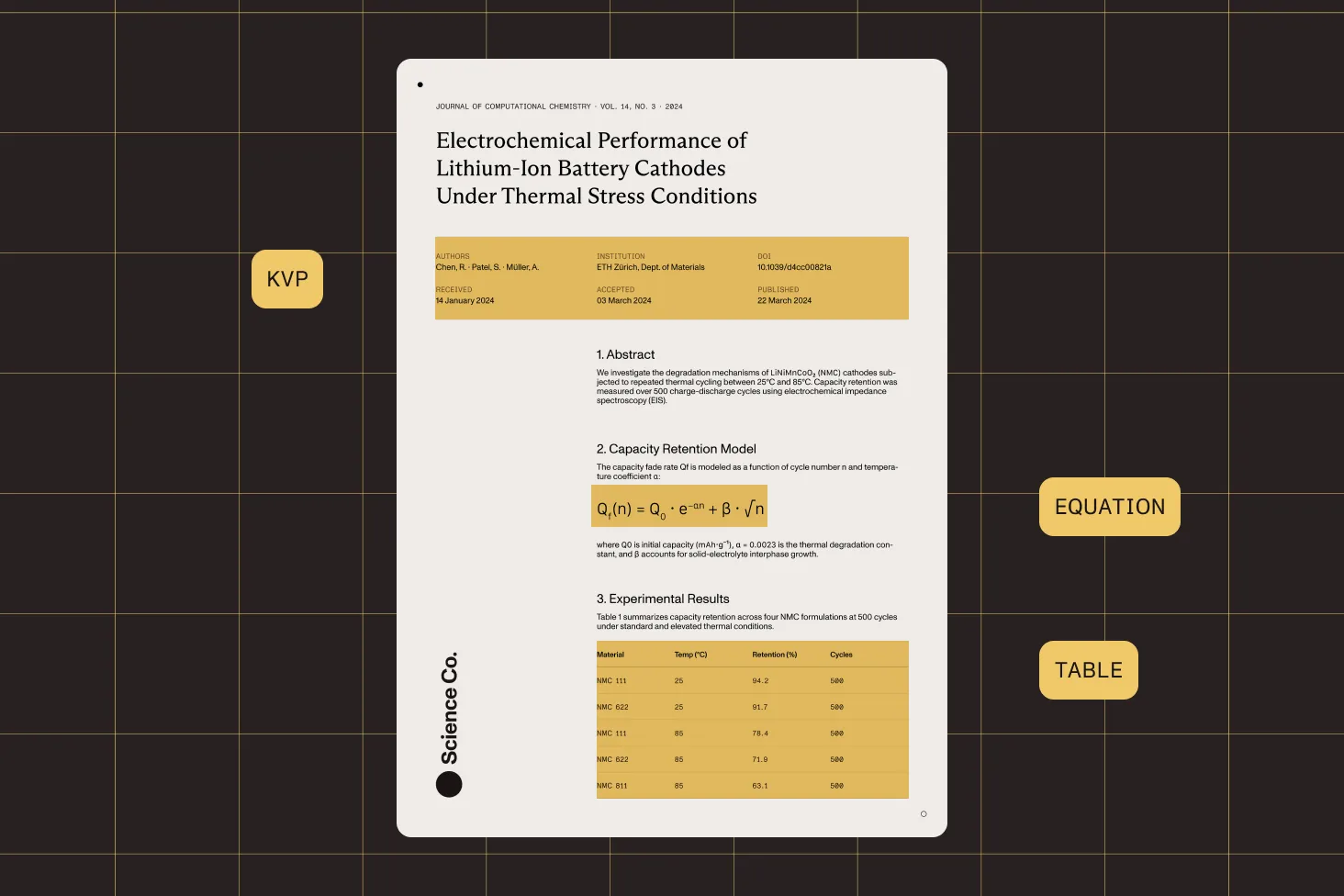
Adaptive table detection
Detect tables with or without visible borders. Extract cell contents with row and column positions, even from scanned documents with irregular layouts.
Template-free key-value extraction
Identify form-like key-value pairs without predefined templates. The AI learns document structure on the fly, adapting to invoices, receipts, and forms.
Mathematical equation recognition
Detect and extract equations with LaTeX representations from scientific papers, textbooks, and technical documentation.
Confidence-scored output
Every extracted element includes a confidence score. Set quality thresholds to filter results and flag documents that need manual review.
Two deployments, same engine
This is Data Extraction in the Python SDK: self-hosted, no network required. The same engine is also available as the hosted cloud Data Extraction API. To try it before writing code, use Nutrient Extract Studio, a Mac app with this SDK built in (sign-in required).
Frequently asked questions
How does Data Extraction extract tables from PDFs?
The ICR and VLM-enhanced ICR engines analyze document layout using AI to detect table regions, identify row and column boundaries, and extract individual cell contents. This works on both native PDFs and scanned documents, including tables without visible borders. The output is structured JSON with each cell mapped to its row and column position, making it straightforward to convert to CSV, database records, or any structured format your application needs.
Do I need to create templates for different document types?
No. Data Extraction analyzes document structure on the fly using AI. It detects tables, key-value pairs, headings, and other elements without predefined templates or training data. This means it works on invoices from any vendor, receipts in any format, and forms with any layout. The AI adapts to each document individually, eliminating the setup and maintenance cost of template-based extraction systems.
Can I extract data from scanned documents, and not just digital PDFs?
Yes. All three engines process both native PDFs and scanned documents. The OCR engine extracts text with bounding boxes from scanned images. The ICR engine goes further, applying AI to understand document structure and extract tables, key-value pairs, and semantic elements from scans. The VLM-enhanced engine adds vision language model processing for maximum accuracy on challenging scanned documents with poor quality or complex layouts.
What output format does the extraction return?
Data Extraction returns structured JSON containing classified document elements. Each element includes its type (table, paragraph, heading, equation, key-value region, figure), text content, bounding box coordinates, and confidence score. Tables include cell-level data with row and column positions. The JSON also includes the document reading order so you can reconstruct the logical flow of content. You can save output directly to a JSON file or process it in memory.
How does extraction accuracy compare between the three engines?
OCR provides fast, reliable text extraction and is best for simple documents where you need raw text and positions. ICR adds AI-powered structural analysis and significantly improves results on documents with tables, mixed layouts, and form-like content — all while running entirely offline. VLM-enhanced ICR delivers the highest accuracy by combining local AI with a vision language model, particularly for complex financial documents, legal contracts, and pages with irregular table structures.
Can I run extraction entirely on-premises?
Yes. The OCR and ICR engines run 100 percent on your infrastructure with no external API calls, and documents never leave your servers. This meets requirements for HIPAA, GDPR, SOC 2, and air-gapped environments. For VLM-enhanced extraction, you can also stay fully on-premises by connecting to a local model server like Ollama, LM Studio, or vLLM instead of cloud providers.
How does Data Extraction compare to Camelot and pdfplumber for Python?
Camelot and pdfplumber are popular open source Python libraries for extracting tables from native PDFs. They parse the underlying text layer and work well on digitally created documents with clear table borders. However, they cannot process scanned documents and struggle with borderless or irregular tables. Nutrient Data Extraction uses AI to detect tables, regardless of borders; works on both scanned and native documents; and also extracts key-value pairs, equations, and full document structure — returning everything as classified JSON with confidence scores.
What document and image formats are supported?
Data Extraction processes PDFs (both native and scanned) and common image formats, including PNG, JPEG, GIF, BMP, and TIFF. PDF pages are automatically rendered for processing, so you don’t need to handle conversion. All three engines accept the same input formats, making it easy to switch between them based on your accuracy and performance needs.
Can I extract data from invoices and financial documents?
Yes. The ICR and VLM-enhanced engines are well suited for invoice and financial document processing. They detect tables with line items and totals; identify key-value pairs like vendor names, dates, and amounts; and understand the hierarchical structure of a document. Because the extraction is template-free, it works across different invoice formats and vendors without per-vendor configuration. Use VLM-enhanced mode for the highest accuracy on complex financial layouts.
How do I get started with data extraction in Python?
Install Nutrient Python SDK with pip and follow the getting started guide. For data extraction, open a document, create a vision instance, select your engine (OCR, ICR, or VLM-enhanced), and call the extraction method. The SDK returns structured JSON that you can parse with standard Python tools. The extraction guides include step-by-step examples for each engine and use case.
Can I try Python data extraction without writing code?
Yes. Nutrient Extract Studio is a desktop app for Apple silicon Macs that ships with its own Python runtime and the Nutrient Python SDK, so there’s no environment to set up. Run parse, extract, or classify on a sample document, and then view the code in the app to copy Python code for the Data Extraction SDK into your project.
Extraction uses an AI model you connect. One running locally through Ollama or LM Studio keeps documents on your Mac. Your own OpenAI or Anthropic key also works, and it sends page images and your schema to that provider. The app needs a free Nutrient account, and runs use Data Extraction credits. Learn about Extract Studio for macOS.
Explore more
Also available for
More Python SDK capabilities