Integrate DWS Viewer API with your own backend
DWS Viewer API provides a programmatic API that enables you to integrate it with your backend. This backend can be a regular server-side application running in your infrastructure or in a cloud, or it could be a serverless function. The API is language agnostic, with the only requirement being the ability to communicate via HTTP.
Your backend can support two document sources:
- DWS-managed documents, where your backend uploads the document to DWS Viewer API and stores the returned document ID.
- App-provided documents, where your backend creates a browser session and your frontend passes the document directly to Nutrient Web SDK.
For cross-product overviews of Web SDK, Document Engine, and DWS Viewer API workflows, refer to the choose the right annotation workflow setup and choose the right forms workflow setup guides.
Uploading a DWS-managed document
When you create a document by upload, your backend service sends the file to DWS Viewer API, which will manage the entire document lifecycle.
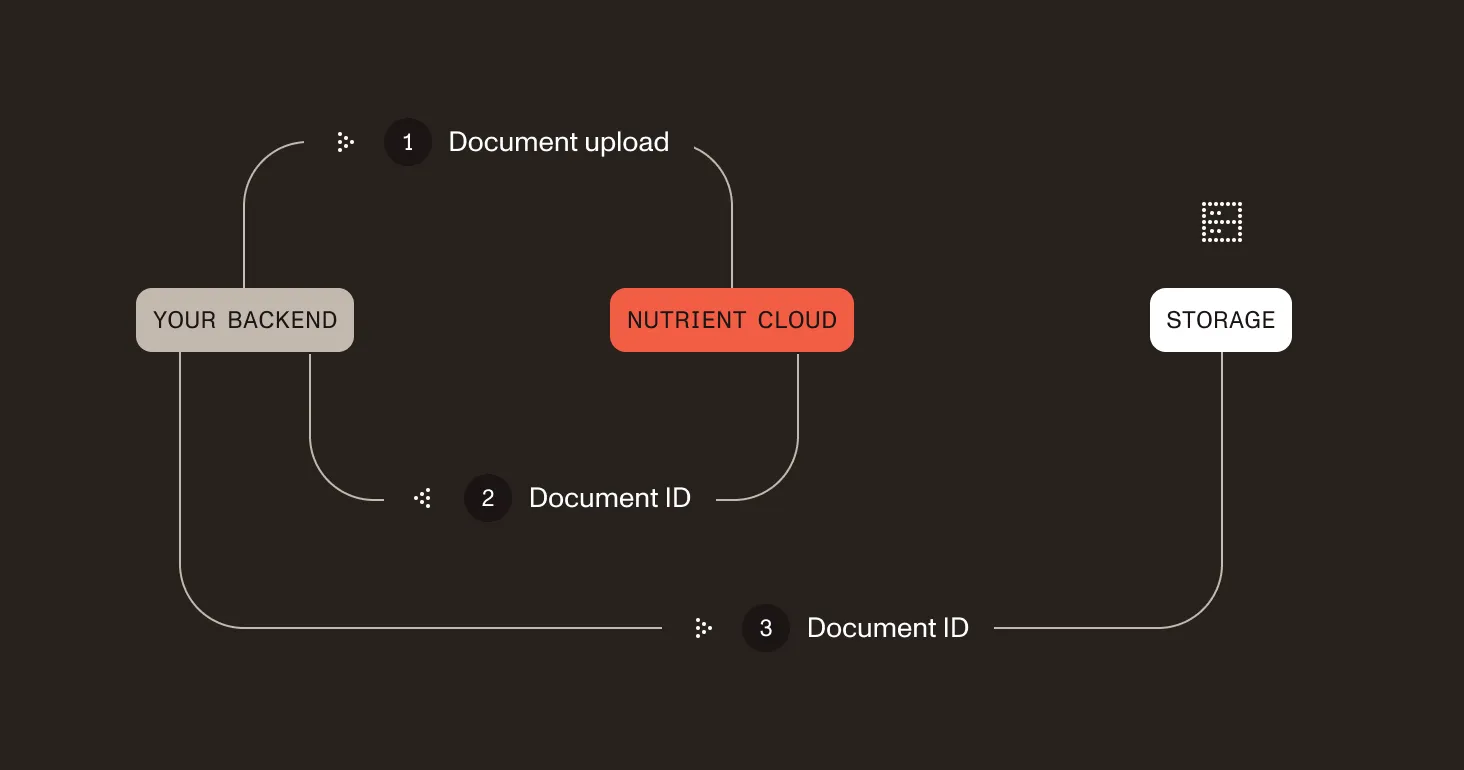
- Your service uploads the document to DWS Viewer API, which stores the document.
- Your service receives the document ID back, which it can use to reference the document later.
- To be able to do this, it needs to persist the document ID in persistent storage — for example, a database.
Viewing a document in your web app
After you create a DWS-managed document via upload, you can open it via Nutrient Web SDK. Any changes made to the document are automatically persisted by DWS Viewer API.
- A user requests a document to display in your web app running in a web browser.
- Your app requests access to the document from your backend.
- Your backend creates a session token for the requested document.
- The session token is then passed to your web app.
- The web app loads Nutrient Web SDK using the session token for authentication.
- After successful authentication, it displays the document streamed from DWS Viewer API.
Viewing an app-provided document
If your browser app already has the document, your backend can create a browser session by omitting allowed_documents from POST /viewer/sessions. Your frontend then loads Nutrient Web SDK with both session and document.
This avoids DWS upload and storage usage while still using DWS Viewer API session authorization and viewer-session quota tracking. See the open app-provided documents guide for the full flow.