How to watermark a PDF using PHP

Table of contents
Watermark PDF documents using our watermark PDF PHP API. Create a free account, get API credentials, and implement watermarking using cURL. Add text or image watermarks to protect proprietary documents and discourage unauthorized use.
This tutorial covers watermarking PDFs using our watermark PDF PHP API. The free plan includes 50 credits. Different operations consume different amounts of credits, so document processing limits vary. Create a free account(opens in a new tab) to get your API key.
Nutrient DWS Processor API
Watermarking PDFs is one of 30+ operations available through our PDF API tools. You can combine watermarking with other tools to build document processing workflows:
- Convert MS Office files and images to PDF, and then add watermarks
- Duplicate or delete PDF pages before watermarking
- Merge or flatten PDFs, and then watermark the result
After creating your account, you can access all PDF API tools.
Step 1 — Creating a free account on Nutrient
Go to our website(opens in a new tab) to create your free account.
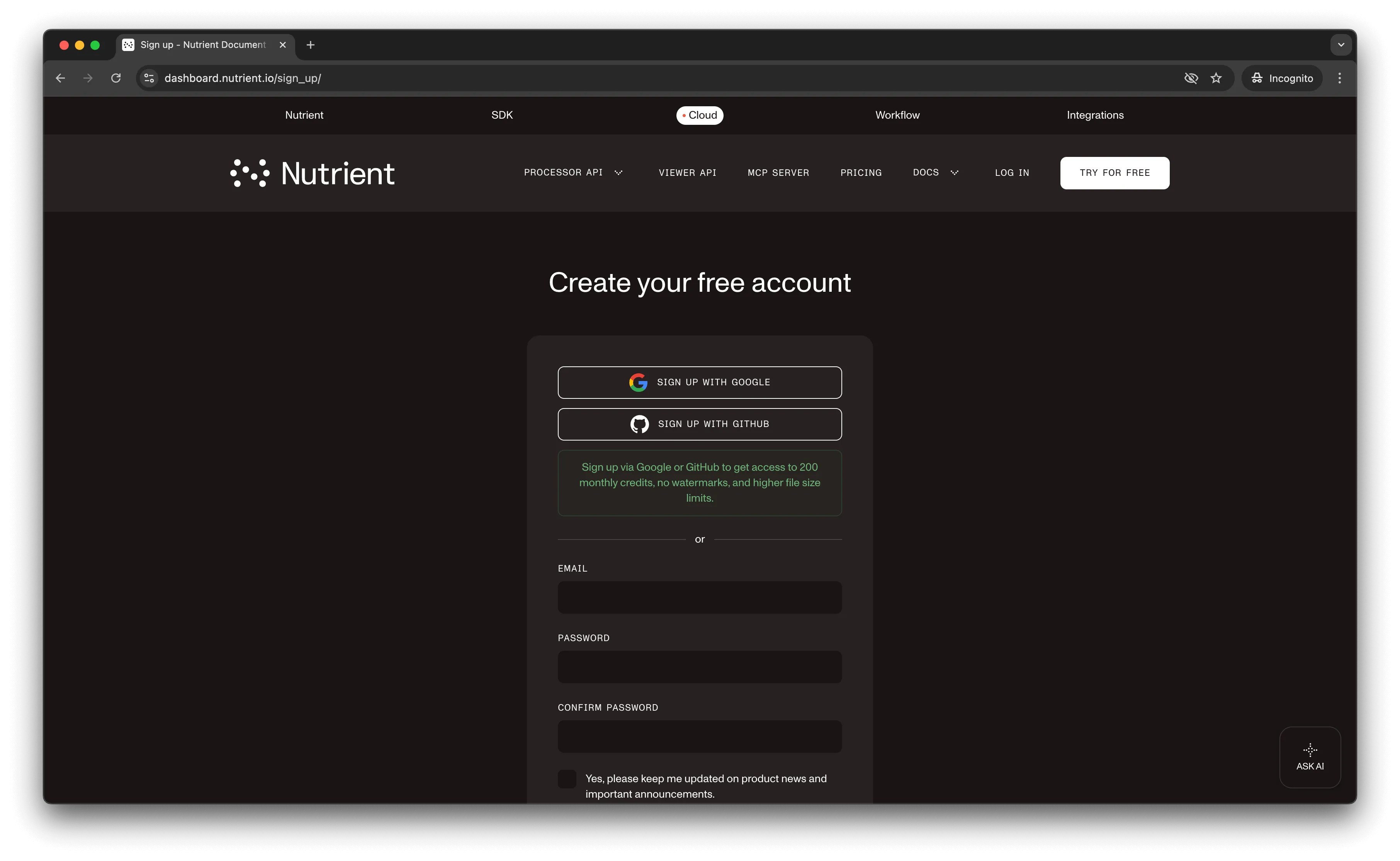
After account creation, the dashboard displays your plan details.
You start with 50 credits and access to all PDF API tools.
Step 2 — Obtaining the API key
After email verification, get your API key from the dashboard. Click API keys in the left menu to view your keys.
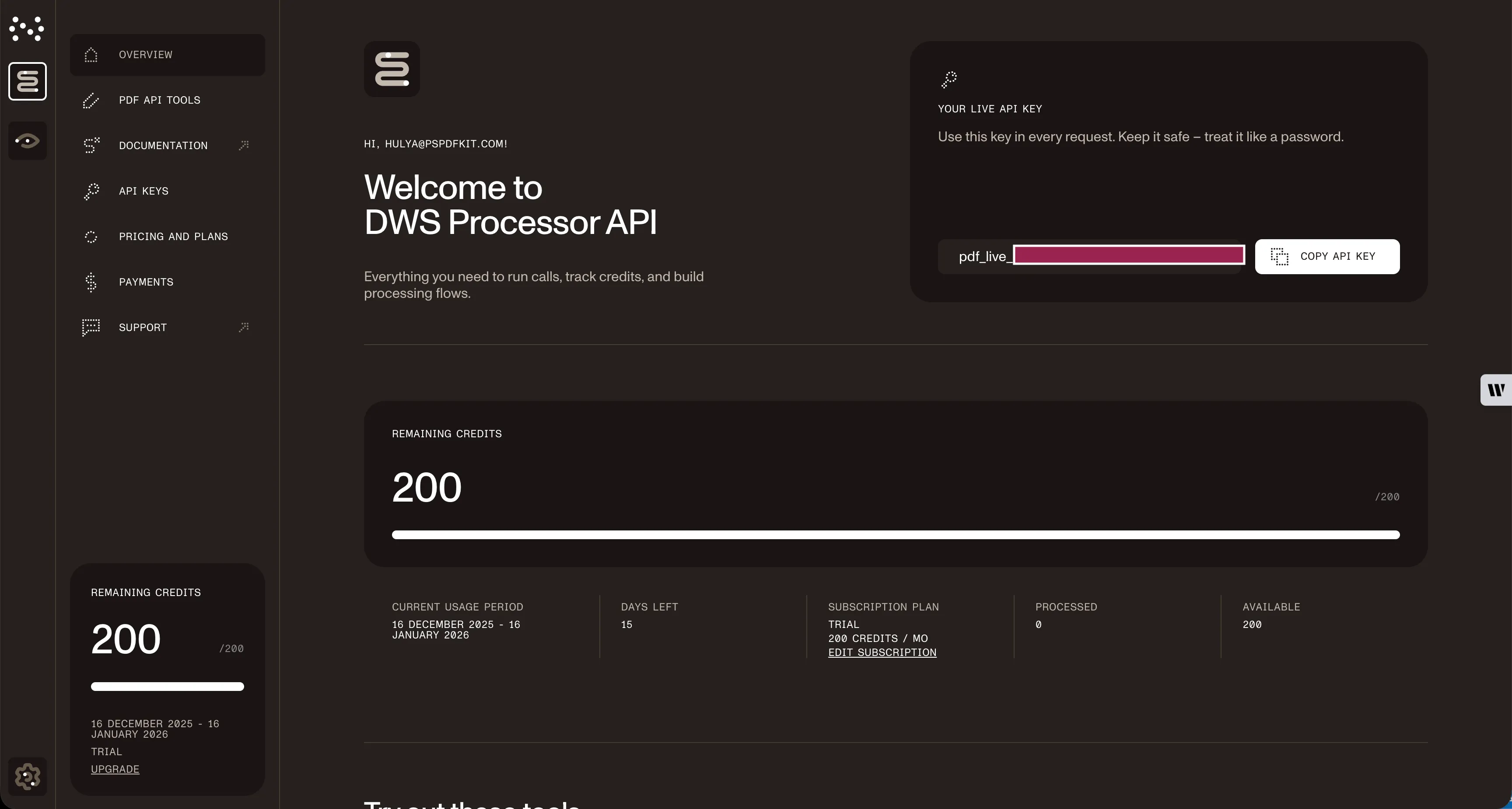
Copy the Live API key for use with the watermark PDF API.
Step 3 — Setting up folders and files
Create a folder called watermark_pdf and open it in a code editor. This tutorial uses VS Code. Create two subfolders: input_documents and processed_documents.
Copy your PDF file to input_documents and rename it to document.pdf. Add your watermark image to the same folder as logo.png.
In the root watermark_pdf folder, create processor.php for your code.
Your folder structure:
watermark_pdf├── input_documents| └── document.pdf| └── logo.png├── processed_documents└── processor.phpStep 4 — Writing the code
Open the processor.php file and paste the code below into it:
<?php
$FileHandle = fopen('processed_documents/result.pdf', 'w+');
$curl = curl_init();
curl_setopt_array($curl, array(  CURLOPT_URL => 'https://api.nutrient.io/build',  CURLOPT_CUSTOMREQUEST => 'POST',  CURLOPT_RETURNTRANSFER => true,  CURLOPT_ENCODING => '',  CURLOPT_POSTFIELDS => array(    'instructions' => '{      "parts": [        {          "file": "document"        }      ],      "actions": [        {          "type": "watermark",          "image": "logo",          "width": "25%"        }      ]    }',    'document' => new CURLFILE('input_documents/document.pdf'),    'logo' => new CURLFILE('input_documents/logo.png')  ),  CURLOPT_HTTPHEADER => array(    'Authorization: Bearer YOUR_API_KEY' // Replace YOUR_API_KEY_HERE with your API key.  ),  CURLOPT_FILE => $FileHandle,));
$response = curl_exec($curl);
curl_close($curl);
fclose($FileHandle);
Make sure to replace YOUR_API_KEY_HERE with your API key.
Code explanation
The FileHandle variable saves the output file to the processed_documents folder.
The instructions variable contains API instructions as a JSON string. The code then makes a CURL request to the API.
Output
Execute the code with:
php processor.phpAfter successful execution, result.pdf appears in the processed_documents folder.
Final folder structure:
watermark_pdf├── input_documents| └── document.pdf| └── logo.png├── processed_documents| └── result.pdf└── processor.phpAdditional resources
Explore more ways to work with Nutrient API:
- Postman collection — Test API endpoints directly in Postman
- Zapier integration — Automate document workflows without code
- MCP Server — PDF automation for LLM applications
Conclusion
This tutorial demonstrated how to watermark PDF documents in PHP using our watermark PDF API.
You can integrate this functionality into existing applications to add watermarks to PDF pages. The same API token provides access to other operations: merging documents, running OCR, duplicating pages, and more. Sign up(opens in a new tab) for a free trial.
FAQ
Nutrient DWS Processor API offers 30+ PDF operations, including merging, splitting, OCR, flattening, and converting Office documents to PDF. You can combine these operations in a single workflow. For example, merge multiple PDFs, watermark the result, and then flatten it to prevent editing — all through the same API.
Yes! Use our Postman collection to test all API endpoints directly in Postman. Import the collection, add your API key, and experiment with different operations and parameters. This helps you understand the API before integrating it into your PHP application. You can also test using cURL in your terminal.
Use our Zapier integration to automate PDF processing without writing code. Connect Nutrient DWS Processor API with 5,000+ apps like Google Drive, Dropbox, Gmail, and Slack. For example, automatically watermark PDFs when they’re uploaded to Google Drive, or watermark invoices from email attachments before saving them.
Yes. Add opacity (0–1 scale) and rotation (in degrees) to the actions array in your instructions JSON. For example, set "opacity": 0.5 for 50 percent transparency and "rotation": 45 to rotate the watermark diagonally. This is useful for subtle background watermarks that don’t obscure document content.
Wrap the API call in a foreach loop with an array of input files. Make individual API calls for each file with unique output filenames to avoid overwriting results. Consider using sleep() between requests to respect API rate limits when processing large batches.