Split merged PDFs into separate documents
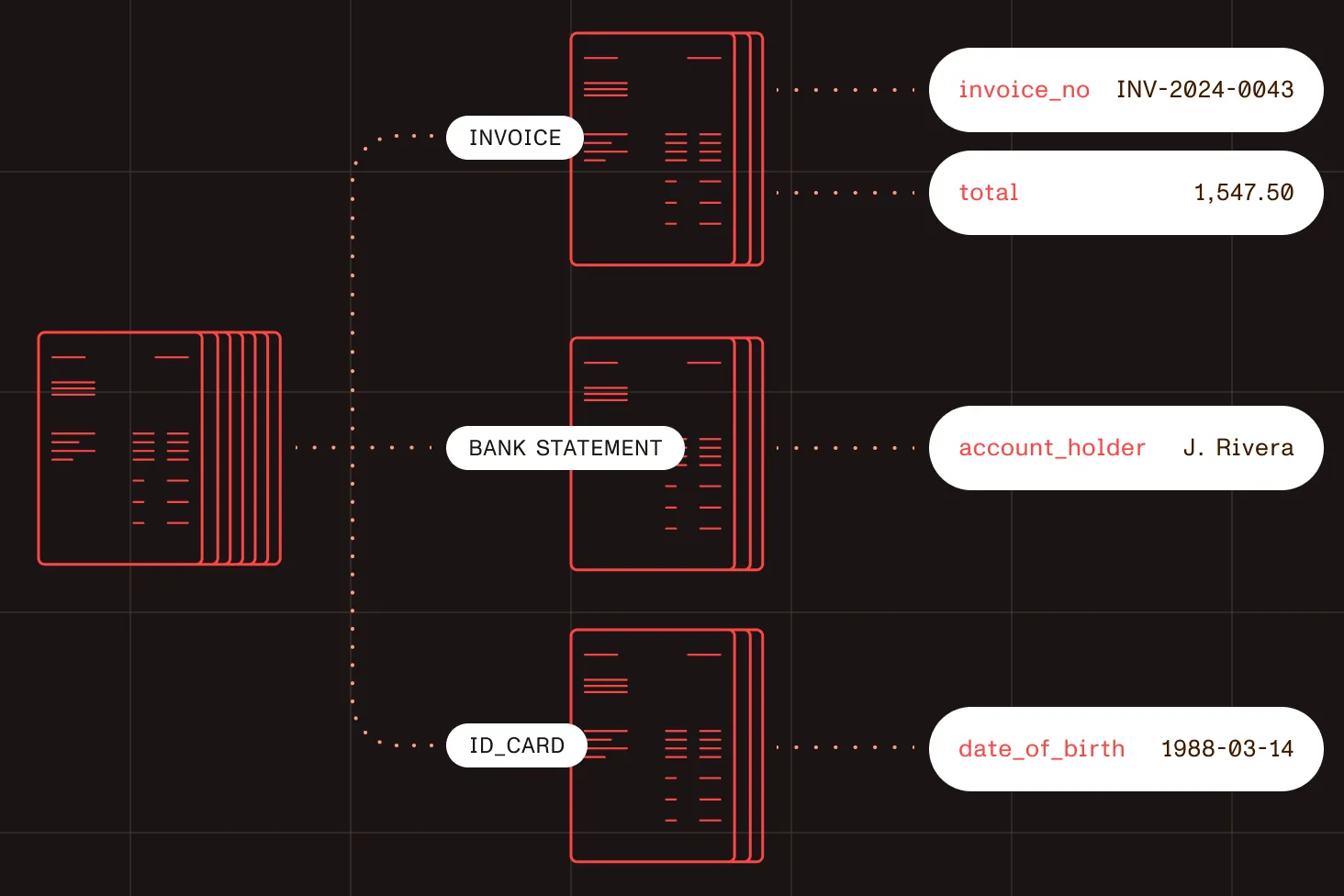
Scanned batches, loan packages, and claim files arrive as one merged PDF. One API call handles the document separation: It finds where every document starts and ends, with a confidence score for each boundary. No page ranges to set upfront.
Trusted by enterprises, governments, and teams building document workflows at scale
Lufthansa
Disney
Autodesk
UBS
Dropbox
IBM
Lufthansa
Disney
Autodesk
UBS
Dropbox
IBM
3 credits per page
Whatever the output
5,000 free credits
Every month, no credit card
PDF, PNG, JPEG, TIFF
Scans and digital files, uploaded or by URL
HOW IT WORKS
Automatic document separation, page by page
Send the file
A merged PDF or scan, uploaded or by URL.
The split endpoint finds the document boundaries
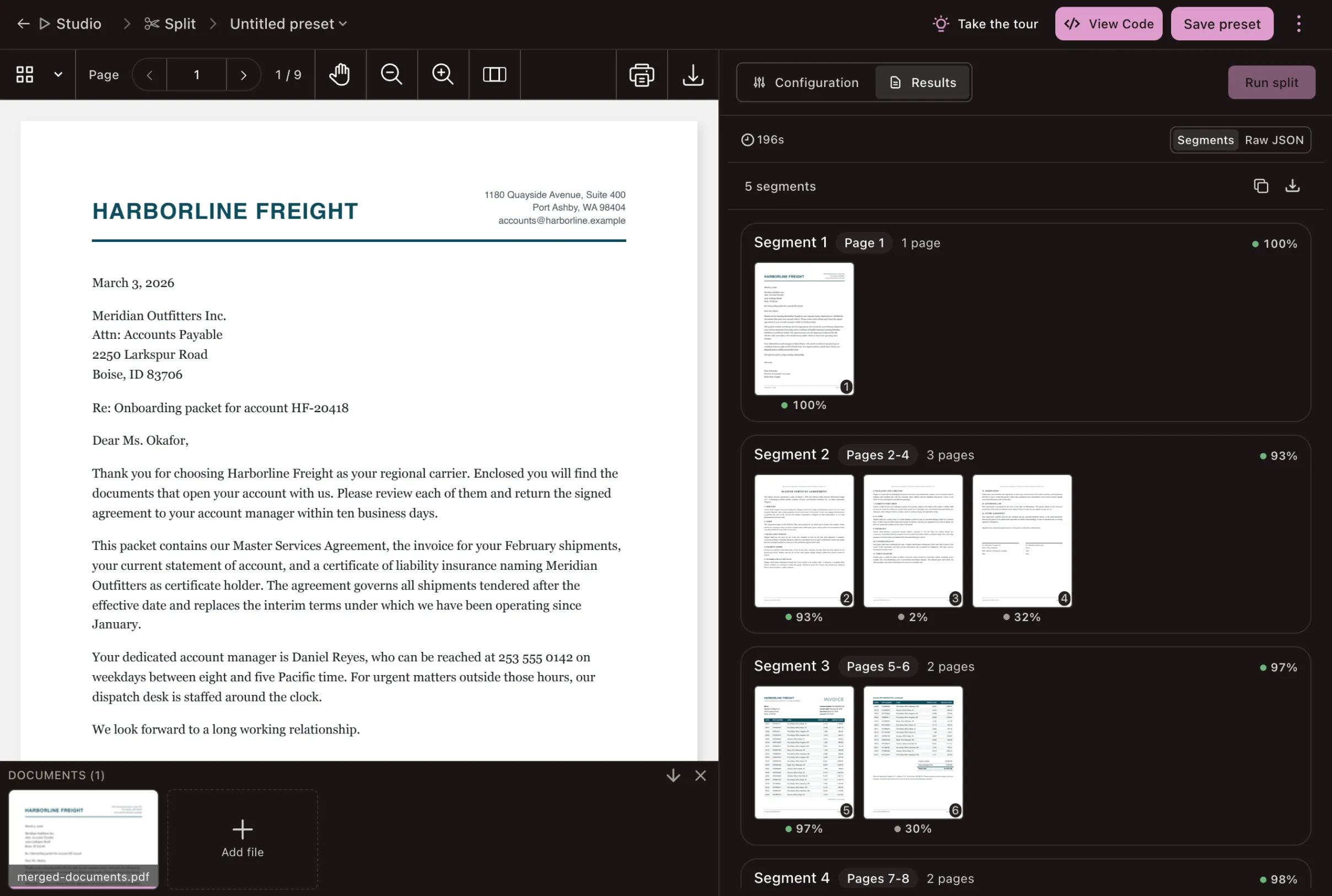
Each page is scored for whether it starts a new document. Every point where one document ends and the next begins is a document boundary.
Check the uncertain boundaries
Auto-accept confident boundaries; send low-confidence ones for review.
Route each document
Send each document to classify, extract, or your own queue.
Nothing to set upfront
No document count, positions, or layouts to define.
No templates, barcodes, or separator sheets
No patch codes, blank pages between documents, keyword rules, or template per document type. Send the batch as it comes off the scanner.
Reads the page, not just the text
Scores the page image as well as the text, so it works on scans where the text alone looks the same from page to page.
ONE CALL
One file in, documents out
POST /extraction/split returns one entry per document, in page order, with the confidence that a new document starts on its first page.
Request
Multipart upload with options
curl -X POST https://api.nutrient.io/extraction/split \ -H "Authorization: Bearer your_api_key_goes_here" \ -F "file=@merged-batch.pdf" \ -F 'instructions={"options":{"output":"json","boundaryThreshold":0.8}}'Response
One page range per document
{ "status": 200, "requestId": "req_sp_001", "output": { "segments": [ { "startPage": 1, "endPage": 3, "pageCount": 3, "boundaryConfidence": 1 }, { "startPage": 4, "endPage": 5, "pageCount": 2, "boundaryConfidence": 0.95 }, { "startPage": 6, "endPage": 10, "pageCount": 5, "boundaryConfidence": 0.84 }, { "startPage": 11, "endPage": 12, "pageCount": 2, "boundaryConfidence": 0.97 } ] }, "metrics": { "processingTimeMs": 2310, "pagesProcessed": 12 }, "usage": { "data_extraction_credits": { "cost": 36, "remainingCredits": 4964 } }}OUTPUT
Choose your output
Request a confidence score for every page. Then auto-accept high-confidence boundaries and send low-confidence ones to a person.
Boundaries as JSON
The page range of each document, ready to route in your own code. The default output.
JSON
Separate files
A ZIP with one PDF per document, served from the stored run with a download link.
ZIP
Both
The page ranges for your pipeline and the files for your archive, in one response.
JSON + ZIP
ONE API
Parse, split, classify, extract
The split endpoint is part of the Data Extraction API, the same API that parses, classifies, and extracts. Every step returns deterministic JSON with confidence scores and page context, ready for agents, RAG, search, automation, and human review.




USE CASES
Built for the batches you actually get
STUDIO
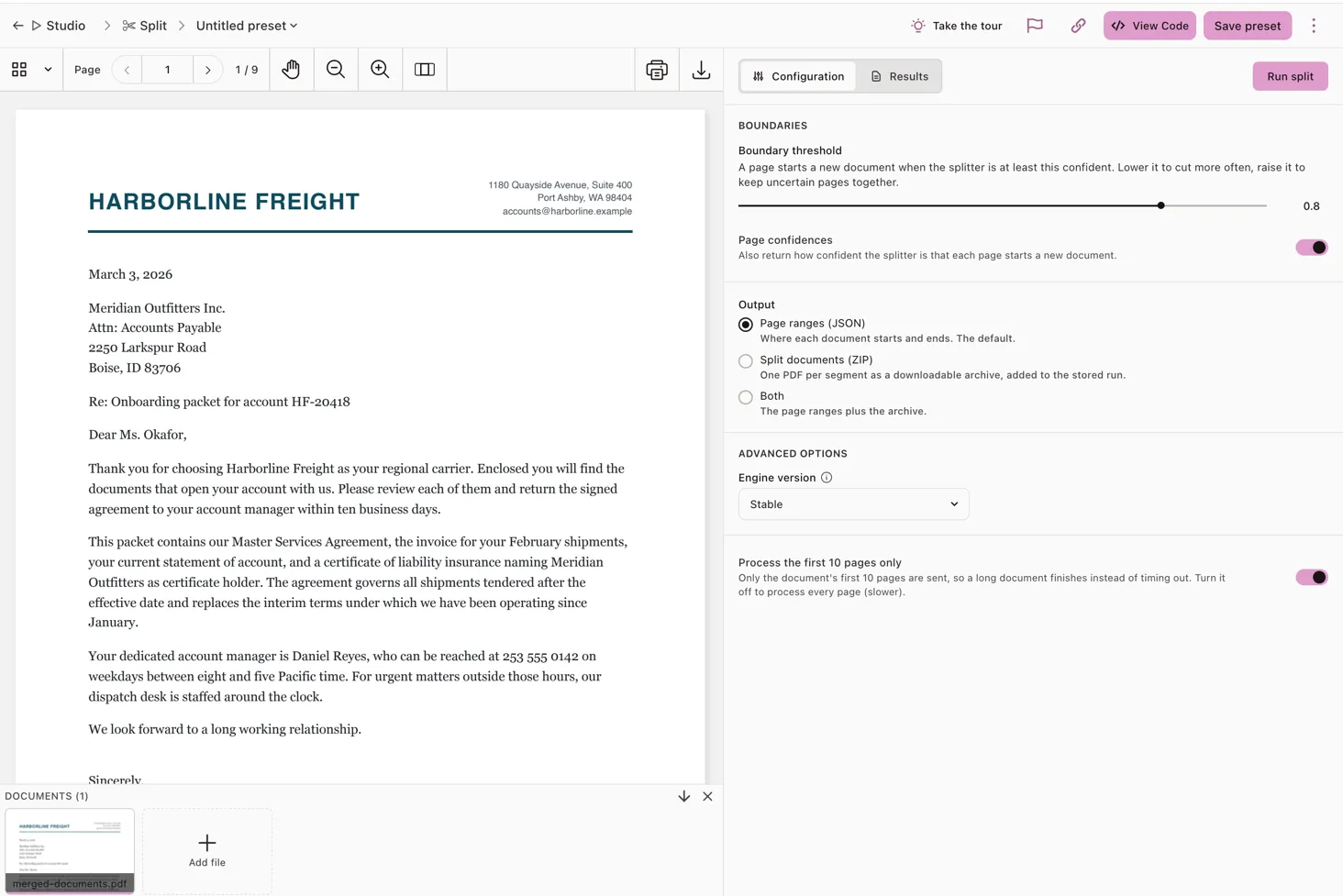
Tune the threshold in Studio. Then call the endpoint.
Run a merged document or the built-in example in the split workbench before wiring the endpoint into a pipeline. Adjust the boundary threshold, check the per-page confidences, choose the output, and save the settings as a preset.
Tested in the open
The splitting model behind split is scored on a public document-splitting leaderboard on Hugging Face, alongside other splitters and cloud vision models.
A flat 3 credits per page
One price per page, whatever the number of documents in the file or the output you choose: A 10-page file costs 30 credits. Start with 5,000 free monthly credits and no credit card, the same free tier as the rest of the Data Extraction API.
Runs on Nutrient DWS
The split endpoint runs on Nutrient DWS, a SOC 2 Type 2-audited API, with HTTPS/TLS encryption in transit. Data retention depends on your plan, and ZIP output is always stored as a run so the archive can be downloaded.
Document separation questions
How do I split a merged PDF into separate documents automatically?
Send the file to the split endpoint of the Nutrient Data Extraction API. It returns where each document starts and ends, as JSON page ranges, a ZIP of separate PDFs, or both.
What is document separation?
Document separation is finding the boundaries between documents in one scanned batch or merged file, so each document can be classified, extracted, and filed on its own.
Do I need barcodes, separator sheets, or templates?
No. The endpoint finds the boundaries from the pages themselves, so you can send batches as they come off the scanner.
How is this different from the split PDF API?
The split PDF API cuts a file at page ranges you choose. The split endpoint finds the ranges for you when you don’t know them. Learn about the split PDF API.
What file types does it accept?
PDF, PNG, JPEG, and TIFF. Upload the file, or pass the URL of a document that’s already hosted.
Does it work on scanned documents?
Yes. The endpoint scores each page from its image as well as its text, so it finds boundaries in scans where the wording alone looks the same from page to page.
How do I know a split is right?
Each boundary comes with a confidence score. Accept high scores automatically and send low-scoring ones to a person for review. The boundary threshold defaults to 0.8: Lower it to cut more often, or raise it to keep uncertain pages together. Set includePageConfidences to true to get the score for every page.
Does split label each document with its type?
No. It returns page ranges. To label each document, send it to the classify endpoint with your own labels, and then to the extract endpoint for the fields you need. Explore document classification.
Does the split endpoint use an LLM?
No. Boundary detection uses dedicated models, not a generative large language model or vision language model.
How much does it cost?
A flat 3 credits per page of the source document, whatever the output. New accounts get 5,000 free monthly credits, no credit card.
Is my data stored?
It depends on your plan and the output you choose. ZIP and both outputs are always stored as a run, which lets the archive be served. Stored runs count against your run-storage quota and expire when the run is deleted. Read the security guide.
Can I split documents on my own servers?
The split endpoint runs on Nutrient DWS, a managed cloud API. To split documents locally, use Nutrient Python SDK or Java SDK, which detect document boundaries on your own machine. See the Python guide or the Java guide.
Developer resources