How to flatten a PDF using Java

Table of contents
Flatten PDF documents using our flatten PDF Java API. Create a free account, get API credentials, and implement flattening using OkHttp and JSON libraries. Merge all layers — including annotations, form fields, and signatures — into a single non-editable layer for printing and secure distribution.
Flatten PDF files using our flatten PDF Java API. Start with 50 free credits — no payment required. Different operations consume different credit amounts, so the number of PDF documents you can generate will vary. Create a free account(opens in a new tab) to get your API key.
Why flatten PDFs?
Flattening PDFs is essential for document workflows that require finalized, non-editable outputs. Common use cases include:
- Print preparation — Merge all layers — including annotations, form fields, and signatures — into a single layer to ensure printers render the complete document correctly.
- Secure distribution — Lock completed forms to prevent recipients from modifying submitted data.
- Archival compliance — Create immutable document versions for legal and regulatory requirements.
- Consistent rendering — Guarantee documents appear identical across all systems and PDF readers.
- Workflow automation — Process batches of documents programmatically as part of your backend infrastructure.
Nutrient DWS Processor API
Document flattening is just one of our 30+ PDF API tools. You can combine our flattening tool with other tools to create complex document processing workflows, such as:
- Converting MS Office files and images into PDFs and then flattening them
- Merging several documents and then flattening the resulting document
- Adding watermarks and signatures to a document and then flattening them
Once you create your account, you can access all our PDF API tools.
Step 1 — Creating a free account on Nutrient
Go to our website(opens in a new tab), where you can create your free account.
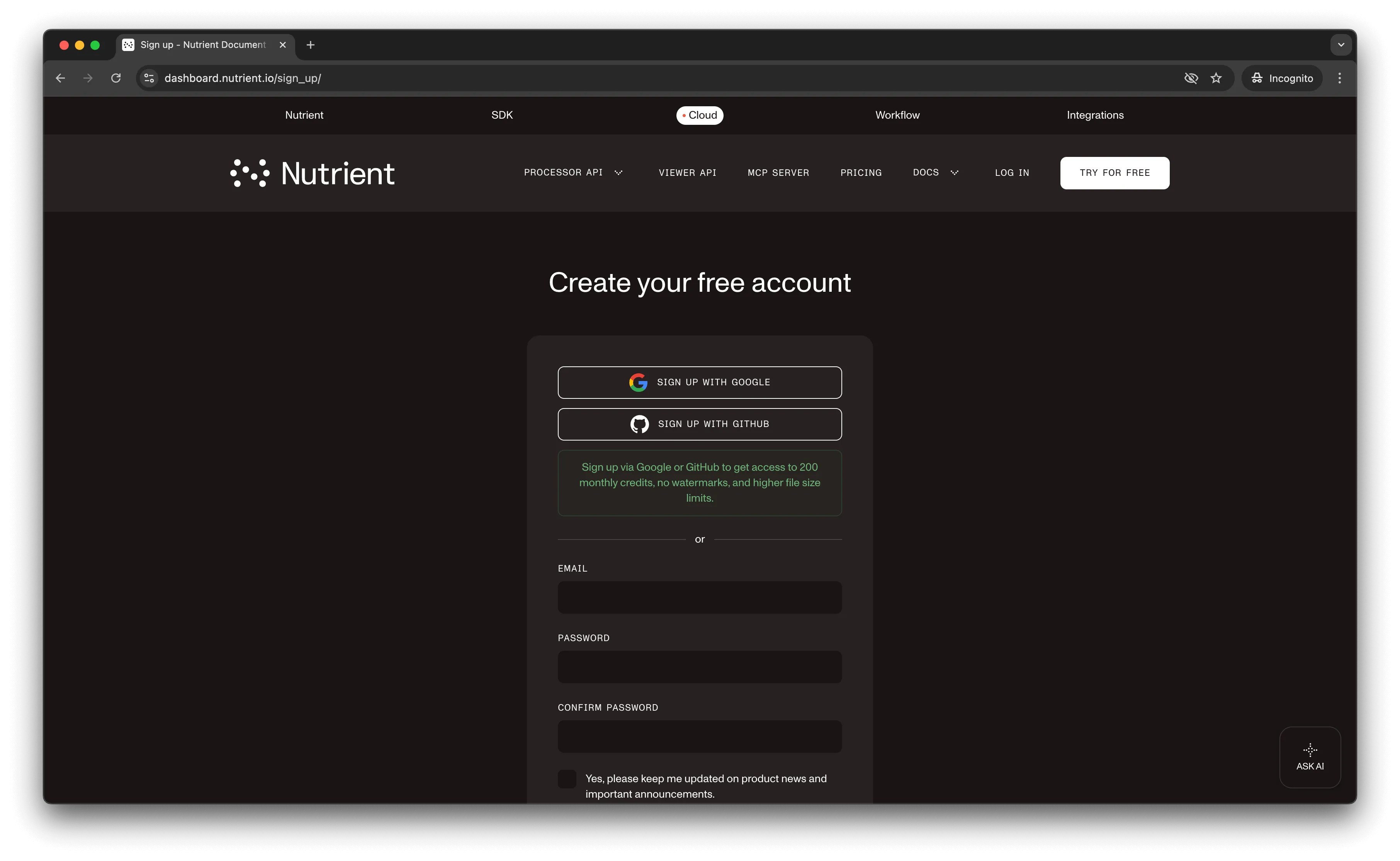
Once you’ve created your account, you’ll see a page showing an overview of your plan details.
You’ll start with 50 credits to process and can access all our PDF API tools.
Step 2 — Obtaining the API key
After you’ve verified your email, you can get your API key from the dashboard. In the menu on the left, click API keys. You’ll see the following page, which is an overview of your keys.
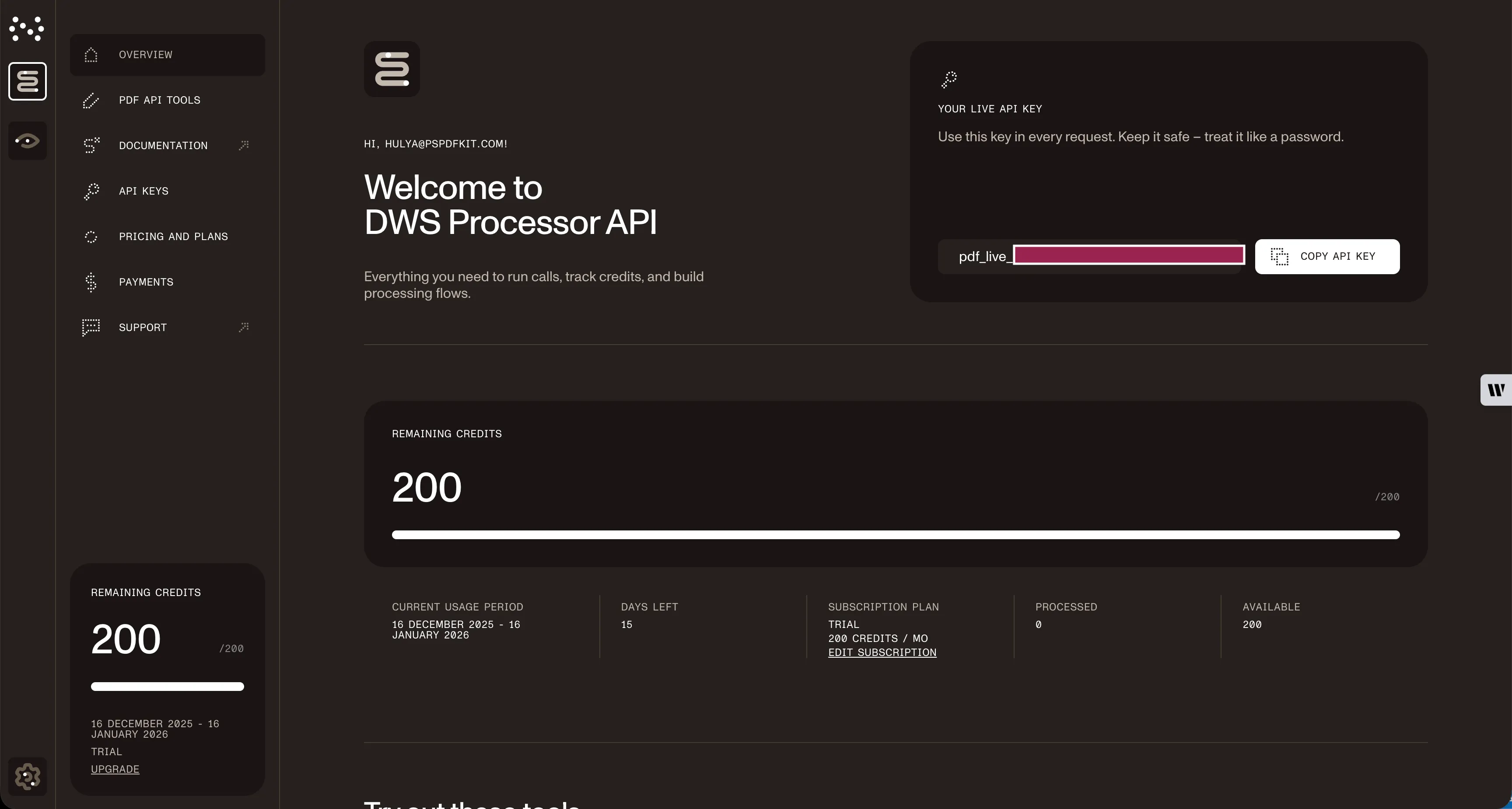
Copy the Live API key — you’ll need it for the flatten PDF API.
Step 3 — Setting up folders and files
For this tutorial, use IntelliJ IDEA as your code editor. Create a new project called flatten_pdf. You can choose any location, but select Java as the language, Gradle as the build system, and Groovy as the Gradle DSL.
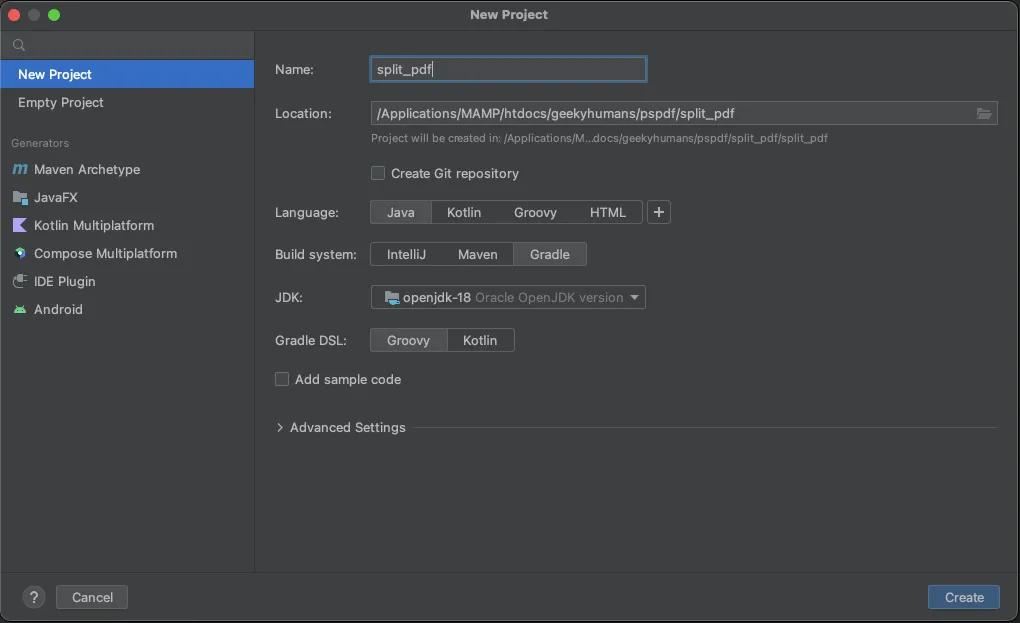
Create a new directory in your project. Right-click your project’s name and select New > Directory. From there, choose the src/main/java option. Create a class file inside the src/main/java folder called processor.java, and create two folders in the root folder called input_documents and processed_documents.
Paste your PDF file inside the input_documents folder.
Your folder structure will look like this:
flatten_pdf├── input_documents| └── document.pdf├── processed_documents├── src| └── main| └── java| └── processor.javaStep 4 — Installing dependencies
Install two libraries:
- OkHttp — This library makes API requests.
- JSON — This library will parse the JSON payload.
Open the build.gradle file and add the following dependencies to your project:
dependencies { implementation 'com.squareup.okhttp3:okhttp:4.9.2' implementation 'org.json:json:20210307'}Once done, click the Add Configuration button in IntelliJ IDEA. This will open a dropdown menu.

Next, select Application from the menu.
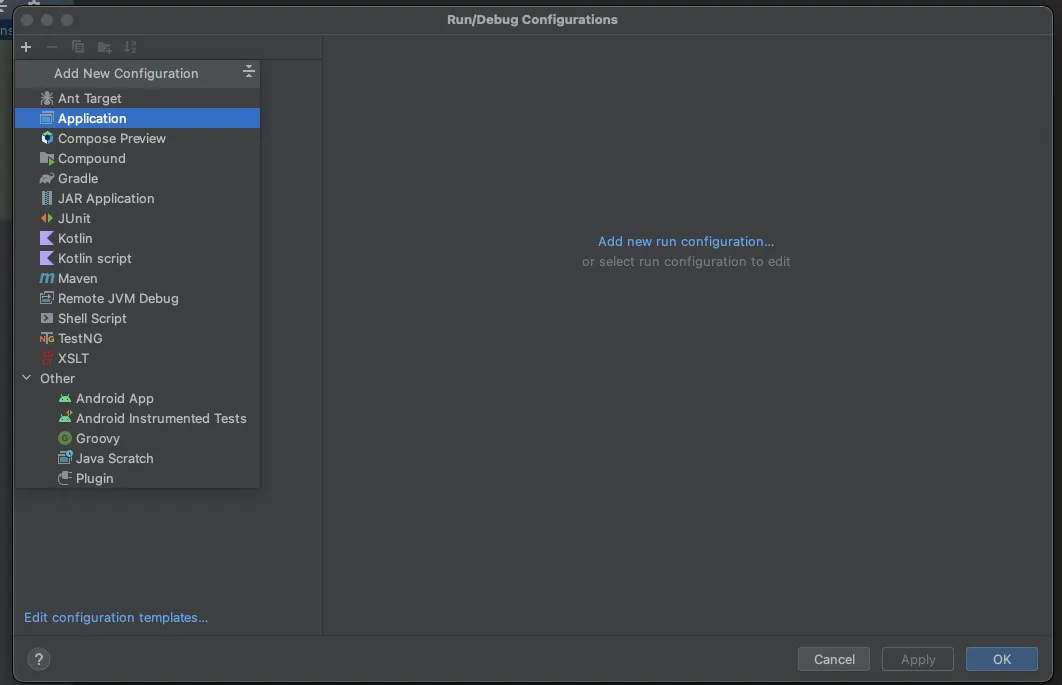
Now, fill the form with the required details. Most of the fields will be prefilled, but you need to select java 18 in the module field and add -cp flatten_pdf.main in the main class.
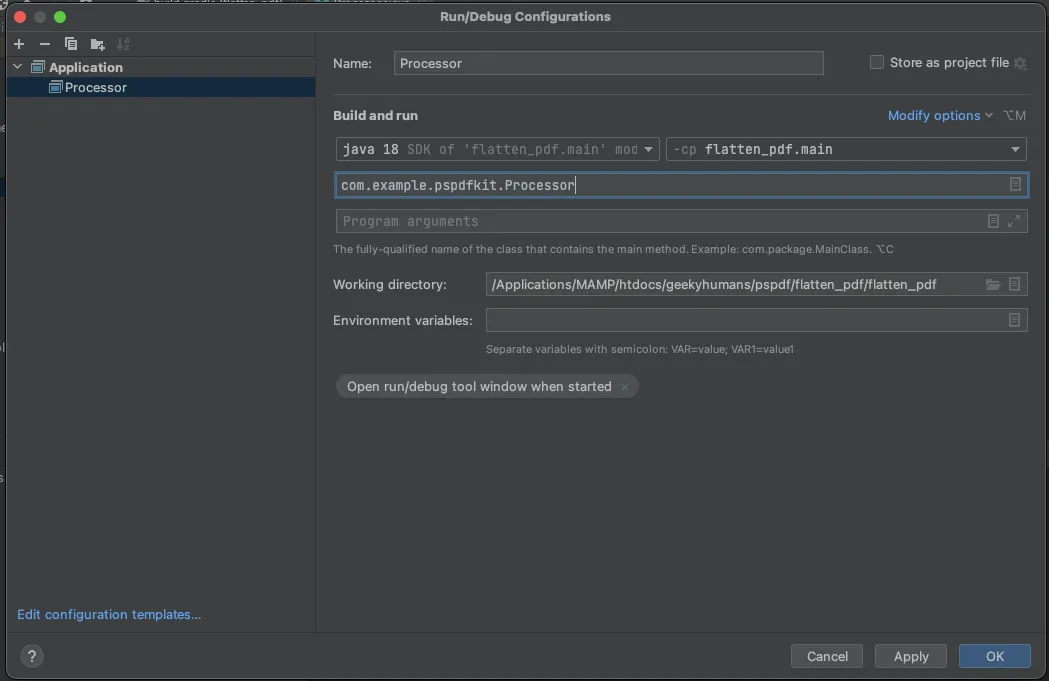
To apply settings, click the Apply button.
Step 5 — Writing the code
Open the processor.java file and paste the code below into it:
package com.example.pspdfkit;
import java.io.File;import java.io.IOException;import java.nio.file.FileSystems;import java.nio.file.Files;import java.nio.file.StandardCopyOption;
import org.json.JSONArray;import org.json.JSONObject;
import okhttp3.MediaType;import okhttp3.MultipartBody;import okhttp3.OkHttpClient;import okhttp3.Request;import okhttp3.RequestBody;import okhttp3.Response;
public final class Processor {  public static void main(final String[] args) throws IOException {    final RequestBody body = new MultipartBody.Builder()      .setType(MultipartBody.FORM)      .addFormDataPart(        "document",        "document.pdf",        RequestBody.create(          MediaType.parse("application/pdf"),          new File("input_documents/document.pdf")        )      )      .addFormDataPart(        "instructions",        new JSONObject()          .put("parts", new JSONArray()            .put(new JSONObject()              .put("file", "document")            )          )          .put("actions", new JSONArray()            .put(new JSONObject()              .put("type", "flatten")            )          ).toString()      )      .build();
    final Request request = new Request.Builder()      .url("https://api.nutrient.io/build")      .method("POST", body)      .addHeader("Authorization", "Bearer YOUR_API_KEY_HERE")      .build();
    final OkHttpClient client = new OkHttpClient()      .newBuilder()      .build();
    final Response response = client.newCall(request).execute();
    if (response.isSuccessful()) {      Files.copy(        response.body().byteStream(),        FileSystems.getDefault().getPath("processed_documents/result.pdf"),        StandardCopyOption.REPLACE_EXISTING      );    } else {      // Handle the error.      throw new IOException(response.body().string());    }  }}
Make sure to replace YOUR_API_KEY_HERE with your API key.
Code explanation
In the code above, you import all the packages required to run the code and create a class called processor. In the main function, you first create the request body for the API call that contains all the instructions for flattening the PDF.
You then call the API using OkHttpClient and check the status of the response. If the response is successful, you store result.pdf in the processed_documents folder.
Output
To execute the code, click the Run button (which is a little green arrow). This is next to the field that says Processor, which is where you set the configuration.

On successful execution, you’ll see the new flattened PDF file in the processed_documents folder:
flatten_pdf├── input_documents| └── document.pdf├── processed_documents| └── result.pdf├── src| └── main| └── java| └── processor.javaAdditional resources
Explore more ways to work with Nutrient API:
- Postman collection — Test API endpoints directly in Postman
- Zapier integration — Automate document workflows without code
- MCP Server — PDF automation for LLM applications
- JavaScript client — Official JavaScript/TypeScript library
Conclusion
You’ve learned how to flatten PDF files for your Java application using our flatten PDF API.
You can integrate these functions into your existing applications. With the same API token, you can perform other operations, like merging documents into a single PDF, adding watermarks, and more. To get started with a free trial, sign up(opens in a new tab) here.
FAQ
Flattening merges all interactive and layered elements (form fields, annotations, signatures, transparency) into a single static layer. The resulting PDF appears identical but can no longer be edited — all content becomes part of the base document layer.
No. Flattening is a permanent operation. Once a PDF is flattened, you cannot restore the original editable form fields or layered annotations. Always keep a backup of your original document before flattening.
Flattening typically reduces file size slightly because it removes interactive layer data and form field metadata. However, the visual appearance remains identical to the original document.
The free account includes 50 credits. Each flatten operation consumes 0.5 credits, regardless of file size. This means you can flatten up to 100 PDFs with your free account. You can also combine flattening with other operations (like merging or watermarking) in a single API call.
This code works with Java 11 and higher. It requires the OkHttp and JSON libraries, which are added as Gradle dependencies. The tutorial uses Java 18, but any version from Java 11 onward will work.
Yes. You can use Maven instead of Gradle. Add the OkHttp and JSON dependencies to your pom.xml file with the appropriate Maven dependency syntax. The rest of the code remains the same.