Passwordless document signing: Three-layer security guide

Table of contents
- External signers can access secure document workflows without creating accounts or remembering passwords.
- Three-layer security architecture combines encrypted tokens, secure email distribution, and multi-factor authentication (MFA).
- MFA verification provides additional security while maintaining seamless user experience.
- The system eliminates password-related security vulnerabilities while improving completion rates.
Start your free 14-day trial — no credit card required.
In today’s digital-first world, document signing workflows must balance security with user experience. The challenge becomes even more complex when external signers — people outside your organization who don’t have system accounts — need to access and sign documents securely.
We recently tackled this challenge by developing a sophisticated authentication system that enables external users to securely access our workflow signer interface without requiring login credentials, using a combination of encrypted tokens and multi-factor authentication (MFA).
The challenge: Security meets usability
Traditional document signing workflows face a fundamental tension:
- Security requirements — Documents often contain sensitive information requiring strong authentication.
- User experience needs — External signers shouldn’t need to create accounts or remember passwords.
- Compliance concerns — Organizations need audit trails and verification that the correct person signed.
Our solution needed to satisfy all three requirements while maintaining the seamless experience users expect from modern digital tools.
Research shows that 81 percent of security breaches involve compromised passwords(opens in a new tab), making traditional authentication a significant vulnerability in document workflows.
Prerequisites
Before implementing this authentication system, you’ll need:
- Basic understanding of token-based authentication and encryption
- Experience with Redis for session management
- Familiarity with MFA implementation patterns
- Access to secure email delivery service
Our approach: Layered security architecture
We designed a three-layer security system that maintains both security and usability.
Layer 1: Encrypted token generation
When an administrator configures a signing task, our system generates cryptographically secure tokens for each external signer. Here’s how it works:
// Generate unique file access token for the signer.string tokenGuid = Guid.NewGuid().ToString();
// Store token with context in secure database table.string sql = @"INSERT INTO ACCESS_TOKENS            (TOKEN_ID, DOCUMENT_ID, OWNER_TYPE,             OWNER_ID, CONTEXT, CREATED_DATE, CREATED_BY)            VALUES (@token_id, @document_id, @owner_type,                    @owner_id, @context, @created_date, @created_by)";
The system then encrypts this token, along with tenant and document information, using AES-256 encryption:
// Create data object with all necessary context.var dataObject = new { fileAccessToken, tenant, documentId = deKey };string data = JsonConvert.SerializeObject(dataObject);
// Encrypt using environment-specific key.using (var aes = Aes.Create()){    aes.Key = encryptionKey;    aes.IV = iv;    aes.Mode = CipherMode.CBC;    aes.Padding = PaddingMode.PKCS7;    // ... encryption logic}
Layer 2: Secure email distribution
Each signer receives an email containing a unique, encrypted link. The link structure ensures:
- Uniqueness — Each token is valid for only one signer and one document.
- Time sensitivity — Tokens can be configured with expiration times.
- Context isolation — Tokens contain only the minimum necessary information.
The email link follows this pattern:
https://domain.com/app/external-signature/{encryptedToken}?standalone=trueLayer 3: Multi-factor authentication (MFA)
When a signer clicks the email link, they don’t immediately access the document. Instead, our React-based MFA component intercepts the request:
// MFA verification component handles the security checkpoint.export function ExternalSignerMFAVerification() {  const { state, setVerified, setFailed } = useSignatureMFA();  const [code, setCode] = useState('');  const [attempts, setAttempts] = useState(0);
  // Handle verification with attempt limiting.  const handleSubmit = useCallback(async (e: FormEvent) => {    if (attempts >= MAX_ATTEMPTS || !isValidCode(code)) return;
    const result = await SignatureMFA.verifyMFA({      sessionId: state.accessToken,      code: code.trim(),    });    // ... verification logic  }, [code, attempts]);}
The backend generates and validates MFA codes using Redis for secure, temporary storage:
// Generate secure MFA code.const mfaCode = Math.floor(100000 + Math.random() * 900000).toString();const mfaRedisKey = `signerMfa:${accessToken}`;
// Store with expiration and attempt tracking.await redisClient.setEx(mfaRedisKey, CODE_EXPIRATION_TIME, JSON.stringify({  attempts: 0,  requestCount: 0,  requests: [{ timestamp: Date.now(), code: mfaCode }]}));
Complete authentication flow
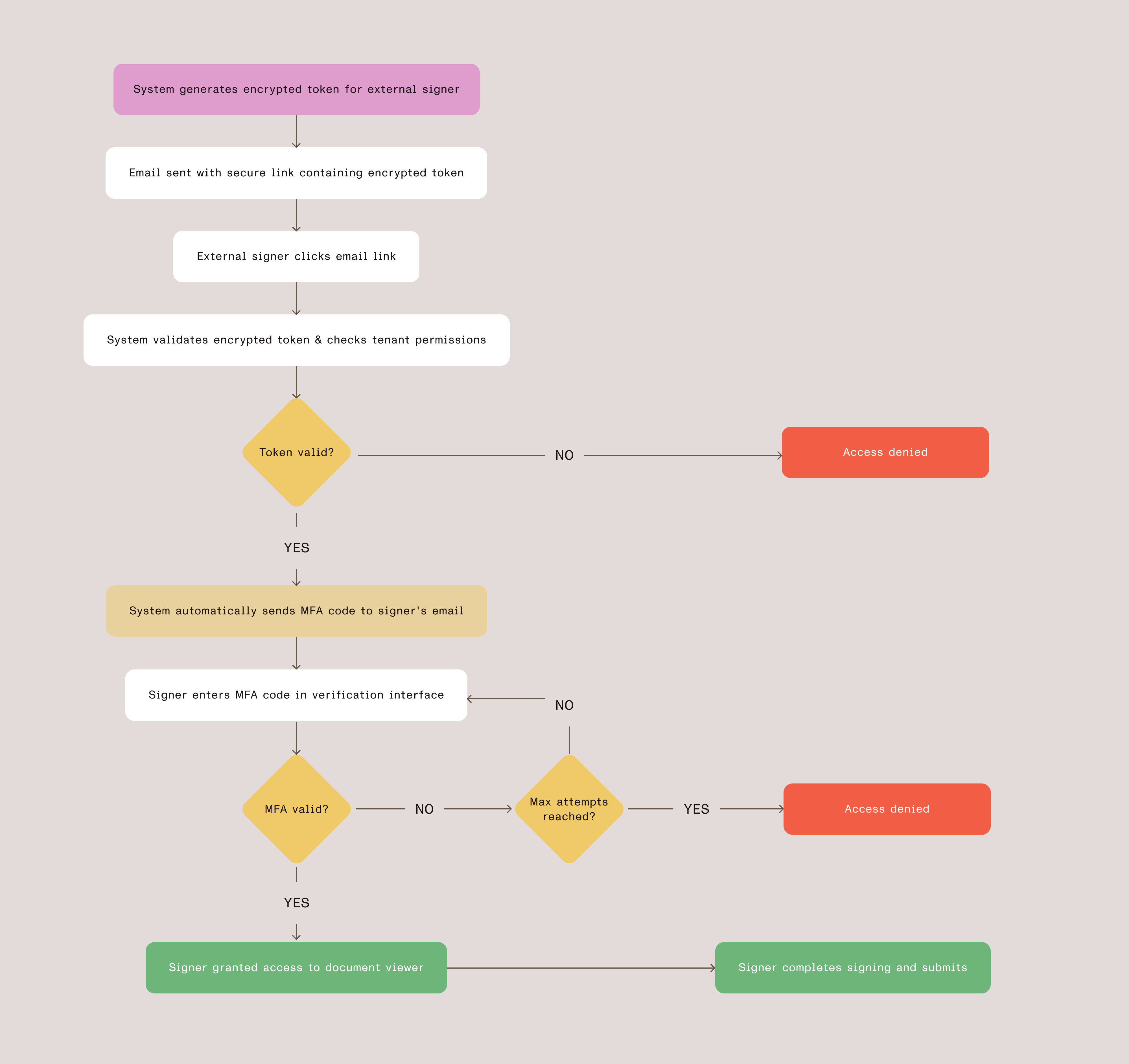
The following diagram shows how these three security layers work together to provide secure, passwordless access for external signers.
Security features in detail
Behind each layer of our authentication system are carefully designed security mechanisms that work together to protect document access. The following sections will examine the specific features that make this system both secure and maintainable, from cryptographic validation to session management.
Token encryption and validation
Our token system uses multiple layers of validation:
Cryptographic integrity
- AES-256 encryption ensures tokens cannot be tampered with
- Environment-specific encryption keys
- Unique initialization vectors for each token
Context validation
- Each token contains specific tenant and document information
- File access tokens are linked to specific signer identities
- License verification ensures the tenant has appropriate permissions
MFA implementation highlights
The MFA system includes several security best practices:
- Rate limiting — Configurable maximum verification attempts per token
- Time expiration — Codes expire after a configurable time period
- Request throttling — Cooldown period between code requests
- Attempt tracking — System tracks all verification attempts for audit purposes
Session management
When a signer accesses the system, we validate their encrypted token and verify tenant permissions before granting access. This ensures that only authorized signers with proper licensing can view and sign documents:
async function validateEncryptedToken(encryptedToken) {  // Decrypt and validate token structure.  const parsed = await this.decryptSigningData(encryptedToken);
  // Verify tenant permissions.  const hasSignaturePermission = await config.checkModule(    parsed.tenant, 'DigitalSignature'  );  const hasBasicPermission = await config.checkModule(    parsed.tenant, 'DocumentSigning'  );
  if (!hasSignaturePermission && !hasBasicPermission) {    throw new Error('Insufficient permissions');  }
  return parsed;}
User experience flow
From the signer’s perspective, the process is straightforward:
- Receive email — Signer gets notification with signing link
- Click link — Browser opens to verification page (no login required)
- Enter MFA code — System automatically sends verification code to their email
- Access document — After verification, signer sees the document in our web viewer
- Complete signing — Signer adds their signature and submits
- Confirmation — System shows completion message and can close the window
Technical benefits
This architecture provides several technical advantages, outlined below.
Scalability
- Stateless design — No server-side sessions to manage
- Redis caching — MFA codes stored in fast, distributed cache
- Token-based access — Eliminates need for user account management
Security
- Zero knowledge — External signers never see system credentials
- Audit trail — Every access attempt and signature action is logged
- Isolation — Each signing session is completely independent
Maintainability
- Modular design — MFA, encryption, and signing logic are separate concerns
- Configuration-driven — Administrators can adjust security parameters
- License integration — Respects existing permission systems
Real-world impact
Since implementing this system, we’ve seen a positive impact in the following areas:
User experience
- Eliminates account creation friction for external signers
- Reduced support burden with fewer password reset requests
- Better mobile experience with streamlined authentication
Security and compliance
- Enhanced security posture with MFA verification layer
- Strong audit trails for regulatory requirements
- Elimination of password-related vulnerabilities
Key insight — Security doesn’t have to come at the expense of usability. With careful architecture and implementation, you can create systems that are both more secure and more user-friendly than traditional approaches.
Implementation considerations
For organizations implementing similar systems, focus on these key areas. Success requires balancing strong security foundations with thoughtful user experience design, while maintaining flexibility to adapt to different document sensitivity levels and use cases.
Layered approach
- Strong cryptographic foundations with proper key management
- Well-designed user interfaces that guide users through the process
- Continuous monitoring and improvement based on usage patterns
Security balance
- Rate limiting and attempt tracking to prevent abuse
- Configurable security parameters based on document sensitivity
- Fallback mechanisms for accessibility and edge cases
User experience
- Clear communication about the authentication process
- Mobile-optimized interfaces for various device types
- Helpful error messages and recovery options
Find out about custom authentication and MFA for your organization.
Conclusion
Passwordless authentication for external signers addresses the challenge of balancing security with user experience. This layered approach — encrypted tokens, multi-factor authentication, and thoughtful interface design — provides secure access without requiring account creation.
The key insight is that security doesn’t have to come at the expense of usability. With careful architecture and implementation, you can create systems that are both more secure and more user-friendly than traditional approaches.
For organizations implementing similar systems, focus on the layered approach: strong cryptographic foundations, well-designed user interfaces, and continuous monitoring and improvement. The result is a system that users trust and administrators can confidently deploy for sensitive business processes.
Ready to modernize your external signer authentication? Explore how Nutrient Workflow Automation Platform can help you implement secure, passwordless authentication for enhanced document security.