Why document-centric automation is different

Table of contents
- Most workflow automation handles routing, not execution. If documents leave a flow to be edited, signed, or stored elsewhere, the process isn’t fully automated — it’s coordinated.
- Document-centric automation brings the full document lifecycle — generate, fill, review, sign, archive — inside a single flow, with a single audit trail.
- The difference shows up in measurable outcomes: shorter cycle times, lower compliance exposure, and less operational cost.
You’ve automated the approval. The task routes. The notification fires. The status updates in the dashboard.
But somewhere between “submitted” and “done,” a document gets downloaded, edited in Word, reuploaded, sent to DocuSign, saved in SharePoint, and referenced in a follow-up email thread.
That’s not automation. That’s coordination with extra steps.
The distinction matters, because for document-heavy operations, the gap between those two things is where cycle times stretch, compliance exposure grows, and manual workarounds become permanent headcount.
Routing and executing aren’t the same thing
Most workflow platforms were built to solve a coordination problem: who needs to do what and in what order, and who’s responsible when something stalls.
That was meaningful progress. It replaced email chains, reduced missed handoffs, and brought visibility to processes that had none. For many organizations, it was the first real step toward operational discipline.
But coordination only gets you so far.
In document-heavy operations — contracts, claims, invoices, permits, onboarding packages — the real work isn’t in the routing. It’s inside the document. Filling it. Editing it. Annotating it. Signing it. Extracting data from it. Archiving it with a defensible record of who did what and when.
When that work happens outside the workflow — in email, in Word, in a separate eSignature tool, in a shared drive — you haven’t closed the loop. You’ve created a gap. And that gap is where exceptions pile up, audit trails fragment, and operations teams spend their days reconciling what the system couldn’t track.
The document is the decision
Here’s the framing shift that matters: Documents aren’t attachments to a workflow. They’re the system of record.
A contract doesn’t just describe an agreement. It is the agreement. A claim form isn’t a summary of care. It is the basis for payment. An invoice isn’t a reference to a purchase. It’s the financial obligation.
When your workflow treats those documents as files to pass between people, it’s doing what a well-organized email inbox does: It’s organizing the handoffs. But it’s not completing the work.
Document-centric automation starts from a different assumption: The document lifecycle is the workflow.

That sequence — and the variations of it that exist across industries and departments — is where decisions are validated, accountability is established, and compliance is proven. If your automation doesn’t operate at that layer, it’s coordinating work, not completing it.
What happens when documents leave the flow
Consider how a typical capital expenditure (CapEx) approval works in a coordination-first system.
A manager submits a request through the workflow portal. The system notifies the finance team. A reviewer opens the attached spreadsheet in Excel, makes edits, and reuploads it. The workflow routes to the next approver, who has questions. An email thread starts. A revised version is attached. The workflow moves forward. Signatures are collected through a separate eSignature tool. The final file is saved to a shared drive. The workflow closes. Nobody owns the audit trail, because it lives across all five systems.
Now consider the same process in a document-centric workflow.
The manager submits a request. A structured CapEx form is generated inside the platform. Reviewers annotate and add comments — within the platform. Approvals route automatically based on request thresholds. Digital signatures are captured inside the flow. The final, approved document is archived with a complete record of every action, every reviewer, and every version. Nothing leaves the system.
One flow. One audit trail. No reconstruction required.
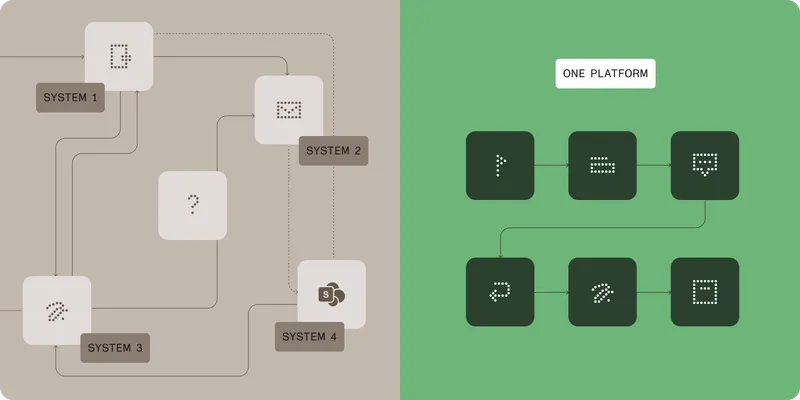
The difference isn’t just efficiency; it’s defensibility. When a Sarbanes–Oxley (SOX) auditor asks for documentation, the first version requires manual reconstruction across multiple systems. The second version prints a report.
Where this plays out across operations
The CapEx example isn’t a special case. The same execution gap shows up across every operation where documents carry decisions.
Accounts payable
Invoices arrive in varied formats: PDFs, scanned images, email attachments, and more. In a coordination-first system, someone downloads an invoice, manually keys the data into the enterprise resource planning (ERP) system, routes exceptions by email, and reconciles discrepancies in a spreadsheet. Every step is a handoff. And every handoff is a delay.
In a document-centric system, AI extracts line items directly from the invoice, validates against the purchase order, and routes exceptions with context inside a single flow. Payment triggers when conditions are met. The entire process has a complete audit trail, from receipt to approval to payment, with no manual rekeying required.
The result isn’t incremental improvement. It’s a different class of operational control.
Claims processing
A healthcare or insurance claim involves medical records, diagnosis codes, procedure documentation, and supporting attachments, as well as a regulatory requirement to document every decision. In a fragmented stack, clinical reviewers download records, annotate in external tools, log decisions in a separate system, and hope the audit trail can be reconstructed when a regulator asks.
In a document-centric system, reviewers work inside the platform — annotating, approving, and escalating — with every action timestamped and preserved. The claim’s complete history, from intake to adjudication, lives in one place. Audit prep shifts from a days-long reconstruction project to an on-demand report.
Contract management
A contract doesn’t end at execution. It’s negotiated, revised, reviewed by legal, approved by leadership, signed, and then archived. And then it’s referenced, renewed, or disputed years later. When that lifecycle is fragmented across email threads, Word documents, a separate eSignature vendor, and a shared drive, version control is a manual exercise. Final_v3_APPROVED_USE_THIS_ONE.docx is not a compliance strategy.
In a document-centric workflow, each version, each tracked change, each approval, and each signature is part of one defensible record. Legal has visibility. Finance has traceability. Leadership has a single source of truth. And when a contract dispute surfaces, the complete history is already organized.
Vendor onboarding
Onboarding a new vendor typically requires a W-9, insurance certificates, a master service agreement, and possibly a non-disclosure agreement (NDA) — each going through its own collection, review, and signature process. In a generic workflow tool, those documents travel by email, get signed through a separate tool, and land wherever the requester remembers to put them.
In a document-centric system, every required document is collected, tracked, reviewed, and signed inside a single flow. Automated routing handles completion status and approval levels. Exceptions surface inside the system, not in someone’s inbox. And when a vendor’s certification expires, the platform can trigger renewal — because it knows what documents exist, what their status is, and when they need attention.
The outcomes are measurable
The case for document-centric automation isn’t theoretical. The execution gap has real operational costs that compound over time.
McKinsey research(opens in a new tab) has found that knowledge workers spend more than a quarter of their working time searching for information — the kind of invisible drag that concentrates in document-heavy operations where files live across multiple systems. Deloitte reports(opens in a new tab) that 57 percent of businesses say they lack the agility to respond to emerging challenges and opportunities — a constraint Deloitte ties directly to legacy systems and integration debt. And according to ServiceNow(opens in a new tab), organizations spend nearly $40,000 per year maintaining legacy systems and lose 17 hours per week to that upkeep alone.
When the document lifecycle is embedded inside the workflow, those costs compress. Cycle times shorten because work moves inside the system, not between systems. Exception handling decreases because AI extraction and structured validation catch problems before they become manual detours. Audit preparation shifts from reactive reconstruction to proactive record-keeping. And teams stop spending time reconciling what happened across five tools and start focusing on what comes next.
Get the free eBook — The execution gap: Are your workflows missing the work?
Routing is a foundation. Execution is the goal.
Generic workflow automation was a meaningful step forward. It reduced email chains. It made handoffs visible. It brought process discipline to operations that had none.
But in document-heavy work, routing is a foundation — not a finish line.
The work that defines operational outcomes — the editing, the signing, the extraction, the archival, the defensible proof — happens inside the document lifecycle. If your workflow stops at routing, it’s still asking people to complete the execution manually. Somewhere between the task list and the system of record, work is falling through the gap.
Document-centric automation brings that execution into the flow, so teams don’t coordinate documents. They complete them.
Ready to see what document-centric automation looks like for your operations? Explore Nutrient Workflow or talk to our team about closing the execution gap.