Extract data from Excel workbooks, cell by cell
Extract data from Excel with the Nutrient Data Extraction API. It reads XLSX files from their cells. Each visible sheet comes back as separate tables, headings, and notes, in the same JSON and Markdown the API returns for PDFs.
Trusted by enterprises, governments, and teams building document workflows at scale
Lufthansa
Disney
Autodesk
UBS
Dropbox
IBM
Lufthansa
Disney
Autodesk
UBS
Dropbox
IBM
WHY SPREADSHEETS BREAK PIPELINES
A spreadsheet isn’t a picture, and it isn’t one table
HOW IT WORKS
How the API reads a workbook
For Excel to JSON, set output.format to spatial. The same call then returns spatial JSON instead of Markdown.
Read the cells
No rendering and no OCR. The API reads values, merged ranges, and table definitions from the file itself.
Split each sheet into regions
Empty rows and columns separate tables, titles, and notes. Thin spacer columns inside a table don’t split it.
Keep declared tables whole
Tables defined in Excel keep their full range, however the sheet around them is laid out.
Turn banners into headings
A merged title above a table becomes a heading, so the header row underneath is detected.
Return JSON or Markdown
Each visible sheet becomes one page, in the same output the API returns for PDFs and scans.
ONE CALL
Excel to Markdown in one request
Send the workbook as-is. The response’s output.markdown holds one section per visible sheet.
Request
Workbook upload with Markdown output
curl -X POST https://api.nutrient.io/extraction/parse \ -H "Authorization: Bearer your_api_key_goes_here" \ -F "file=@q3-report.xlsx" \ -F 'instructions={"output":{"format":"markdown"}}'Markdown response
Headings, notes, and tables per sheet
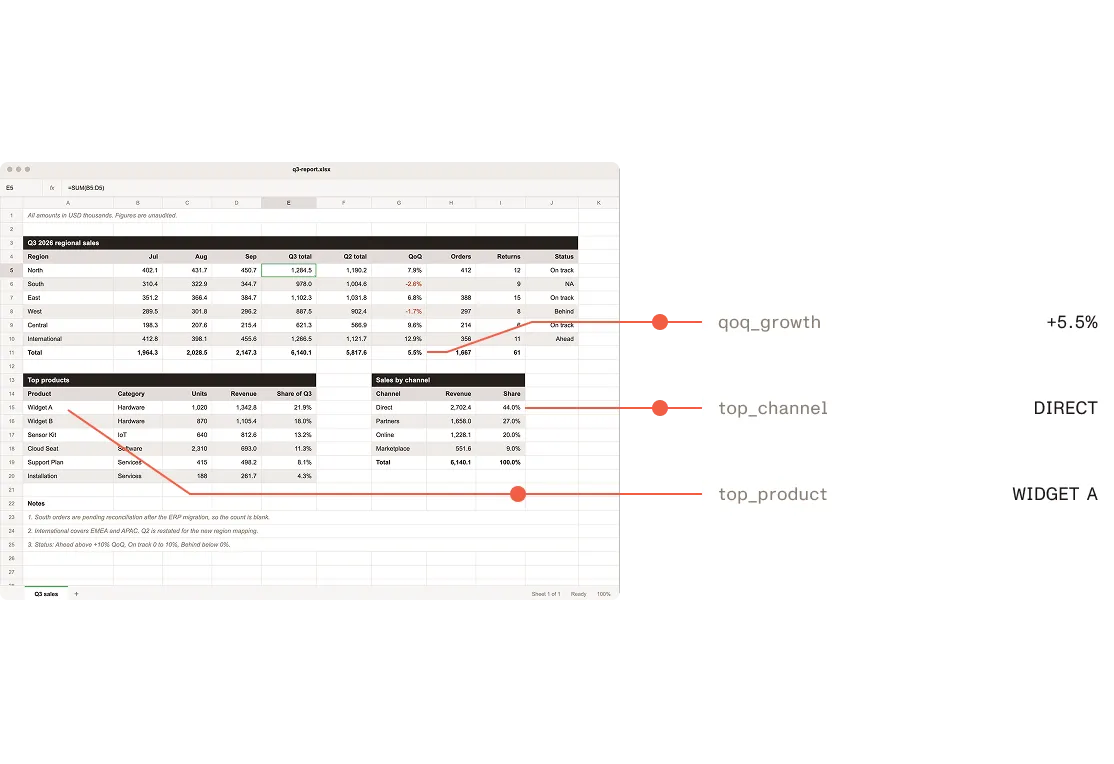
# Q3 sales
All amounts in USD thousands. Figures are unaudited.
## Q3 2026 regional sales
<table> <tr><th>Region</th><th>Orders</th><th>Revenue</th><th>Returns</th><th>Status</th></tr> <tr><td>North</td><td>412</td><td>1284.5</td><td>12</td><td>On track</td></tr> <tr><td>South</td><td></td><td>978.0</td><td>9</td><td>NA</td></tr> <tr><td>East</td><td>388</td><td>1102.3</td><td>15</td><td>On track</td></tr></table>
## Top products
<table> <tr><th>Product</th><th>Units</th><th>Share</th></tr> <tr><td>Widget A</td><td>1020</td><td>34%</td></tr> <tr><td>Widget B</td><td>870</td><td>29%</td></tr></table>
USE CASES
Where Excel files show up in document workflows
TESTED ON REAL WORKBOOKS
Faster conversion, fewer failures
Workbooks that used to hit a two-minute timeout now convert in seconds. Values are read straight from the cells, not from an image, so OCR can’t misread a number.
Internal tests, September 2026. Speed: the same 40 workbooks converted before and after the change, on the same machine. Both runs used debug builds, so only the ratio is reported. Robustness: 408 workbooks, including the spreadsheet files from the Apache POI test suite.
76×
faster than the previous render-and-OCR path
408/408
test workbooks converted with zero failures
Questions about extracting data from Excel
How does the Data Extraction API read Excel files?
The API reads an XLSX workbook’s cells directly instead of rendering its sheets as images. Each visible sheet becomes one page, split into tables, headings, and paragraphs. Merged title cells become headings, and tables declared in Excel stay whole. Read how spreadsheets are processed.
Which spreadsheet formats are supported?
The API accepts the Excel formats listed in the supported file types guide. XLSX workbooks are read cell by cell. Other Excel formats, such as XLS, are still accepted and go through the previous conversion path. CSV files aren’t a listed input type.
Can one sheet hold more than one table?
Yes. Empty rows and columns separate the tables, titles, and notes on a sheet, and each comes back as its own element. Side-by-side tables that span exactly the same rows are returned as one table.
What happens to merged cells and titles?
A merged title above a table becomes a heading, and the row below it becomes the header row. Tables declared in Excel keep their full range.
Are hidden sheets included?
No. Hidden sheets aren’t converted, which matches what printing the workbook shows.
Does the API return formulas or stored values?
Neither. Each cell returns the value Excel displays. A cell that stores 1.25 and is formatted to one decimal returns 1.3.
Can the API extract data from Excel into a JSON schema?
Yes. Send the workbook to the Extract endpoint with a JSON schema, the same way as a PDF. The response returns the fields as typed JSON.
How do I use Excel files in a RAG pipeline?
Request Markdown output. Each visible sheet becomes a section with headings and tables, so the heading-based chunking used for PDFs works for workbooks too. See the RAG ingestion example.
Related resources