0.5 Credits
Instant JSON import API
Import annotations, form fields, and form values into your PDF documents using our JSON import API, designed for speed, flexibility, and automation.
Fast, JSON-driven imports
Use a simple JSON structure to instantly add highlights, comments, form fields, and prefilled values to your PDFs. No complex tools or formats required.
Automate with Zapier
Automatically import JSON into new PDF files in Google Drive using our Zapier integration. Drop in a JSON file and a PDF file, and Nutrient will merge them on the fly.
Ideal for dynamic document workflows
Perfect for programmatically generating annotated PDFs, populating forms, or layering data onto documents in real time.
Lufthansa
Disney
Autodesk
UBS
Dropbox
IBM
Lufthansa
Disney
Autodesk
UBS
Dropbox
IBM
Try it out
This example will import Instant JSON with annotations into your PDF.
Try it out in three steps
- Add
document.pdfandannotations.jsonto your project folder. - Run the code from the same folder.
- Open
result.pdfto see the output.
curl -X POST https://api.nutrient.io/build \ -H "Authorization: Bearer your_api_key_here" \ -o result.pdf \ --fail \ -F document=@annotations.pdf \ -F annotations.json=@annotations.json \ -F instructions='{ "parts": [ { "file": "document" } ], "actions": [ { "type": "applyInstantJson", "file": "annotations.json" } ] }'curl -X POST https://api.nutrient.io/build ^ -H "Authorization: Bearer your_api_key_here" ^ -o result.pdf ^ --fail ^ -F document=@annotations.pdf ^ -F annotations.json=@annotations.json ^ -F instructions="{\"parts\": [{\"file\": \"document\"}], \"actions\": [{\"type\": \"applyInstantJson\", \"file\": \"annotations.json\"}]}"package com.example.pspdfkit;
import java.io.File;import java.io.IOException;import java.nio.file.FileSystems;import java.nio.file.Files;import java.nio.file.StandardCopyOption;
import org.json.JSONArray;import org.json.JSONObject;
import okhttp3.MediaType;import okhttp3.MultipartBody;import okhttp3.OkHttpClient;import okhttp3.Request;import okhttp3.RequestBody;import okhttp3.Response;
public final class PspdfkitApiExample { public static void main(final String[] args) throws IOException { final RequestBody body = new MultipartBody.Builder() .setType(MultipartBody.FORM) .addFormDataPart( "document", "annotations.pdf", RequestBody.create( MediaType.parse("application/pdf"), new File("annotations.pdf") ) ) .addFormDataPart( "annotations.json", "annotations.json", RequestBody.create( MediaType.parse("application/octet-stream"), new File("annotations.json") ) ) .addFormDataPart( "instructions", new JSONObject() .put("parts", new JSONArray() .put(new JSONObject() .put("file", "document") ) ) .put("actions", new JSONArray() .put(new JSONObject() .put("type", "applyInstantJson") .put("file", "annotations.json") ) ).toString() ) .build();
final Request request = new Request.Builder() .url("https://api.nutrient.io/build") .method("POST", body) .addHeader("Authorization", "Bearer your_api_key_here") .build();
final OkHttpClient client = new OkHttpClient() .newBuilder() .build();
final Response response = client.newCall(request).execute();
if (response.isSuccessful()) { Files.copy( response.body().byteStream(), FileSystems.getDefault().getPath("result.pdf"), StandardCopyOption.REPLACE_EXISTING ); } else { // Handle the error throw new IOException(response.body().string()); } }}using System;using System.IO;using System.Net;using RestSharp;
namespace PspdfkitApiDemo{ class Program { static void Main(string[] args) { var client = new RestClient("https://api.nutrient.io/build");
var request = new RestRequest(Method.POST) .AddHeader("Authorization", "Bearer your_api_key_here") .AddFile("document", "annotations.pdf") .AddFile("annotations.json", "annotations.json") .AddParameter("instructions", new JsonObject { ["parts"] = new JsonArray { new JsonObject { ["file"] = "document" } }, ["actions"] = new JsonArray { new JsonObject { ["type"] = "applyInstantJson", ["file"] = "annotations.json" } } }.ToString());
request.AdvancedResponseWriter = (responseStream, response) => { if (response.StatusCode == HttpStatusCode.OK) { using (responseStream) { using var outputFileWriter = File.OpenWrite("result.pdf"); responseStream.CopyTo(outputFileWriter); } } else { var responseStreamReader = new StreamReader(responseStream); Console.Write(responseStreamReader.ReadToEnd()); } };
client.Execute(request); } }}// This code requires Node.js. Do not run this code directly in a web browser.
const axios = require('axios')const FormData = require('form-data')const fs = require('fs')
const formData = new FormData()formData.append('instructions', JSON.stringify({ parts: [ { file: "document" } ], actions: [ { type: "applyInstantJson", file: "annotations.json" } ]}))formData.append('document', fs.createReadStream('annotations.pdf'))formData.append('annotations.json', fs.createReadStream('annotations.json'))
;(async () => { try { const response = await axios.post('https://api.nutrient.io/build', formData, { headers: formData.getHeaders({ 'Authorization': 'Bearer your_api_key_here' }), responseType: "stream" })
response.data.pipe(fs.createWriteStream("result.pdf")) } catch (e) { const errorString = await streamToString(e.response.data) console.log(errorString) }})()
function streamToString(stream) { const chunks = [] return new Promise((resolve, reject) => { stream.on("data", (chunk) => chunks.push(Buffer.from(chunk))) stream.on("error", (err) => reject(err)) stream.on("end", () => resolve(Buffer.concat(chunks).toString("utf8"))) })}import requestsimport json
response = requests.request( 'POST', 'https://api.nutrient.io/build', headers = { 'Authorization': 'Bearer your_api_key_here' }, files = { 'document': open('annotations.pdf', 'rb'), 'annotations.json': open('annotations.json', 'rb') }, data = { 'instructions': json.dumps({ 'parts': [ { 'file': 'document' } ], 'actions': [ { 'type': 'applyInstantJson', 'file': 'annotations.json' } ] }) }, stream = True)
if response.ok: with open('result.pdf', 'wb') as fd: for chunk in response.iter_content(chunk_size=8096): fd.write(chunk)else: print(response.text) exit()<?php
$FileHandle = fopen('result.pdf', 'w+');
$curl = curl_init();
curl_setopt_array($curl, array( CURLOPT_URL => 'https://api.nutrient.io/build', CURLOPT_CUSTOMREQUEST => 'POST', CURLOPT_RETURNTRANSFER => true, CURLOPT_ENCODING => '', CURLOPT_POSTFIELDS => array( 'instructions' => '{ "parts": [ { "file": "document" } ], "actions": [ { "type": "applyInstantJson", "file": "annotations.json" } ] }', 'document' => new CURLFILE('annotations.pdf'), 'annotations.json' => new CURLFILE('annotations.json') ), CURLOPT_HTTPHEADER => array( 'Authorization: Bearer your_api_key_here' ), CURLOPT_FILE => $FileHandle,));
$response = curl_exec($curl);
curl_close($curl);
fclose($FileHandle);POST https://api.nutrient.io/build HTTP/1.1Content-Type: multipart/form-data; boundary=--customboundaryAuthorization: Bearer your_api_key_here
--customboundaryContent-Disposition: form-data; name="instructions"Content-Type: application/json
{ "parts": [ { "file": "document" } ], "actions": [ { "type": "applyInstantJson", "file": "annotations.json" } ]}--customboundaryContent-Disposition: form-data; name="document"; filename="annotations.pdf"Content-Type: application/pdf
(document data)--customboundaryContent-Disposition: form-data; name="annotations.json"; filename="annotations.json"Content-Type: application/octet-stream
(annotations.json data)--customboundary--Instant JSON
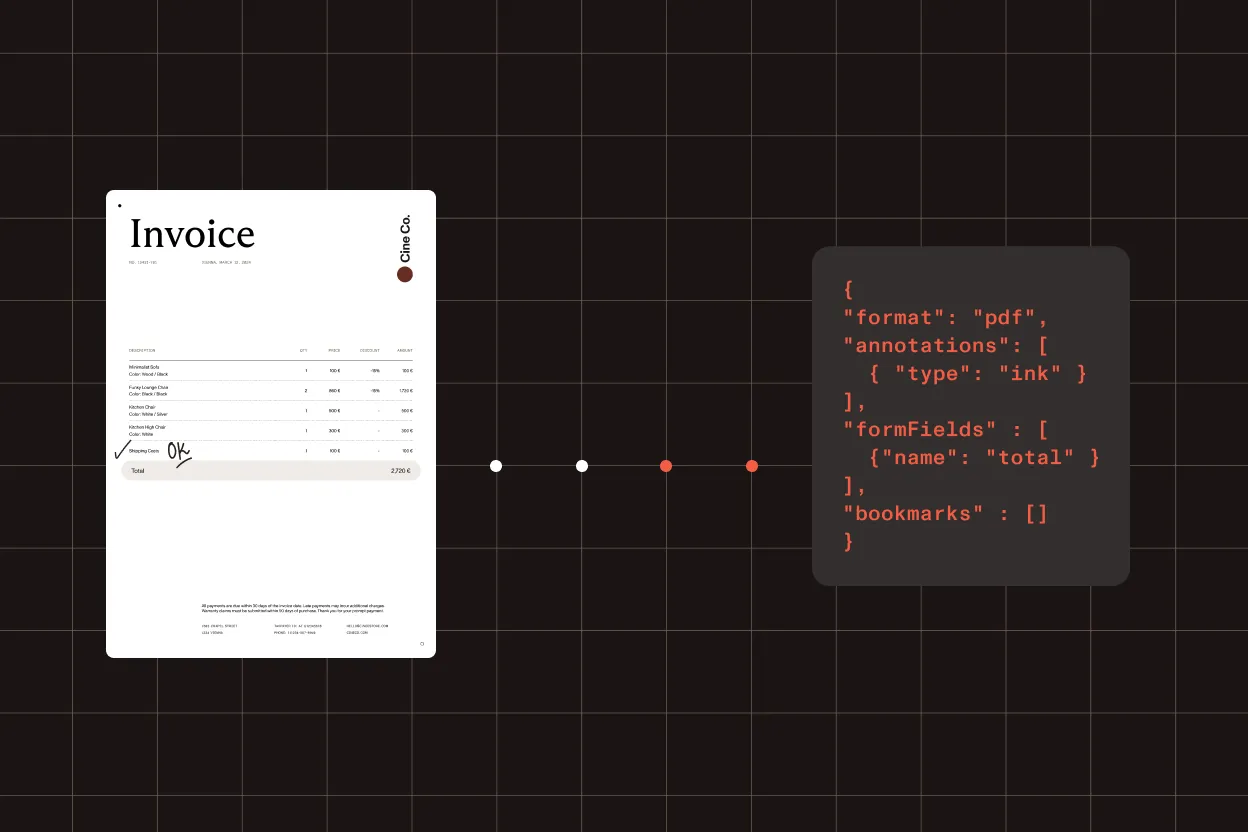
We created Instant JSON to bring annotations, forms, and bookmarks into a modern format while keeping all important properties to make the Instant JSON specification work with PDF documents. The format is fully documented and can easily be converted to XFDF to make it interoperable.
Most common next steps
Connect Instant JSON imports to getting started, pricing, and broader annotation or form workflows
Use the following:
Get started:
Platform resources:
Security is our top priority
SOC 2 Type 2 audited
Nutrient’s infrastructure is SOC 2 Type 2 audited and GDPR compliant. See our privacy policy and security documentation for details on data handling.
HTTPS encryption
All communication between your application and Nutrient is done via HTTPS to ensure your data is encrypted when it’s sent to us.
Safe payment processing
All payments are handled by Paddle. Nutrient DWS Processor API never has direct access to any of your payment data.
Frequently asked questions
What is Instant JSON?
Instant JSON is Nutrient’s open format for representing annotations, form fields, and form field values separately from the source PDF. It keeps the original document untouched and layers changes on top, and it can be converted to XFDF for interoperability.
How do I import annotations into a PDF using the API?
Send your PDF and an Instant JSON payload to the import endpoint, and the API merges the annotations into the document and returns the result. See the getting started guide for API key setup, or pair it with the PDF annotations API for broader annotation workflows.
Can I import form fields and prefilled values too?
Yes. Instant JSON can carry form fields and their values, so you can populate forms programmatically in the same request. For dedicated form workflows, see the PDF form filling API.
How does Instant JSON differ from XFDF?
Both describe annotations and form data outside the PDF. Instant JSON is a modern, fully documented JSON format that preserves the properties needed to work with PDF documents, and it converts to XFDF when you need compatibility with XFDF-based tooling.
Is it free to try?
Yes. Create a free account to get an API key and start importing Instant JSON right away. Production usage is credit-based — see Processor API pricing for details.
Ready to try it?
Create an account to get your DWS Processor API key and start making API calls.