How to merge PDFs using PHP

Table of contents

Merge PDF documents using our merge PDF PHP API. Create a free account, get API credentials, and implement merging using cURL. Combine with 30+ other API tools for document processing workflows.
In this post, you’ll learn how to combine multiple PDF files using our merge PDF PHP API. With our API, you receive 50 credits with the free plan. Different operations on a document consume different amounts of credits, so the number of PDF documents you can generate may vary. You’ll just need to create a free account(opens in a new tab) to get access to your API key.
Nutrient DWS Processor API
Document merging is just one of our 30+ PDF API tools. You can combine our merging tool with other tools to create complex document processing workflows, such as:
- Converting MS Office files and images into PDFs before merging
- Performing OCR on several documents before merging
- Merging, watermarking, and flattening PDFs
Once you create your account, you’ll be able to access all our PDF API tools.
Step 1 — Creating a free account on Nutrient
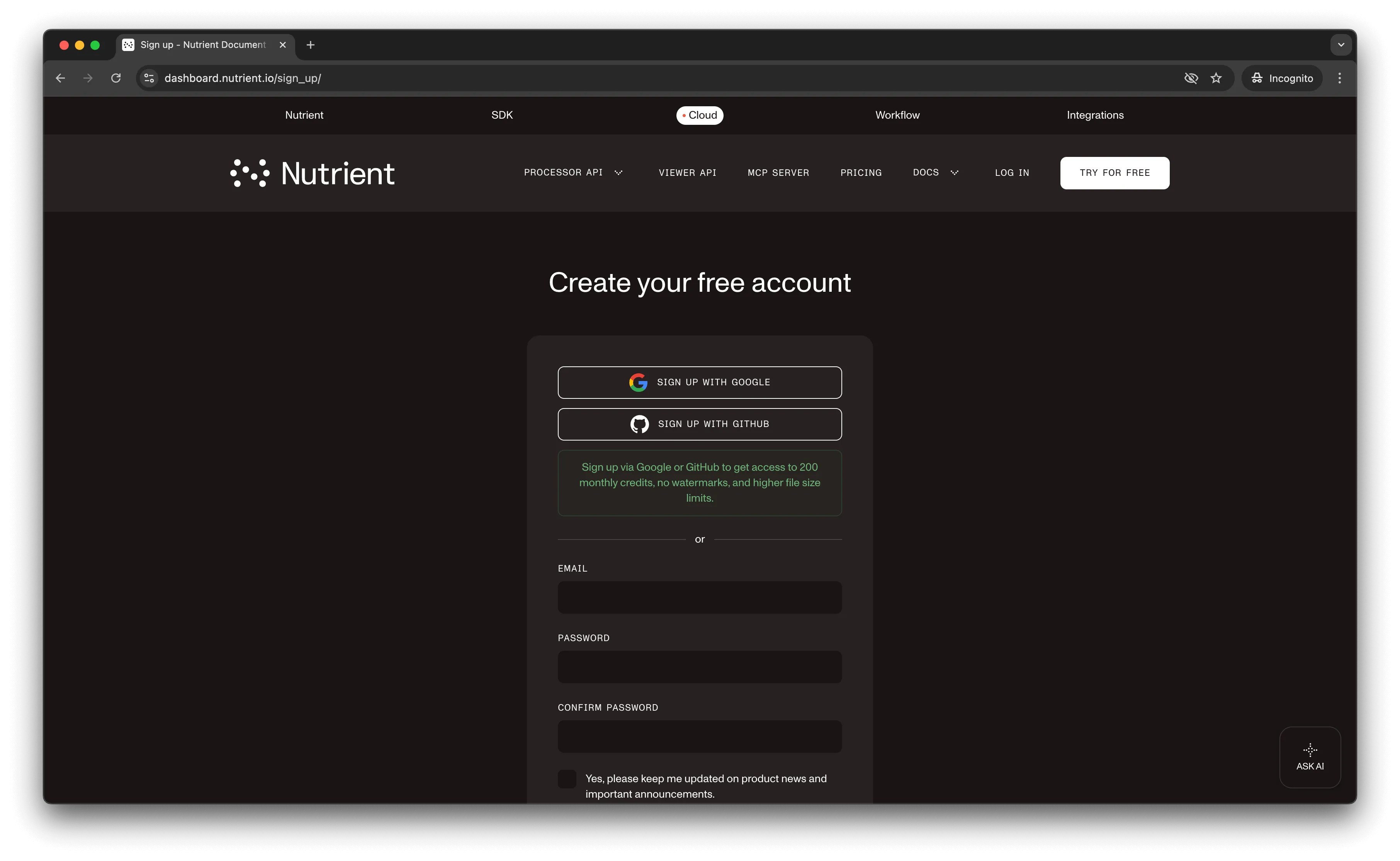
Go to our website(opens in a new tab), where you’ll see the page below, prompting you to create your free account.
Once you’ve created your account, you’ll be welcomed by the page below, which shows an overview of your plan details.
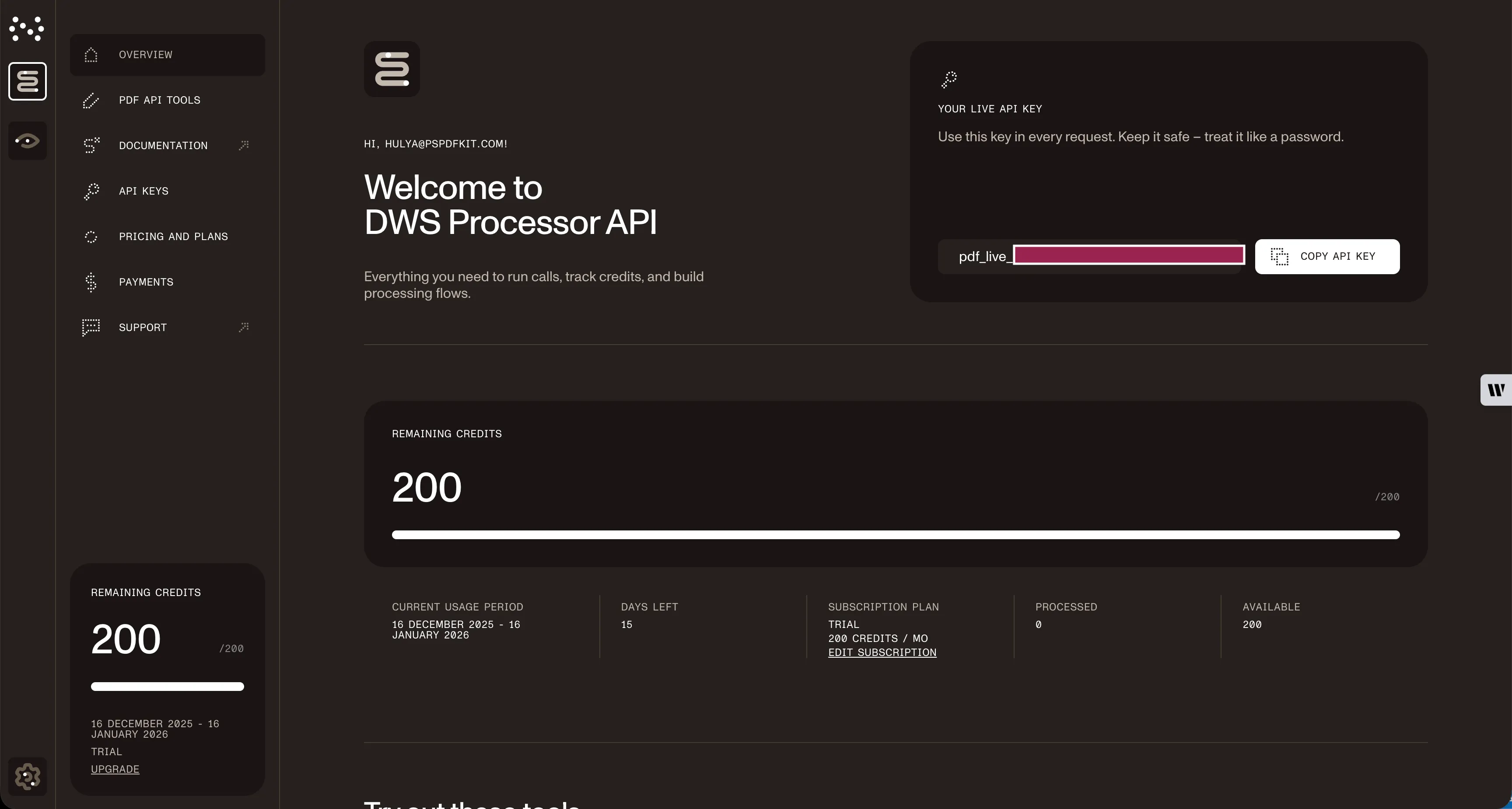
As you can see in the bottom-left corner, you’ll start with 50 credits to process, and you’ll be able to access all our PDF API tools.
Copy the Live API key, because you’ll need this for the merge PDF API.
Step 2 — Setting up files and folders
Now, create a folder called merge_pdf and open it in a code editor. For this tutorial, you’ll use VS Code as your primary code editor. Next, create two folders inside merge_pdf and name them input_documents and processed_documents.
Then, in the root folder, merge_pdf, create a file called processor.php. This is the file where you’ll keep your code.
Step 3 — Writing the code
Open the processor.php file and paste the code below into it:
<?php
$FileHandle = fopen('processed_documents/result.pdf', 'w+');
$curl = curl_init();
curl_setopt_array($curl, array(  CURLOPT_URL => 'https://api.nutrient.io/build',  CURLOPT_CUSTOMREQUEST => 'POST',  CURLOPT_RETURNTRANSFER => true,  CURLOPT_ENCODING => '',  CURLOPT_POSTFIELDS => array(    'instructions' => '{      "parts": [        {          "file": "first_half"        },        {          "file": "second_half"        }      ]    }',    'first_half' => new CURLFILE('input_documents/first_half.pdf'),    'second_half' => new CURLFILE('input_documents/second_half.pdf')  ),  CURLOPT_HTTPHEADER => array(    'Authorization: Bearer YOUR_API_KEY_HERE'  ),  CURLOPT_FILE => $FileHandle,));
$response = curl_exec($curl);
curl_close($curl);
fclose($FileHandle);
Make sure to replace YOUR_API_KEY_HERE with your API key.
Code explanation
In the code above, you created and opened the php_result.pdf file under processed_documents. Then, you created a variable called instructions that contains all the information regarding the payload.
In the next part, you made a CURL POST request to your API endpoint, and in the parameters, first_half contains the first PDF, while second_half contains the second PDF.
Step 4 — Output
To execute the code, run the command below:
php processor.phpOn successful execution, you’ll see a new processed file, php_result.pdf, which is located in the processed_documents folder.
The folder structure will look like this:
merge_pdf├── input_documents| └── first_half.pdf| └── second_half.pdf├── processed_documents| └── php_result.pdfAdditional resources
Explore more ways to work with Nutrient API:
- Postman collection — Test API endpoints directly in Postman
- Zapier integration — Automate document workflows without code
- MCP Server — PDF automation for LLM applications
Conclusion
In this post, you learned how to merge files for your PHP application into a single PDF using our merge PDF API.
If you have a more complex use case, you can use our other tools to add watermarks, perform OCR, and edit (split, flatten, delete, duplicate) documents — and you can even combine these tools. To get started with a free trial, sign up here(opens in a new tab).
FAQ
Nutrient DWS Processor API offers 30+ PDF operations, including splitting, watermarking, OCR, flattening, and converting Office documents to PDF. You can combine these operations in a single workflow. For example, merge multiple PDFs, watermark the result, then flatten it to prevent editing — all through the same API.
Yes! Use our Postman collection to test all API endpoints directly in Postman. Import the collection, add your API key, and experiment with different operations and parameters. This helps you understand the API before integrating it into your PHP application. You can also test using cURL in your terminal.
Use our Zapier integration to automate PDF processing without writing code. Connect Nutrient DWS Processor API with 5,000+ apps like Google Drive, Dropbox, Gmail, and Slack. For example, automatically merge PDFs when they’re uploaded to a specific Google Drive folder, or combine email attachments and save the merged result.
Nutrient DWS API doesn’t store any input or output documents on its infrastructure. Files are processed in memory and deleted immediately after your request completes. All communication uses HTTPS encryption. For enhanced security requirements, Nutrient also offers self-hosted deployment options where documents never leave your infrastructure.
Add additional files to the CURLOPT_POSTFIELDS array and reference them in your instructions. For example, add 'third' => new CURLFILE('input_documents/third.pdf') and include {"file": "third"} in the parts array. The API processes files in the order specified in the parts array, allowing you to control the final document structure.