Where PDF parsers fail: Docling vs. Nutrient on three real documents

Table of contents
Aggregate accuracy scores describe how parsers perform across 200 documents, but what they don’t show is what failure looks like in a specific document — and what that failure costs downstream.
This article examines three documents from the opendataloader-bench corpus(opens in a new tab) where extraction engines diverge. Each example isolates a different failure mode: a misread table of contents, heading hierarchy in a textbook page, and table structure in a regulatory report. For each, the ground truth annotation, Nutrient’s output, and Docling’s output are compared — along with the downstream consequence of getting it wrong.
For methodology, metrics, and full benchmark results, read How we test PDF extraction: The opendataloader-bench benchmark.
A course’s table of contents misread as a table
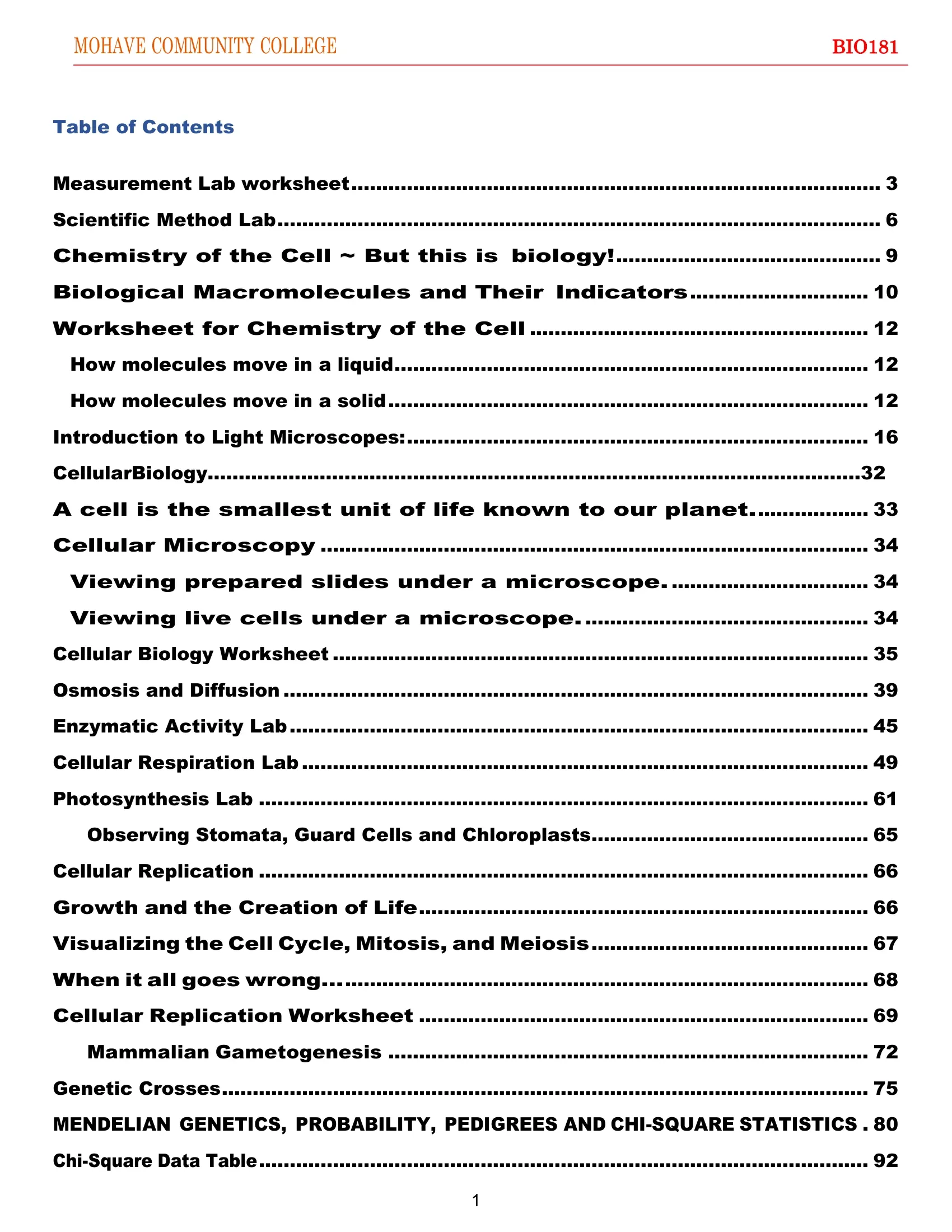
Document: This is the table of contents (TOC) page of a Mohave Community College BIO181 biology course workbook — a 92-page document spanning genetics, cell biology, and lab exercises. The TOC uses dot-leader formatting (section titles followed by dotted lines and page numbers) to list 30+ entries. Course materials of this type appear regularly in educational technology and content digitization pipelines.
Why it’s difficult: Parsers that identify tabular structure by column alignment can misread dot-leader rows as table cells, wrapping the entire TOC in a markdown table. As a result, the opening heading can be demoted or lost.
Ground truth: College and course identifiers appear as plain text, followed by a # Table of Contents H1 heading, with all entries appearing as plain text dot-leader rows.
Nutrient output (default engine): Produces the correct plain-text TOC with a college header and # Table of Contents as H1. Score: 0.998 overall.
Docling output: Demotes the heading from H1 to H2 and wraps every TOC entry in a single-column markdown table — a structure that doesn’t exist in the source. Score: 0.787 overall (MHS 0.699).
## Table of Contents
| Measurement Lab worksheet...................................................................................... 3           ||-----------------------------------------------------------------------------------------------------------------------------|| Scientific Method Lab.................................................................................................. 6   || Chemistry of the Cell ~ But this is biology!........................................... 9                                   || Biological Macromolecules and Their Indicators............................. 10                                              || Worksheet for Chemistry of the Cell....................................................... 12                               |...
The heading demotion (H2 instead of H1) directly drives the Markdown Heading Score (MHS) gap. A pipeline that uses heading depth to classify document landmarks will treat the Table of Contents as a subsection rather than a top-level navigational element. The spurious table wrapping compounds the problem: A schema that expects plain text rows receives a single-column table instead, silently breaking any downstream step that relies on that field’s type.
Heading hierarchy in an astronomy textbook
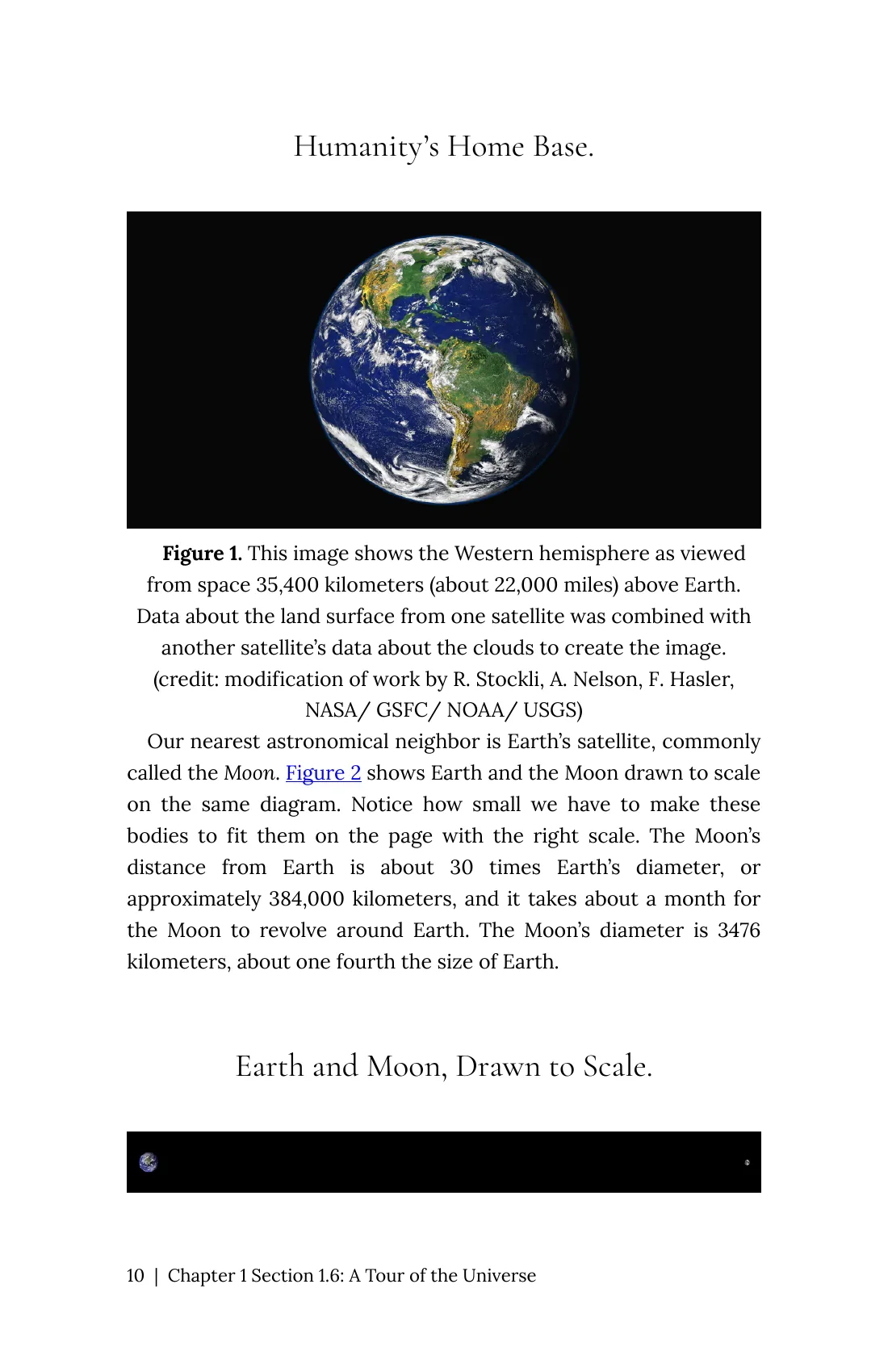
Document: This is a page from an OpenStax astronomy chapter covering Earth’s position in the solar system. The page opens with a section title and closes with a figure caption that also functions as a subsection heading. Open-access academic texts like OpenStax are common source documents in scientific retrieval-augmented generation (RAG) systems and educational platforms.
Why it’s difficult: The second heading — “Earth and Moon, Drawn to Scale” — appears directly below a figure and can be read as a caption rather than a new section. Tools that rely on font size alone may treat it as body text or assign it the wrong heading level.
Ground truth: Two headings appear at H1 — “Humanity’s Home Base” and “Earth and Moon, Drawn to Scale.”
Nutrient output (default engine): Both headings are correctly identified and structured. Score: 1.000 overall (MHS 1.000).
Docling output: Demotes the first heading from H1 to H2 and misses the second heading entirely — rendering “Earth and Moon, Drawn to Scale” as plain body text. Score: 0.773 overall (MHS 0.585).
## Humanity’s Home Base.
Figure 1. This image shows the Western hemisphere as viewedfrom space 35,400 kilometers (about 22,000 miles) above Earth.Data about the land surface from one satellite was combined withanother satellite’s data about the clouds to create the image.(credit: modification of work by R. Stockli, A. Nelson, F. Hasler,NASA/ GSFC/ NOAA/ USGS)
Our nearest astronomical neighbor is Earth’s satellite, commonlycalled the Moon. Figure 2 shows Earth and the Moon drawn to scale...
Earth and Moon, Drawn to Scale.
In a retrieval system, a missing heading means the content under it can’t be navigated to directly. Any query targeting the figure-and-scale comparison section must scan the full document rather than routing to the correct node in the heading tree. The failure isn’t visible in the extracted text itself — the words are present — but the structural signal that downstream systems rely on for chunking and retrieval is gone.
Table structure in a Philippine ports regulatory report
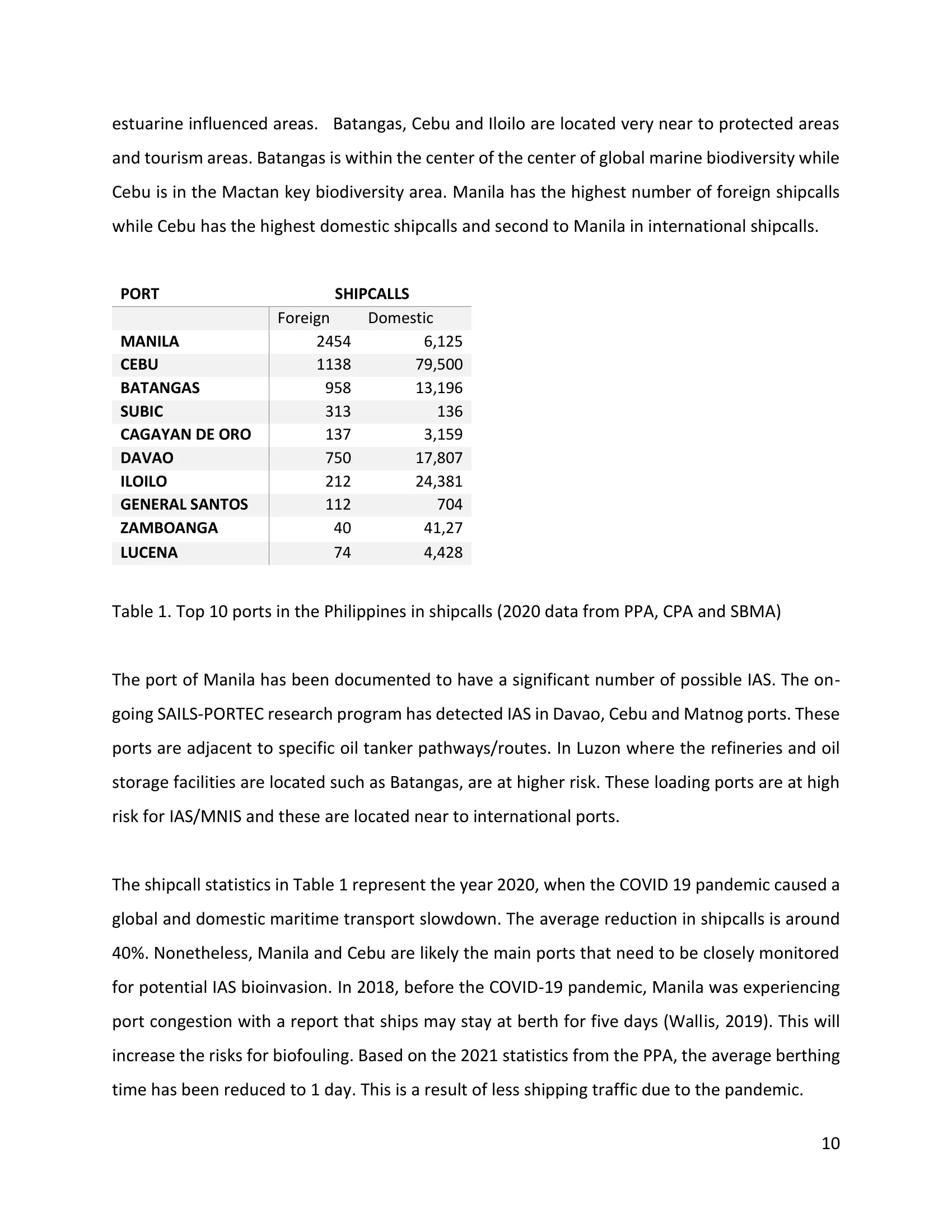
Document: This is a page from a regulatory research report on invasive aquatic species risk at Philippine ports. The page contains a shipcall statistics table listing foreign and domestic traffic counts for 10 ports. Regulatory and government reports with visually complex tables are standard inputs for compliance, risk, and financial due diligence pipelines.
Why it’s difficult: The table uses a two-level visual header: “PORT” and “SHIPCALLS” appear as labels above the table, with “Foreign” and “Domestic” as the actual column subheaders inside it. A parser that treats these visual labels as table header cells produces a structurally incorrect representation.
Ground truth: The table has three columns, with a header row (empty, Foreign, Domestic) and 10 data rows.
Nutrient output (default engine): Produces the correct three-column structure with a header row matching ground truth. Score: 1.000 TEDS, 0.976 overall.
Docling output: Absorbs the visual labels into the table header row, producing “PORT | SHIPCALLS | SHIPCALLS” as the first row — a structurally incorrect three-column header that doesn’t match the ground truth schema. Score: 0.920 overall (TEDS 0.918).
| PORT | SHIPCALLS | SHIPCALLS ||----------------|-------------|-------------|| | Foreign | Domestic || MANILA | 3,047 | 38,476 || BATANGAS | 612 | 10,428 || CEBU | 1,170 | 21,799 |...The downstream consequence is an ambiguous header. Foreign and Domestic still sit in columns 2 and 3, but they arrive as a data row, and both columns are labeled SHIPCALLS. Any workflow that reads column names — “Which value is Foreign shipcalls for CEBU?” — finds two identical headers and no Foreign column to match. The data is present; the structural error is invisible until a query can’t resolve the column it needs.
What these failures have in common
These three examples share a pattern: The extracted text is largely correct, but the structural interpretation is wrong. Dot-leader rows become tables. Headings get demoted or dropped. Visual label rows become data columns. None of these failures produces an obvious error — they pass character-level checks and only surface when downstream systems depend on the structure to navigate, join, or chunk the content.
Across all three documents, Nutrient’s default engine avoided the failure and Docling did not:
| Document | Nutrient | Docling |
|---|---|---|
| Course table of contents | 0.998 | 0.787 |
| Astronomy textbook | 1.000 | 0.773 |
| Ports regulatory report | 0.976 | 0.920 |
These three documents were picked to show specific failure modes, so they aren’t a random sample. Across all 200 documents in the public opendataloader-bench results, Nutrient’s default engine scores higher than Docling overall on 149 and lower on 51. On the 42 documents with tables, Docling scores higher on 26 and Nutrient on 12.
The aggregate scores in the benchmark reflect this: small overall gaps between tools that can correspond to large functional differences on specific document types.
ParseBench: As of 24 September 2026, Nutrient DWS (Agentic) scores 76.4 out of 100 on the public ParseBench leaderboard. Nutrient measured that row itself, with ParseBench’s own harness against the production API. ParseBench is published by LlamaIndex, the maker of LlamaParse, and uses a different corpus and metrics from opendataloader-bench. Current scores for every mode, and how they compare with the rest of the leaderboard, are on the benchmarks page.
View full benchmark results →Teams evaluating PDF parsers for production use can run the opendataloader-bench harness(opens in a new tab) against any parser on their own document sample. For schema-driven extraction with per-field citations and bounding boxes — making structural errors like these observable per field before data enters a pipeline — see Nutrient Data Extraction API, or compare Docling and Nutrient feature by feature.