Introducing WholeDoc Bench: A benchmark for parsing whole documents

Table of contents
WholeDoc Bench is a new benchmark that scores document parsers on whole documents, from the first page to the last, in seven areas. In Season 1, Nutrient Agentic has the highest score, 86.1 at 1.8¢ per page, and nothing on the board that costs more scores higher. The best frontier model scores 67.1 at about 18¢ per page. We make one of the parsers on the board, so the code, the options we used for each parser, and a sample of the test documents are public.
A parser can read every page of a document correctly and still get the document wrong. If a table runs across five pages, it can come back as five separate tables. If a sentence breaks at the bottom of a page, it can come back with the page number stuck in the middle. These errors happen between pages, so a benchmark that scores one page at a time never sees them.
We built WholeDoc Bench to catch them. It scores what a parser returns for the whole document, across seven areas. Today, we’re releasing Season 1: 13 parsers, run in 19 settings. A setting is one parser in one mode or at one effort level. For example, Nutrient runs in three modes and Claude Fable 5.1 at two effort levels, so together they count as five settings. Each setting that has a list price shows it next to its score. See the leaderboard →
What each budget buys
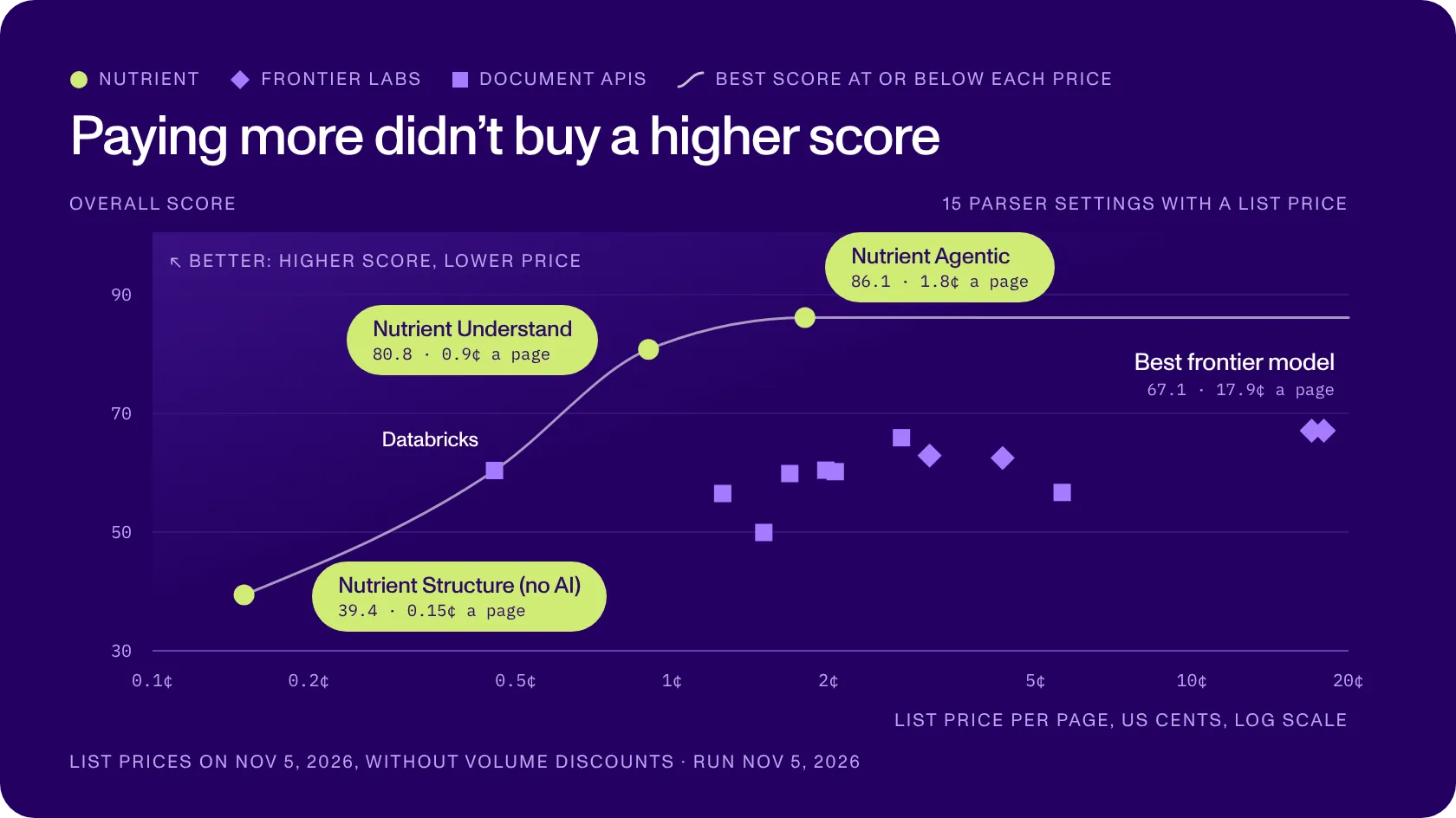
Each shape is one setting. Its height shows the overall score, and its place from left to right shows the price per page. The green circles are the three modes of the Nutrient Data Extraction API, the diamonds are models from frontier labs, and the squares are document APIs. The curve shows the best score you can get at each price, so you can read the chart from left to right as a budget.
At the low end, Nutrient Structure reads text and basic layout without AI, for scans and simple documents. It costs 0.15¢ per page and scores 39.4, and it doesn’t read charts or barcodes. Databricks is the next step up, with 60.4 at about 0.45¢ per page. Nutrient Understand scores 80.8 at 0.9¢, and Nutrient Agentic scores 86.1 at 1.8¢, the highest score of all 19 settings.
Past 1.8¢, the curve goes flat, because no setting that costs more scores higher. The best frontier model scores 67.1 at about 18¢ per page, which is about 10 times the price of Nutrient Agentic. On this set, paying more didn’t buy a higher score.
Prices are list prices on 5 November 2026, without volume discounts. The full leaderboard also lists the free open source tools and shows a score in each of the seven areas.
We make one of the parsers on this board, so skepticism is fair. That’s why the code, the options we used for each parser, and a sample of the test documents are public: You can see how each score is made and run the benchmark yourself.
Why whole documents?
Our customers send us documents — such as bank statements, invoices, delivery notes, and reports — and many of them run for several pages. In that work, we often see errors right at a page break.
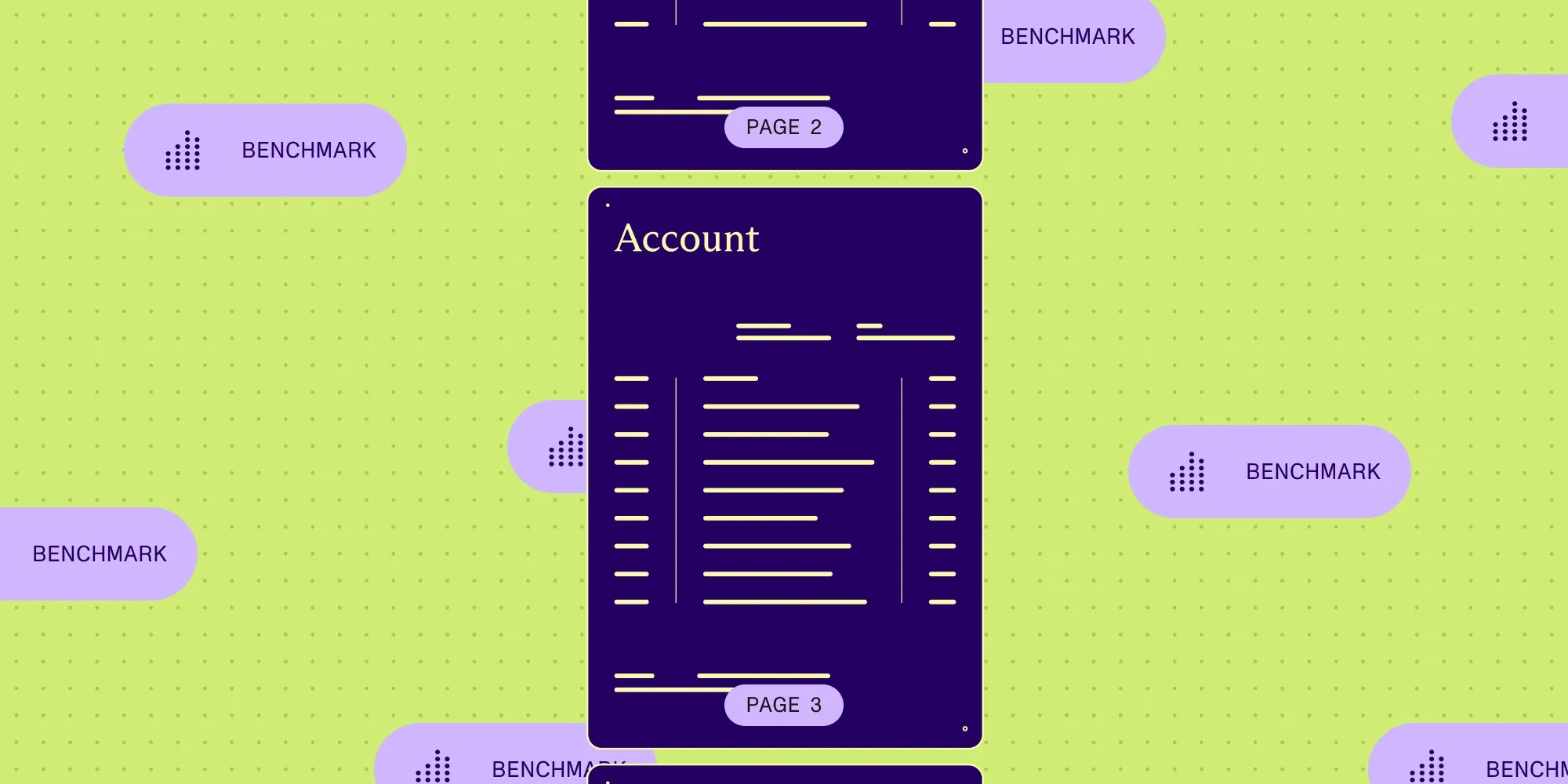
Take this bank statement from our test set. It has six pages and one table of 222 transactions that runs across five of them. We generated the file ourselves, so we know exactly what a correct parser must return: one table.
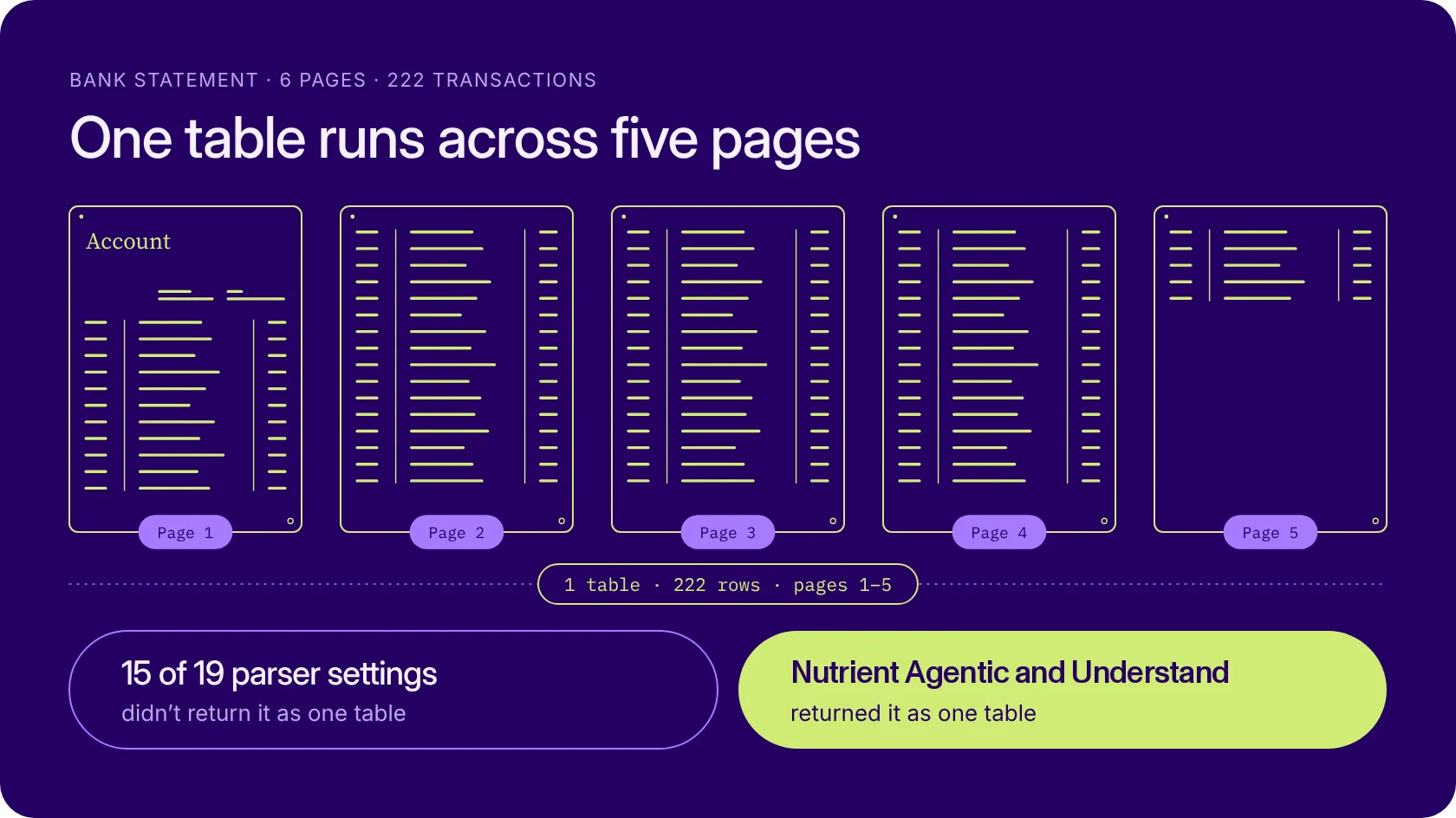
Fifteen of the 19 settings we tested didn’t return it as one table. Nutrient Understand and Nutrient Agentic were among the four that did. With the other 15, the software that adds up the transactions gets the table in pieces and has to guess how they fit together.
Good parsing benchmarks already exist, and we learned a lot from them. ParseBench(opens in a new tab) by LlamaIndex and OmniDocBench(opens in a new tab) show where parsers fail on tables, charts, and layout, and our own ParseBench score is on our benchmarks page. But most of them score one page or one table at a time.
A few newer ones — such as READoc, MPDocBench-Parse, and Dr. DocBench — do score whole documents, and some of them check that content cut by a page break gets joined again. We haven’t found one that also tests the opposite trap, where two paragraphs on two pages look like one but must stay apart, or one that scores charts, text styles, and barcodes across whole documents. Extraction benchmarks such as ExtractBench(opens in a new tab) use long documents, but they check fields, not the full text and layout.
WholeDoc Bench covers that gap with seven areas, scored on whole documents.
Seven areas, one score
Each area answers one question about the parser’s output.
| Area | The question | A typical error |
|---|---|---|
| Text | Is every word there, spelled as printed? | “Müller” comes out as “Muller.” |
| Reading order | Does the text come out in the order a person reads it? | Two columns get mixed line by line. |
| Structure | Do headings, paragraphs, captions, and footnotes keep their shape? | A paragraph that continues on the next page is cut in two. |
| Tables | Is every cell in the right row and column, even when the table continues on the next page? | A table that runs across five pages comes back in five pieces. |
| Barcodes | Can the parser read what each barcode contains? | A code is skipped, or one character is wrong. |
| Charts | Does the chart become the right data points, series, type, and title? | The parser invents values that aren’t in the chart. |
| Position on the page | Does each item, and each table cell, get the right box on the page? | A parser draws one box around the whole page. |
Some documents also hide traps: misspelled words, rare accents, and near-miss names that must come out exactly as printed. A parser must not “correct” them, because a fixed typo is still a changed value. The same goes for part numbers: When “M8x40” becomes “M8×40,” it no longer matches the catalog. Other documents have page breaks where content must be joined or kept apart.
The overall score is the plain average of the seven areas, from 0 to 100, so each area counts for one-seventh.
Where parsers still break
The two biggest failures both happen at a page break.
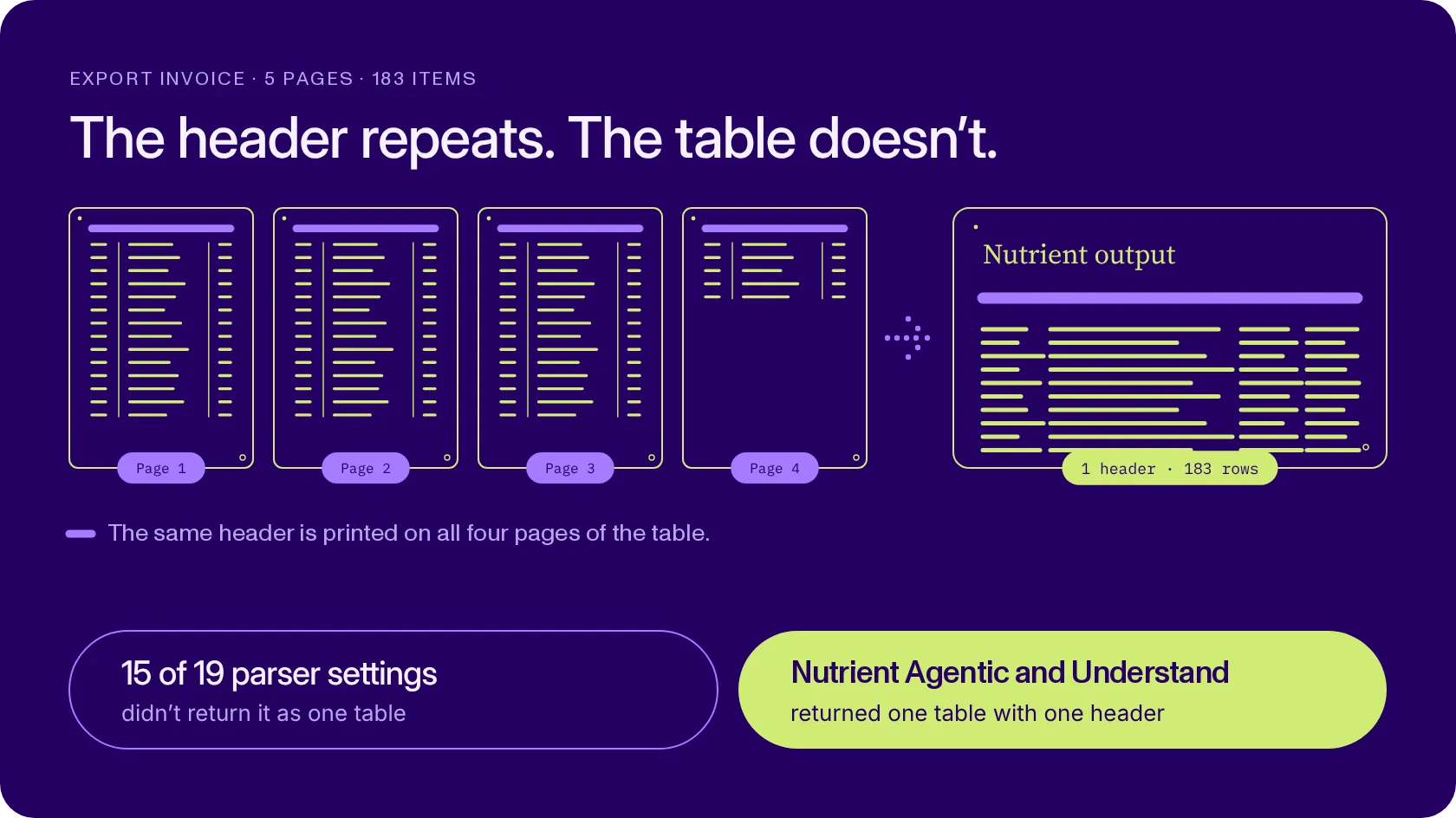
Tables that cross pages. Forty-four documents in the test have a table that continues across a page break. On those, 15 of the 19 settings returned the table as one table in fewer than one case in five. Four settings got it right almost every time: Nutrient Understand, Nutrient Agentic, Reducto, and LlamaParse Agentic Plus.
In the export invoice below, the table runs across four pages, with the same header printed at the top of each one. A correct parser returns one table with one header and 183 rows.
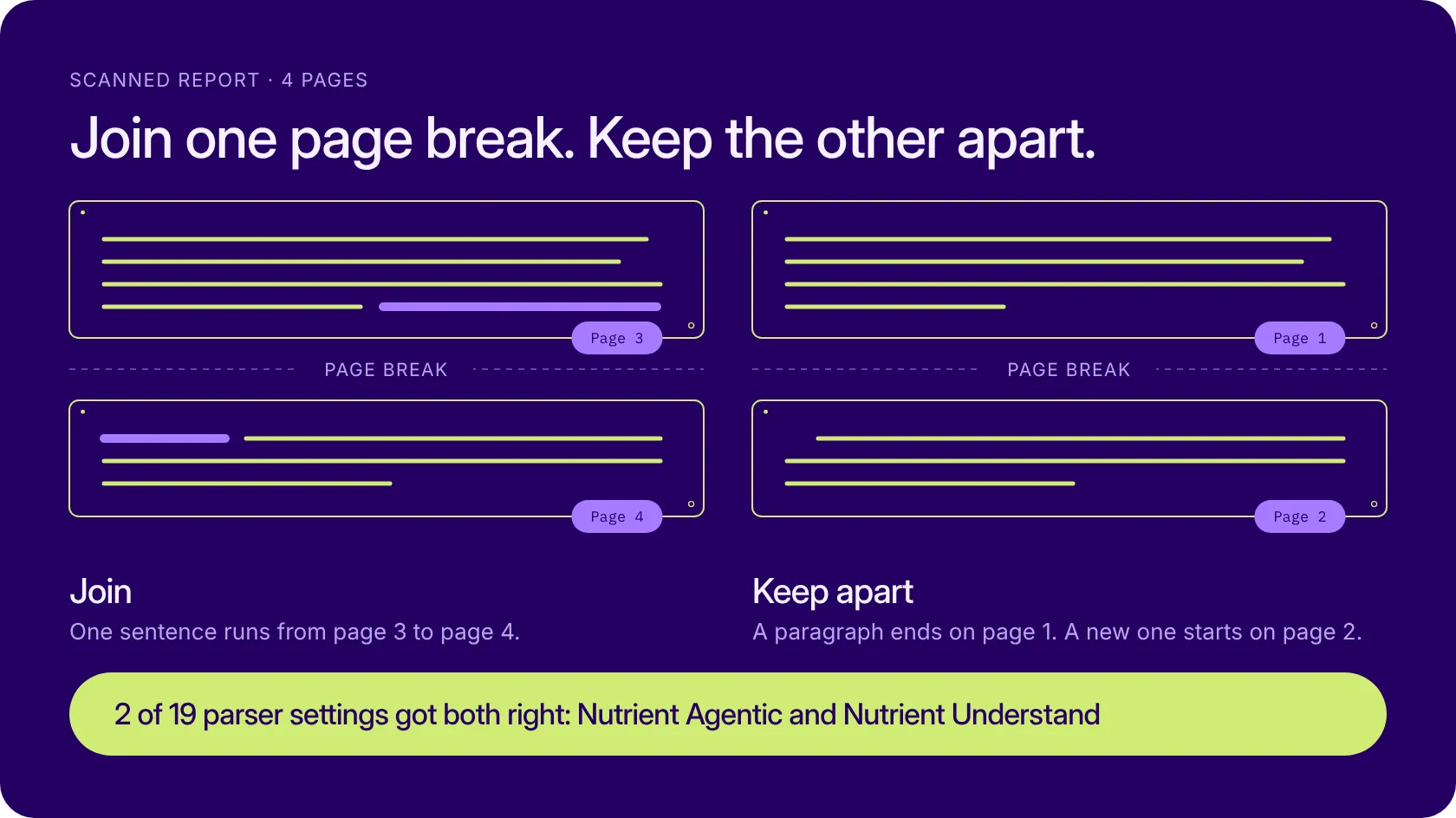
Text that crosses pages. In a scanned report from the test, one sentence runs from page 3 to page 4 and must be joined. At another page break in the same report, a paragraph ends on page 1 and a new one starts on page 2, so the two must stay apart. Only two of the 19 settings got both right: Nutrient Agentic and Nutrient Understand.
How we built it
Every score comes from written rules, and the rules are public. Here’s how we chose the documents, built the answer keys, and ran each parser.
The documents. The set has 481 documents with 634 pages, in more than 30 languages. We chose documents with the problems that break parsing in real work, such as tables that cross pages, scans, charts, and barcodes. Nutrient’s parser wasn’t trained on them.
What’s public, and what stays private. A sample of 10 documents, with their answer keys, is public. Use it to test any parser, see how the benchmark grades each document, and extend it with documents of your own. The main test set stays private. We use it to validate performance independently and to reduce the risk of benchmark contamination or overfitting. The leaderboard scores come from the full set.
The answer keys. An answer key says what a correct parser must return for a document. For real documents, three AI models from OpenAI, Anthropic, and Google read each page, and a value goes in only when at least two of them read it the same way. A person then resolves every disagreement, corrects the draft, and approves it. For generated documents, the key comes straight from the generator. If you find a mistake, tell us, and we’ll fix it and score every parser again.
The scoring. Code applies the same written rules to every parser, and no AI model hands out points. Some rules make sure only correct output earns points: One box drawn around the whole page scores 0, and a parser can’t pass the reading-order test by repeating text. A document that fails scores 0 and stays in the average, so we don’t skip the hard ones. A parser that fails on more than 5 percent of the documents is listed after the others.
How we ran each parser. Nutrient runs through its public API, the same one our customers use. The options we used for every other document API are in the repository. Table merging across pages is on for LlamaParse and Reducto, and chart extraction is on wherever a tool offers it. Cloud document APIs get the whole file, except AWS Textract, which takes one page per request.
Frontier models from OpenAI and Anthropic run at medium and high effort, one page per request, with our layout prompt. When a page ends with a paragraph, list item, or table, the next request quotes it, so the model can join content across the break.
The prices. For each cloud parser, the leaderboard shows the list price per page on the day of the run. The price never changes the rank. It’s there so you can see what each score costs.
Don’t take our word for it
A benchmark shows how parsers do on our documents, and yours may be different. Cloud parsers also change often, and small gaps between scores can be noise, so we date every result, keep the options for every parser in the repository, and make it easy to run the test yourself.
The code is on GitHub(opens in a new tab) under Apache 2.0, with 13 parsers ready to go. Download the public sample from Hugging Face(opens in a new tab), and three commands take you from documents to a report:
uvx --from huggingface_hub hf download nutrientdocs/wholedoc-bench-sample --repo-type dataset --revision v1 --local-dir wholedoc-bench-sampleuv run wholedoc-bench run --provider [parser] --corpus wholedoc-bench-sample --out runs/[parser]uv run wholedoc-bench score --corpus wholedoc-bench-sample --predictions runs/[parser] --results resultsuv run wholedoc-bench report --results resultsYou can also help in two ways:
- Score your own parser. Bring its output files for the sample documents and a short claims file with its version and options. Your row shows up in your own report, marked “(imported).” The official leaderboard ranks only runs the benchmark made itself.
- Tell us we’re wrong. If a parser would score higher with other options, open a pull request that adds them to the parser’s adapter and configuration, and we’ll run it again. If a rule is wrong, open an issue.
What’s next
WholeDoc Bench comes in seasons, and Parse is its first track. Upcoming seasons will add more documents and more file types, such as Word and PowerPoint files. The full method is in our paper(opens in a new tab), and every number we publish carries the date of its run.
Try it on your own documents
Every Nutrient score in this post comes from the same Data Extraction API you can use today. Try it on your own files to get the text, the tables, the charts, and the position of every item on the page.
Questions you’ll probably ask
We chose the documents, and we’re on the leaderboard, so we made the method checkable. Code scores every parser with the same written rules, and failures count as zero. The code, the options for each parser, and a sample of the documents are public, and you can run the benchmark yourself on the sample. The main test set stays private to reduce the risk of benchmark contamination or overfitting.
No. Nutrient’s parser wasn’t trained on these documents. The answer keys are drafted by AI models from three other companies, and a person checks and approves every one.
It can cost them points on content that crosses pages. When a page ends with a paragraph, list item, or table, the next request quotes it, so the model can join content across the break. If you have a fairer setup, open a pull request and we’ll run it.
Reading barcodes is part of reading a document. Labels, invoices, delivery notes, and forms often carry data in barcodes and QR codes, and the software that uses the output needs that data too. Like every area, barcodes count for one-seventh of the overall score.
Yes. Run the benchmark on your parser’s output for the sample documents, and you get your own report, with your row marked “(imported).” For the official leaderboard, the benchmark has to make the run itself. That takes an adapter and a configuration for your parser, so open a pull request.