How to catch hallucinated values in document extraction

Table of contents
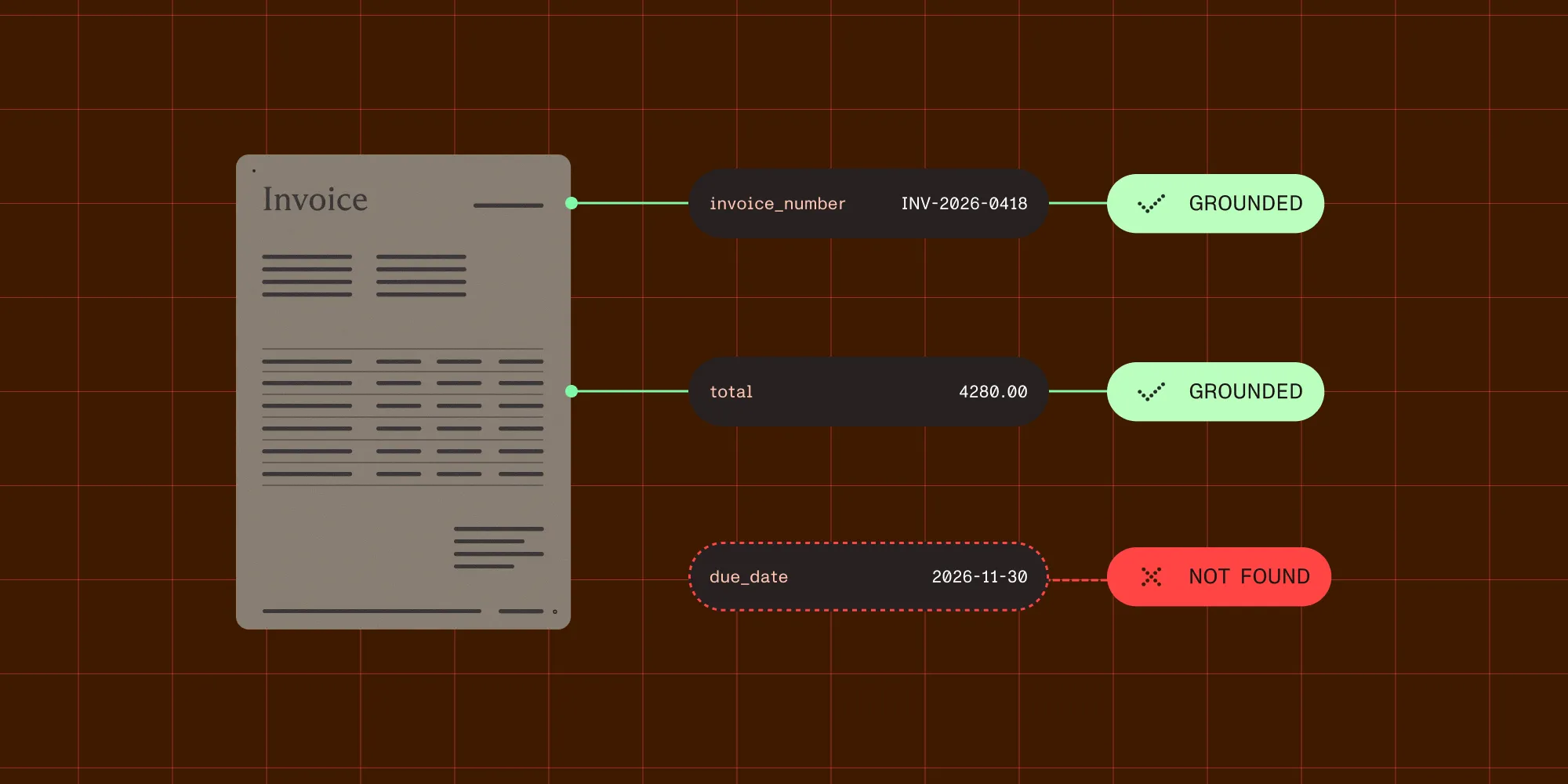
Structured output with per-field confidence scores through the Nutrient Data Extraction API.
An extraction model reads an invoice and returns "due_date": "2026-11-30". The JSON is valid and the date has the right format, so nothing in your pipeline complains. But the invoice has no due date. The model filled the gap with a guess that looks right.
That’s an extraction hallucination: a value in your structured output that the source document doesn’t support. This post covers extraction hallucination detection in practice, including the five ways a value goes wrong and the signal that catches each one. It also shows how to build the checks with the Nutrient Data Extraction API.
- An extraction hallucination is a value a document doesn’t support. It can be invented, misplaced, misread, transformed, or forced by the schema.
- Schema validation and strict output can’t catch it. A hallucinated value usually has the right type and format.
- The most reliable check is grounding: Tie each value to a region on the page, and treat a value you can’t trace as unverified.
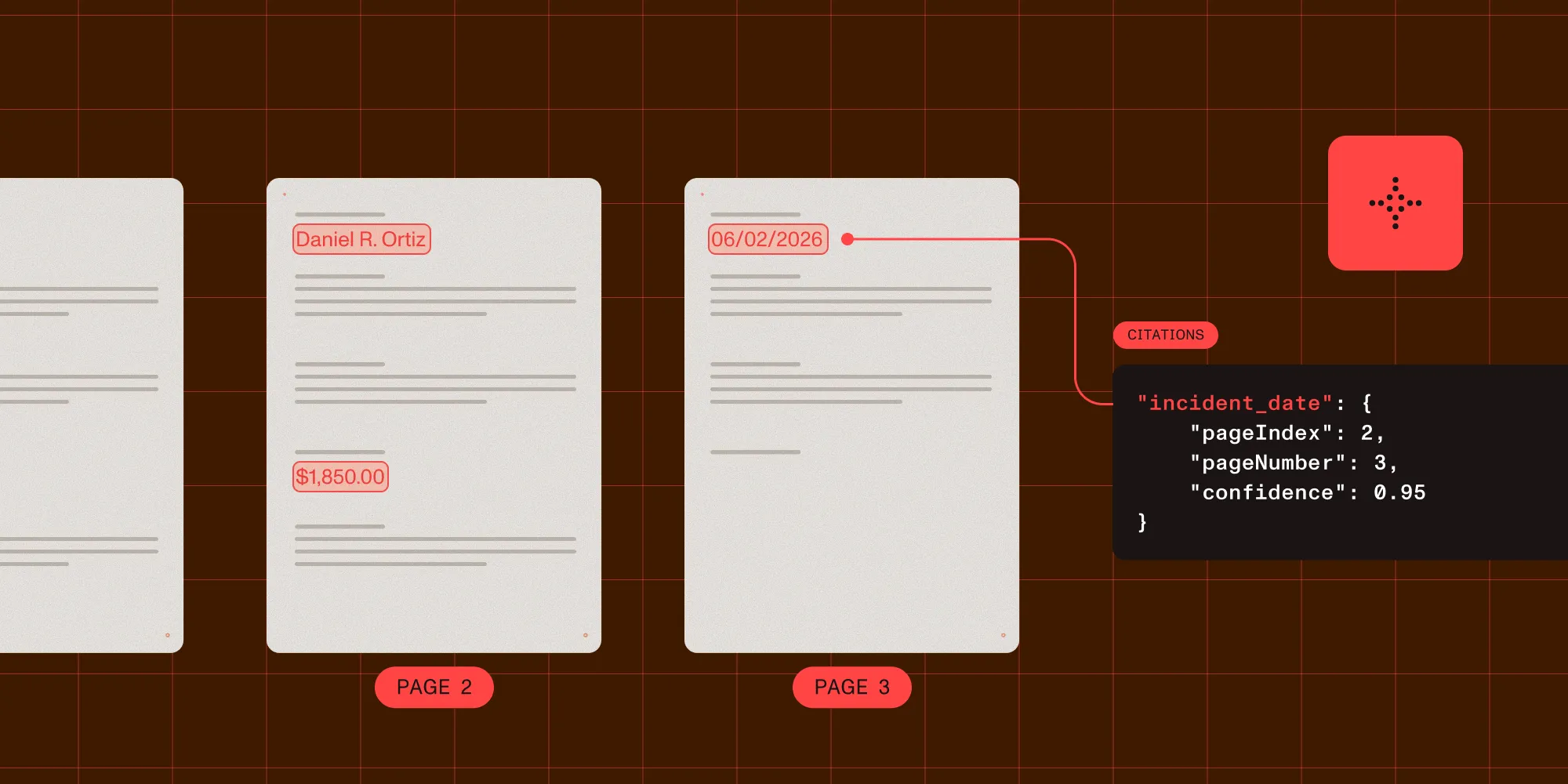
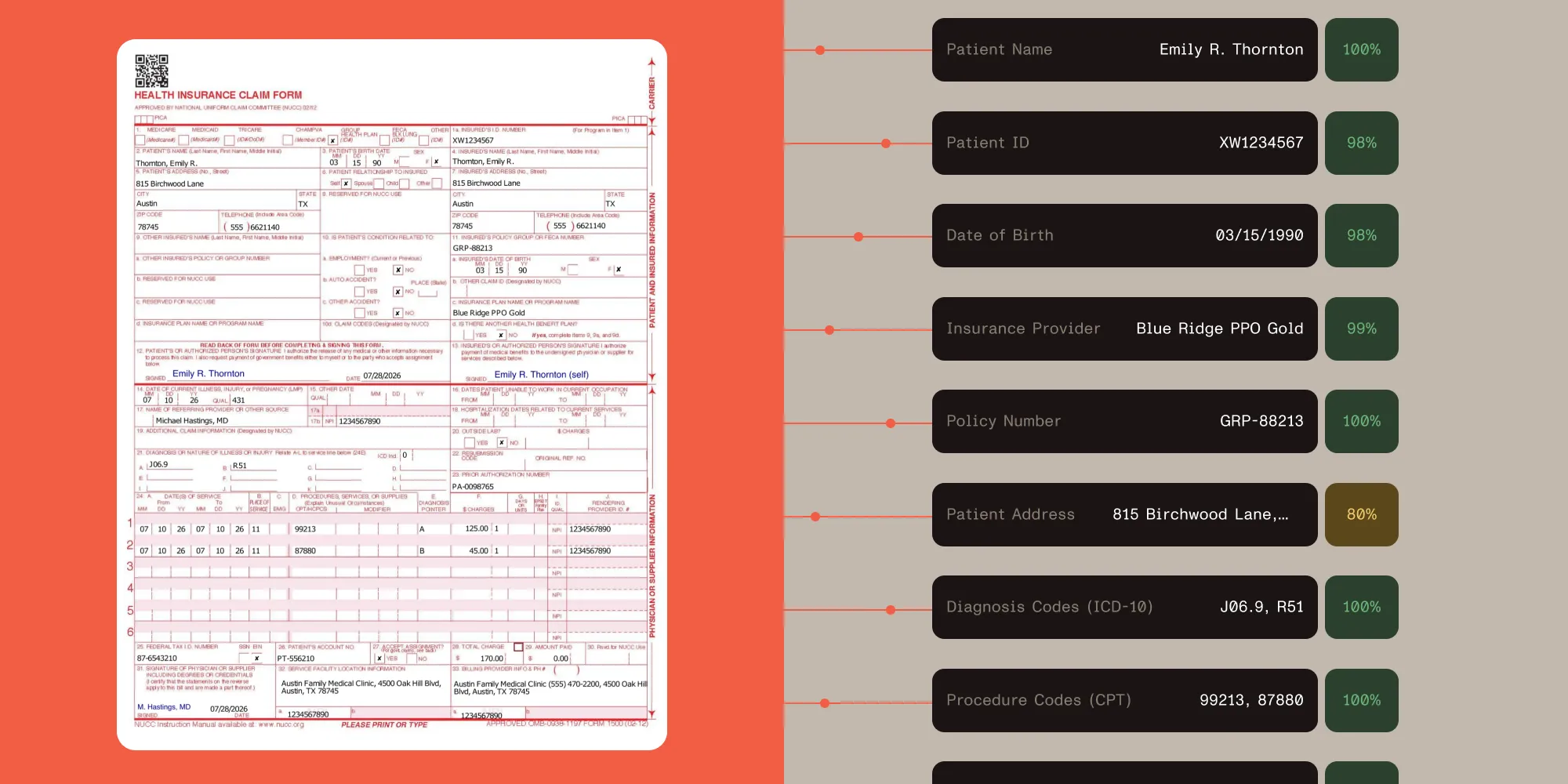
- Nutrient Data Extraction API returns a citation for every field. Each citation has a match label, source regions, and — when available — a composite confidence score built on whether the cited text supports the value.
- Check in layers: Start with the match label, add confidence, apply business rules and cross-field math, and finish with human review that highlights the source.
- Prevent hallucinations upstream with an honest schema, clear field descriptions, a “don’t guess” instruction, and a parse mode that can read the page.
What is an extraction hallucination?
An extraction hallucination is an output value that the source document doesn’t support. The value can be invented, misread, taken from the wrong place, or changed on the way out. It usually looks correct, so nobody questions it.
Large language models (LLMs) and vision language models (VLMs) produce the most likely answer for each field. When the answer isn’t on the page, they often produce a likely-looking answer anyway. A 2025 research paper, Why Language Models Hallucinate(opens in a new tab), argues that common training and evaluation methods reward this behavior. Under most scoring, a guess earns more points than “I don’t know.”
In document extraction, the cost is higher than in a chat. A wrong value doesn’t stay in a conversation. It moves into a payment run, a claims system, or a tax return, and nobody reads it again.
Five kinds of hallucinated values
Not every hallucinated value is invented from nothing. In real pipelines, most bad values are close to the truth, which makes them harder to spot. Each kind leaves a different trace, so each kind needs a different check.
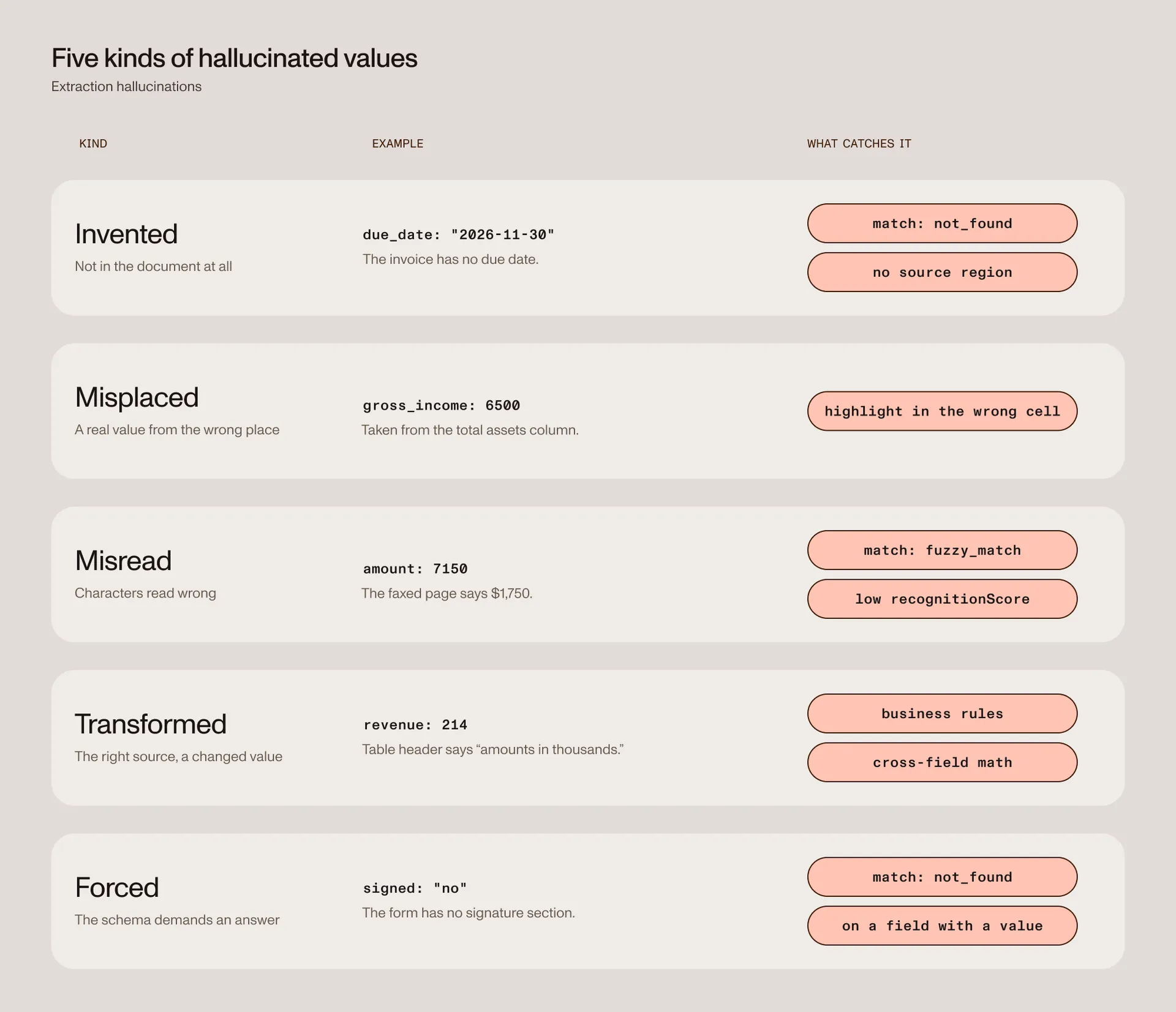
| Kind | What happens | Example | What catches it |
|---|---|---|---|
| Invented | The value isn’t in the document at all. | A due date for an invoice that has none. | A not_found match label and no source region. |
| Misplaced | A real value, taken from the wrong place. | Total assets returned as gross income from the next column. | A source highlight in the wrong place. |
| Misread | Recognition reads the characters wrong. | $1,750 read as $7,150 on a faxed page. | A fuzzy_match label and a low recognition score. |
| Transformed | The right source, changed on the way out. | A table in thousands returned as 214 instead of 214,000. | Business rules and cross-field math. |
| Forced | The schema demands an answer the page doesn’t have. | A required yes-or-no field returns “no” for a form with no signature section. | A not_found match label on a field that has a value. |
Nutrient’s open grounding benchmark(opens in a new tab) builds its hardest test cases from the same kinds of errors, including adjacent cells, wrong periods, values off by a factor of 1,000, sign flips, and transposed digits.
Why schema validation doesn’t catch hallucinations
Schema validation checks shape. It confirms that total is a number and invoice_date is a date. A hallucinated value usually passes, because models reliably produce the right shape.
Strict structured output has the same limit. In the Data Extraction API, options.strict: true constrains the model to return JSON that matches your schema. That’s useful, and the production extraction guide recommends it. But a made-up date is still a valid date.
Keep schema validation in your pipeline. Just don’t mistake it for hallucination detection. To catch a hallucinated value, you need to check it against the document.
How extraction hallucination detection works
The most reliable test for a hallucinated value is whether you can point to where it came from. A value you can trace to a region on the page has evidence. A value you can’t trace has none, no matter how confident it looks.
This idea is called grounding. Research systems such as Google’s LMDX(opens in a new tab) added grounding to LLM extraction for this reason: It localizes each extracted value in the source document.
The Data Extraction API grounds values by default. When you call the extract endpoint with a JSON Schema, the response has two parts:
output.dataholds your values, in the shape of your schema.output.metadataholds a citation for every value, in the same shape.
The citation for data.total is at metadata.total. The citation for data.line_items[2].amount is at metadata.line_items[2].amount, so you can check every value, including values inside arrays and nested objects.
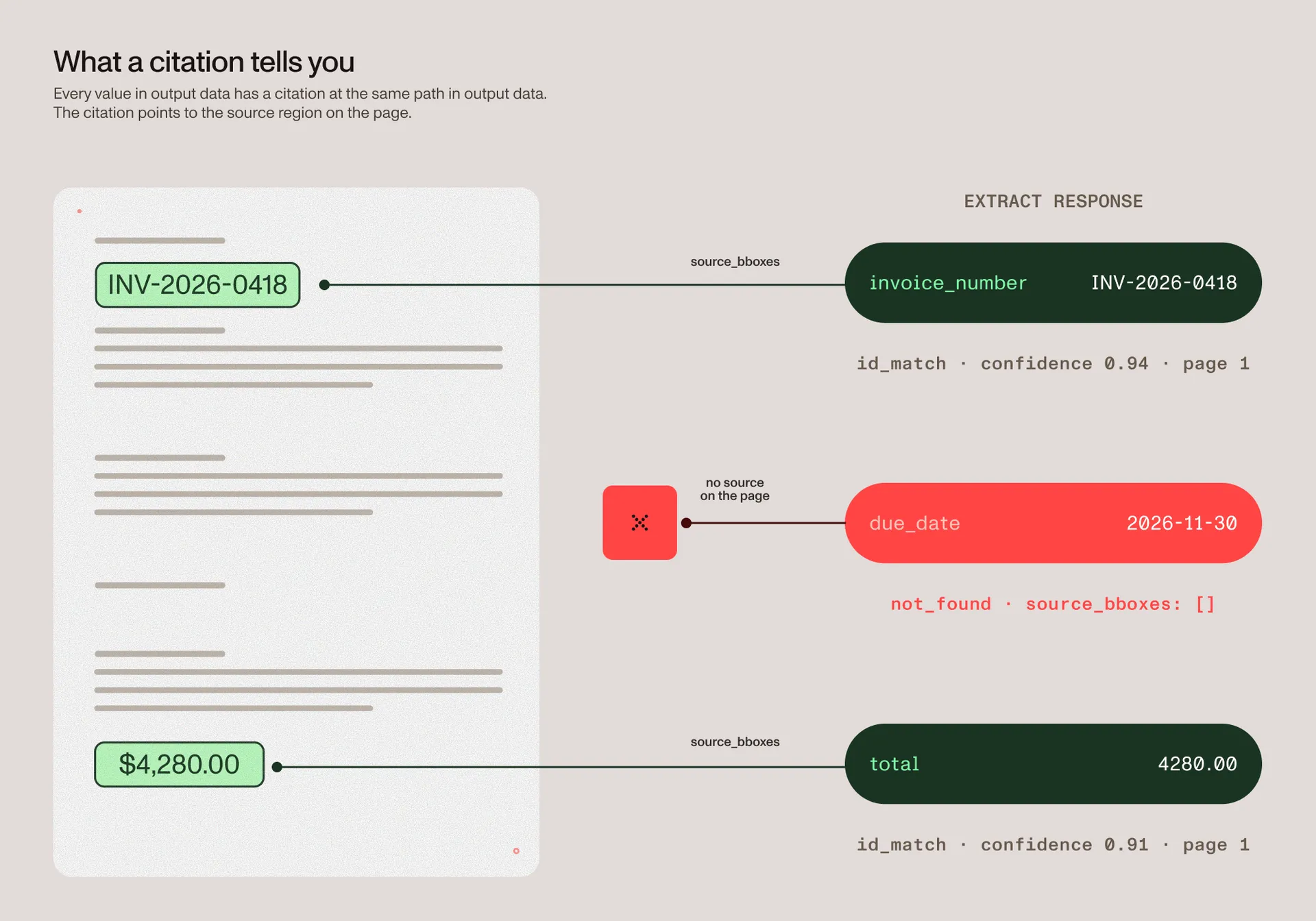
Each citation can include the following signals.
| Field | What it tells you |
|---|---|
match | How the API grounded the value, from an exact match to not_found. |
source_bboxes | The exact source regions, each with a page number. Empty when the value isn’t found. |
bbox | A legacy box: the union of the source regions on the first cited page. It can be very large. |
confidence | A composite score from zero to one, built on whether the cited source text supports the value, when available. |
confidenceComponents | The signals behind the score, such as groundingScore and formatScore. |
recognitionScore | How legible the source text was to optical character recognition (OCR) on scanned content. |
pageNumber | The page the value came from. |
Here’s a trimmed, illustrative response for an invoice with no due date. The invoice number is grounded. The due date isn’t:
{ "output": { "data": { "invoice_number": "INV-2026-0418", "due_date": "2026-11-30" }, "metadata": { "invoice_number": { "match": "id_match", "confidence": 0.94, "pageNumber": 1, "bbox": { "x": 878, "y": 268, "width": 140, "height": 25 }, "source_bboxes": [ { "bbox": { "x": 878, "y": 268, "width": 140, "height": 25 }, "block_id": "c5", "pageIndex": 0, "pageNumber": 1 } ] }, "due_date": { "match": "not_found", "source_bboxes": [] } }, "pages": [{ "page": 1, "width": 1200, "height": 1697 }] }}The value 2026-11-30 passes any schema check. The citation shows that there’s nowhere on the page it came from.
Start with the match label
The match label is the clearest grounding signal. Unlike a score, it has a plain meaning, so it’s easy to turn into rules.
| Match label | What it means | Risk | Suggested action |
|---|---|---|---|
id_match | Matched one source block exactly. | Low | Accept if the confidence passes your threshold. |
id_match_multiblock | Matched text across several source blocks. | Low | Accept if the confidence passes. Highlight every source box. |
id_match_partial | Found some, but not all, cited source blocks. | Medium | Send to review, or accept only for low-risk fields. |
fuzzy_match | Close to the source text, but not identical. | High | Send to review. Look for misreads and changed values. |
not_found | The API couldn’t find a source location. | Highest | Never accept automatically. |
A not_found label is the closest thing to a hallucination alarm the API gives you. It means the API couldn’t find the returned value on the page. Treat that value as unverified, however reasonable it looks.
A field that comes back empty, or that the API leaves out, is different. That’s the correct “not in the document,” and it’s what you want for a missing field.
Read confidence as evidence strength
Nutrient’s confidence is a composite score built on natural language inference (NLI) groundedness. Rather than measuring only how sure the model felt, it also checks whether the cited source text supports the returned value. The post on document extraction confidence scores explains how it works.
This difference matters for hallucinations because a model can be very sure about a value it took from the wrong column. A grounding signal checks whether the text at this location actually says it.
Three rules keep the score useful:
- It’s relative, not a probability. The score runs from zero to one, but it isn’t a percentage. Don’t show it to users as one.
- A missing score isn’t a low score. If
confidenceis absent, no score was available for that field. Rely on the match label instead. - Thresholds belong to fields. Pick them from a labeled sample of your own documents. Totals and IDs need stricter thresholds than free-text fields.
When the engine provides it, the confidenceComponents object shows what drove the score. groundingScore reports how well the value is grounded in a source location. formatScore reports how well the value fits its declared type or format. probabilityScore and marginScore report the model’s own certainty and how far its top answer led the next-best one. When a field fails, these components tell you where to look first.
Check the recognition score on scans
For scanned pages, recognitionScore reports how legible the source text was to OCR. It takes the lowest recognition score across the matched source blocks, so one blurry region pulls the whole field down. A low value is a strong hint for the misread kind of hallucination.
The API omits recognitionScore for born-digital text, for not_found values, and for values that only a VLM read. Its absence isn’t a warning on its own.
Run the grounding check yourself
Nutrient publishes its grounding models on Hugging Face. The English model, grounding-en(opens in a new tab), is open under the Apache 2.0 license. You give it a passage from a document and a claim, such as a number or a date, and it scores how strongly the passage supports the claim.
You can use it to check values from any pipeline, including your own LLM prompts. A commercially licensed sibling, grounding-multilingual(opens in a new tab), powers the confidence scores in the Data Extraction API.
Add business rules the document can’t check for you
Grounding tells you that a value exists on the page. It can’t tell you that the value makes sense. A transformed value can point at the right cell and still be wrong, for example, when the table header says “amounts in thousands.”
Business rules catch this kind of error. Useful rules for most document types include:
- Reconcile totals. Line items add up to the subtotal. The subtotal plus tax equals the total.
- Check dates. A due date comes after the issue date. A policy end date comes after its start date.
- Check formats. The schema supports
enumandformat: "date"for strings, but not patterns. Check tax IDs, International Bank Account Numbers (IBANs), and policy numbers in your own code. - Check ranges. The schema doesn’t support minimum or maximum values. Reject negative quantities and impossible percentages in code.
- Compare with your records. A vendor name should match a known vendor. A policy number should exist in your system.
Cross-field math works especially well because a hallucinated line item rarely adds up to the right total by accident.
Put it together: A detection function in Python
The full check runs in layers. Each layer catches a different kind of hallucinated value, and anything that fails goes to review with its reason.
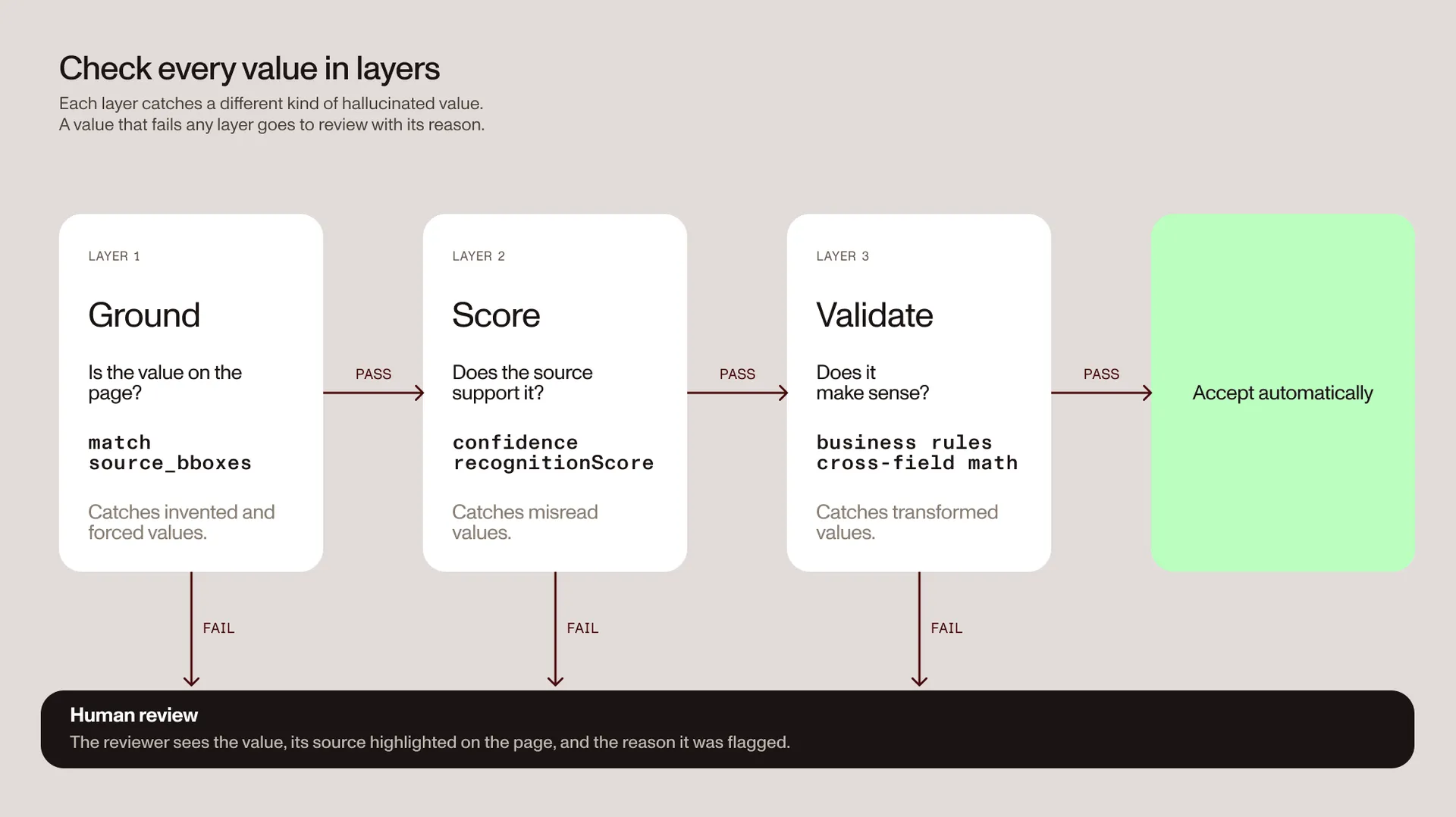
The following example extracts an invoice and checks every field. It uses the match label, per-field confidence thresholds, and two reconciliation rules. It returns a decision and the reasons behind it:
import json
import requests
API_URL = "https://api.nutrient.io/extraction/extract"API_KEY = "your_api_key_goes_here"
SCHEMA = {    "type": "object",    "properties": {        "invoice_number": {            "type": "string",            "description": "Invoice identifier exactly as printed.",        },        "invoice_date": {            "type": "string",            "format": "date",            "description": "Date the invoice was issued.",        },        "due_date": {            "type": "string",            "format": "date",            "description": "Payment due date. Leave empty if the invoice doesn't state one.",        },        "subtotal": {            "type": "number",            "description": "Sum of all line items before tax.",        },        "tax": {"type": "number", "description": "Total tax amount."},        "total": {            "type": "number",            "description": "Grand total at the bottom of the invoice, including tax.",        },        "line_items": {            "type": "array",            "description": "One entry per row in the line-item table.",            "items": {                "type": "object",                "properties": {                    "description": {"type": "string"},                    "amount": {"type": "number"},                },            },        },    },    "required": ["invoice_number", "total"],}
INSTRUCTIONS = (    "Extract values exactly as shown. "    "Do not infer, calculate, or fill in missing values.")
# Stricter thresholds for fields that move money. Calibrate on your own sample.THRESHOLDS = {"invoice_number": 0.9, "total": 0.9, "subtotal": 0.85, "tax": 0.85}DEFAULT_THRESHOLD = 0.7REVIEW_MATCHES = {"id_match_partial", "fuzzy_match"}

def extract_invoice(path):    """Send an invoice to the extract endpoint and return the output."""    instructions = {        "schema": SCHEMA,        "instructions": INSTRUCTIONS,        "parseConfig": {"mode": "understand"},        "options": {"strict": True, "includeCitations": True},    }    with open(path, "rb") as document:        response = requests.post(            API_URL,            headers={                "Authorization": f"Bearer {API_KEY}",                "x-nutrient-api-version": "2026-05-25",                "x-nutrient-engine-version": "stable",            },            files={"file": document},            data={"instructions": json.dumps(instructions)},            timeout=300,        )    response.raise_for_status()    return response.json()["output"]

def iter_fields(data, metadata, path=""):    """Yield (path, value, citation) for every scalar value."""    if isinstance(data, dict):        for key, value in data.items():            child = metadata.get(key, {}) if isinstance(metadata, dict) else {}            yield from iter_fields(value, child, f"{path}.{key}" if path else key)    elif isinstance(data, list):        for index, value in enumerate(data):            in_range = isinstance(metadata, list) and index < len(metadata)            child = metadata[index] if in_range else {}            yield from iter_fields(value, child, f"{path}[{index}]")    else:        yield path, data, metadata if isinstance(metadata, dict) else {}

def check_grounding(output):    """Flag values that the document doesn't clearly support."""    flags = []    for path, value, citation in iter_fields(        output["data"], output.get("metadata", {})    ):        if value is None:            continue  # An empty value is an honest "not in the document."        match = citation.get("match")        confidence = citation.get("confidence")        threshold = THRESHOLDS.get(path, DEFAULT_THRESHOLD)        if not citation:            flags.append((path, "no citation returned"))        elif match == "not_found":            flags.append((path, "value not found in the document"))        elif match in REVIEW_MATCHES:            flags.append((path, f"weak grounding: {match}"))        elif confidence is not None and confidence < threshold:            flags.append((path, f"confidence {confidence:.2f} is below {threshold}"))    return flags

def check_business_rules(data, tolerance=0.01):    """Flag values that are grounded but don't add up."""    flags = []    for field in SCHEMA["required"]:        if data.get(field) is None:            flags.append((field, "required value is missing"))
    amounts = [item.get("amount") for item in data.get("line_items") or []]    subtotal, tax, total = data.get("subtotal"), data.get("tax"), data.get("total")
    if amounts and None not in amounts and subtotal is not None:        if abs(sum(amounts) - subtotal) > tolerance:            flags.append(("subtotal", "line items don't add up to the subtotal"))
    if None not in (subtotal, tax, total):        if abs(subtotal + tax - total) > tolerance:            flags.append(("total", "subtotal plus tax doesn't equal the total"))
    # ISO dates (YYYY-MM-DD) compare correctly as strings.    issued, due = data.get("invoice_date"), data.get("due_date")    if issued and due and due < issued:        flags.append(("due_date", "due date is before the invoice date"))
    return flags

def check_invoice(path):    """Extract an invoice and decide whether it can skip review."""    output = extract_invoice(path)    flags = check_grounding(output) + check_business_rules(output["data"])    return {        "decision": "review" if flags else "accept",        "flags": flags,        "data": output["data"],    }

if __name__ == "__main__":    print(json.dumps(check_invoice("invoice.pdf"), indent=2))
A few details make this safe to run at volume:
- Missing values pass. A field that’s left out or empty is the correct answer for a value the document doesn’t have, so it isn’t flagged.
- Values without evidence don’t pass. A value with a
not_foundlabel is flagged, even when it looks plausible. - Thresholds are per field. Money fields get stricter cutoffs than descriptive text. Replace the numbers with values from your own labeled sample.
- Versions are pinned. The two version headers keep the API contract and engine stable. A change in results then points to a change in your documents.
For the full request template, error handling, and audit logging, refer to the production structured extraction guide.
Prevent hallucinations at the source
Detection catches bad values, and a careful request design creates fewer of them.
- Mark fields as required only when every document has them. The API can leave out a field that isn’t required when the document doesn’t contain it. A required field removes that option and pushes the model to fill the gap.
- Give required enum fields a way to say the value is missing. If a required enum field can be missing from the document, add a value such as
not_stated. For required yes-or-no questions, use a string enum such asyes,no, andnot_statedinstead of a Boolean. - Point descriptions at the right place. Say where the value is — for example, “the grand total at the bottom of the invoice” or “the value in the leftmost column.” Vague descriptions invite values from nearby fields.
- Tell the model not to guess. Add a document-level
instructionsstring, such as “Extract values exactly as shown. Do not infer missing values.” - State scale and sign rules. If tables use thousands or show negative numbers in parentheses, say what you want returned.
- Use a parse mode that can read the page.
textmode runs no OCR, so a scan gives the model nothing to read. Use the defaultunderstandmode for most documents andagenticfor degraded scans or cursive handwriting. - Use multimodal extraction when layout carries meaning.
options.multimodal: truesends page images to the extraction model with the parsed text. It helps when a field’s meaning depends on its position, but it adds cost and time.
Since the 2026.10.1 release, the Data Extraction API runs OCR alongside vision model analysis on scans and resolves disagreements between the two. That reduces misreads, but it doesn’t remove them. Even agentic output can be confidently wrong on ambiguous handwriting, so keep the checks above in place.
For field types and limits, refer to the define a schema guide. For modes and language hints, refer to the parse configuration guide.
Show reviewers the evidence, not just the value
Some fields will always need a person. Review is fast when the reviewer sees the source. It’s slow when they have to search the whole document for it.
A good review item contains:
- The field name, the extracted value, and the expected type.
- The page, with the source region highlighted.
- The match label, the confidence score, and the recognition score.
- The rule that sent the field to review.
- A way to correct the value and record the decision.
Draw source_bboxes, not bbox. For values that span several blocks, bbox is a legacy union of the source regions on the first cited page, and it can cover most of the page. Coordinates use a top-left origin. When a page reports its width and height, coordinates are in render-space pixels. Scale them with one factor: the display width divided by the page width. The coordinate spaces guide has the formulas.
You can see this kind of highlight while you design a schema. In Data Extraction Studio(opens in a new tab), hover over an extracted field, and Studio highlights the region it came from. In production, draw the same source_bboxes as overlays in your own review UI — for example, one built with Nutrient Web SDK. Nutrient Workflow Automation, sold separately, adds no-code approval steps.
Measure your hallucination rate
You can’t set good thresholds without data. Build a labeled sample for each document type, and include the hard cases: faxed scans, missing fields, unusual layouts, and handwriting.
Then track three numbers:
- Flag rate. The share of fields with a
not_foundorfuzzy_matchlabel, or a score below the threshold. - Escape rate. The share of auto-accepted values that turn out to be wrong. This number should be close to zero.
- Review volume. The number of fields people check each day. This is the cost of your thresholds.
Log requestId for every request, and send storeRun: true to get a runId for stored runs. Log the API version, engine version, schema version, and parse mode too. When the flag rate for one document type starts to rise, the incoming documents have probably changed. You’ll see it weeks before anyone finds a wrong value downstream.
Common mistakes to avoid
These mistakes let hallucinated values through, even when the citations are in the response:
- Trusting a value because it looks reasonable. Hallucinated values usually look plausible. Check the match label.
- Reading confidence as a percentage. A score of 0.92 isn’t a 92 percent chance of being right.
- Treating a missing score as a low score. Absent means “no score available.” Route on the match label instead.
- Copying thresholds between document types. A cutoff that works for invoices may be too loose for medical forms.
- Marking every field as required. Required fields force the model to answer, so a missing value becomes a filler value.
- Highlighting
bboxinstead ofsource_bboxes. A large union box hides where the value came from.
Conclusion
Hallucinated values are a normal failure mode of AI extraction. You can’t prompt them away completely, but you can make them visible.
Ground every value, read the match label before the score, add business rules for the errors grounding can’t see, and show reviewers the source. A hallucinated value then becomes a flagged field instead of a silent error in your downstream system.
The Data Extraction API returns citations and match labels for every field by default, plus grounding-based confidence scores when available. You can test it on your own documents with 5,000 free credits every month.
FAQ
Extraction hallucination detection is the process of checking each extracted value against its source document before you use it. It flags values that are invented, misplaced, misread, transformed, or forced by the schema. The most reliable method is grounding: Tie every value to a region on the page, and send any value you can’t trace to review.
Use layered checks. First, check that each value is grounded to a source region. With Nutrient, that’s the match label in each citation. Second, compare the confidence score with a per-field threshold. Third, apply business rules, such as totals that must add up. Send everything that fails to human review with the source highlighted.
No. Strict mode and schema validation make sure the output has the right shape and types. A hallucinated value usually has the right shape. A made-up date is still a valid date, so you also need grounding checks against the document.
Not by itself. Nutrient’s confidence score is built on whether the cited source text supports the value, not only on model certainty. But it’s a relative signal, not a probability. A value can be well supported by the wrong cell, so check where the highlight lands and apply business rules to high-stakes fields.
not_found match label mean?It means the Data Extraction API couldn’t ground the value to any location in the document. If the value is empty, that’s the correct “not in the document.” If the field has a value anyway, treat it as unverified and send it to review.
Yes. Nutrient’s English grounding model, grounding-en, is open under the Apache 2.0 license on Hugging Face. It scores how strongly a passage from a document supports a claim, such as a number or a date. You can run it on values from any extraction pipeline.
Yes, for high-stakes fields. Grounding, confidence, and business rules reduce how many values need a person, and they make each review faster. They don’t replace judgment on fields where a wrong value is expensive.