Process mapping examples: Eight real workflows you can automate today (2026)

Table of contents

- Eight process mapping examples across finance, HR, legal, procurement, IT, sales, and marketing — each with a visual flowchart
- What process mapping is and when to use it
- How to turn static process maps into automated workflows with Nutrient Process Builder
A process map is a visual representation of how work moves through an organization — who does what and in what order, and where decisions, handoffs, and delays occur. Process mapping exposes the informal approvals, the manual copy-paste between systems, and the “I always email Sarah because she catches mistakes.”
But most process maps end up as documentation that nobody maintains. The real value comes when the map doesn’t just describe the process but becomes the automation.
This guide covers what process mapping is, the standard symbols of process mapping, and eight real examples across different business functions. Each example includes the process flow and shows how it translates from a static diagram to a running workflow.
What is process mapping?
Process mapping is the practice of creating a visual diagram that shows every step in a business process from start to finish. It uses standardized shapes connected by arrows to show the sequence of tasks, decision points, and handoffs between people or teams.
When a process exists only as shared knowledge — in people’s heads, in email habits, in “the way we’ve always done it” — it’s impossible to analyze, improve, or automate. A process map makes the structure explicit so you can spot bottlenecks, eliminate unnecessary steps, and find opportunities for automation.
Process mapping goes by several related names: business process mapping, workflow mapping, process flow diagrams, and value stream mapping.
Process mapping symbols
Process maps use standardized shapes: ovals for start/end points, rectangles for tasks, diamonds for decisions, parallelograms for inputs/outputs, arrows for flow direction, and swimlanes to group steps by role or department. For a full breakdown of each symbol and how to use them, see our workflow diagram guide.
Eight process mapping examples
Each example below includes the function, trigger, why mapping matters, and the key design element that makes the workflow effective.
Example 1: Purchase requisition approval
Function: Finance/procurement
Trigger: Employee submits purchase request
Why map it: Purchase approvals are one of the most common bottlenecks. Without a clear process, every request — from a $50 supply order to a $50K equipment purchase — follows the same vague path.
Key design element: The decision diamonds at the dollar thresholds make this process work. They keep senior leaders from reviewing routine purchases while ensuring high-value purchases get proper scrutiny.
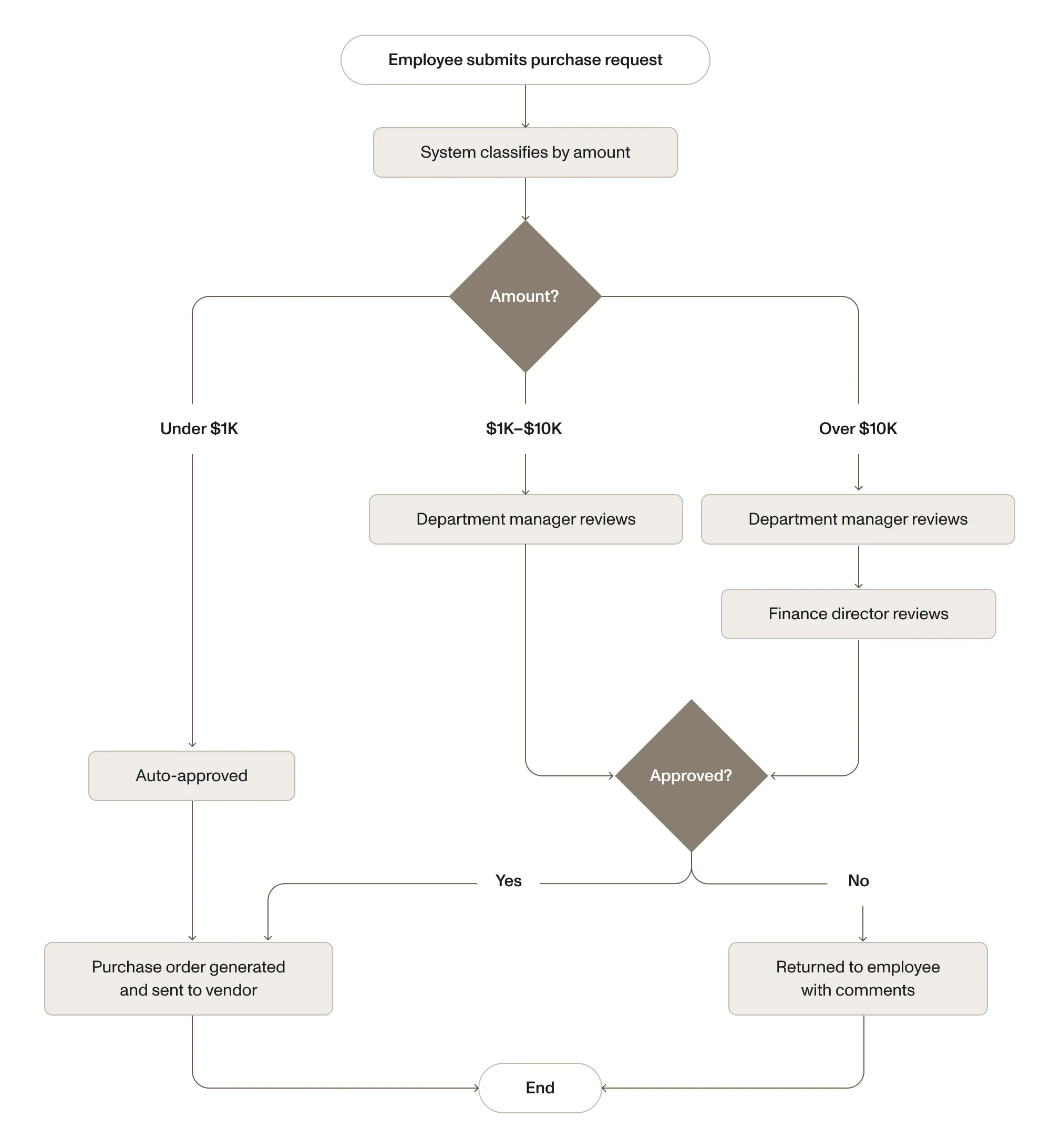
For a deep dive into this process, see our requisition form guide.
Example 2: Employee onboarding
Function: HR
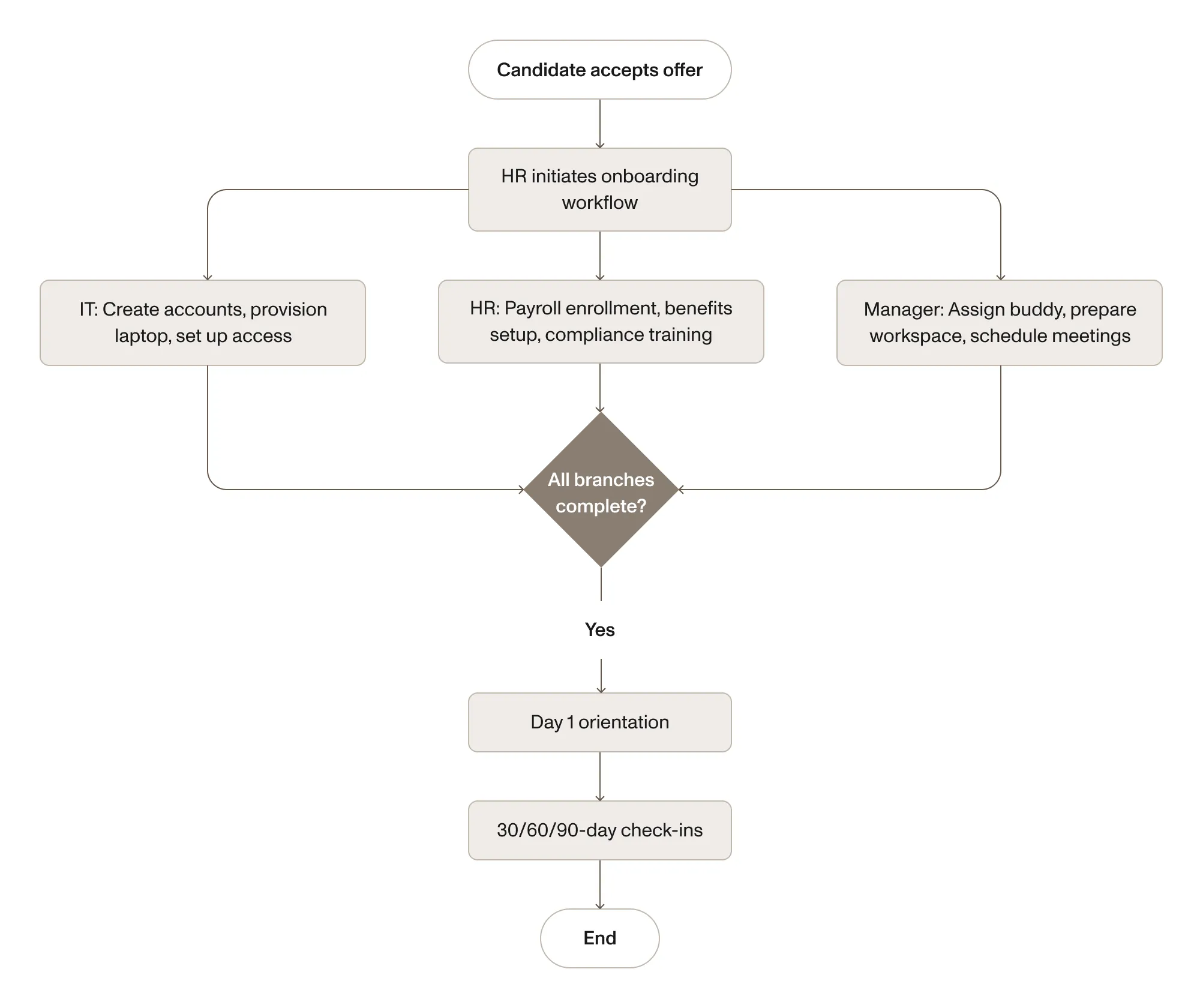
Trigger: Candidate accepts offer
Why map it: Onboarding involves multiple departments acting in parallel. Without a map, tasks happen sequentially by accident — IT waits for HR, HR waits for the hiring manager — and the new hire’s first day is disorganized.
Key design element: The parallel swimlanes. IT, HR, and the hiring manager all work simultaneously, each with their own SLAs. The process doesn’t advance to day one orientation until all three branches are complete.
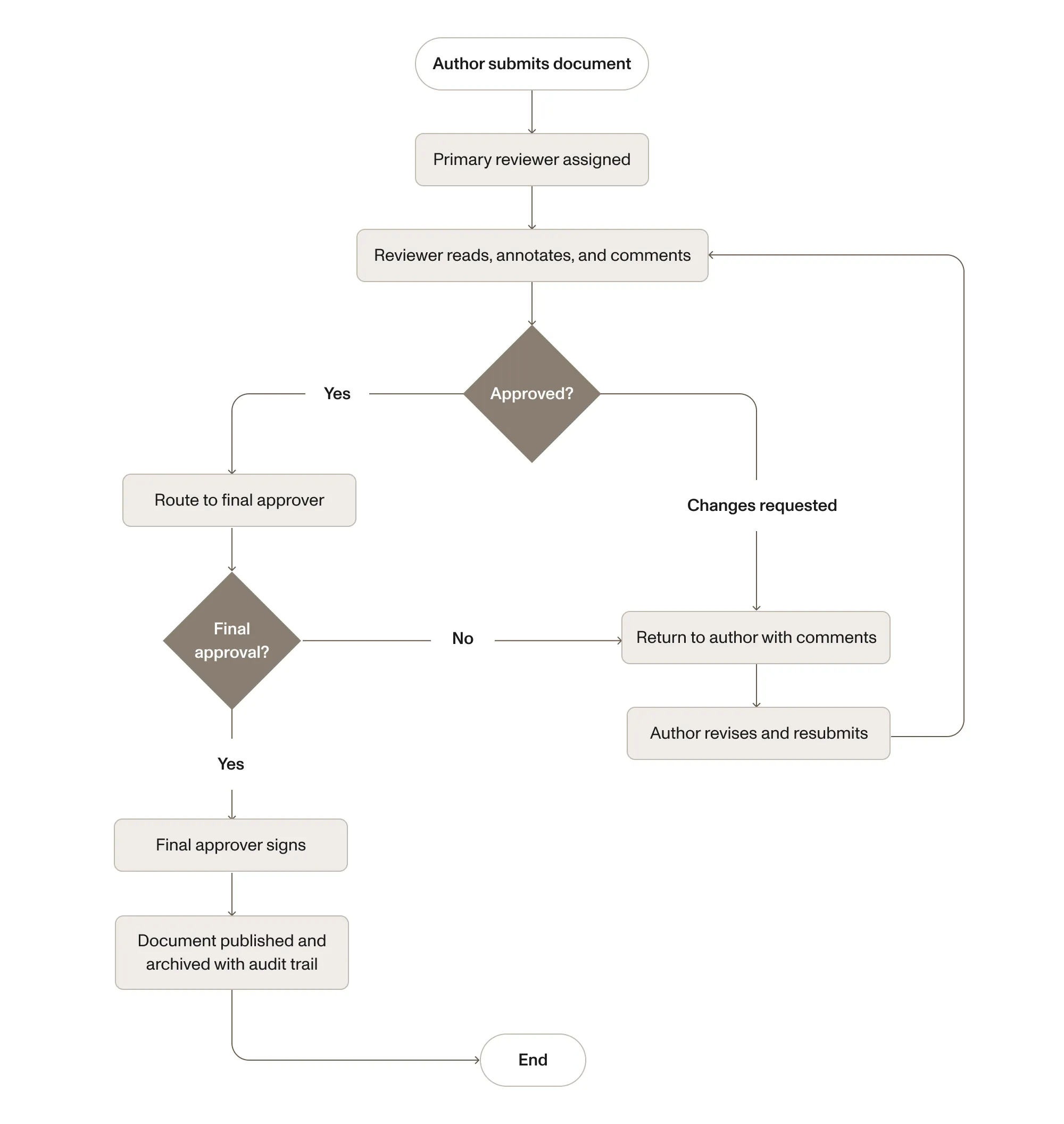
Example 3: Document review and approval
Function: Legal/compliance/operations
Trigger: Author submits document for review
Why map it: Document review processes suffer from version confusion (someone reviews an outdated draft), missing audit trails, and nobody knowing who currently has the document.
Key design element: The revision loop. Most process maps show a happy path, but documents typically go through 2–3 rounds of revision. The loop must be explicitly mapped, with clear rules about whether a revision restarts the entire chain or returns only to the reviewer who flagged changes.
For more on automating this process, see our document approval workflow guide.
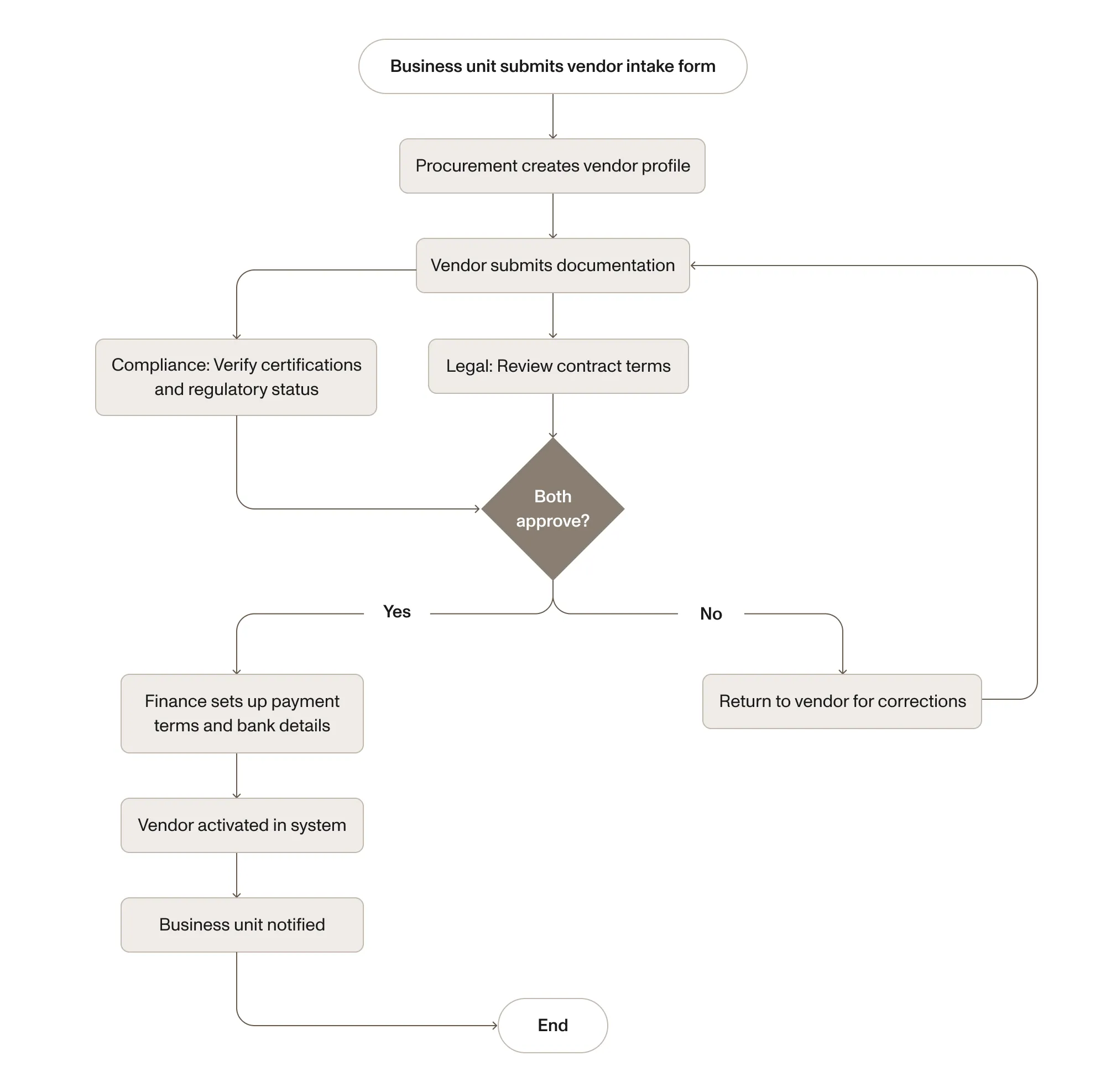
Example 4: Vendor onboarding
Function: Procurement/compliance
Trigger: Business unit requests a new vendor
Why map it: Vendor onboarding involves cross-functional checks (procurement, legal, compliance, finance) that often happen out of order or get skipped entirely.
Key design element: The vendor intake form is the trigger — it captures all required vendor information upfront, preventing the back-and-forth emails that typically stretch vendor onboarding to weeks. See our intake form guide for more on designing effective intake processes.
Try Nutrient Workflow Automation free for 14 days.
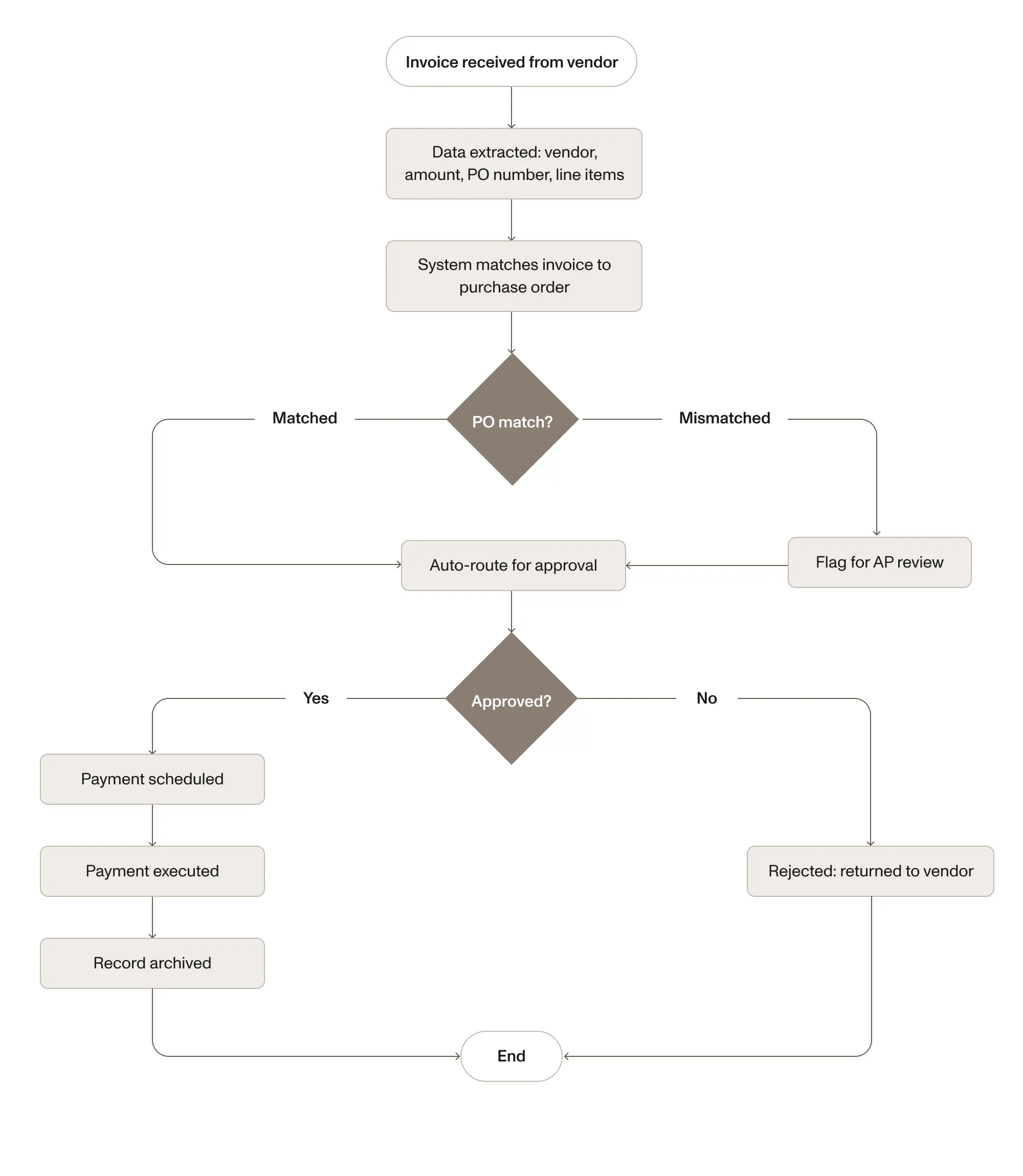
Example 5: Invoice processing
Function: Accounts payable
Trigger: Invoice received from vendor
Why map it: Manual invoice processing is error-prone (wrong amounts, duplicate payments) and slow (approval bottlenecks).
Key design element: The PO-matching step. Automated matching catches discrepancies before the approval chain, saving approvers from reviewing invoices that don’t align with what was ordered. AI-powered data extraction can pull invoice fields automatically, eliminating manual data entry.
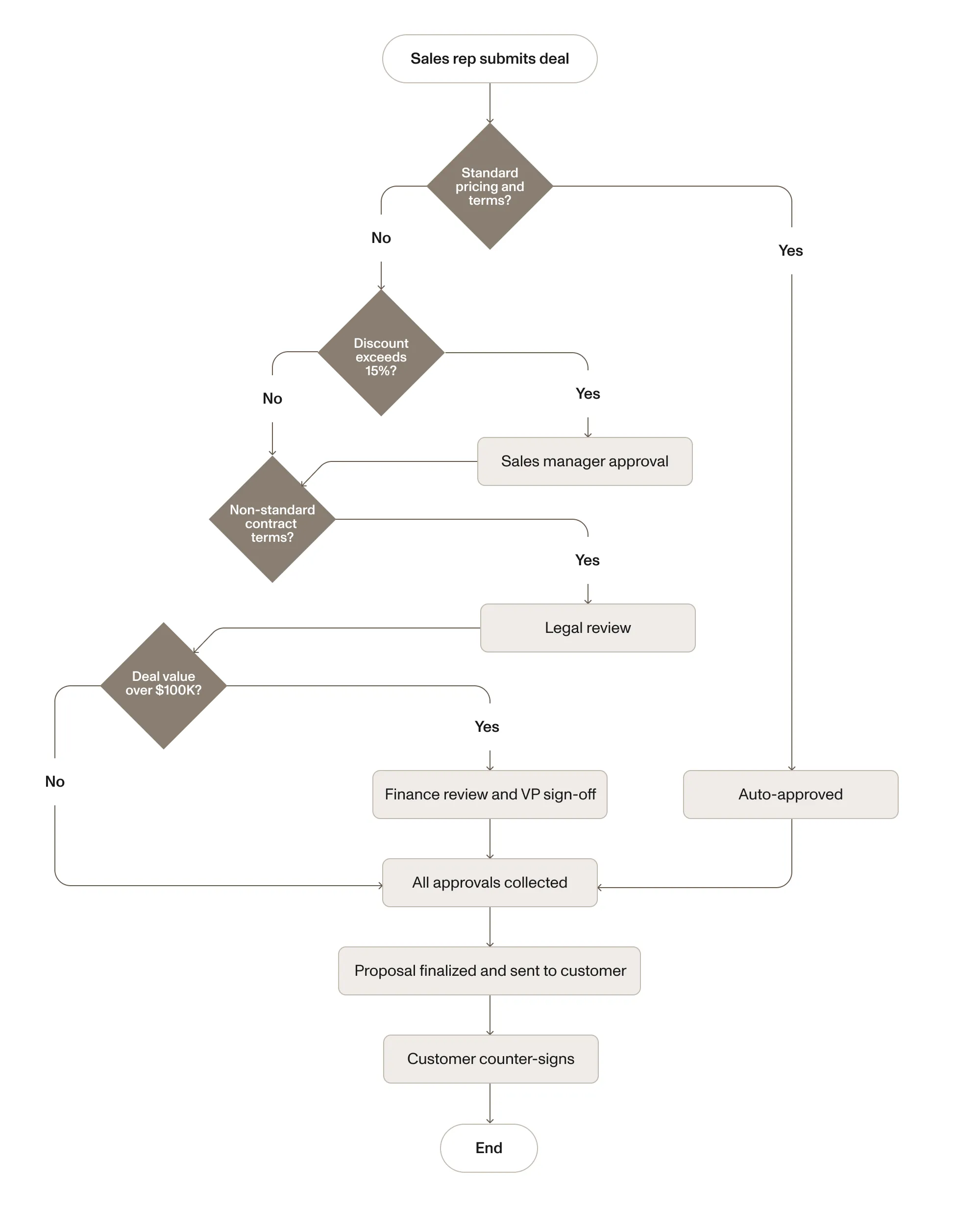
Example 6: Sales proposal approval
Function: Sales/legal/finance
Trigger: Sales representative submits deal for approval
Why map it: Deals stall when pricing, discounts, or non-standard terms need approval from multiple stakeholders who don’t have visibility into each other’s status.
Key design element: The conditional branches. Standard deals clear in minutes. Only exceptions trigger the full review chain. This keeps deal velocity high while maintaining controls on discounting and non-standard terms.
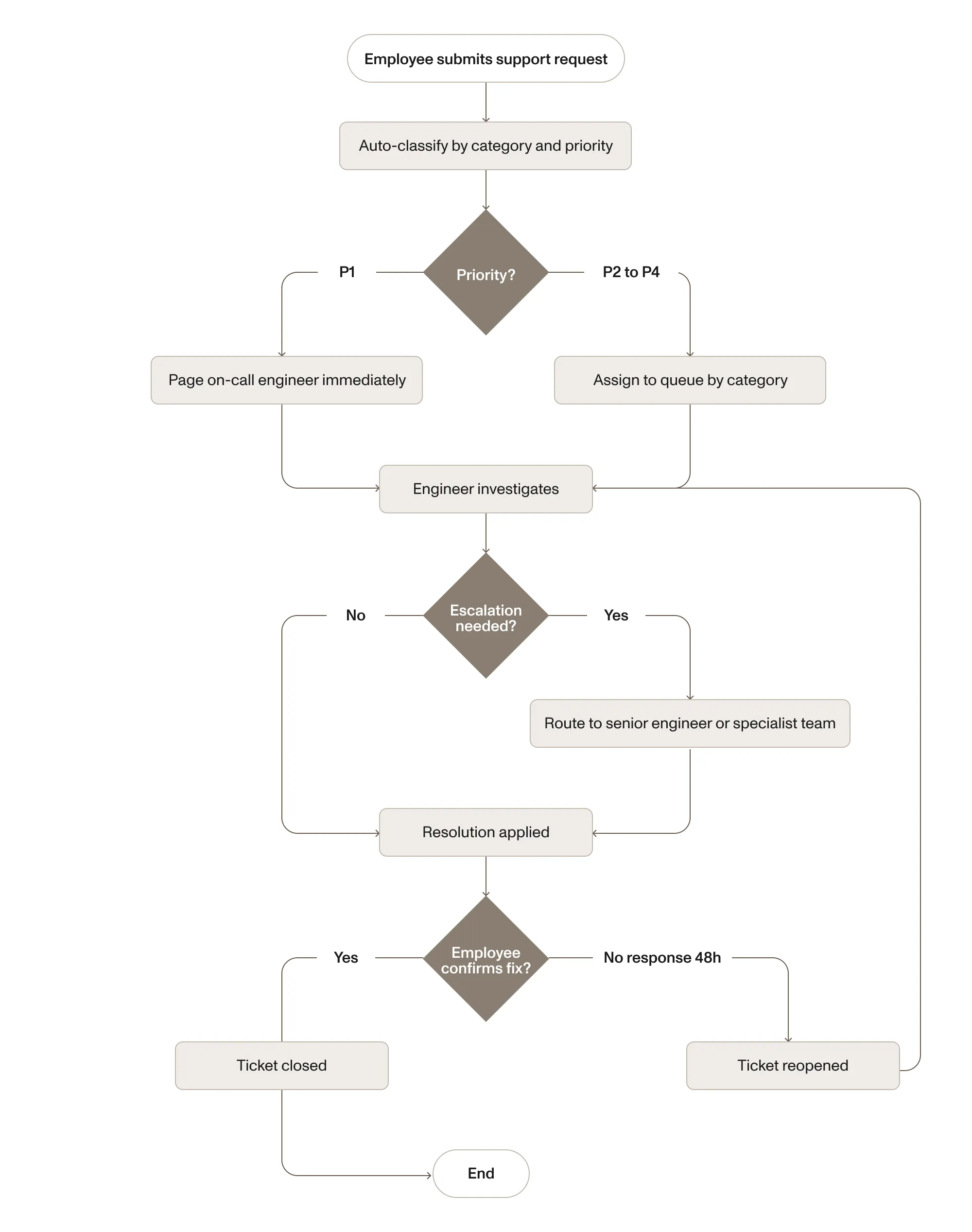
Example 7: IT service request
Function: IT/help desk
Trigger: Employee submits support request
Why map it: IT teams handle hundreds of requests with varying priority. Without process mapping, urgent requests get lost behind routine tickets.
Key design element: The auto-classification. Priority determines the entire downstream process — P1s bypass the queue entirely. Category determines which specialist receives the ticket. Both decisions should be automated based on form fields, not manually triaged.
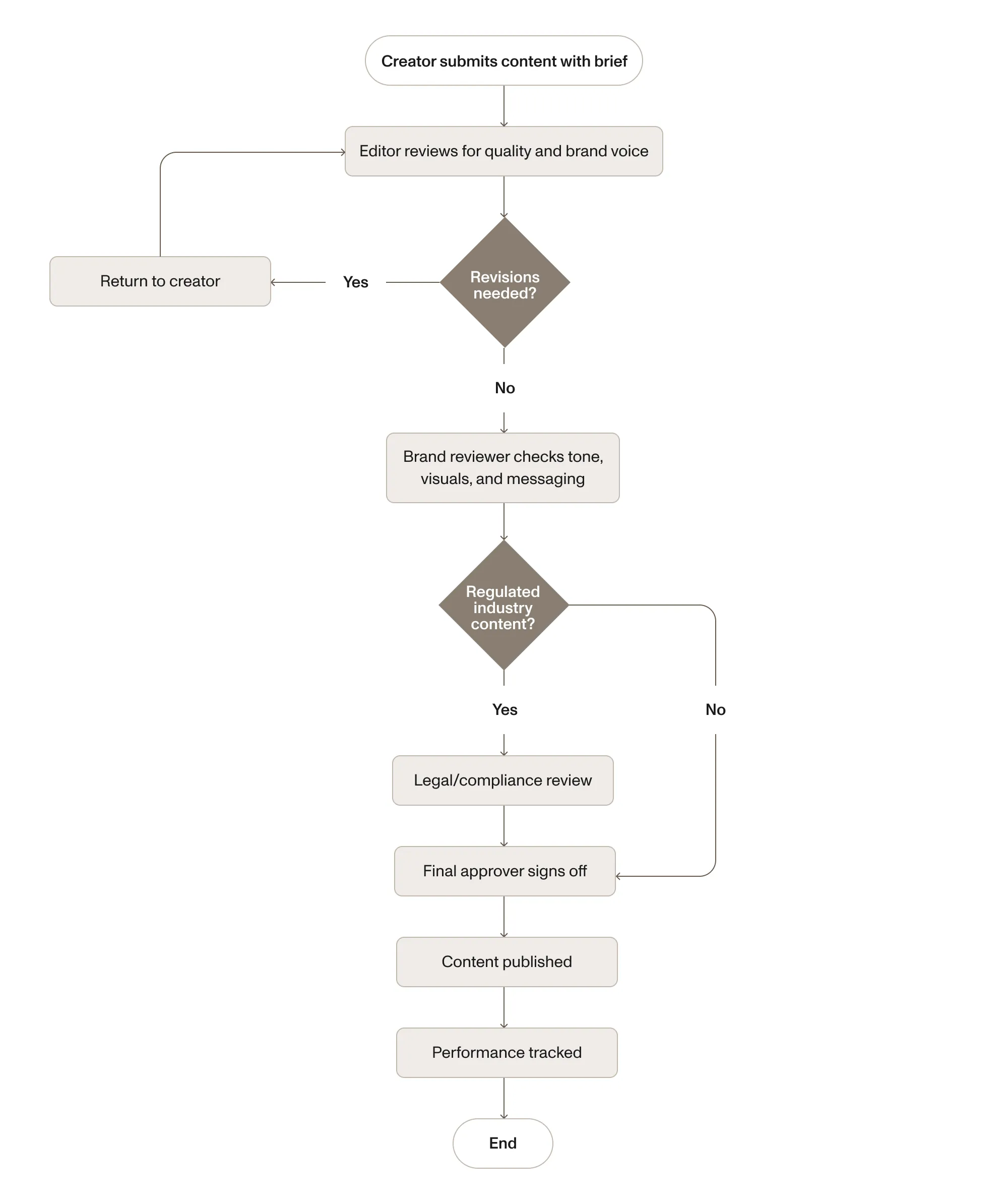
Example 8: Content approval (marketing)
Function: Marketing
Trigger: Content creator submits draft for review
Why map it: Content goes through brand review, legal review (for claims and compliance), and stakeholder approval. Without a process map, content stalls in inboxes waiting for review.
Key design element: The legal/compliance branch is conditional — only triggered for content that makes claims, references competitors, or targets regulated industries. This keeps the approval process lightweight for routine content while adding oversight where it’s legally required.
From process map to automated workflow
Every example above can live as a diagram on a whiteboard or as a running process that automates routing, approvals, notifications, and document handling. The difference is whether you’re mapping for documentation or for execution.
Static process maps are valuable for understanding. But the moment someone adds an informal step or skips an approval, the map no longer reflects reality and nobody updates it.
Executable process maps stay accurate because the map is the process. Change the routing rule in the map, and the next request follows the new path. This means there’s no gap between documentation and reality.
How Nutrient Process Builder turns maps into automation
Nutrient’s Process Builder is a visual, drag-and-drop tool that lets you create process maps that execute as real workflows. The map you design — steps, decisions, parallel branches, escalation timers — is the logic that runs. There’s no separate implementation step.
All eight examples can be built in Process Builder: threshold-based routing for purchase approvals, parallel swimlanes for onboarding, revision loops for document review, and conditional branches for sales deals. AI Data Extraction reads invoices and contracts to route based on actual document content. Built-in signing, mobile approvals, and real-time dashboards complete the workflow.
For a detailed look at the platform’s capabilities, see our workflow diagram guide or explore Nutrient Workflow Automation.
Process mapping templates
The eight examples above follow five common patterns: linear approval, threshold-based routing, parallel review, revision loops, and escalation chains. For a detailed breakdown of each pattern and when to use it, see the templates section of our workflow diagram guide.
Key takeaways
Process mapping makes business processes visible and analyzable. The eight examples above cover the most common patterns across finance, HR, legal, procurement, IT, sales, and marketing — and every one of them can move from a static diagram to an automated workflow.
The biggest insight from mapping any process is usually the handoffs. Every handoff — visible in swimlanes — is a potential delay point. Effective process maps automate handoffs rather than just documenting them.
Explore Nutrient Workflow Automation to build process maps that route, approve, and track automatically.
FAQ
A process map is a visual diagram that shows every step in a business process from start to finish. It uses standardized shapes — ovals for start/end, rectangles for tasks, diamonds for decisions, and arrows for flow direction — to make the structure of a process explicit so teams can analyze, improve, and automate it.
The core symbols are: ovals (start/end points), rectangles (tasks or actions), diamonds (decision points with conditional branches), parallelograms (inputs/outputs), arrows (flow direction), and swimlanes (role or department groupings that show handoffs between people or teams).
Any repeatable business process can be mapped. Common examples include purchase approvals, employee onboarding, document review, vendor onboarding, invoice processing, sales proposal approvals, IT service requests, and content approval workflows.
The terms overlap. A flowchart is the broader category — any diagram showing a sequence of steps. A process map is a flowchart specifically focused on business processes, with emphasis on who performs each step, handoffs between people or teams, and decision-based routing. Process maps frequently use swimlanes to show role assignments.
Yes, with the right tool. Traditional diagramming tools produce static images. Workflow automation platforms like Nutrient let you build a visual process map where each element — tasks, decisions, branches, assignments — executes as real automation. The map you design is the logic that routes requests, assigns tasks, enforces SLAs, and sends notifications.