Document Converter data flow and how real-time watermarks skip the queue

Table of contents
Document Converter routes your data through regional queues, processes it securely, and deletes it immediately. Higher-tier subscriptions unlock higher priority and regional control. Real-time watermarks skip the queue altogether.
Have you ever wondered where your data goes while using Nutrient Document Converter Online?
The long journey of your data
Where exactly does your data travel? This is a common question for customers evaluating our product. If data residency is important to you, read on.
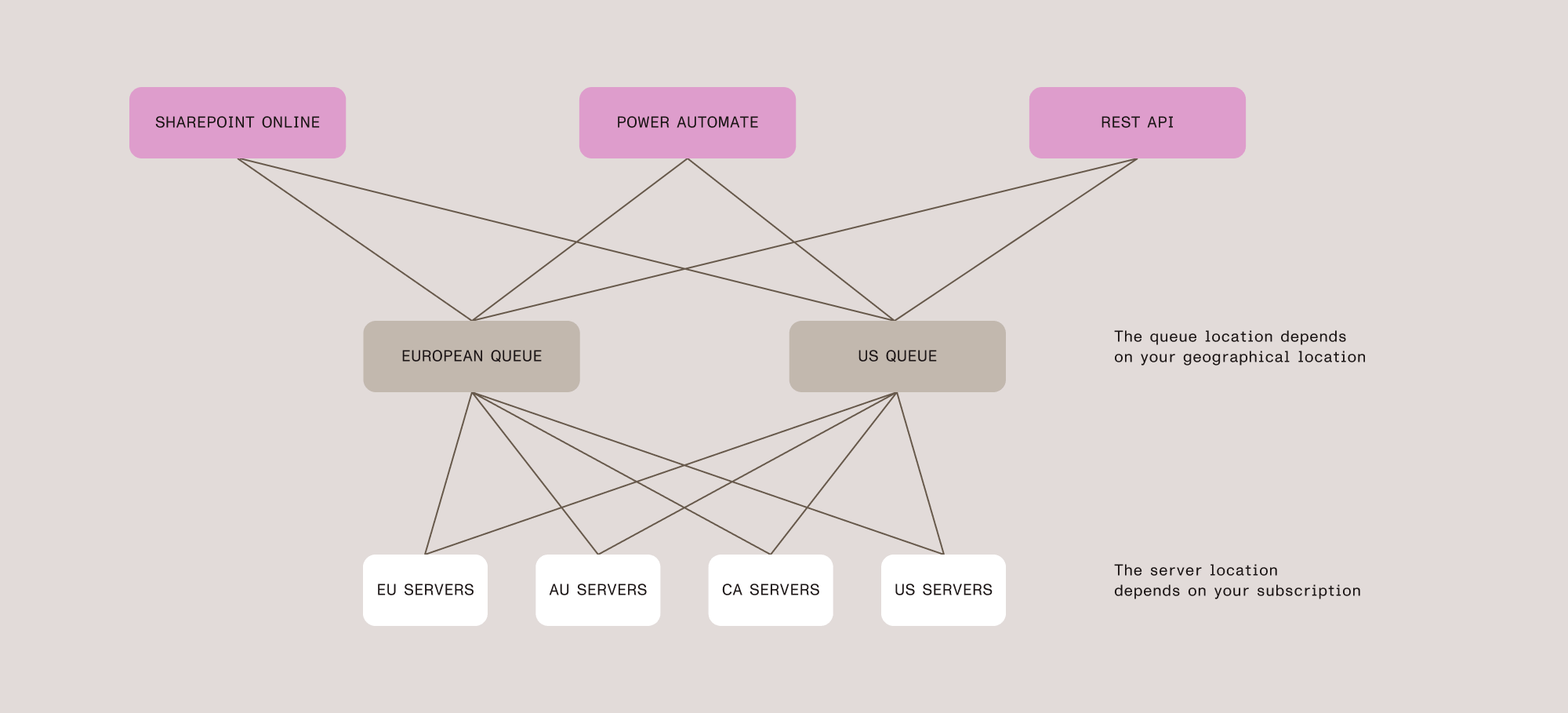
When you connect to Document Converter and initiate an operation from SharePoint Online (via SPFx), Power Automate (a flow), or your own application (using our REST API), certain data is sent to us. Depending on the operation and how you interact with our services, this data consists of either the binary content of your files or a reference to them.
This data is temporarily placed into a processing queue and is picked up by our server farm as soon as processing resources become available. These queues are located in either our European or US data center. The queue your data enters depends on your geographical location: European requests go to the European queue; all other requests go to the US queue.
Once queued, the actual processing location depends on your subscription. If your subscription specifies regional restrictions, your requests are processed only in those regions. Without restrictions, requests are distributed to whichever server — located in Europe, the US, Canada, or Australia — has available capacity.
Your subscription level determines both the processing priority and geographical route of your data. Requests are handled in priority order: Custom subscriptions are processed first, followed by Enterprise, Professional, Trial, and Free. Enterprise and Professional subscriptions also allow you to select your preferred data center region — choosing the nearest region reduces network latency and can improve response times. With Trial or Free subscriptions, your data may be processed in any available region.
Once your data is picked up by one of our servers, it’s either processed directly (when file content is provided) or resolved on your behalf (when a reference is provided). After processing, the result is returned to the same queue from which the request originated, and all temporary files are immediately deleted.
Your original operation then retrieves the result from the outgoing queue, after which that queue is also cleaned up.
How real-time watermarking cuts in line
Higher latency is usually not a problem when work is automated or processed in batches, but it becomes inconvenient during direct user interaction. This is especially true when using Nutrient’s real-time watermarking or securing features in SharePoint Online.
When a user clicks a document, they expect it to open immediately. In reality, the request is intercepted, the document is processed on Nutrient’s servers, and the watermarked (or secured) version is presented instead of the original. If documents had to wait in a queue for several seconds — or even tens of seconds — the user experience would suffer significantly.
Fortunately, the slowest part of any process involving computers and people is usually human interaction. Under normal circumstances, the likelihood of multiple users opening documents in SharePoint Online at exactly the same moment is low. In addition, the watermarking process itself is highly optimized and extremely fast.
This enables us to fast-track real-time watermarking (and securing) requests through a separate, high-priority processing path. In this path, documents bypass the queue entirely — including the priority system — and typically reach the conversion server 4–5x faster than standard requests. This “queue jumping” is reserved exclusively for real-time operations and ensures consistently fast performance — even during peak times, when demand for Nutrient Document Converter is high.
Your data, handled with care
Whether you’re converting documents in bulk or applying real-time watermarks, your data is encrypted in transit and at rest, processed securely, and deleted as soon as the job is complete. No file content is retained — only an audit trail for your records. This audit trail is preserved indefinitely unless you request its removal, in which case all log entries are anonymized. For more details, see our security FAQ.
If data residency is a priority for your organization, upgrading to a Professional, Enterprise, or Custom subscription gives you control over which regions process your data. And if you need instant document processing for end users, real-time watermarking delivers that without compromise.
Ready to get started? Explore our pricing options or try Document Converter today.