Capture, view, annotate, redact, convert, process, compress, and sign all your documents online.
USE CASES
With more than 2,000 functionalities, give your users the ability to do more.
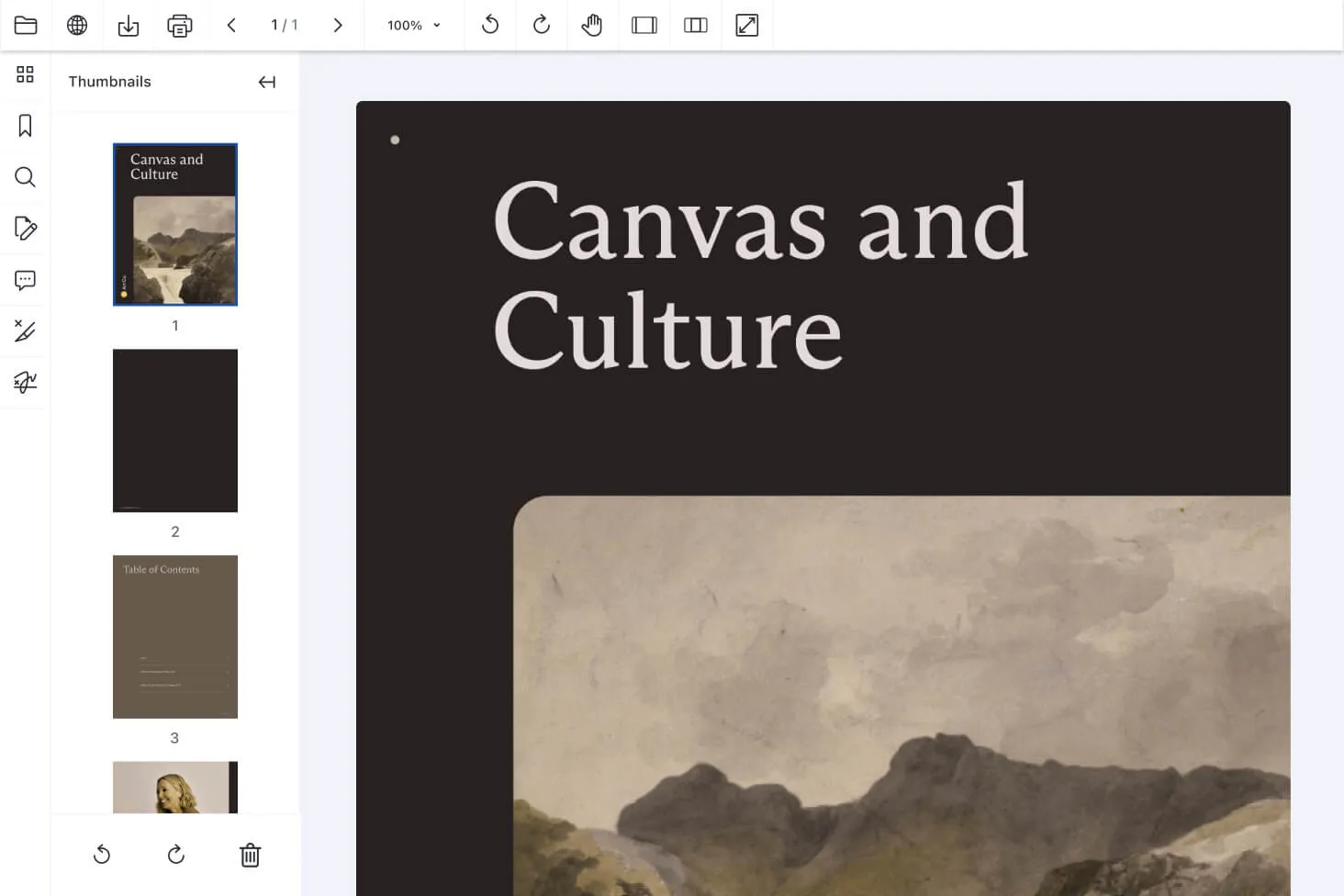
Navigate lengthy documents easily with DocuVieware’s continuous page view. Jump to pages or sections via page numbers, a table of contents, or bookmarks. Manage documents by reordering and deleting pages and using text selection tools. Print and export to PDF or TIFF. Supports custom snap-ins for thumbnails, bookmarks, and link navigation.
Perform advanced searches in documents to quickly find precise information. DocuVieware supports whole-word and case-sensitive searches across pages or an entire document. Results are displayed with context, allowing users to assess their relevance and streamline document investigation.
DocuVieware automatically adjusts its interface language based on the user’s browser settings on all device types. It supports dozens of languages, ensuring users can interact in their preferred language, which enhances accessibility and user experience.
Enable teams to review and discuss documents with threaded annotations and secure digital signatures. HTML5/AJAX control allows real-time viewing and collaboration on formats like PDF, SVG, TXT, and more than 100 image types. With real-time updates, optimized performance, and cross-platform support, DocuVieware boosts teamwork and productivity.
DocuVieware supports digital certificates (PFX, P12, Windows store, smart cards) and saves documents in ISO-compliant PDF/A format for archiving. Customize signatures with options for page, size, color, text, and image. Integrate with ASP.NET, Angular, Node.js, React, PHP, and more. Supports simple, advanced, and qualified signatures per eIDAS regulation.
Capture documents from a local TWAIN scanner and process them in your web app with minimal code. After a one-time software installation to connect TWAIN devices, users can trigger the driver window, process scans using the SDK, and save them as PDF/A or multipage TIFF files.
COMPONENTS
Incorporate everything from custom stamps to freehand notes, shapes, and rulers. Built-in widgets offer effortless text underlining, highlighting, and more — plus, a snap-in for any annotation type you need.
Add comments to any annotation, enabling dynamic, threaded discussions. Seamlessly manage permissions and choose whether to store comments separately or as part of the document.
Sign documents by typing, drawing, or importing your signature. Enhance security with certificates, supporting multiple signatures, timestamps, and SHA-256 encryption.
Manage redaction with customizable permissions. Manually draw marks, add titles and comments, or automate redactions using regional expressions for ultimate control.
Convert more than 100 formats to PDF/A, ensuring compliance with requirements like embedded fonts and platform-independent colors.
Leverage a no-setup scanning snap-in with adaptive compression for optimized, high-quality results. Fully customizable, it supports 32- and 64-bit TWAIN devices, with all acquisition options accessible through the device driver or TWAIN JavaScript API.
Load more than 100 formats from any source — server, client, or remote URI — via HTTP(S) or FTP(S). Enjoy seamless controls with zoom, rotation, fullscreen support, and customizable toolbars for a truly intuitive experience.
View the full bookmarks tree of bookmark-structured PDF files for quick navigation. Quickly jump to the corresponding section or chapter of a document, improving the overall reading and scanning experience.
Choose your preferred thumbnail size for optimal viewing. Print or save selected pages, or apply processing like deskew or punch hole removal to all selected pages at once.
Fill forms programmatically or via the UI. Our API enables creating or editing form fields and supports flattening form fields to integrate data seamlessly into documents.
Perform whole-word, case-sensitive, any word, and fuzzy searches with an indexed search feature and snap-in for managing results.
Accurately select text in searchable documents and copy it to the clipboard for reuse. Highlight, strikeout, or underline the selected text and perform custom operations.
REAL-WORLD IMPACT
Nutrient powers mission-critical document workflows for global enterprises — from compliance-heavy industries to modern SaaS teams.
Uses Nutrient to power annotation and secure distribution of sensitive board materials to directors across jurisdictions.
Renders multipage PDFs and signature tags with Nutrient, keeping 200 million users in 188 countries moving at the speed of eSignature.
Empowers 34,000 pilots to view, annotate, and sign 90-page flight releases on iPad using Nutrient iOS SDK, saving minutes — and money — on every flight.
Yes. DocuVieware includes built-in TWAIN acquisition for HTML5 document scanning. Because a browser cannot talk to a scanner on its own, users install a lightweight local TWAIN connector once; DocuVieware serves the installer itself so the version always matches. Any TWAIN-compliant device works, acquired pages land straight in the viewer, and the result can be saved as PDF/A or multipage TIFF. See the TWAIN acquisition guide for the JavaScript API that customizes the flow.
DocuVieware is a zero-footprint HTML5 viewer, so nothing is installed on the client for viewing, and documents are served from your own .NET application. You control access, editing, viewing, and printing rights; redact content permanently with permission-based redaction; sign with certificate-backed digital signatures; and archive in PDF/A. For full data control, deploy it on-premises as described in the deployment guide.
Yes. DocuVieware ships as on-premises software in Nutrient .NET SDK, through an ASP.NET API for MVC and Web Forms, so your web application and its documents stay on servers you run. A cloud-based service is also available through the PassportPDF ecosystem for teams that prefer zero maintenance.
DocuVieware integrates with ASP.NET Core, ASP.NET MVC and Razor, and ASP.NET Web Forms on the server, and its JavaScript client API works with frontends such as Angular, React, Node.js, and PHP. Step-by-step setup for each stack is in the DocuVieware guides.
DocuVieware is powered by GdPicture.NET, the document imaging and processing engine behind Nutrient .NET SDK. A DocuVieware development license grants access to every GdPicture.NET feature — including OCR, barcode recognition, format conversion, and image processing — so you can load a document in the viewer and process it server-side. Read more in the DocuVieware and GdPicture.NET guide.
Start on the DocuVieware product page for an overview and licensing. Then follow the getting started guide to add the viewer to a .NET web application. A free trial of Nutrient .NET SDK includes DocuVieware.
FREE TRIAL




