Nutrient Data Extraction
Generate image descriptions and alt text with the Java SDK
Turn document images into natural language descriptions programmatically. Generate WCAG-compliant alt text, catalog visual content, and build accessible document workflows. Choose your vision language model — Claude for nuanced reasoning, OpenAI for enterprise scale, or local models for complete data privacy.
Lufthansa
Disney
Autodesk
UBS
Dropbox
IBM
Lufthansa
Disney
Autodesk
UBS
Dropbox
IBM
Image descriptions built for developers
WCAG-compliant alt text
Generate concise, accurate, and contextual image descriptions that meet accessibility standards. Automate alt text for document remediation at scale.
Three VLM providers
Claude for nuanced visual reasoning. OpenAI for enterprise cloud scale. Local models — run in-process with nothing extra to install, or connect to Ollama, LM Studio, or vLLM. Switch with one configuration change.
On-premises with local models
Run vision language models on the same infrastructure as the SDK, with automatic GPU acceleration when available. Documents and images never leave your infrastructure, at zero per-image cost.
Custom prompts and detail levels
Control output with custom prompts and detail levels. Generate one-sentence summaries or detailed visual analysis. Tailor descriptions to your specific use case.
Choose your vision language model
Describe images with Claude
Anthropic Claude delivers nuanced contextual understanding and strong visual reasoning.
- State-of-the-art visual understanding
- Nuanced reasoning about relationships and context
- Customizable prompts for specific description styles
Describe images with OpenAI
Enterprise-grade image understanding with global availability and SLA guarantees.
- Enterprise SLA guarantees and cloud scalability
- Consistent output for automated pipelines
- Well-documented API behavior
Describe images with local AI
Run vision language models on your infrastructure for complete privacy and zero API costs.
- Ollama, LM Studio, or vLLM integration
- Zero per-image costs at any scale
- Any OpenAI-compatible endpoint supported
OCR text extraction
Extract text from images with high-speed OCR alongside image descriptions.
- Fast text extraction with word-level bounding boxes
- Multi-language document support
- Combine with descriptions for full image understanding
Intelligent content recognition
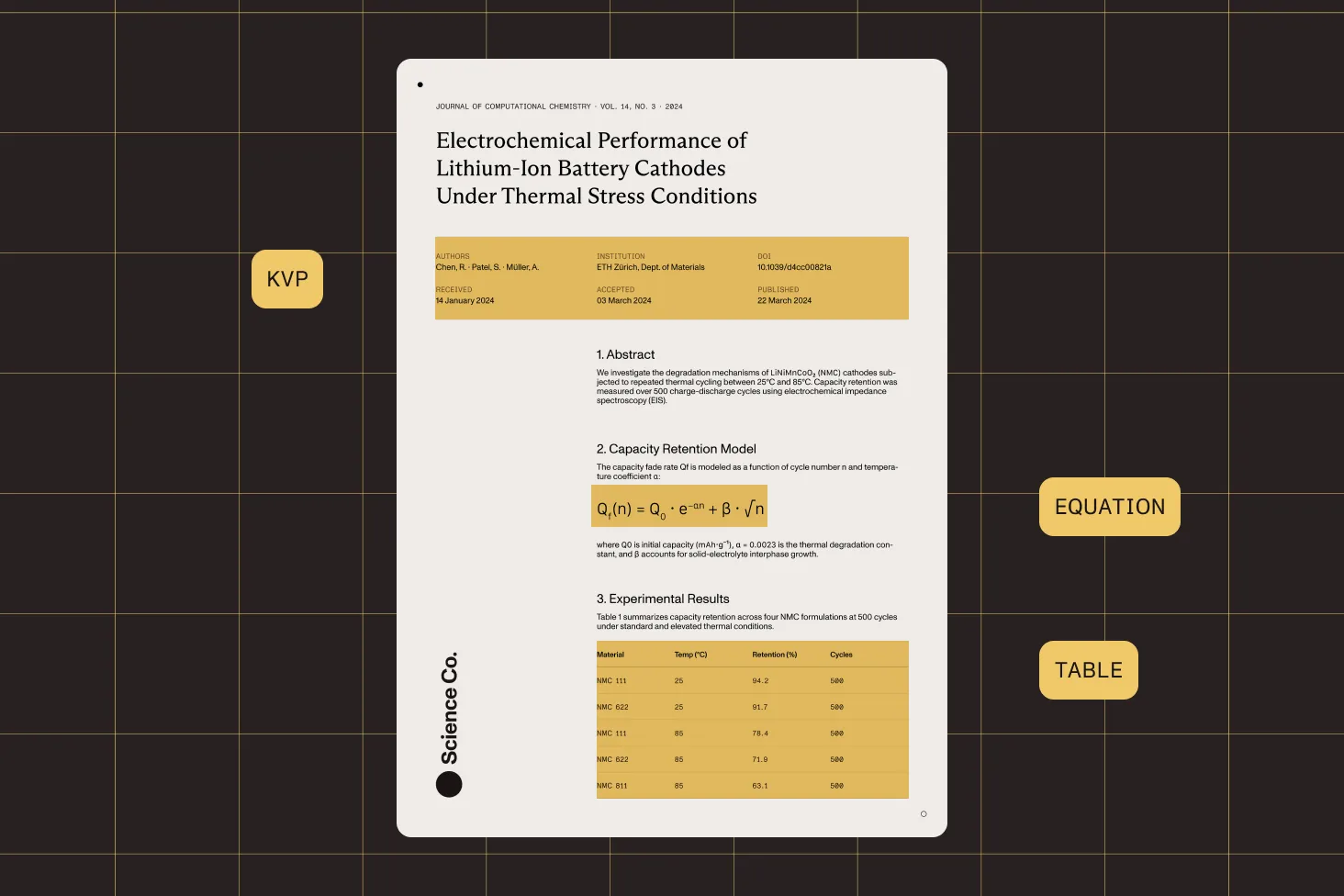
AI-powered document understanding that detects tables, equations, and structure.
- Table, equation, and key-value detection
- 100 percent offline — no external API calls
- Structured JSON output with confidence scores
VLM-enhanced extraction
Combine local AI with vision language models for maximum extraction accuracy.
- Hybrid ICR + VLM approach
- Superior accuracy on complex documents
- Local or custom VLM endpoints
Use cases
Image description fits into document processing workflows wherever visual content needs to be understood, cataloged, or made accessible.
Accessibility
- WCAG alt text
- PDF remediation
- PDF/UA compliance
Content management
- Asset cataloging
- Image tagging
- Searchable media
Document workflows
- Metadata generation
- Content indexing
- Automated summaries
Supported formats
PNG JPEG GIF BMP TIFF PDF PART OF DATA EXTRACTION
Image description is one piece of a complete document intelligence toolkit
Data Extraction also includes OCR for fast text extraction, ICR for AI-powered document understanding, and VLM-enhanced ICR for maximum accuracy on complex layouts. Combine image descriptions with structured data extraction for complete document processing in your Java application.
OCR text extraction
High-speed text extraction with word-level bounding boxes. Optimized for throughput on large document sets.
Intelligent content recognition
On-premises AI that detects tables, equations, key-value regions, and document structure without external API calls.
VLM-enhanced extraction
Combine local AI with Claude, OpenAI, or local models for the highest accuracy on complex financial, legal, and medical documents.
Structured JSON output
Every extraction returns classified elements with bounding boxes, confidence scores, and hierarchical reading order.
Frequently asked questions
What kind of image descriptions does the SDK generate?
The SDK generates natural language descriptions of visual content in images and document pages. Descriptions are concise, accurate, and contextual — focusing on observable details and relationships between objects. You can customize the output with detail levels (brief or detailed) and custom prompts to match your specific requirements, whether that’s accessibility alt text, content cataloging metadata, or detailed visual analysis.
Are the generated descriptions WCAG-compliant?
The descriptions are designed to meet WCAG accessibility guidelines for alt text. They describe observable content accurately and concisely without making assumptions about context that isn’t visible. For document remediation workflows, you can use custom prompts to further tailor descriptions to your organization’s accessibility standards and style guides.
Which vision language model providers are supported?
There are three provider types: Anthropic Claude for strong visual reasoning and contextual understanding, OpenAI for enterprise-grade cloud scalability, and local models for on-premises processing. Local models can run in-process with nothing extra to install, or connect to Ollama, LM Studio, vLLM, and other local inference servers through an OpenAI-compatible custom endpoint. Switch providers with a single configuration change — no code modifications needed.
Can I generate descriptions without sending images to the cloud?
Yes. Run the vision language model in-process with no external server needed, or connect to a local server (Ollama, LM Studio, or vLLM) using the custom endpoint option. Either way, images are processed entirely on your infrastructure with zero data transmitted externally, suitable for HIPAA, GDPR, and air-gapped environments.
Does the local model use GPU acceleration?
Yes, when running in-process, GPU acceleration is used automatically when available, with a fallback to CPU.
What image formats are supported?
The image description feature supports PNG, JPEG, GIF, BMP, and TIFF. The same formats work across all three VLM providers.
How do I control the detail level of descriptions?
The SDK provides configurable detail levels and custom prompts. Use the detail level setting to choose between concise descriptions (1–3 sentences for alt text) and detailed analysis (comprehensive visual breakdown). Custom prompts let you further shape the output — for example, focusing on specific elements, using particular terminology, or following your organization’s style guide.
Can I use image description for digital asset management?
Yes. Image description is well-suited for automated content cataloging workflows. Generate descriptions and metadata for large image libraries, making visual content searchable and organized. Combined with the OCR and ICR engines, you can process entire document archives — extracting text and data while simultaneously generating descriptions for embedded images and figures.
How does this compare to dedicated alt text tools like AltText.ai?
Dedicated alt text tools are typically web-based services designed for content managers and marketers. The Nutrient SDK is a developer tool that integrates image description into your Java application’s document processing pipeline. You get programmatic control, choice of VLM provider (including on-premises), custom prompts, and the ability to combine descriptions with OCR, data extraction, and other document operations in a single workflow.
What are the costs of using different VLM providers?
Claude and OpenAI charge per-request API fees based on their pricing models. Local models have zero per-image API costs, whether run in-process or via Ollama, LM Studio, or vLLM — you only pay for the infrastructure to run them. For high-volume description workflows, local models can significantly reduce costs while maintaining quality. The Nutrient SDK itself does not add per-image fees on top of your VLM provider costs.
How do I get started with image description in Java?
Add the Nutrient Java SDK dependency to your project. Configure your VLM provider (Claude API key, OpenAI API key, or a local model endpoint). Open a document or image, create a vision instance, and call the describe method. The SDK handles image preparation, API communication, and response formatting. The guides include step-by-step examples for each provider.
Explore more
Also available for
More Java SDK capabilities