Apply user-specific watermarks to PDFs

Table of contents

We just released another major version of Nutrient Document Converter for SharePoint and Nutrient Document Converter Services! Our document conversion engine has had the ability to add watermarks to PDF files using the web services interface for quite some time. It’s a flexible system that allows all kind of watermark types — including images, shapes, text, other PDF files, or any combination of these — to be added to a PDF file. It’s also possible to target individual pages, even or odd pages, or portrait or landscape pages. But no matter how well this worked, the fact that it was only available when programming directly against our web services interface made it out of reach for users unless they were .NET developers.
Many customers wanted to apply watermarks directly from their workflows, so we made it possible to apply watermarks using SharePoint workflows. However, a common request we had was the ability to add watermarks to a document the moment it’s opened with content specific to the user opening the file — for example, the user’s name, IP address, or current time, or a combination of these. The problem, however, is that SharePoint doesn’t provide the means to run a workflow, or any other logic, when a document is opened, as a trigger for this isn’t available.
So, we had to dig deep, open our magic box of tricks, and in this new version, we managed to add a layer to SharePoint to facilitate this functionality.
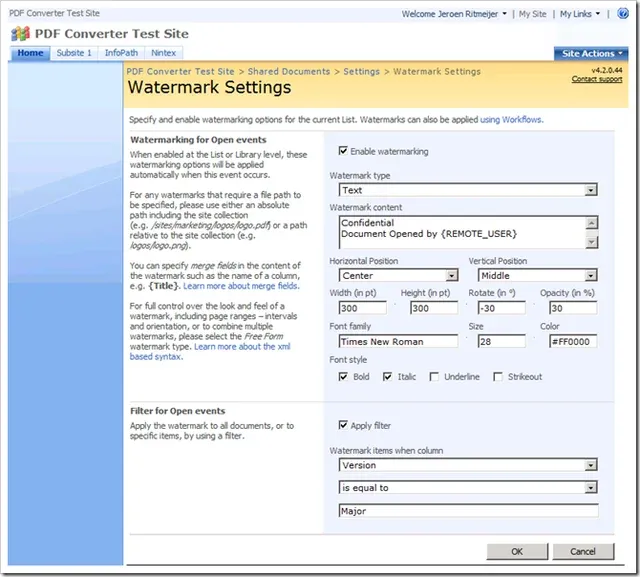
So, why is this functionality so important? Well, if you work with highly confidential information, then you’ll want to be able to figure out who uploaded your documents to Wikileaks, or who gave their copy of a draft document to their buddy at the newspaper.
So although it has taken quite a bit of rocket science to add this functionality to SharePoint, we’ve managed to make it user friendly and easy for SharePoint administrators and power users to use.
The key features are as follows:
- Specify stock watermarks at the site collection level and optionally inherit the settings at the list or document library level.
- Support for different watermark types: text, image, RTF, and compound watermarks using XML.
- Merge codes can be added to allow dynamic, user-specific content. More information on this can be found in this blog post.
- Allow filters to be specified to make sure watermarks are only applied to certain documents, e.g. depending on the content type, version, or content of certain columns.
- Support for PDF files in document libraries, as well as files attached to individual list items.
Note that by default, the automatic watermarking screens are disabled. You can enable automatic watermarking at either the web application or site collection level, but not both. Additionally, the default values for watermarks can be specified in the site settings menu; however, you need to separately enable watermarking on the document library settings screen to activate it.
Want to secure your SharePoint documents like a pro? Start applying user-specific watermarks today and track who views and shares your PDFs — right from within your workflows. Try Nutrient Document Converter for SharePoint now.