How to fill PDF forms in Node.js

Table of contents
Automate PDF form filling in Node.js to eliminate manual data entry and streamline document workflows. This tutorial walks through pdf-lib for basic form filling. Then it shows how Nutrient provides a complete solution with both UI components for end users and programmatic APIs for developers.
In this tutorial, you’ll explore how to programmatically fill PDF form fields using Node.js and the pdf-lib(opens in a new tab) library. You’ll use axios(opens in a new tab) to fetch a PDF file, and then you’ll leverage the power of pdf-lib to fill in PDF form fields with the desired values. By the end of this tutorial, you’ll be able to automate the process of filling PDF forms and generate customized PDF files effortlessly.
Prerequisites
Before you begin, make sure you have the following installed:
- Node.js(opens in a new tab) — It’s best to use the latest long-term support (LTS) version or a stable version.
- npm(opens in a new tab) — Node Package Manager comes bundled with Node.js, so it’ll be installed by default.
Setting up the project
- To get started, create a new directory for your project and initialize it as a Node.js project by running the following commands in your terminal:
mkdir fill-pdf-formcd fill-pdf-formnpm init -y- In this tutorial, you’ll use pdf-lib, a powerful JavaScript library for PDF manipulation. Install it by running the following command:
npm install pdf-lib- Install the
axioslibrary, which will help you fetch the PDF file:
npm install axios- Create a new file in the project directory called
index.js, and open it in a code editor.
Using the pdf-lib library
- Import the required modules by adding the following code at the top of the
index.jsfile:
const { PDFDocument } = require('pdf-lib');const fs = require('fs');const axios = require('axios');The pdf-lib library provides capabilities for manipulating existing PDF files, such as filling form fields. You also need the fs module to perform file system operations, and the axios library to make HTTP requests.
- Define the
fillPdfFormfunction, which will handle filling the PDF form fields. Copy and paste the following code below the module imports:
async function fillPdfForm(input) {  const response = await axios.get(input, {    responseType: 'arraybuffer',  });  const pdfBytes = response.data;  const pdfDoc = await PDFDocument.load(pdfBytes);  const form = pdfDoc.getForm();
  // Get the form fields by their names.  const nameField = form.getTextField('CharacterName 2');  const ageField = form.getTextField('Age');  const heightField = form.getTextField('Height');  const weightField = form.getTextField('Weight');  const eyesField = form.getTextField('Eyes');  const skinField = form.getTextField('Skin');  const hairField = form.getTextField('Hair');  const alliesField = form.getTextField('Allies');  const factionField = form.getTextField('FactionName');  const backstoryField = form.getTextField('Backstory');  const traitsField = form.getTextField('Feat+Traits');  const treasureField = form.getTextField('Treasure');
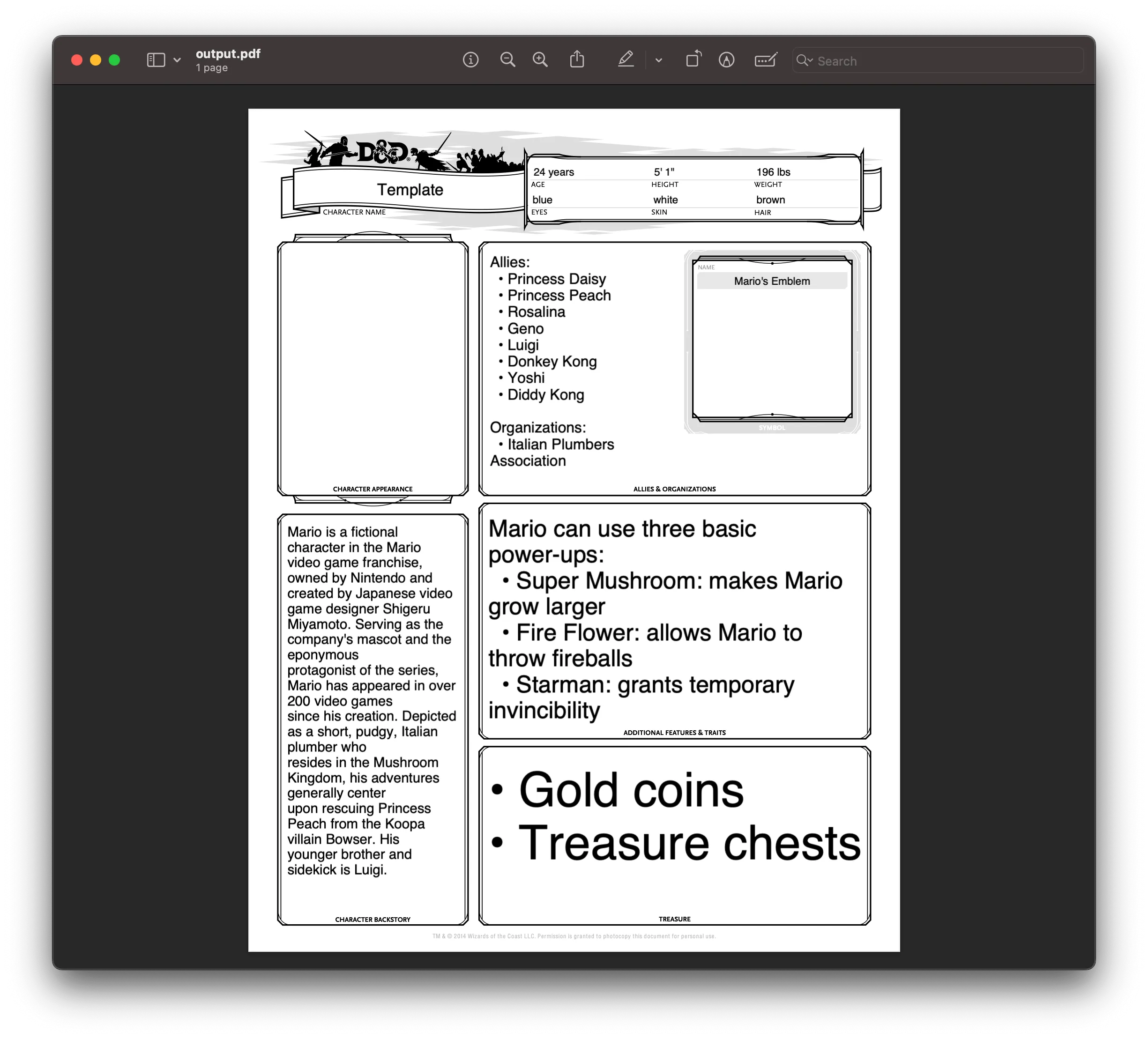
  // Set the values for the form fields.  nameField.setText('Template');  ageField.setText('24 years');  heightField.setText(`5' 1"`);  weightField.setText('196 lbs');  eyesField.setText('blue');  skinField.setText('white');  hairField.setText('brown');  alliesField.setText(    [      `Allies:`,      `  • Princess Daisy`,      `  • Princess Peach`,      `  • Rosalina`,      `  • Geno`,      `  • Luigi`,      `  • Donkey Kong`,      `  • Yoshi`,      `  • Diddy Kong`,      ``,      `Organizations:`,      `  • Italian Plumbers Association`,    ].join('\n'),  );
  factionField.setText(`Mario's Emblem`);  backstoryField.setText(    [      `Mario is a fictional character in the Mario video game franchise,`,      `owned by Nintendo and created by Japanese video game designer Shigeru`,      `Miyamoto. Serving as the company's mascot and the eponymous`,      `protagonist of the series, Mario has appeared in over 200 video games`,      `since his creation. Depicted as a short, pudgy, Italian plumber who`,      `resides in the Mushroom Kingdom, his adventures generally center`,      `upon rescuing Princess Peach from the Koopa villain Bowser. His`,      `younger brother and sidekick is Luigi.`,    ].join('\n'),  );  traitsField.setText(    [      `Mario can use three basic power-ups:`,      `  • Super Mushroom: makes Mario grow larger`,      `  • Fire Flower: allows Mario to throw fireballs`,      `  • Starman: grants temporary invincibility`,    ].join('\n'),  );  treasureField.setText(    ['• Gold coins', '• Treasure chests'].join('\n'),  );
  return pdfDoc;}
The fillPdfForm function is an asynchronous function that fills a PDF form. It takes the input parameter (the URL of the PDF file to be filled), fetches the PDF file, loads it into a pdfDoc object, retrieves the form, and sets the values for the form fields using their names and the setText method. Errors bubble up to the caller for centralized handling.
- Define the
saveFilledFormfunction, which will save the filled PDF form to a new file:
async function saveFilledForm(pdfDoc, output) { const filledFormBytes = await pdfDoc.save(); fs.writeFileSync(output, filledFormBytes); console.log('Filled form saved successfully!');}This function takes the pdfDoc object and the output file name as parameters. It calls pdfDoc.save() to obtain the modified PDF bytes and writes them to a file using fs.writeFileSync.
- Define the
mainfunction, which will orchestrate the process of filling and saving the PDF form:
async function main() {  const input = 'https://pdf-lib.js.org/assets/dod_character.pdf';  const output = 'output.pdf';
  const pdfDoc = await fillPdfForm(input);  await saveFilledForm(pdfDoc, output);}
main().catch((err) => console.error('Error:', err));
This function is the entry point of the program. It defines the input URL and output file name, calls fillPdfForm to fill the PDF form and obtain the modified pdfDoc object, and then calls saveFilledForm to save the filled form to a new file. Errors from either function are caught here and logged.
Ensure you have write permissions for the current directory. The filled form will be saved as output.pdf.
- To run the code, execute the following command in your terminal:
node index.jsNow, you’ll see the output.pdf file in your current directory. Open it to see the filled form.
Downsides of using pdf-lib
While the pdf-lib library is a powerful tool for working with PDF documents, including form filling, it does have a few downsides and limitations:
- Limited User Interface (UI) Interactivity — The pdf-lib library primarily focuses on programmatic manipulation of PDF documents, and it doesn’t provide built-in UI components or interactivity for form filling. As a result, users cannot directly type into the form fields within the application’s UI; the form fields need to be programmatically filled using code, as demonstrated in the example.
- Lack of Real-Time Updates — Since the form fields are filled programmatically on the server or within the application code, there’s no real-time update or synchronization with the UI. If the user wants to see their input reflected in the filled form fields, they need to generate and download the updated PDF file.
Form filling with Nutrient
Nutrient Web SDK provides a complete form filling solution that addresses pdf-lib’s limitations while supporting all standard PDF form field types:
| Form field type | Description |
|---|---|
| Text fields | Single and multiline text input |
| Checkboxes | Multiple selection options |
| Radio buttons | Single selection from a group |
| Combo boxes | Dropdown menus with optional custom input |
| List boxes | Scrollable selection lists |
| Push buttons | Clickable action buttons |
| Signature fields | Electronic and digital signatures |
UI form filling
Nutrient’s prebuilt UI lets end users interact directly with PDF forms in the browser — no code required on their part. Users can tab through fields, select options, and see their changes in real time. Try the demo to see it in action.
Programmatic form filling
For server-side or automated workflows, Nutrient offers multiple approaches:
Instant JSON — The most efficient format for storing and restoring form data. Pass form values when loading the document:
NutrientViewer.load({ container: '#nutrient', document: 'document.pdf', instantJSON: { format: 'https://pspdfkit.com/instant-json/v1', formFieldValues: [ { name: 'firstName', value: 'John', type: 'pspdfkit/form-field-value', v: 1, }, { name: 'lastName', value: 'Doe', type: 'pspdfkit/form-field-value', v: 1, }, ], },});XFDF — XML format for interoperability with other PDF tools like Adobe Acrobat:
NutrientViewer.load({ container: '#nutrient', document: 'document.pdf', XFDF: xfdfString,});Document Engine — Persist form data server-side and sync changes across devices in real time with Instant synchronization:
NutrientViewer.load({ container: '#nutrient', documentId: 'your-document-id', authPayload: { jwt: 'your-jwt-token' }, instant: true, // Sync changes between users.});Manual API — Extract and set form values directly:
// Get all form field values.const values = instance.getFormFieldValues();console.log(values); // { firstName: "John", lastName: "Doe" }
// Export to Instant JSON for storage.const instantJSON = await instance.exportInstantJSON();
Form creation
Need to create forms, not just fill them? The PDF Form Creator lets you build fillable forms from scratch using a drag-and-drop UI or programmatically via the API. Convert static PDFs into interactive forms without writing complex code.
Conclusion
In this tutorial, you learned how to programmatically fill PDF forms using Node.js and pdf-lib. While pdf-lib works for basic server-side form filling, it lacks UI components, real-time updates, and multi-device synchronization.
Nutrient fills these gaps with a complete solution: prebuilt UI for end users, multiple data formats (Instant JSON, XFDF) for interoperability, Document Engine for persistence and real-time sync, and a full API for custom workflows.
Start your free trial to integrate form filling into your application, or launch the demo to see it in action.
FAQ
You can use the pdf-lib library in combination with Node.js to fill PDF forms programmatically.
Yes, you need to install pdf-lib and optionally axios if you’re fetching PDFs from external sources.
Yes, you can easily fill multiple form fields by targeting them using their field names and setting the desired values.
No, pdf-lib is used for programmatic form filling. It does not offer user interface components for direct interaction with the form fields.
Yes, Nutrient offers advanced form filling options, including UI components and programmatic solutions.