Multimodal RAG: How to retrieve over text, tables, and images in documents

Table of contents
- Multimodal RAG retrieves over text, tables, and images together, instead of treating a document as one stream of plain text.
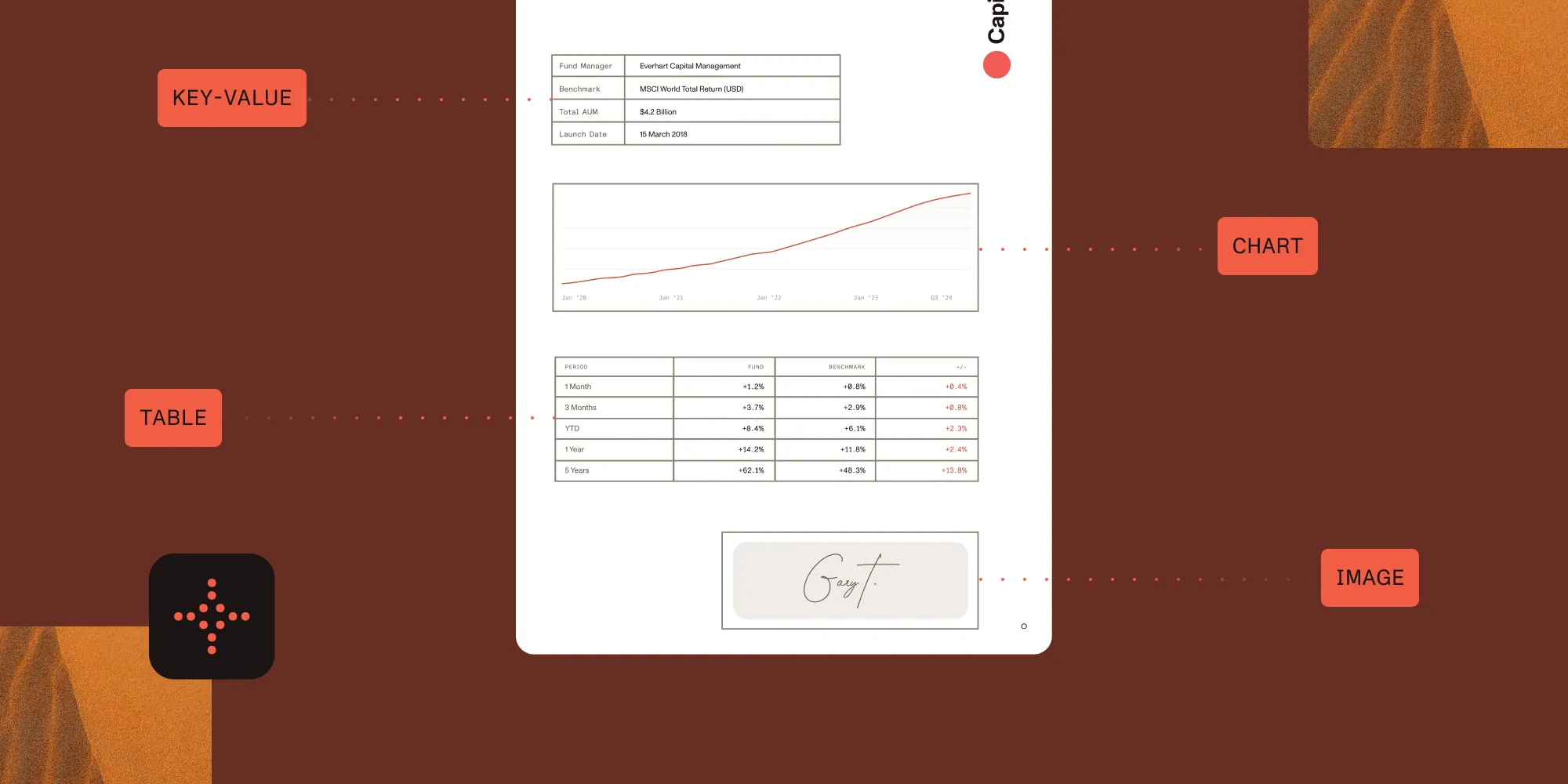
- Most documents are already multimodal: A single PDF page can hold prose, a financial table, a chart, and a scanned signature.
- Parsing is the hard part. A multimodal RAG system is only as good as the text, tables, and figures you extract from the source documents.
- This guide covers the architecture and how to extract each modality from PDFs so your pipeline retrieves clean, structured input.
Multimodal RAG is a retrieval-augmented generation (RAG) architecture that retrieves over text, tables, and images together, instead of flattening a document into a single stream of plain text.
Retrieval-augmented generation (RAG) grounds a language model’s answers in your own documents: You retrieve the passages most relevant to a question and pass them to the model as context.
Standard RAG treats every source as plain text. That works until the answer lives in a table, a chart, or a scanned page. In real documents, it usually does.
Multimodal RAG handles those cases, retrieving across all three modalities rather than flattening everything into one text stream. This article explains how it works, why document parsing is the part that determines quality, and how to extract each modality from PDFs to feed the pipeline.
What is multimodal RAG?
Multimodal RAG is a RAG architecture that indexes and retrieves more than one content type. Where standard RAG embeds and retrieves text chunks, a multimodal system also represents tables and images so they can be retrieved and reasoned over.
| Standard RAG | Multimodal RAG | |
|---|---|---|
| Indexes | Text chunks only | Text, tables, and images |
| Tables | Flattened into plain text | Serialized with structure intact |
| Figures and charts | Ignored | Summarized or embedded |
| Scanned pages | Returned empty | OCR/ICR before indexing |
| Answer quality on real documents | Degrades fast | Holds up |
Much of the information in real documents isn’t prose. A quarterly report’s numbers live in tables. A specification’s meaning lives in a diagram. A signed contract’s proof lives in a scanned image. Flatten those into plain text, or drop them entirely, and the model never sees the answer.
Why documents are inherently multimodal
A single page of a real-world PDF often contains several modalities at once:
- Body text — Paragraphs, headings, lists
- Tables — Financial figures, specifications, comparison grids
- Figures — Charts, diagrams, screenshots, photographs
- Scanned content — Pages that are images of text, with no extractable text layer
Standard text-only RAG mishandles all but the first. Tables get linearized into unreadable runs of numbers, figures are ignored, and scanned pages return nothing at all.
The retrieval step can only surface what the parsing step managed to extract, so the quality ceiling of the whole system is set before any embedding or retrieval happens.
This is the most common reason a RAG demo works on clean text and then fails on the customer’s actual documents is because the pipeline never extracted the table or the scanned page where the answer lived.
How multimodal RAG works
A multimodal RAG pipeline has the same shape as standard RAG, with the ingestion and retrieval stages widened to handle each modality.
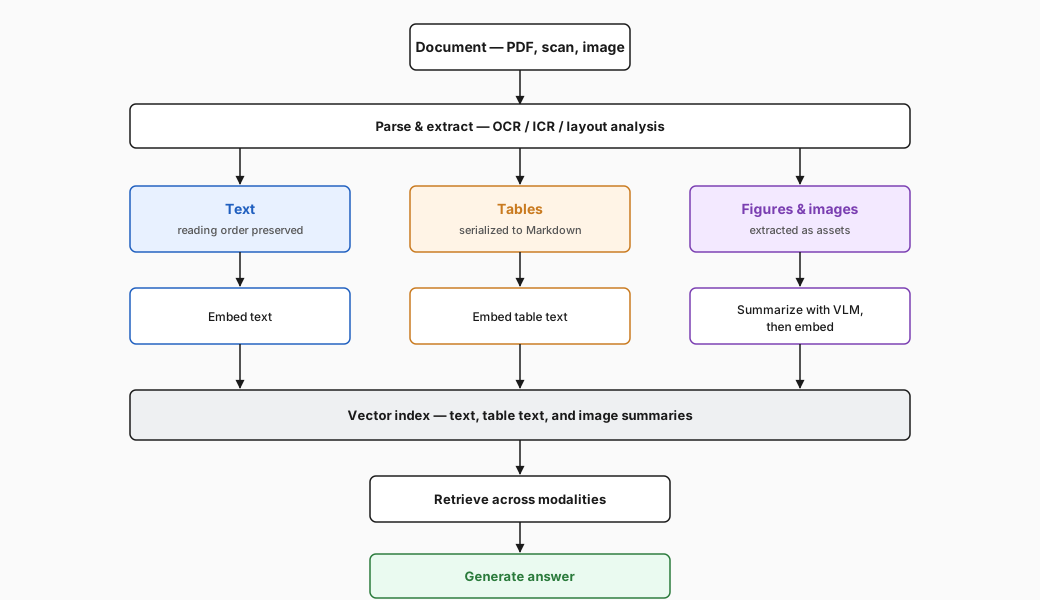
- Parse the document into separate elements: text blocks, tables, and images.
- Represent each element. Text and tables are typically embedded as text (tables serialized to Markdown or HTML so structure survives). Images are either embedded with a multimodal embedding model or first summarized into text by a vision language model (VLM), and then embedded.
- Index the representations in a vector store, keeping a reference back to the source element.
- Retrieve the elements most relevant to the query across all modalities.
- Generate an answer, passing the retrieved text, serialized tables, and image summaries (or the images themselves) to the model.
There are three common approaches to representing non-text content:
- Joint multimodal embeddings — A multimodal model embeds images and text into a shared vector space, so a figure or a scanned page is retrieved directly as an image, with no lossy text conversion in between. This is the closest representation to true multimodal RAG, and the models have matured fast: CLIP established the pattern, and newer models such as Google’s Gemini embeddings(opens in a new tab) push multimodal quality much further. The cost is extra infrastructure and a model that can embed both modalities.
- Summarize-then-embed — A VLM writes a text description of each image or table; you embed the description. It works with any text embedding model and keeps everything in one text index, which makes it the simplest to run and a solid fallback when a joint embedding model isn’t practical, at the cost of whatever detail the summary drops.
- Separate indexes with fusion — Each modality is embedded and retrieved with its own model, and the results are merged at query time, which is the most flexible setup but the one with the most moving parts.
The following walkthrough shows Nutrient Data Extraction API parsing a document and preparing the output for a search and RAG pipeline — from raw PDF to structured, indexed content ready for retrieval.
Embedding images directly is the stronger representation and increasingly the default; summarize-then-embed remains a valid fallback when you need to keep everything in a single text index.
The part that breaks: Extracting modalities from PDFs
Everything above assumes step 1 produced clean, structured elements. With PDFs, that assumption is where pipelines fail.
PDFs encode layout, not meaning: Text can arrive out of reading order, a table is often just absolutely positioned text with no row or column structure, and a scanned page has no text layer at all.
So the real engineering work in multimodal RAG is extraction:
- Text must come out in correct reading order, with multicolumn layouts handled.
- Tables must be detected and serialized with their structure intact, not flattened into a stream of cells.
- Images and figures must be located and pulled out as discrete assets.
- Scanned pages must be run through optical character recognition (OCR), and handwriting through intelligent character recognition (ICR) or a VLM, before any of the above is even possible.
That extraction layer is exactly what a document processing toolset handles.
Nutrient’s AI document and data extraction SDK is built for it: OCR, ICR, and VLM-enhanced extraction handle scanned and handwritten content, detect and extract tables with cell-level coordinates, and pull key-value pairs from forms and invoices without templates. Output is structured JSON with reading order and confidence scores, and every engine, including the VLM, can run on your own infrastructure. That turns a messy PDF into the structured text, tables, and figures a multimodal RAG pipeline can index.
If your documents include scans or handwriting, OCR/ICR quality sets the ceiling for the entire system. See why your AI agent hallucinates PDF table data for how parsing errors propagate into wrong answers downstream.
Serializing a table so retrieval works
A table is only useful to the model if its structure survives extraction. Linearized into plain text, the relationship between a row label and its value is lost. Serialized to Markdown, it stays intact:
| Quarter | Revenue | Growth || ------- | ------- | ------ || Q1 2026 | $4.2M | 12% || Q2 2026 | $4.9M | 17% |Embedding this representation, rather than a flat run of numbers, means a query like “Q2 revenue growth” retrieves a chunk where the structure makes the answer recoverable.
Representing extracted elements in code
Once the document is parsed into elements, representing them is mechanical: Text and tables embed as-is, images get a short VLM summary, and everything lands in one vector store. With LangChain:
from langchain.chat_models import init_chat_modelfrom langchain_openai import OpenAIEmbeddingsfrom langchain_core.documents import Documentfrom langchain_core.vectorstores import InMemoryVectorStore
# `elements` come from your document parser — each has a type and content.# Text and tables are already text; images are base64-encoded.vlm = init_chat_model("gpt-4o-mini", model_provider="openai")embeddings = OpenAIEmbeddings(model="text-embedding-3-small")vector_store = InMemoryVectorStore(embeddings)
docs = []for element in elements:    if element["type"] in ("text", "table"):        docs.append(            Document(page_content=element["content"], metadata={"type": element["type"]})        )    elif element["type"] == "image":        summary = vlm.invoke(            [                {                    "role": "user",                    "content": [                        {"type": "text", "text": "Describe this figure for retrieval."},                        {"type": "image", "base64": element["content"], "mime_type": "image/png"},                    ],                }            ]        ).content        docs.append(Document(page_content=summary, metadata={"type": "image"}))
vector_store.add_documents(docs)results = vector_store.similarity_search("Q2 revenue growth", k=4)
Tables come in as Markdown so structure survives, images become searchable through their summaries, and one query retrieves across all three modalities. The quality of elements, whether the parser actually recovered that table and ran OCR on that scan, decides everything downstream.
Evaluating a multimodal RAG system
Standard retrieval metrics still apply, but multimodal systems need extra checks tied to the modality split:
- Per-modality retrieval — Does the system surface tables and images for queries whose answers live there, or does it default to prose?
- Extraction fidelity — Sample parsed tables and OCR output against the source. Errors here are invisible at retrieval time but fatal at answer time.
- Grounding — Does the generated answer cite the right element, including non-text ones?
Measure extraction quality first. A retrieval bug is debuggable; a silent parsing error looks like a model hallucination and sends you chasing the wrong problem.
Common pitfalls
- Treating every PDF as text. Scanned and image-heavy documents need OCR and figure extraction before indexing.
- Flattening tables. Serialize to Markdown or HTML so structure survives the embedding step.
- Ignoring reading order. Multicolumn and complex layouts produce scrambled text unless layout analysis runs first.
- Skipping evaluation of the parse. Most “the model is wrong” reports trace back to “the document was never extracted correctly.”
FAQ
Multimodal RAG is a retrieval-augmented generation architecture that indexes and retrieves more than one content type. Alongside text chunks, it represents tables and images so they can be retrieved and reasoned over, instead of flattening a document into a single text stream.
Standard RAG embeds and retrieves text only, so tables get flattened and figures and scanned pages are dropped. Multimodal RAG keeps tables as structured text, summarizes or embeds images, and runs OCR on scans, so the answer survives wherever it lives in the document.
It’s almost always because extraction failed first. Retrieval can only surface what parsing pulled out, so a flattened table or a skipped scan means the answer was never indexed. Measure extraction quality before tuning embeddings or retrieval.
There are three common approaches: Use a joint multimodal embedding model (such as CLIP or Google’s Gemini embeddings) to embed images directly, summarize each image or table with a VLM and embed the text, or keep a separate index per modality and merge results at query time. Embedding images directly is the closest to true multimodal RAG; summarize-then-embed is a valid fallback when you need everything in a single text index.
No. The summarize-then-embed approach turns images and tables into text descriptions, so a standard text embedding model and one vector index are enough. A multimodal model adds capability but also infrastructure.
Conclusion
Multimodal RAG extends retrieval to text, tables, and images: what real documents contain. The retrieval and indexing patterns are well understood; the variable that decides quality is how cleanly you pull each modality out of the source PDFs. A pipeline fed scrambled tables and skipped scans retrieves noise, no matter how good the embeddings are.
If you’re building one, start by getting structured text, tables, and figures out of your documents reliably. Nutrient’s AI document and data extraction SDK is built for that ingestion layer. Contact our team to talk through your document workflow, or explore the Data Extraction API guides to get started.
Related reading
- Why your AI agent hallucinates PDF table data — How parsing errors become wrong answers downstream
- Document AI vs. traditional OCR — Choosing between OCR, AI, and hybrid extraction pipelines
- Handwriting OCR vs. VLMs — Extracting handwritten content before indexing
- AI document automation workflows — From extraction to action across a document pipeline
- Nutrient AI Data Extraction — Turning documents into structured, RAG-ready data
- Data Extraction API guides — Convert documents to RAG-ready Markdown