Why your AI agent hallucinates PDF table data

Table of contents
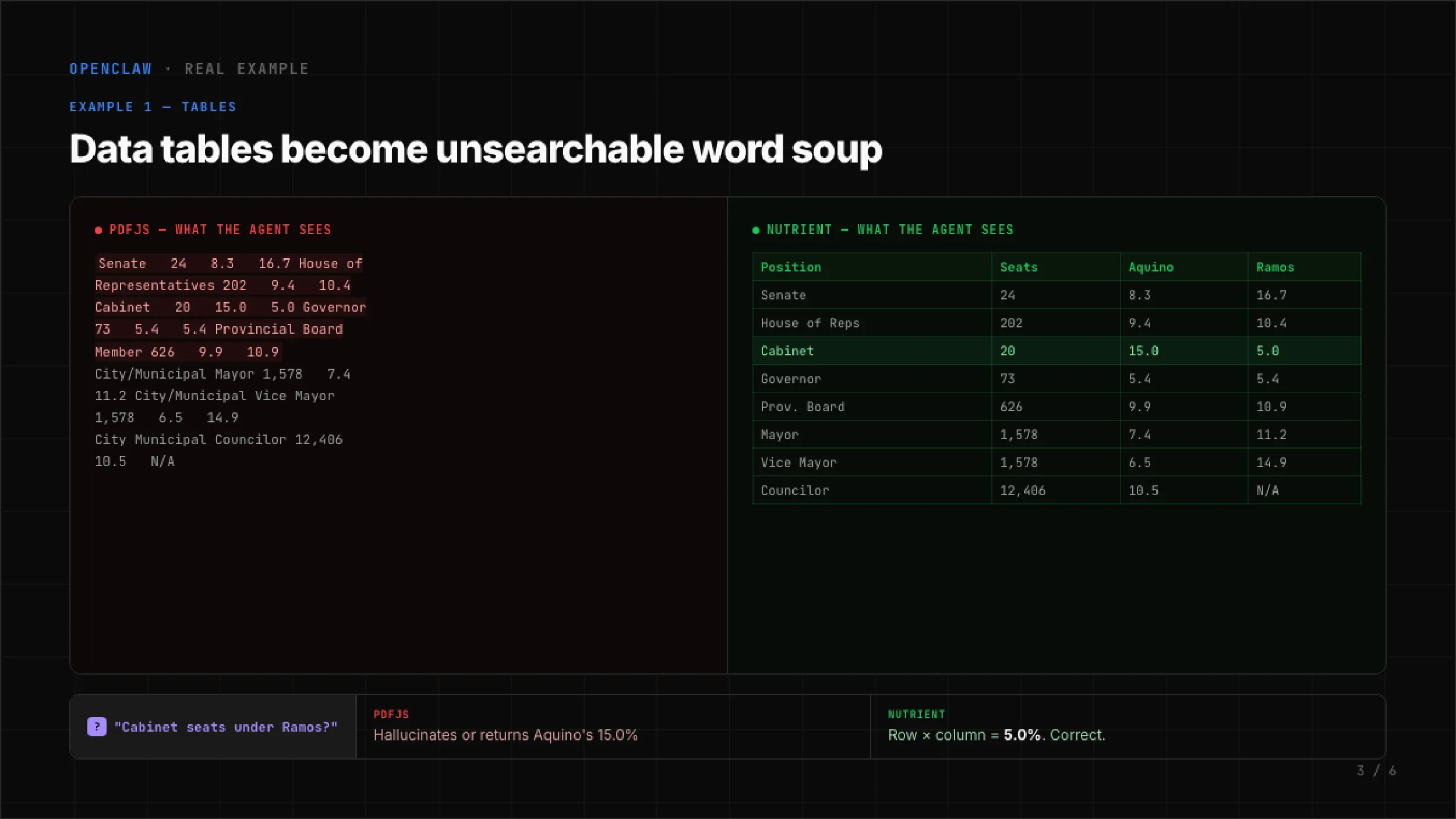
You asked your agent: “How many Cabinet seats does Ramos have?” The PDF contains a table with four columns: Position, Seats, Aquino, Ramos. The Cabinet row reads 20 seats, Aquino 15 percent, Ramos 5 percent. The correct answer is 5 percent.
Your agent returned 15 percent. That’s Aquino’s number, not Ramos’s. The agent never flagged uncertainty; it just picked the wrong column.
This isn’t a model problem. It’s an extraction problem.
PDF.js extracts text, not structure
Most AI agent frameworks — OpenClaw(opens in a new tab) included — default to PDF.js for PDF extraction. PDF.js was built to render PDFs in a browser. It wasn’t designed to recover document structure. It reads character positions off the page and concatenates them into a string. That works fine for running prose, but it fails on tables.
Here’s what PDF.js produces from the table above:
Senate 24 8.3 16.7 House of Representatives 202 9.4 10.4 Cabinet 20 15.0 5.0 Governor 73 5.4 5.4 Provincial Board Member 626 9.9 10.9No column headers. No row boundaries. No cell alignment. Just a flat sequence of words and numbers. The LLM receives this and has to guess which number belongs to which column. Sometimes it guesses right. Often it doesn’t.
The model isn’t hallucinating in the usual sense. Rather, it’s doing its best with garbage input. The extraction layer destroyed the information the model needed to answer correctly.
Three ways flat extraction breaks documents
Tables are the most obvious failure, but PDF.js loses structure in at least three ways.
Tables become word soup. Column relationships vanish. A four-column table turns into an unpunctuated stream of tokens. The model doesn’t have a way to reconstruct grid alignment from positional guessing. In our benchmark of 200 real documents, PDF.js scored 0.000 on table structure recovery. Not low — zero.
Headings vanish into body text. PDFs encode heading level through font size, weight, and spacing — none of which survives text extraction. A section heading and the paragraph below it merge into one block. The model loses the document’s outline. When asked “what does the methodology section say,” it may pull text from the wrong section entirely. PDF.js scored 0.000 on heading detection across the same 200 documents.
Reading order gets scrambled. Multicolumn layouts, sidebars, and numbered lists depend on spatial position. PDF.js reads left-to-right, top-to-bottom from the raw content stream. A two-column page produces interleaved sentences. Numbered steps arrive out of order. The model cites step 3 when it means step 5.
What the benchmark shows
We tested two extraction pipelines across 200 real-world documents using three scoring methods:
- Normalized information distance (NID) measures overall text fidelity
- Tree-edit distance similarity (TEDS) measures table structure recovery
- Markdown heading score (MHS) measures heading detection accuracy
Results:
| Metric | PDF.js | Nutrient | Change |
|---|---|---|---|
| Overall accuracy (NID) | 0.578 | 0.880 | +52 percent |
| Table structure (TEDS) | 0.000 | 0.662 | 0 percent → 66 percent |
| Heading fidelity (MHS) | 0.000 | 0.811 | 0 percent → 81 percent |
| Reading order | 0.871 | 0.924 | +6 percent |
The overall accuracy gain is significant. The table and heading numbers tell the real story: PDF.js doesn’t attempt structure recovery at all. The scores aren’t low. They’re zero.
These figures come from the April 2026 run. Nutrient’s extraction has improved since — table structure in particular. See the current opendataloader-bench results for the latest scores, the full competitor field, and the methodology.
With Nutrient’s pdf-to-markdown(opens in a new tab) extraction, that same Cabinet table becomes:
| Position | Seats | Aquino | Ramos ||-------------------------|--------|--------|-------|| Senate | 24 | 8.3 | 16.7 || House of Reps | 202 | 9.4 | 10.4 || Cabinet | 20 | 15.0 | 5.0 || Governor | 73 | 5.4 | 5.4 || Provincial Board Member | 626 | 9.9 | 10.9 |Cabinet row, Ramos column: 5 percent. The LLM doesn’t need to guess. Row and column boundaries are explicit. The answer is a lookup, not an inference.
The fix is two commands
If you’re running OpenClaw, install the Nutrient plugin and set it as the default PDF extraction engine:
openclaw plugins install @nutrient-sdk/openclaw-nutrient-pdfopenclaw config set agents.defaults.pdfExtraction.engine autoThe auto setting uses Nutrient extraction for PDFs and falls back to PDF.js for anything the plugin cannot handle. Processing runs on your computer, and no documents leave it. Standard conversion is free and doesn’t require an API key.
The underlying problem
AI agent PDF extraction is treated as a solved problem. It isn’t. Dumping raw text into a context window works until the document contains a table, a heading hierarchy, or a multicolumn layout. Then the model confabulates, and the agent delivers the wrong answer with full confidence.
The fix isn’t a better model. It’s a better extractor. Structure-aware PDF-to-Markdown conversion preserves the relationships models need to answer correctly. Until your extraction pipeline recovers tables as tables and headings as headings, your agent will keep hallucinating tabular data. The same failure mode shows up in retrieval systems — see agentic RAG and multimodal RAG.
Resources
- OpenClaw Nutrient PDF plugin(opens in a new tab) — Installation and configuration guide
- pdf-to-markdown library(opens in a new tab) — The extraction engine underneath the plugin