Construction document data extraction: From drawings, RFIs, and submittals to structured data

Table of contents
Construction teams run on data — project numbers, drawing references, specification sections, RFI responses, review notes, permit conditions, and change order amounts. The problem is that most of that data gets locked inside PDFs, scans, drawings, and document packets that resist easy extraction.
A document may be readable, but the data inside it isn’t automatically usable. Someone still has to find the right value, verify it against the source, copy it into another system, and then route it to the right person or workflow. Multiply that across hundreds of documents per project, and the manual effort becomes a real bottleneck.
The gap isn’t that documents are unreadable — it’s that readable isn’t the same as usable. Getting from raw document content to structured project data requires more than OCR.
- OCR makes documents readable. Construction workflows need more — they need structured data with source context that can be validated and routed.
- Construction documents are layout-heavy and inconsistent across types: Drawings, RFIs, submittals, inspection reports, permits, and change orders each carry different data in different formats.
- Extraction has to preserve context — the same word or value can mean different things depending on where it appears in a document.
- Structured output (spatial JSON or Markdown) can support submittal logs, review queues, search, compliance workflows, and AI pipelines.
- Nutrient Data Extraction API parses PDFs, scans, and Office files and returns layout-aware structured output ready for downstream review and automation.
Why OCR isn’t enough for construction data
OCR is a useful starting point when a document needs to become machine-readable. It identifies words on a page and makes scanned files searchable. But construction workflows usually need answers to more specific questions:
- What project is this document for, and what drawing number does it reference?
- What is the RFI or submittal number, and who submitted it?
- What specification section applies, and what review action was selected?
- Are there exceptions, field-verification requirements, or compliance notes?
- Where exactly did each extracted value come from?
A wall of OCR text may help someone search a document, but it doesn’t help a system route a review task, populate a submittal log, or flag a field-verification requirement. That requires structured extraction — output that knows what the values mean, where they came from, and how they relate to each other.
The distinction matters more in construction than in most industries, because construction documents combine complex form fields, tables, revision histories, stamps, handwritten notes, and product data in formats that vary significantly across document types, contractors, architects, and jurisdictions.
Why construction documents are difficult to extract
Most document extraction tools are designed for relatively predictable formats: invoices, purchase orders, standard forms. Construction documents are a different category entirely.
A drawing title block doesn’t look like an RFI. An RFI doesn’t look like an inspection report. A submittal transmittal doesn’t look like a product data sheet. A change order doesn’t look like a permit. Even within the same document type, formatting varies by firm, project, and jurisdiction.
Construction documents commonly include dense tables, revision histories, title blocks, review stamps and signatures, handwritten or field-completed sections, product data sheets, specification references, and multipage packets with attached drawings or calculations. The challenge isn’t just reading the text — it’s understanding which information matters, where it sits in a document, and how it should be structured for downstream use.
A project number in a header, a date in a signature block, and a date in a review note may all be extracted as text. But they don’t mean the same thing, and treating them interchangeably creates downstream errors that can be difficult to trace back to the source.
Document types and what to extract from each
Different construction documents carry different types of project data. A well-designed extraction workflow accounts for that variety rather than applying a generic approach to every document type.
Drawings and title blocks
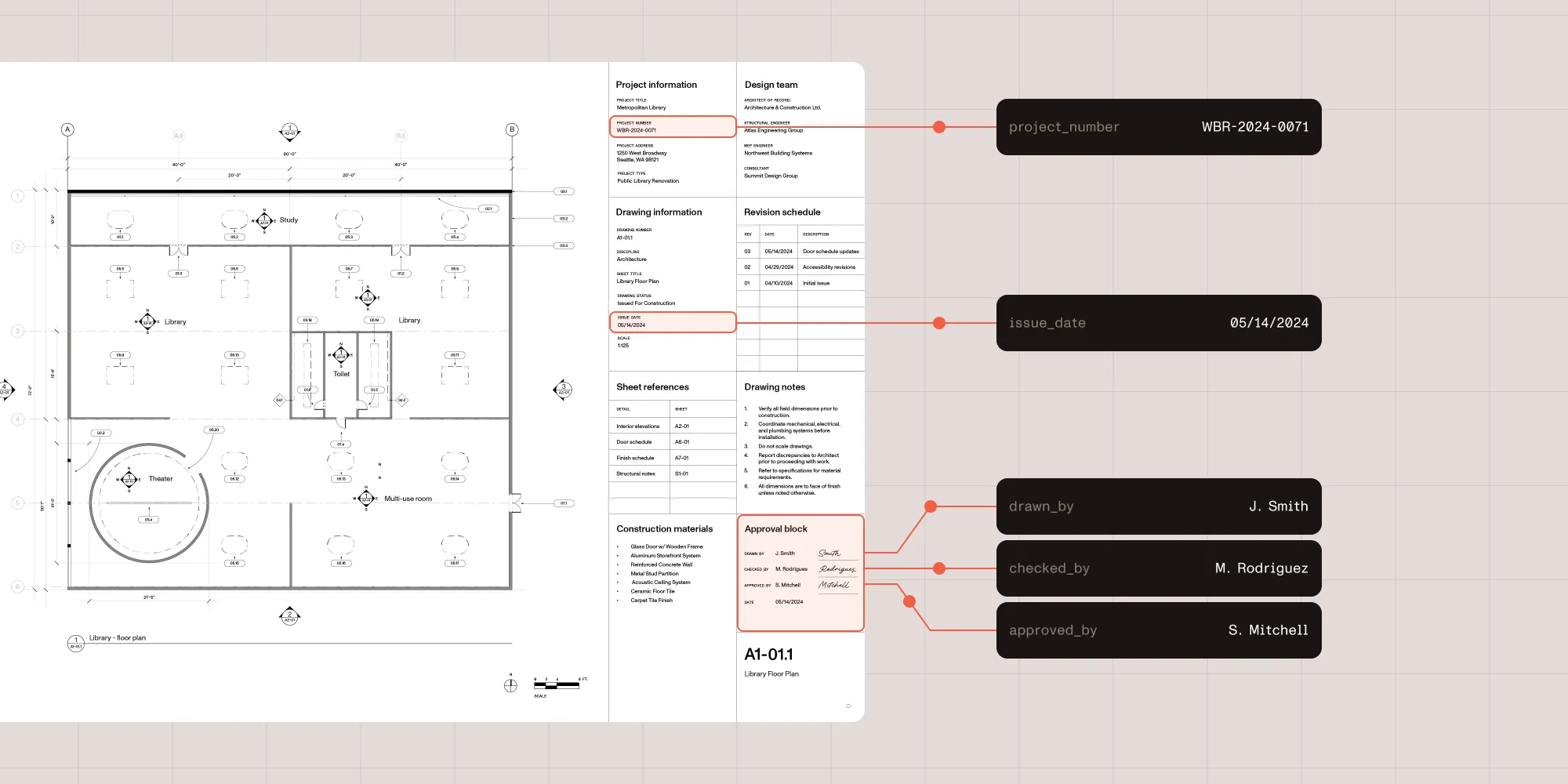
Drawings contain project metadata and sheet-level information in title blocks, revision tables, and drawing notes. Fields worth extracting typically include project name and number, drawing number and sheet title, discipline, revision number and date, drawing status, issue date, architect or engineer of record, scale, and sheet cross-references. This data can support drawing registers, search, review workflows, and project documentation systems.
RFIs
RFIs contain questions, responses, ownership, dates, and status information that teams need to track across a project. Useful fields include RFI number, project name, submitting party, assigned party, the question and response, status, due date, response date, and any cost or schedule impact notes. Extracting this data makes it easier to route follow-ups, maintain searchable project records, and audit outstanding items.
Submittals
Submittals are among the most data-rich construction documents, combining project metadata, specification sections, submitted items, review decisions, product data, and reviewer notes in a single packet. Key fields include submittal number, specification section, sheet references, submitted-by information, date submitted, date required, line-item submitted items with manufacturer and model, review action, review notes, reviewer name and date, and product compliance values.
Inspection reports and field reports
Inspection and field reports mix structured checklist responses with unstructured findings. Useful fields include inspection date and location, inspector name, trade or area inspected, checklist responses, deficiency findings, corrective actions, responsible party, and follow-up dates. This data can support compliance workflows, issue tracking, and project records.
Permits
Permit documents contain jurisdictional details, dates, conditions, and approval status. Fields worth capturing include permit number, project address, issuing authority, permit type, applicant, issue and expiration dates, conditions, inspection requirements, and approval status. Extraction makes permit details easier to search, validate, and route to the right person at the right stage of a project.
Change orders
Change orders carry commercial and scope-related data that often requires careful review before moving downstream. Key fields include change order number, project number, scope description, cost amount, schedule impact, approval status, submitted and approved dates, contractor and owner or architect approval, and supporting notes. Because change orders can affect budget and schedule, extracted values should always be validated against the source document before entering project systems.
A closer look: Extracting data from a construction submittal
Submittals are a useful benchmark for construction data extraction because they contain almost every challenge in one document: form fields, tables, review decisions, notes, and product data.
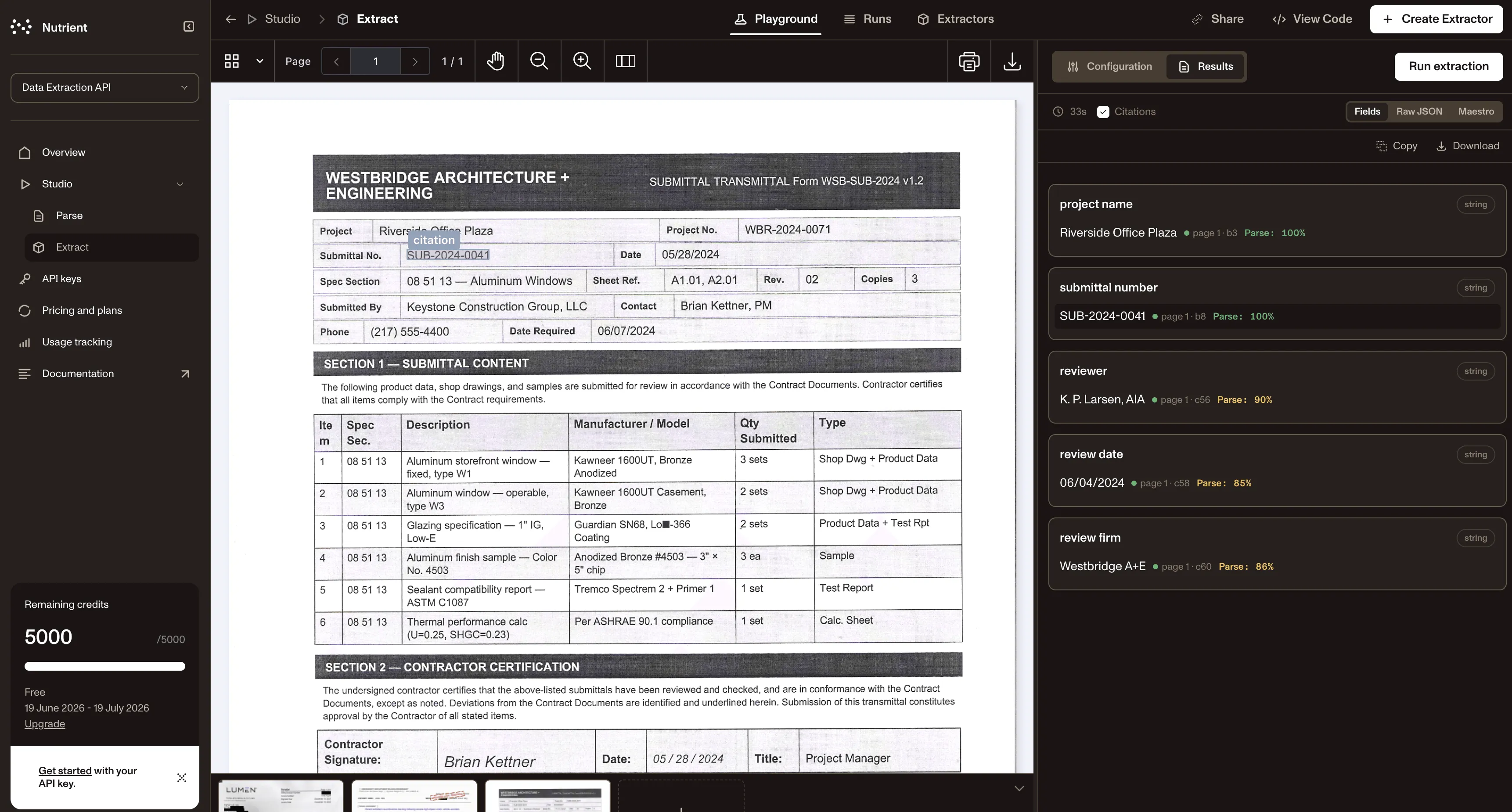
A single submittal packet for aluminum windows, for example, might include a front page with the project name, project number, submittal number, specification section, required date, submitted-by details, and reviewer notes. The main table lists submitted items — storefront windows, operable windows, glazing specifications, finish samples, sealant compatibility reports, thermal performance calculations — each with its own status. A product data page contains performance values such as U-factor, solar heat gain coefficient (SHGC), air infiltration, water resistance, structural load, Low-E coating orientation, and compliance status per value.
The goal of extraction here isn’t just to read the page. It’s to produce structured output that a project system or reviewer can actually use:
{ "project_name": "Riverside Office Plaza", "project_number": "WBR-2024-0071", "submittal_number": "SUB-2024-0041", "spec_section": "08 51 13 — Aluminum Windows", "date_required": "06/07/2024", "review_action": "Approved", "review_note": "Confirm Low-E coating orientation before full installation"}That structured output could update a submittal log, trigger a review task, index the document for search, or flag a field-verification requirement. But it only works if it’s traceable. A reviewer needs to be able to verify where each value came from before it moves downstream — especially when a review note like “Approved — confirm Low-E coating orientation before full installation” has real consequences on the job site.
Why source context matters in construction extraction
Construction workflows are high-context. The same word or value can mean entirely different things depending on where it appears.
“Approved” may be the review action on a submittal, but it could also appear in a product status column or a signature block. A date might be a submission date, a required date, a review date, an inspection date, or an expiration date. A compliance value like “exceeds” is meaningful only when paired with the specification it refers to.
That’s why source context — page number, source region, confidence score, nearby text, table or section context, or reading order — matters as much as the extracted value itself. Extracted construction data without traceability isn’t just incomplete; it can actively create risk when unverified values enter project systems.
The right extraction workflow reduces manual copying and speeds up review, but it doesn’t remove human judgment from high-stakes decisions. It makes that judgment faster and better-informed by surfacing which extracted values can move forward confidently and which need a closer look.
Where structured construction data can go
Once extraction produces structured, traceable output, several downstream workflows become easier to automate or streamline.
Project search. Structured data makes it possible to search documents by project number, drawing number, specification section, RFI number, submittal number, manufacturer, product type, reviewer note, or approval status — not just by filename or date.
Review queues. Review actions, due dates, field-verification requirements, and exceptions can be automatically routed to the right person or team rather than relying on someone to read through document packets and forward items manually.
Submittal and RFI logs. Extracted metadata can keep logs updated with less manual entry. When the submittal number, specification section, submitted date, review action, and reviewer are all extracted at intake, the log update becomes automatic rather than a separate task.
Compliance workflows. Inspection findings, permit conditions, product performance values, and validation requirements can be flagged for follow-up based on extracted content rather than relying on reviewers to catch everything manually.
Reporting and analytics. Structured document data — statuses, vendors, products, review outcomes, dates — supports reporting across projects and document types in ways that aren’t practical when data stays locked in PDFs.
AI and knowledge workflows. Structured Markdown and spatial JSON can prepare construction documents for search, retrieval-augmented generation (RAG), document Q&A, and internal knowledge workflows where project teams need to surface relevant information quickly across large document sets.
How Nutrient Data Extraction API fits into a construction workflow
Nutrient Data Extraction API isn’t a construction project management platform. It doesn’t replace document control, design review, field judgment, or approval processes. Its role is more specific: Parse complex documents and extract reliable, structured output that can be reviewed, validated, and routed downstream.
The API handles PDFs, scanned images, and Office files and returns content as spatial JSON or Markdown. For construction workflows, spatial JSON preserves layout-aware details — source regions, coordinates, confidence scores, page context, and reading order — that help reviewers validate extracted values against the original document. Markdown prepares document content for search indexes, RAG pipelines, and document Q&A systems.
That makes it useful as an extraction layer across the document types that drive construction projects: drawings, RFIs, submittals, inspection reports, permits, change orders, and product data sheets.
Teams that need to go from document intake to usable project data — without building custom parsers for every document format — can use the API to handle the extraction step while keeping validation and routing in their existing systems. You can try it interactively in the Data Extraction Studio(opens in a new tab).
Nutrient Data Extraction API parses PDFs, scans, and Office files and returns layout-aware structured output ready for downstream review and automation.
FAQ
Construction document data extraction is the process of pulling structured, usable project data from construction documents — drawings, RFIs, submittals, inspection reports, permits, and change orders — rather than just making those documents readable as text. The goal is structured output that can be validated, routed, and used in project systems and workflows.
OCR makes scanned or image-based documents machine-readable by identifying text on a page. Data extraction goes further: It identifies which values matter, where they sit in the document, how they relate to each other, and how to structure them for downstream use. For construction workflows, the difference between a searchable PDF and a structured submittal record with traced, validated fields is significant.
Construction documents are layout-heavy, format-inconsistent, and context-dependent. A drawing title block, an RFI form, a product data sheet, and a permit document are all structured differently — and the same formats vary across firms, projects, and jurisdictions. Extraction has to handle tables, stamps, handwritten sections, multipage packets, revision histories, and embedded product data, while preserving enough context to distinguish values that look similar but mean different things.
Most construction document types can be processed, including drawings and title blocks, RFIs, submittals, inspection and field reports, permits, change orders, product data sheets, and specification sections. Different document types carry different fields, so extraction workflows often define document-specific schemas rather than applying a generic approach.
Spatial JSON is structured output that includes not just the extracted values but also their location in the document — page number, bounding coordinates, source region, confidence score, and surrounding context. For construction workflows, this matters because reviewers need to verify extracted values against the original document before they move into project systems. Knowing where a value came from makes that validation fast and traceable.
For most construction workflows, yes — especially for values that affect budgets, schedules, approvals, or fieldwork. Extraction reduces manual copying and speeds up review, but it shouldn’t replace judgment on high-stakes decisions. The right workflow uses structured extraction to surface which values can move forward confidently and which need a closer look, rather than automating past the review step entirely.