Architecture diagram
When you edit a document — for example, by rotating all pages — Document Engine saves a new asset for that document. It also updates all relevant annotations.
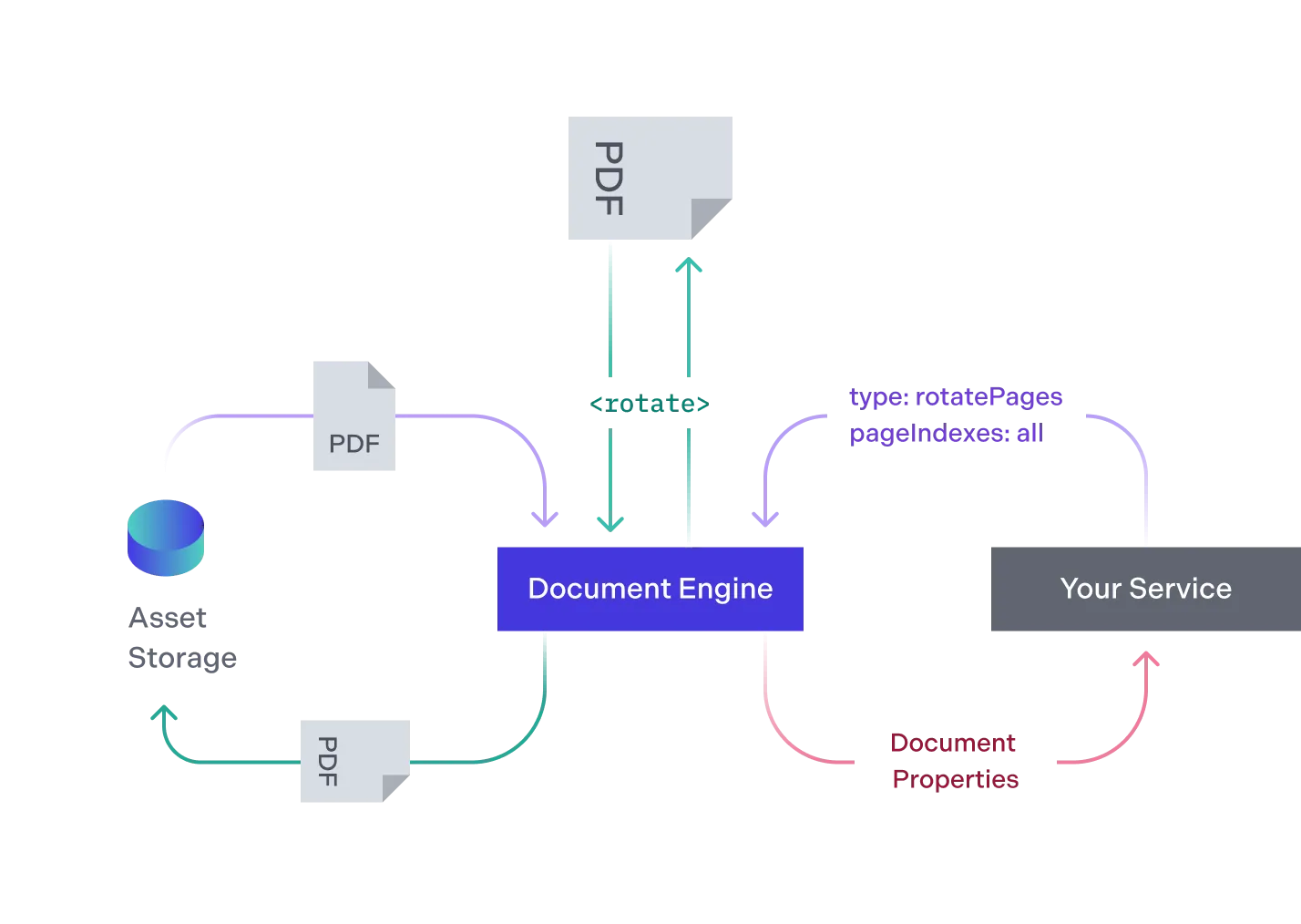
- Your service requests that the Document Engine rotates all pages of the document. Document Engine retrieves the document from the asset storage for processing.
- Document Engine transforms the document, rotating all of its pages.
- Document Engine persists the transformed document in the asset storage without deleting the original. It returns the new document’s properties to your service.
Client-side content editing
Content editing is distinct from Document Engine’s server-side document-processing API. It runs through Nutrient Web SDK:
- Web SDK retrieves the document from Document Engine and prepares it for browser-side editing.
- The content editor modifies the PDF through Core/WASM commands in the browser.
- On save, Web SDK persists the result using
update-source-documentwith an incremental update, orreplace-source-documentwith the complete replacement PDF.
Separately, Document Engine exposes apply_instructions, which executes Build instructions and persists the resulting document. This supports server-side document transformations, but doesn’t provide a Build action for editing PDF text content.