Horizontal scaling
Document Engine scales horizontally by running multiple nodes against a shared PostgreSQL database. On startup, each node registers itself with the database and sends and receives document change updates.
When you enable clustering, Document Engine adds document-aware request routing on top of this setup. Document-scoped requests go to a single owner node. This improves cache locality and worker reuse for operations that open a document, not just repeated views of the same document. A single user-facing operation can trigger many internal document opens, and non-rendering operations benefit too.
Shared configuration
Configure all nodes in a deployment with the same settings. If you deploy with Helm, use replicaCount to control the number of nodes.
Dashboard
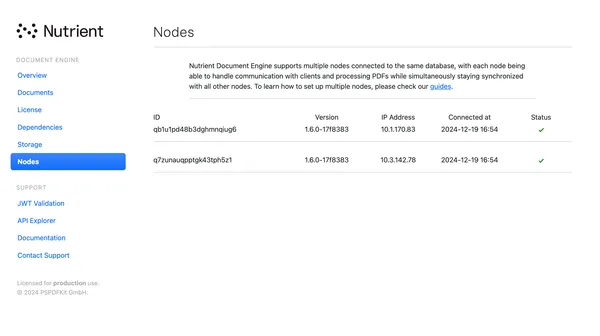
The dashboard shows all connected nodes, including their IDs, Document Engine versions, IP addresses, and first connection times.
Clustering
When clustering is enabled, Document Engine nodes discover each other and build a consistent-hash ring. Each document_id maps to one owner node, and document-scoped requests go to that owner.
With clustering enabled:
- Improves local cache hit rates because requests for the same document go to the same node
- Reduces duplicate work across nodes when multiple requests target the same document
- Applies to all document-scoped operations, not just rendering
- Rebalances ownership automatically when nodes join or leave
Clustering doesn’t replace the shared database or shared Redis cache. It complements them by reducing duplicated work across nodes.
Enable clustering
Set these environment variables on every node:
| Variable | Default | Description |
|---|---|---|
CLUSTERING_ENABLED | false | Enables clustering. Set it to true on every node. |
CLUSTERING_METHOD | local in dev and test | Peer discovery method. Supported values: local, kubernetes_dns. |
CLUSTERING_SERVICE_NAME | document-engine | Headless service name used for kubernetes_dns discovery. |
CLUSTERING_APPLICATION_NAME | pssync | Distributed Erlang application name used for kubernetes_dns discovery. |
Use local for development and testing. For Kubernetes deployments, use kubernetes_dns with a headless service that matches CLUSTERING_SERVICE_NAME. Refer to the Kubernetes deployment guide for details.
If CLUSTERING_METHOD is set to an unknown value, Document Engine logs a warning and starts without automatic clustering.
Kubernetes node identity and ports
With kubernetes_dns, Document Engine discovers peers through the headless service’s DNS records and addresses each node by pod IP as <application_name>@<pod-ip> using Erlang long names. Each node reads its own address from POD_IP and names itself pssync@<pod-ip>. Set POD_IP to the pod’s own IP so the node’s name matches the name discovery uses. Without POD_IP, Erlang distribution fails to start and the node exits on boot. If a node is named by a hostname or FQDN instead of its pod IP, it starts, but discovery logs unable to connect to pssync@<ip>, and the routing ring never forms.
Supply POD_IP from the pod’s status through the downward API in the container specification:
env: - name: POD_IP valueFrom: fieldRef: fieldPath: status.podIPLeave CLUSTERING_APPLICATION_NAME at its default (pssync) so it matches the node’s Erlang basename (pssync).
Erlang distribution uses two sets of ports between pods: 4369 for EPMD, and 4370 to 4380 for the distribution channel. Allow both between pods.
The Helm chart sets POD_IP, exposes the EPMD service, and includes a network policy that allows these ports between pods. Configure them yourself only when you deploy your own manifests.
Node readiness and the routing ring
A node can own documents only after its HTTP endpoint is ready to serve proxied requests. Until readiness completes, the node is discoverable but isn’t added to the routing ring.
This means:
- During scale-up, a new node can appear before it starts owning documents.
- During a rolling restart, short periods without ownership are expected and safe.
- Configure your Kubernetes readiness probes to reflect this, so a node isn’t removed from service until its endpoint is ready.
Graceful shutdown and rebalance
When a node shuts down, it stops accepting new routing decisions, notifies its peers, and drains in-flight cluster work before it exits. The remaining nodes redistribute ownership across the ring.
This means:
- In-flight requests on the leaving node can finish.
- New requests for affected documents go to the new owner.
- You can scale in or roll out updates without dropping document-scoped requests.
Operational notes
During healthy cluster startup, each node logs Local endpoint is ready. Broadcasting readiness to cluster peers and then logs Cluster handshake completed with peer metadata as peers become routable.
During rolling restarts, Removing it from the ring messages are expected when an old pod exits, as long as they’re followed by Discovered new node and handshake completion messages for the replacement pod.
When you monitor a clustered deployment, use cluster_ring_size as the first health signal. If routing looks wrong, inspect redirect failures first. Then, compare peer-change churn and cluster_ring_size across nodes. Refer to the metrics reference guide for the full list of clustering metrics.
Impact on caching
Without clustering, any node can serve any document, so each node’s local cache must be sized for the full working set.
With clustering, each node owns only part of the documents — roughly 1/n of the working set in an n-node cluster. This reduces the cache requirement per node.
For example, if a single-node deployment needs 2 TB of local storage to hold the working set without early eviction, a four-node clustered deployment needs about 500 GB per node.
In practice, size the per-node cache slightly above total working set / minimum node count so temporary scale-in events or ownership rebalances don’t create immediate eviction pressure.
Refer to the cache configuration guide for more information.
Tile rendering and clustering
If you also enable HTTP/2 shared rendering for tiled viewing of large documents, tile requests become cluster-aware. They go to the same owner node that handles other document-scoped requests for that document.
Refer to the HTTP/2 shared rendering guide for details.
Licensing
Your license defines how many nodes you can use. If you have questions, contact our Sales team.