Create a document from a URL
When you already have an existing data store for your files or prefer not to store them with Document Engine, you can create a document from a URL.
When operating on a document from a URL, Document Engine will fetch the file using the provided URL and cache it in the node file system.
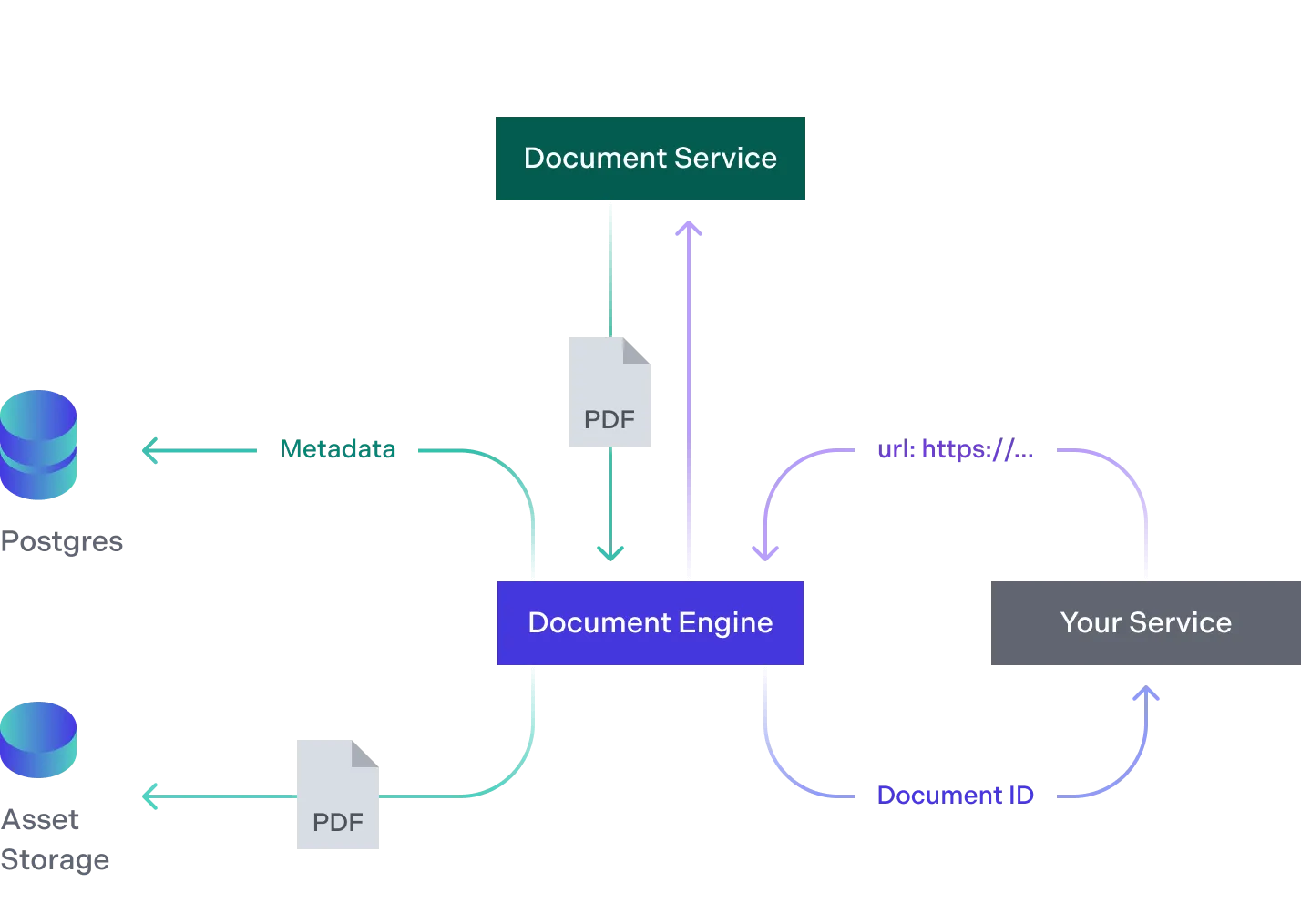
- Your service sends a document’s URL to Document Engine, which makes a request to the URL to retrieve the document.
- The document service returns the document, and Document Engine stores its metadata, such as the document URL, in PostgreSQL.
- Your service receives the document ID back, which it can use to reference the document later.
Keeping documents available
By default, Document Engine doesn’t keep its own copy of a document added from a URL. It fetches the file from the URL when the document is needed and keeps only a cached copy that can expire at any time. A non-PDF file, such as an Office document, is converted to a PDF on import, and Document Engine can persist that generated PDF, though it may still need the original file from the URL.
Either way, the URL has to stay accessible for as long as you use the document, and it has to keep serving the same file. Document Engine records the file’s SHA256 when the document is created and never recalculates it, so if the content behind the URL changes and Document Engine has to refetch it after the cache expires, the request fails with a hash_mismatch error. Signed, time-limited URLs, such as an Amazon S3 presigned URL or an Azure Blob SAS URL, fail the same way once their credentials expire and the file can no longer be fetched.
You have two ways to avoid depending on the URL. If you don’t need the file to stay in your own storage, set copy_asset_to_storage_backend to true when you create the document, and Document Engine stores the file in its configured asset storage and serves it from there. If you need to keep the file in your own storage, you’re responsible for keeping the URL accessible and serving the same file — for example, by putting a proxy in front of it that always serves the same file at the stored URL.
Security considerations
Be aware that the workflow of this functionality requires Document Engine to perform a server-side retrieval of data at the specified URL. As such, creating a document from a URL comes with inherent security limitations.
For increased security at the expense of ease of integration, consider disabling document creation from a URL and instead use the document creation from upload architecture to have data processed by Document Engine sourced from a Postgres database or S3-compatible storage.
The design intent of the document creation from a URL feature is for Document Engine to be able to easily integrate with other known and trusted services by reaching out and collecting data directly via HTTPS.
You should never send an untrusted URL directly to Document Engine. If your service is working with user input or other untrusted data sources, your service needs to implement checks to prevent untrusted URLs from being directly sent to Document Engine so as to mitigate the risk of server-side request forgery(opens in a new tab).
Because document creation from a URL requires an authorized API call, Document Engine doesn’t place limitations on the network sources it’ll attempt to resolve and retrieve data from. As an exercise in the principle of least privilege, consider limiting outbound network traffic at the container or network firewall level so that Document Engine can only communicate outbound to the sources it’s expected to retrieve data from.