Nutrient Android SDK
Build a document scanner into your Android app
- Turn captured or imported page images into PDF documents on device
- Run OCR to produce searchable PDFs with selectable, extractable text
- Recognize text in many languages with the OCR component
- Extract text, words, and glyphs for search, markup, and indexing
Need pricing or implementation help? Talk to Sales.
SCAN TO SEARCHABLE PDF ON ANDROID
// 1. Convert a captured page image into a PDF.val imageSize = Size(image.width.toFloat(), image.height.toFloat())val pageImage = PageImage(image, PagePosition.CENTER).apply { setJpegQuality(70) }val newPage = NewPage.emptyPage(imageSize).withPageItem(pageImage).build()val creationTask = PdfProcessorTask.newPage(newPage)
PdfProcessor.processDocumentAsync(creationTask, outputFile).subscribe({ }, { }, { // 2. Run OCR so the scan becomes selectable and searchable. val document = PdfDocumentLoader.openDocument(context, Uri.parse(outputFile.absolutePath)) val ocrTask = PdfProcessorTask .fromDocument(document) .performOcrOnPages((0 until document.pageCount).toSet(), OcrLanguage.ENGLISH)
PdfProcessor.processDocumentAsync(ocrTask, ocrFile).subscribe({ }, { }, { // 3. Extract the recognized text. val ocrDocument = PdfDocumentLoader.openDocument(context, Uri.parse(ocrFile.absolutePath)) Log.d("Nutrient OCR", ocrDocument.getPageText(0)) })})// 1. Convert a captured page image into a PDF.final Size imageSize = new Size(image.getWidth(), image.getHeight());final PageImage pageImage = new PageImage(image, PagePosition.CENTER);pageImage.setJpegQuality(70);final NewPage newPage = NewPage.emptyPage(imageSize).withPageItem(pageImage).build();final PdfProcessorTask creationTask = PdfProcessorTask.newPage(newPage);
PdfProcessor.processDocumentAsync(creationTask, outputFile).subscribe(progress -> { }, throwable -> { }, () -> { // 2. Run OCR so the scan becomes selectable and searchable. final PdfDocument document = PdfDocumentLoader .openDocument(context, Uri.parse(outputFile.getAbsolutePath())); final Set<Integer> pages = new HashSet<>(); for (int i = 0; i < document.getPageCount(); i++) pages.add(i);
final PdfProcessorTask ocrTask = PdfProcessorTask .fromDocument(document) .performOcrOnPages(pages, OcrLanguage.ENGLISH);
PdfProcessor.processDocumentAsync(ocrTask, ocrFile).subscribe(progress -> { }, throwable -> { }, () -> { // 3. Extract the recognized text. final PdfDocument ocrDocument = PdfDocumentLoader .openDocument(context, Uri.parse(ocrFile.getAbsolutePath())); Log.d("Nutrient OCR", ocrDocument.getPageText(0)); });}); Lufthansa
Disney
Autodesk
UBS
Dropbox
IBM
Lufthansa
Disney
Autodesk
UBS
Dropbox
IBM
A document scanning workflow for Android
Capture and import
Bring in page images from the camera or gallery and turn them into document pages on device.
Image to PDF
Convert captured images into PDF pages with control over size, position, and JPEG quality.
Searchable PDF with OCR
Run OCR over the scanned pages so the document gains selectable, searchable, extractable text.
Text extraction
Pull out page text, words, and glyphs for full-text search, text markup, and indexing.
Document scanning capabilities for Android
Image to PDF
Convert a captured page image into a PDF page, ready to be combined into a multipage scan.
- Place images with size and position control
- Set JPEG quality for the embedded image
- Build single- or multi-page documents
Scan to searchable PDF
Run OCR over scanned pages to unlock selectable text, text markup, extraction, and search.
- OCR raster and photographed pages
- Output a fully searchable PDF
- Enable text selection and markup
Image to text
After OCR, retrieve the recognized text from any page for indexing, validation, or export.
- Retrieve page text, words, and glyphs
- Feed search and indexing pipelines
- Export extracted content downstream
Multilanguage OCR
Recognize text written in many languages with the OCR component, configurable per page.
- Many supported OCR languages
- Select the language per OCR pass
- Licensed OCR component
Built on the Android SDK processor
The scanning workflow uses the same document processor that powers conversion and editing on Android — convert an image to a PDF page, OCR it, and read the text back, all on device.
Inputs
Camera image Gallery image Bitmap Outputs
Searchable PDF Extracted text Words/glyphs Android API
PdfProcessorTask performOcrOnPages getPageText HOW IT WORKS
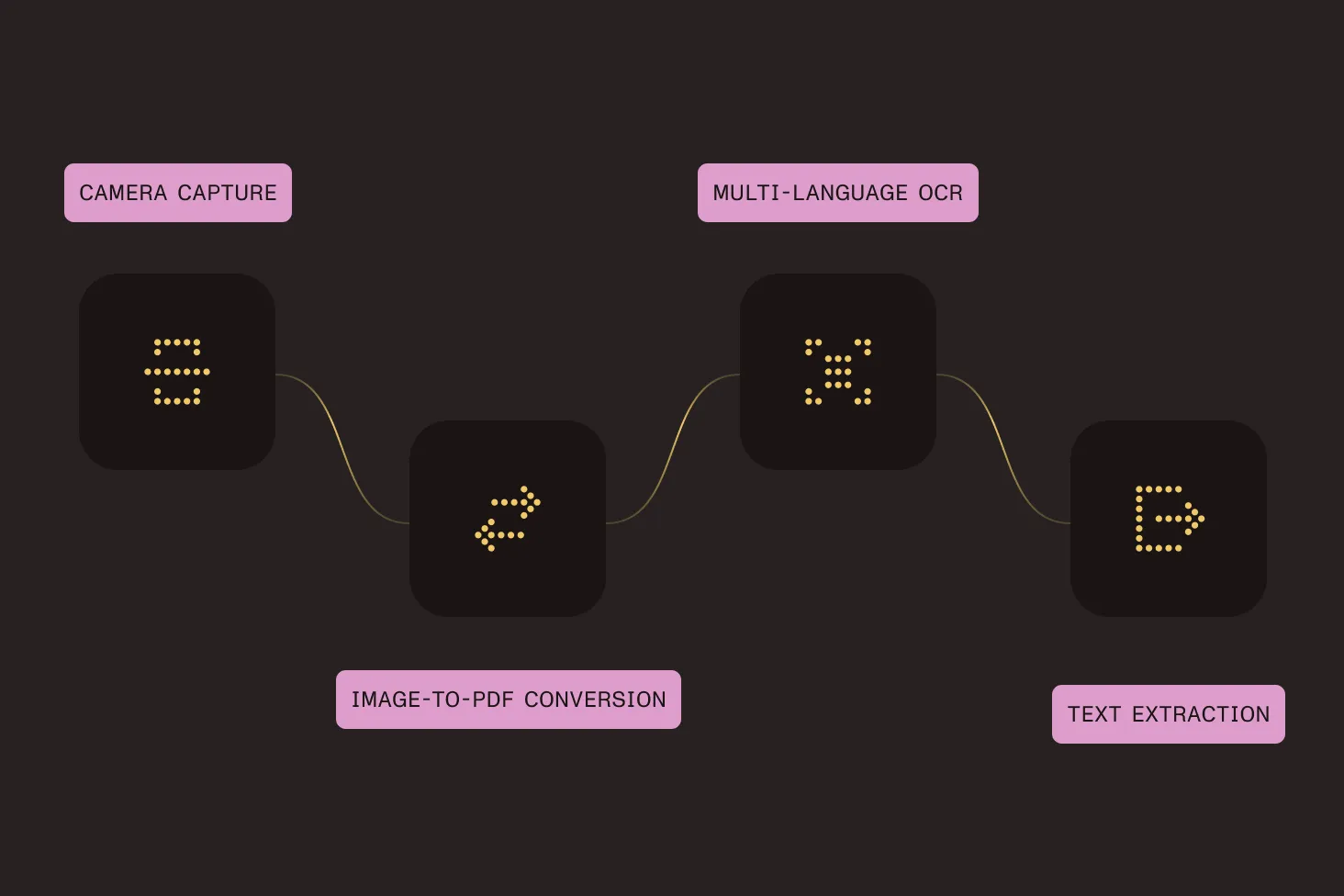
From captured image to searchable document
A document scanner is a short pipeline: Capture or import a page image, convert it to a PDF page, run OCR to make the text recognizable, and then read the text back. The Android SDK handles each step on device with its document processor.
Capture or import a page
Start from a camera or gallery image and prepare it as a document page.
Convert image to PDF
Use a processor task to place the image on a new PDF page at the size and quality you choose.
OCR for searchable text
Run OCR across the pages so the scan becomes selectable, searchable, and markable.
Extract the text
Read page text, words, or glyphs from the OCR’d document for search, validation, or export.
Why choose Nutrient’s Android document scanner SDK?
Nutrient’s Android document scanner SDK turns captured or imported images into searchable, extractable PDFs entirely on device. It combines camera capture, image-to-PDF conversion, multilanguage OCR, and text extraction in one SDK — powered by the same document processor behind conversion and editing across the Nutrient Android SDK.
Frequently asked questions
How do I build a document scanner on Android?
Capture or import a page image, and convert it to a PDF page with a processor task. Then run OCR over the page so the text becomes selectable and searchable. Finally, read the recognized text back from the document. The scan to searchable PDF guide walks through the full flow.
Does the SDK include a camera UI with edge detection?
The SDK works from page images you provide — captured from the camera or chosen from the gallery — and converts, OCRs, and extracts text from them. You control the capture step in your app; the SDK handles converting the image to a searchable PDF and reading the text back.
How do I make a scanned document searchable?
Run OCR on the PDF using a processor task with
performOcrOnPages(). This recognizes the text in
the scanned pages and writes it into the PDF, unlocking text
selection, text markup annotations, extraction, and full-text
search.
Which languages does OCR support?
The OCR component recognizes text in many languages, and you
choose the language for each OCR pass (for example,
OcrLanguage.ENGLISH). See the
OCR language support guide
for the full list.
Can I extract the text from a scanned document?
Yes. After OCR, call getPageText() to retrieve the recognized
text for a page; you can also retrieve text blocks, words, and glyphs.
This is useful for indexing, search, validation, and exporting content
to other systems.
Is OCR included in the Android SDK?
OCR is an additional component that can be added to your license. Contact Sales to add OCR to your license or to discuss your document scanning use case.
Is there a free trial?
Yes. Get started with a free trial of the Android SDK to evaluate the scanning, OCR, and text extraction workflow in your own app.
Explore more
More Android SDK capabilities
Scanning guides