Nutrient Python SDK
Extract text from scanned documents with the Python OCR SDK
- PDF, PNG, JPEG, and TIFF in — text with word-level bounding boxes and language detection out
- OCR for speed, ICR for tables and equations with fully local AI, cloud vision language models for the toughest layouts
- Handwriting detection, multilanguage support, and hierarchical reading order
- pip install nutrient-sdk — minutes to first OCR result
Need pricing or implementation help? Talk to Sales.
OCR EXTRACTION
from nutrient_sdk import Document, Vision, VisionEngine
with Document.open("scan.png") as document: document.settings.vision_settings.engine = VisionEngine.OCR
vision = Vision.set(document) content_json = vision.extract_content() # Text + word-level bounding boxes in JSON Lufthansa
Disney
Autodesk
UBS
Dropbox
IBM
Lufthansa
Disney
Autodesk
UBS
Dropbox
IBM
OCR built for Python developers
Three processing engines
OCR for speed. ICR for offline AI-powered document understanding. VLM-enhanced ICR for maximum accuracy with Claude, OpenAI, or local models.
100 percent on-premises processing
ICR runs entirely on your infrastructure with no external API calls. Process sensitive documents without data leaving your servers. HIPAA and GDPR ready.
Word-level bounding boxes
Get precise pixel coordinates for every extracted word. Enables document reconstruction, search indexing, and overlay positioning.
AI-powered document understanding
Go beyond character recognition. Detect tables with cell boundaries, mathematical equations, key-value regions, and hierarchical reading order.
Complete OCR and vision toolkit
Text extraction with OCR
Fast text extraction optimized for high-throughput document processing.
- Optimized for speed with minimal computational overhead
- Word-level bounding boxes with pixel coordinates
- Multilanguage support for international documents
Intelligent content recognition
AI-powered document understanding that runs 100 percent offline on your infrastructure.
- Detect tables, equations, and key-value regions
- No external API calls — fully air-gapped processing
- Hierarchical document structure and reading order
VLM-enhanced extraction
Combine local AI with vision language models for maximum accuracy on complex documents.
- Hybrid local AI + cloud VLM approach
- Support for Claude, OpenAI, and custom endpoints
- Enhanced confidence scores and cell boundary detection
Image description with Claude
Generate natural language descriptions of images and documents using Anthropic Claude.
- WCAG-compliant alt text generation
- Contextual understanding of visual content
- Customizable description detail levels
Image description with OpenAI
Cloud-scalable image descriptions with enterprise SLA guarantees.
- Enterprise-grade cloud scalability
- Global availability and well-documented behavior
- Consistent output for automated pipelines
Local AI image description
Run vision language models locally with Ollama, LM Studio, or vLLM for complete data privacy.
- Zero per-image API costs at any scale
- Complete data privacy — nothing leaves your network
- Compatible with any OpenAI-compatible endpoint
Three engines for every use case
Choose the right processing engine based on your accuracy, privacy, and performance requirements. Switch between engines with a single configuration change.
OCR engine
- Fast extraction
- Word bounding boxes
- Multilanguage
- Batch processing
ICR engine
- Table detection
- Equations
- Key-value regions
- Reading order
VLM-enhanced
- Claude
- OpenAI
- Custom endpoints
- Local VLMs
Output formats
JSON Structured elements Bounding boxes Confidence scores BEYOND TRADITIONAL OCR
AI document understanding that sees structure, not just text
Traditional OCR extracts characters. Nutrient Data Extraction understands document layout, detects tables with cell boundaries, recognizes mathematical equations, and classifies semantic elements — all from a single API call inside your Python application.
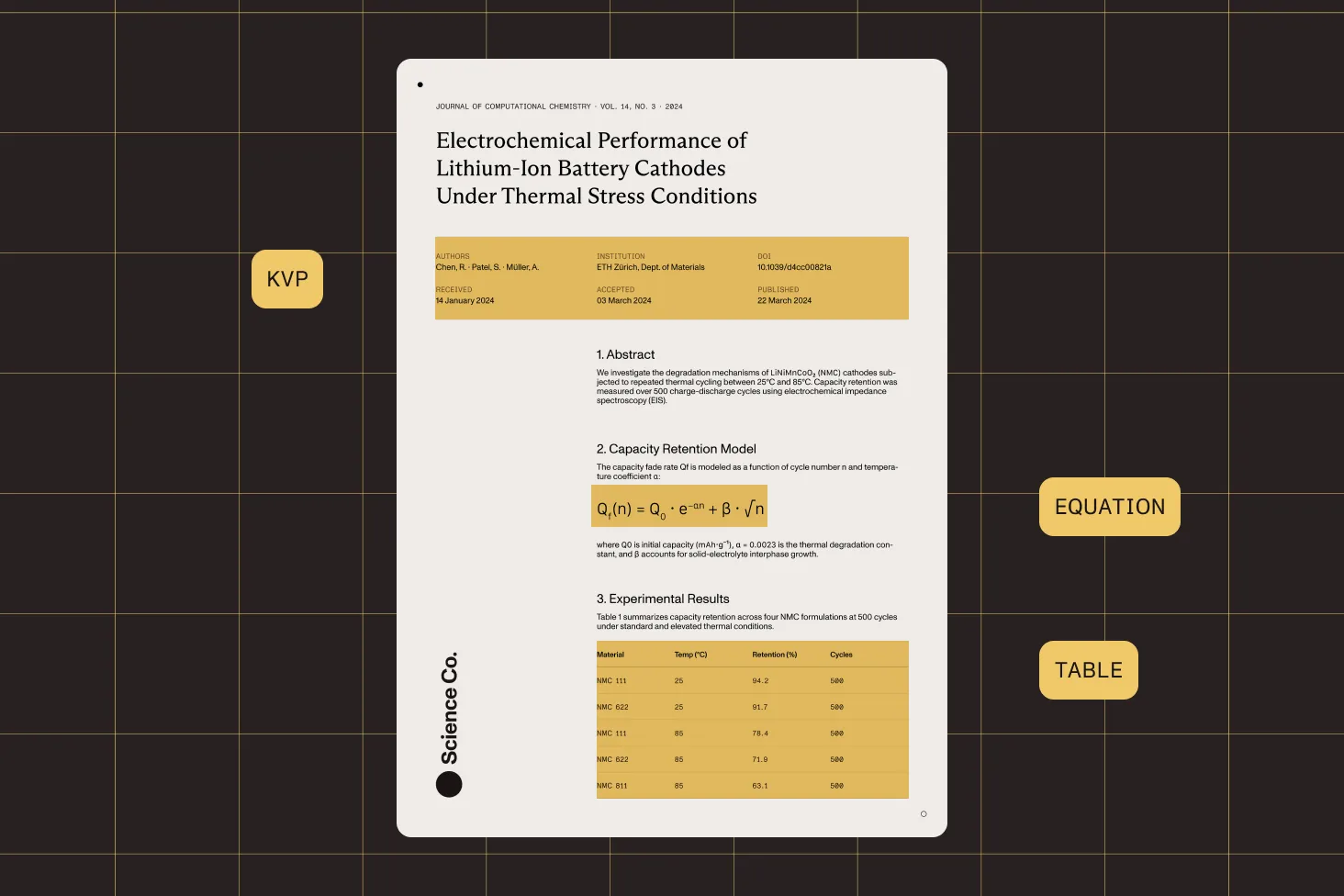
Table detection with cell boundaries
Automatically detect tables and extract individual cell contents with row and column structure, even in documents with complex or irregular layouts.
Mathematical equation recognition
Detect and extract mathematical equations with LaTeX representations. Process scientific papers, textbooks, and technical documentation.
Key-value region identification
Identify and extract form-like key-value pairs from invoices, receipts, and structured documents without predefined templates.
Hierarchical reading order
Analyze multicolumn layouts and determine the correct reading sequence. Produce structured output that preserves the logical flow of a document.
Frequently asked questions
What’s the difference between OCR, ICR, and VLM-enhanced ICR?
OCR is the fastest engine, optimized for high-throughput text extraction with word-level bounding boxes. It focuses on character recognition without analyzing document structure. ICR (intelligent content recognition) is an AI-powered engine that runs entirely on your infrastructure. It understands document layout, detects tables with cell structures, recognizes equations, identifies key-value regions, and determines reading order — all without external API calls. VLM-enhanced ICR combines the local ICR engine with a vision language model (Claude, OpenAI, or a local model) for the highest accuracy on complex documents, with improved table boundaries and confidence scores.
Can I run OCR entirely on-premises without cloud dependencies?
Yes. Both the OCR and ICR engines run 100 percent on your infrastructure with no external API calls. Your documents never leave your servers, which makes our engines suitable for air-gapped environments, HIPAA-compliant medical record processing, GDPR workflows, and any scenario where data sovereignty is required. The VLM-enhanced engine can also run fully on-premises when paired with a local model server like Ollama, LM Studio, or vLLM.
What accuracy can I expect from each processing engine?
Accuracy depends on document quality and complexity. OCR delivers fast, reliable character recognition on clean scans and is ideal for simple text extraction and search indexing. ICR adds structural understanding and achieves significantly better results on documents with tables, equations, and mixed layouts. VLM-enhanced ICR provides the highest accuracy, particularly on complex multicolumn layouts, financial documents, and pages with overlapping visual elements. Each engine returns confidence scores so you can assess extraction quality programmatically.
How does Data Extraction compare to pytesseract and EasyOCR?
pytesseract and EasyOCR are popular open source Python OCR libraries focused on character recognition. Nutrient Data Extraction goes significantly further. Beyond text extraction, it offers AI-powered document understanding with table detection, equation recognition, key-value extraction, and reading order analysis. The ICR engine provides these capabilities entirely offline, while VLM-enhanced ICR adds vision language models for complex documents. Unlike pytesseract, Data Extraction returns structured JSON output with element classification and confidence scores, reducing the post-processing code you need to write.
What image and document formats are supported?
Data Extraction processes PDFs and common image formats, including PNG, JPEG, GIF, BMP, and TIFF. For PDFs, it handles both native (digitally created) and scanned documents. PDF pages are automatically rendered to images for processing, so you don’t need to handle conversion separately. All three engines work with the same input formats, making it easy to switch engines without changing your document pipeline.
Can I extract tables and structured data, not just raw text?
Yes. The ICR and VLM-enhanced ICR engines detect tables automatically, extracting cell contents with row and column structure. They also identify key-value regions (like form fields on invoices), mathematical equations, headings, paragraphs, and figures. The output is structured JSON with element classification, bounding boxes, and reading order. This means you can extract a table from a scanned invoice and get structured data with cell-level precision without writing custom parsing logic.
How do I choose between Claude, OpenAI, and local VLMs?
This choice applies to VLM-enhanced ICR and image description features. Claude offers strong reasoning and nuanced contextual understanding. OpenAI provides cloud scalability and enterprise SLA guarantees. Local VLMs (via Ollama, LM Studio, or vLLM) give you zero per-image API costs and complete data privacy. Choose based on your priorities: maximum accuracy (Claude or OpenAI), cost efficiency at scale (local VLMs), or data sovereignty (local VLMs). You can switch providers with a single configuration change.
Does Data Extraction support handwritten text?
Yes. The ICR and VLM-enhanced ICR engines include handwriting detection as a dedicated vision feature. The engines can identify regions containing handwritten content and extract text from them. Recognition accuracy depends on writing clarity and quality. For best results on handwriting-heavy documents, use the VLM-enhanced engine, which leverages vision language models to better interpret handwritten content in context.
What are word-level bounding boxes and how are they useful?
Word-level bounding boxes provide the exact pixel coordinates (position and dimensions) of every extracted word in a document. This enables precise text positioning for document reconstruction, search highlighting, text overlay on scanned images, and coordinate-based data extraction. All three engines return bounding box data, making it straightforward to map extracted text back to its physical location on the page.
How do I get started with OCR in my Python project?
Install Nutrient Python SDK with pip. The getting started guide walks you through installation and basic setup. For OCR, open a document, create a vision instance, and call the extraction method with your chosen engine. The SDK handles all preprocessing, model loading, and output formatting. Refer to the extraction guides for step-by-step examples covering OCR, ICR, VLM-enhanced processing, and image description with each supported provider.
Explore more
Also available for
More Python SDK capabilities