PDFium in 2026: Secure, high-performance PDF rendering explained

Table of contents

In 2014, Nutrient forked PDFium — the C++ PDF rendering engine used by Chrome — to support enterprise document workflows. Maintaining the fork requires upstream security updates, testing, and changes for document workflows beyond browser viewing.
Rumors persist that open source PDF libraries are inherently insecure or poorly maintained. PDFium(opens in a new tab) is a permissively licensed C++ engine used by Chrome and document applications. Evaluate its security through maintenance, testing, and deployment practices rather than its license model alone.
In this 2026 analysis, Nutrient chief executive officer (CEO) Jonathan Rhyne separates fact from fiction. The analysis examines why enterprise chief technology officers (CTOs) continue choosing PDFium for their most demanding document workflows.
What is PDFium?
PDFium is an open source C++ PDF rendering engine that parses PDF files and rasterizes their pages for display. Google originally open sourced it in 2014. It powers Chrome’s built-in PDF viewer and underlies document SDKs, including Nutrient’s maintained fork. Microsoft has announced Edge’s transition to an Adobe PDF engine(opens in a new tab); the engine in a particular Edge installation depends on rollout and configuration.
Applications use PDFium for rendering and rasterizing PDFs: browser PDF viewing, server-side page rendering, thumbnail generation, and text extraction. It’s a rendering engine rather than a full document SDK. The SDKs that embed it build capabilities like annotation UIs, digital signatures, and collaboration on top of it.
The PDFium reality: Powering the modern web
PDFium provides C++ APIs for PDF rasterization. Applications using it need to account for rendering quality, performance, memory use, and ongoing maintenance.
Key insight — PDFium’s public source and development history enable teams to inspect changes and follow upstream fixes. Adoption alone doesn’t establish a security ranking.
Why Nutrient forked PDFium in 2014
Release control
Enable faster resolution of production issues without waiting for upstream merges, with release timing controlled by the SDK team.
Capability extension
Add rendering features and performance optimizations beyond Chromium’s browser-focused use cases.
More than a decade later, our fork continues active development, tracking upstream changes alongside enhancements for document workflows beyond browser viewing.
Myth vs. reality: PDFium security
Two persistent myths shape how teams evaluate PDFium’s security. Here’s how each holds up against the evidence.
Myth #1: “Open source means insecure”
Reality: You’re already trusting open source technology daily. Consider the historical browser statistics below.
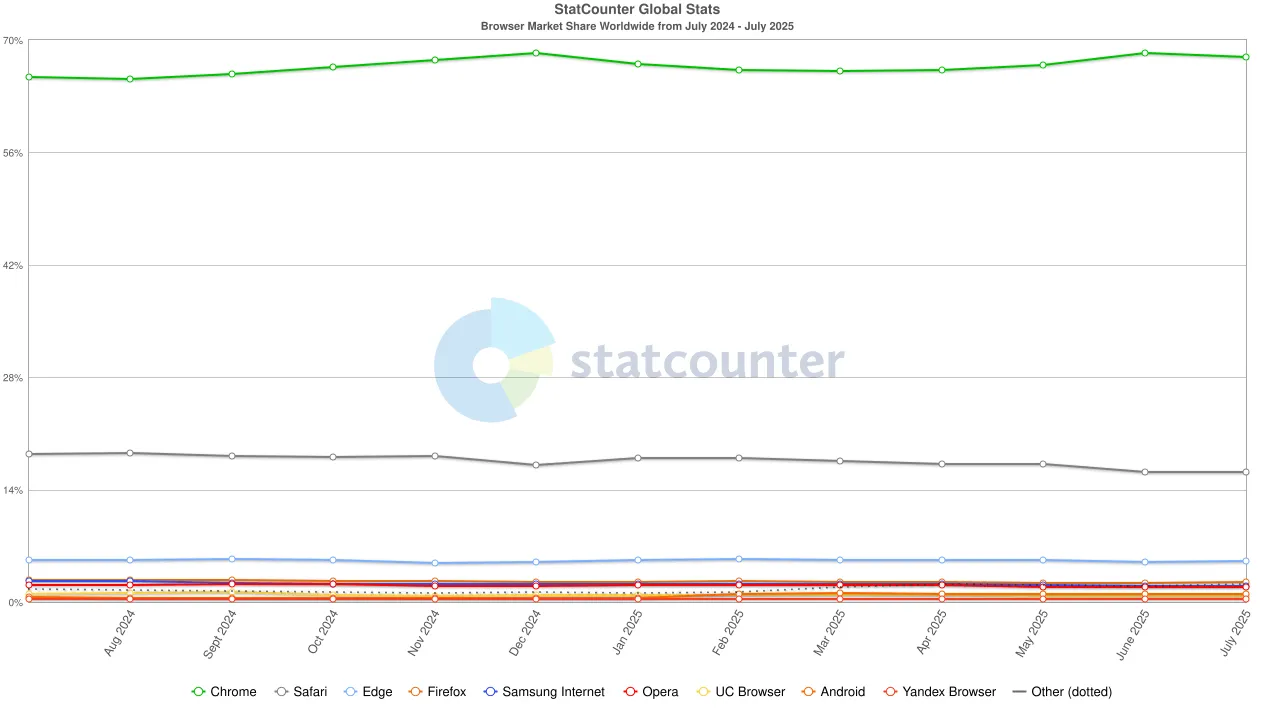
The chart covers July 2024–July 2025; it’s historical context, not a current market-share snapshot.
Browsers commonly incorporate open source components. That shows open source can be used in widely deployed products; it doesn’t demonstrate that one PDF engine is more secure than another.
Security depends on the component version, vulnerability response, testing, and application isolation.
Myth #2: “PDFium lacks enterprise security”
Reality: Fortune 500 companies actively contribute to and deploy PDFium.
Google — Uses PDFium for Chrome’s PDF viewing Microsoft — Contributed to PDFium; Edge’s PDF engine is transitioning to Adobe
Amazon: Integrated into Echo and Fire TV products Dropbox: Handles document preview across client applications
These examples show PDFium’s use and contributor history. They don’t prove that its review process is more rigorous than a proprietary engine’s.
Our enterprise fork: Technical architecture

PDF architecture overview: Modern PDF tools separate parsing (reading document structure) from rendering (visual presentation). PDFium handles parsing and rendering in C++. It isn’t inherently memory-safe, so vulnerability fixes and defensive deployment remain important.
Security-first development process
Nutrient’s process divides security work into two tracks: upstream patch integration and enterprise-specific enhancements.
Upstream integration strategy
- Monitor Chromium security advisories and PDFium commits
- Evaluate and integrate relevant vulnerability fixes and memory safety improvements
- Validate patches through automated regression testing
- Verify the fork’s patch status for each release; browser and SDK release schedules differ
Enterprise enhancements
- Performance at scale — Threading and memory optimizations for high-volume rendering across iOS, Android, Web Standalone, and server environments
- Text extraction improvements — Better accuracy and robustness across diverse document structures
- Production hardening — Fixes for edge cases in malformed documents
Security testing — Upstream fuzzing and fork-specific tests help find defects. They don’t establish lower vulnerability exposure than another engine without a comparative assessment.
Maintenance model: Best of both worlds
Development runs in two parallel streams, keeping the fork up to date with Chromium while advancing enterprise capabilities.
Parallel development streams
- Upstream syncs — Regular integration of Chromium security and stability patches
- Enterprise commits — Production-informed enhancements from Nutrient’s engineering team
Validation pipeline
- Unit tests from both upstream and fork-specific codebases
- Rendering comparison tests using synthetic and real-world PDF corpora
- Performance benchmarks detecting throughput and memory regressions
The enterprise advantage
After more than a decade of active development, Nutrient’s PDFium fork delivers:
- Upstream maintenance through monitoring and integration of relevant fixes
- Extended feature coverage for specialized document workflows beyond browser use cases
- Performance optimizations tuned for both client-side and high-volume server rendering
- Production hardening informed by document-processing use cases
For teams evaluating PDF solutions, review patch handling, rendering behavior, platform support, and the complete SDK feature set.
The community advantage
“If you want to go FAST, go alone. If you want to go FAR, go together.”
This philosophy drives Nutrient’s participation in the PDFium community. While each company has unique business requirements, we’re collectively committed to advancing PDF technology that benefits everyone.
The community supports a PDF rendering platform that’s:
- Used in browsers and document applications
- Continuously improved by diverse industry needs
- Maintained through public development and security testing
- Optimized for both performance and reliability
Conclusion
PDFium is a widely used rendering engine with a public development history. A maintained fork gives Nutrient control over release timing and document-specific improvements, while requiring ongoing integration and testing.
Evaluate Nutrient with your documents and deployment requirements, including security maintenance, rendering quality, and support.
FAQ
PDFium is an open source C++ PDF rendering engine, open sourced by Google in 2014, that parses and rasterizes PDF pages. It powers Chrome’s PDF viewer and is used in document SDKs, including Nutrient’s maintained fork. Microsoft has announced Edge’s transition to an Adobe PDF engine.
Applications use PDFium to render and rasterize PDFs — browser PDF viewing, server-side rendering, thumbnail generation, and text extraction. It’s a rendering engine, not a full document SDK. The SDKs that embed it build features like annotation tools, digital signatures, and forms UIs on top of it.
Review the deployed version, applicable security fixes, update process, testing, and application isolation. Public development helps teams inspect changes, but it doesn’t prove that PDFium is more secure than a proprietary engine.
We monitor upstream changes and security advisories and validate relevant updates through testing. The fork and browsers have different release schedules, integrations, and isolation boundaries, so you shouldn’t treat their security posture as identical.
Our fork adds enhanced font handling, PDF/A compliance features, server-optimized threading, and production-hardened edge case handling for document workflows beyond upstream browser use cases.
While you could use upstream PDFium, our fork provides enterprise-specific optimizations, faster issue resolution, and professional support — plus a decade of production-informed improvements.
We continuously monitor upstream changes and integrate security patches promptly. We evaluate major feature updates based on enterprise needs and compatibility with our enhanced functionality.
Ready to put production-grade PDF rendering to work? Explore how Nutrient’s SDKs deliver PDFium’s power with professional support, advanced features, and production-ready deployment guides.
Sources
- The list of companies that contribute to PDFium, which includes Google, Microsoft, and Dropbox(opens in a new tab)
- The list of open source software used by Amazon Echo devices, which includes PDFium(opens in a new tab)
- The Dropbox.Tech blog discussing the performance of PDFium in Dropbox software(opens in a new tab)
- Microsoft’s announcement about Edge’s transition to an Adobe PDF engine(opens in a new tab)