Nutrient Java SDK
Add digital signatures to PDFs in Java
- Visible and invisible digital signatures with PKCS#12 certificates
- PAdES-T-compliant timestamps for long-term validation and regulatory compliance
- Customizable signature appearance — auto-generated text, custom images, or styled typography
- Electronic signatures (visual only) for internal approvals without cryptographic validation
Need pricing or implementation help? Talk to Sales.
DIGITAL SIGNATURES IN JAVA
import io.nutrient.sdk.signing.PdfSigner;import io.nutrient.sdk.signing.DigitalSignatureOptions;import io.nutrient.sdk.signing.SignatureAppearance;
try (PdfSigner signer = new PdfSigner()) { DigitalSignatureOptions options = new DigitalSignatureOptions(); options.setCertificatePath("certificate.pfx"); options.setCertificatePassword("password"); options.setSignerName("John Doe"); options.setReason("Final Approval"); options.setLocation("New York");
SignatureAppearance appearance = new SignatureAppearance(); appearance.setUseAutoGeneratedText(true); appearance.setShowValidationMark(true);
signer.signField( "input.pdf", "output_signed.pdf", "ApprovalSignature", options, appearance );}import io.nutrient.sdk.signing.PdfSigner;import io.nutrient.sdk.signing.DigitalSignatureOptions;
try (PdfSigner signer = new PdfSigner()) { DigitalSignatureOptions options = new DigitalSignatureOptions(); options.setCertificatePath("certificate.pfx"); options.setCertificatePassword("password"); options.setSignerName("John Doe"); options.setReason("Document Approval"); options.setLocation("New York"); options.setContactInfo("john@example.com");
signer.sign( "input.pdf", "output_signed_invisible.pdf", options );}import io.nutrient.sdk.signing.PdfSigner;import io.nutrient.sdk.signing.DigitalSignatureOptions;import io.nutrient.sdk.signing.TimestampConfiguration;
try (PdfSigner signer = new PdfSigner()) { DigitalSignatureOptions options = new DigitalSignatureOptions(); options.setCertificatePath("certificate.pfx"); options.setCertificatePassword("password"); options.setSignerName("Legal Department"); options.setReason("Contract Execution");
// Add a trusted timestamp for PAdES-T compliance. TimestampConfiguration timestamp = new TimestampConfiguration(); timestamp.setServerUrl( "http://timestamp.digicert.com" ); options.setTimestamp(timestamp);
signer.sign( "input.pdf", "output_signed_timestamped.pdf", options );} Lufthansa
Disney
Autodesk
UBS
Dropbox
IBM
Lufthansa
Disney
Autodesk
UBS
Dropbox
IBM
USE CASES
When developers reach for this SDK
Automate contract signing workflows
Contracts, NDAs, and agreements need to be signed at scale. The SDK signs PDFs programmatically in Spring Boot services, batch jobs, or API endpoints — no manual signing step.
Meet regulatory compliance requirements
eIDAS, FDA 21 CFR Part 11, and other frameworks require cryptographic signatures with timestamps. Add PAdES-T compliant signatures with trusted TSA timestamps for long-term validation.
Guarantee document integrity
Signed documents must be tamper-proof. The SDK embeds a certificate chain and encrypted hash — any modification after signing triggers tamper warnings in PDF viewers.
Brand your signature experience
Signatures need to match corporate guidelines. Customize appearance with company logos, handwritten signature images, branded fonts, colors, and custom text.
Digital signature capabilities for Java
Visible digital signatures
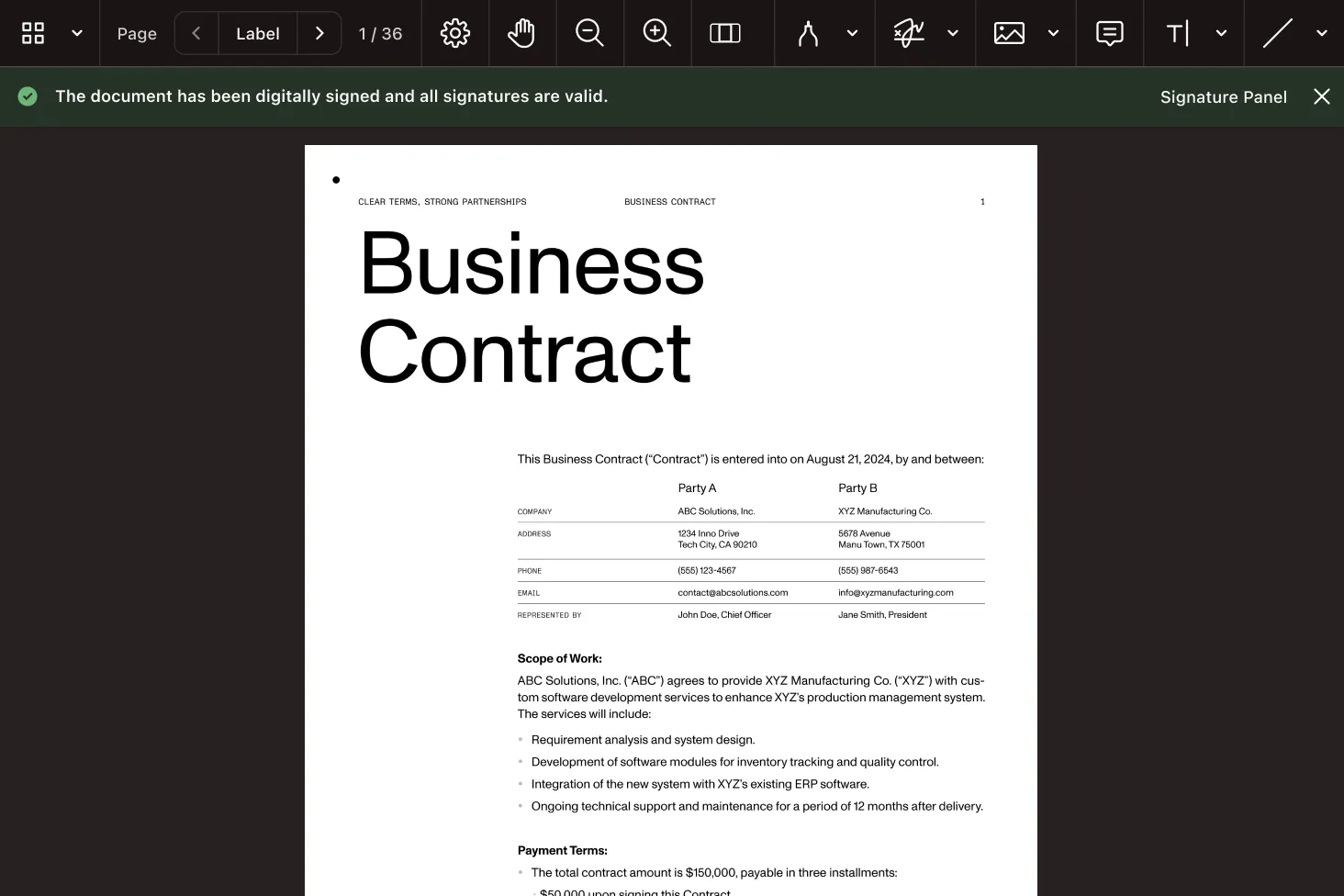
Sign PDFs with a visible signature field that shows signer name, date, reason, and a validation mark. Customize with images, text, or auto-generated content.
- Auto-generated text from signer metadata
- Custom images: handwritten signatures or logos
- Styled typography: font, size, and color control
Invisible digital signatures
Sign PDFs without any visual change. The signature embeds a certificate chain and encrypted hash into the PDF structure for tamper detection.
- Document looks unchanged after signing
- Verifiable in any PDF viewer’s signature panel
- One method call:
signer.sign()
Advanced signature workflows
PAdES-T timestamps, SHA-512 hashing, and electronic signatures. Meet eIDAS, FDA, and FIPS compliance requirements.
- PAdES-T: Trusted timestamps via RFC 3161 TSA
- SHA-512 for high-security environments
- Electronic signatures (visual only, no certificate)
ADVANCED CAPABILITIES
Beyond basic PDF signing
The SDK handles more than one-off signatures. Build signing into automated pipelines, add trusted timestamps for compliance, and deploy anywhere Java runs.
Long-term validation with timestamps
PAdES-T signatures include a trusted timestamp from an RFC 3161 TSA. The signature remains valid even after the certificate expires — required for legal archival.
Batch signing at scale
Sign hundreds of documents in a loop or with Java’s concurrency tools. Each signing follows the same pattern: Configure options and call sign() or signField().
Tamper detection built in
Every signed PDF includes an encrypted hash. If the document is modified after signing, PDF viewers display tamper warnings automatically.
Server-side signing
No GUI dependencies — sign PDFs in Spring Boot services, background jobs, or API handlers. Deploy on Linux, Docker, and CI/CD pipelines.
Frequently asked questions
How do I add a digital signature to a PDF in Java?
Create a PdfSigner instance, configure DigitalSignatureOptions with your PKCS#12 certificate path and password, set signer metadata (name, reason, location), and call signer.sign() for invisible signatures or signer.signField() for visible signatures. See the visible signature guide for a complete working example.
What is the difference between visible and invisible digital signatures?
Both embed a certificate chain and encrypted hash for tamper detection. Visible signatures also render a signature appearance on the page — showing signer name, date, and an optional image or validation mark. Invisible signatures leave the document visually unchanged while still being verifiable through a PDF viewer’s signature panel.
How do I sign a PDF with a PKCS#12 certificate in Java?
Set the certificate path and password on DigitalSignatureOptions using setCertificatePath() and setCertificatePassword(). The SDK handles PKCS#12 parsing, private key extraction, hash computation, and signature embedding automatically. Both .pfx and .p12 files are supported.
How do I add a trusted timestamp for PAdES-T compliance?
Create a TimestampConfiguration, call setServerUrl() with your TSA endpoint (e.g. DigiCert’s public timestamp service), and set it on the signature options with setTimestamp(). The SDK communicates with the TSA via the RFC 3161 protocol automatically. See the advanced signatures guide.
Does the SDK support SHA-512 for stronger security?
Yes. Call options.setHashAlgorithm(SignatureHashAlgorithm.SHA512) to use a 512-bit hash instead of the default SHA-256. This provides stronger collision resistance for high-security environments, government compliance (FIPS 140-2), and organizational policies requiring stronger cryptographic algorithms.
Can I add an electronic signature without a certificate?
Yes. Pass null for the options parameter when calling signField(), and provide only a SignatureAppearance with an image path. The SDK renders the image as a flattened graphic on the page without cryptographic validation. This is suitable for internal approvals and acknowledgment workflows. See the electronic signatures section.
Can I customize the visible signature appearance?
Yes. SignatureAppearance supports auto-generated text (signer name, date, location, reason), custom images (JPEG, PNG — handwritten signatures or logos), custom text content, and full typography control with setFontName(), setFontSize(), and setTextColor(). You can also show a validation checkmark with setShowValidationMark(true).
Can I sign PDFs in batch in a server-side Java application?
Yes. The SDK has no GUI dependencies — sign PDFs in Spring Boot services, batch jobs, or API handlers. Iterate through documents in a loop, configure options once, and call sign() or signField() for each file. Deploy on Linux, Docker, and any environment where Java runs.
FREE TRIAL
Ready to get started?
Start signing PDFs in Java in minutes — no payment information required.
Explore more
Also available for
More Java SDK capabilities