Nutrient Java SDK
Extraction, conversion, and editing in one Java SDK
- Extract text, tables, and key-value pairs from scanned and digital documents with OCR, ICR, or cloud vision language models
- Convert between PDF, Word, Excel, PowerPoint, HTML, and Markdown — all on-premises
- Edit PDFs with annotations, form fields, digital signatures, and permanent redaction
- One dependency (Maven or Gradle) — minutes to first document processed
Need pricing or implementation help? Talk to Sales.
WORD TO PDF
import io.nutrient.sdk.Document;
try (Document document = Document.open("report.docx")) { // Convert Word → PDF in one call document.exportAsPdf("output.pdf"); // Also: Excel, PowerPoint, HTML, Markdown} Lufthansa
Disney
Autodesk
UBS
Dropbox
IBM
Lufthansa
Disney
Autodesk
UBS
Dropbox
IBM
One SDK for the entire document lifecycle
AI-powered extraction
Three engines — OCR, ICR, and VLM-enhanced ICR — extract text, tables, equations, and key-value pairs from scanned and digital documents. Run on-premises or connect to Claude, OpenAI, or local VLMs.
Document conversion
Convert between PDF, Word, Excel, PowerPoint, HTML, and Markdown. Produce accessible PDF/UA output. No external dependencies required.
PDF editing and redaction
Add annotations, form fields, digital signatures, and stamps. Redact sensitive content with permanent removal. Manage pages, merge documents, and edit metadata.
Template-based generation
Generate documents dynamically from Word, PowerPoint, and Excel templates with data-driven content. Convert template output to accessible PDF/UA for compliance workflows.
What you can build
AI data extraction
Extract structured data from any document using OCR, ICR, or VLM-enhanced processing.
- Tables, key-value pairs, equations, and figures
- On-premises ICR or cloud-enhanced VLM accuracy
- Structured JSON with confidence scores
Document conversion
Convert between PDF, Office formats, HTML, and Markdown with high-fidelity output.
- Word, Excel, and PowerPoint to and from PDF
- PDF to HTML and Markdown to PDF
- Accessible PDF/UA output for compliance
PDF editing and annotations
Add annotations, text, stamps, and shapes to PDFs. Manage pages, merge files, and edit metadata.
- Text, shape, stamp, and link annotations
- Page reordering, merging, and custom pages
- Metadata editing and document management
Forms and digital signatures
Create and fill interactive form fields. Apply visible and invisible digital signatures.
- Add, edit, and fill PDF form fields
- Visible and invisible digital signatures
- Advanced signature workflows and verification
Content redaction
Permanently remove sensitive content from documents for compliance and privacy.
- Permanent content removal, not just visual overlay
- Redact text, images, and regions
- GDPR and HIPAA compliance workflows
Document generation
Generate documents dynamically from Word, PowerPoint, and Excel templates with data-driven content.
- Word, PowerPoint, and Excel template processing with dynamic data
- PDF/UA accessible output from templates
- Automate report and contract generation
Full capability map
Every document processing capability in one SDK. AI extraction runs on-premises by default, with optional cloud VLM enhancement. Editing, conversion, and generation run entirely locally.
AI extraction
- OCR
- ICR
- VLM-enhanced
- Image description
Conversion
- Word
- Excel
- PowerPoint
- HTML
- PDF/UA
PDF editing
- Annotations
- Forms
- Signatures
- Redaction
Generation
- Office templates
- PDF/UA output
- Dynamic content
DATA EXTRACTION
AI extraction that runs on your terms
Data Extraction is the AI core of the Nutrient Java SDK. Run intelligent content recognition entirely on-premises, or enhance accuracy with Claude, OpenAI, or local vision language models. Extract tables, equations, key-value pairs, and document structure — or generate natural language image descriptions for accessibility and cataloging.
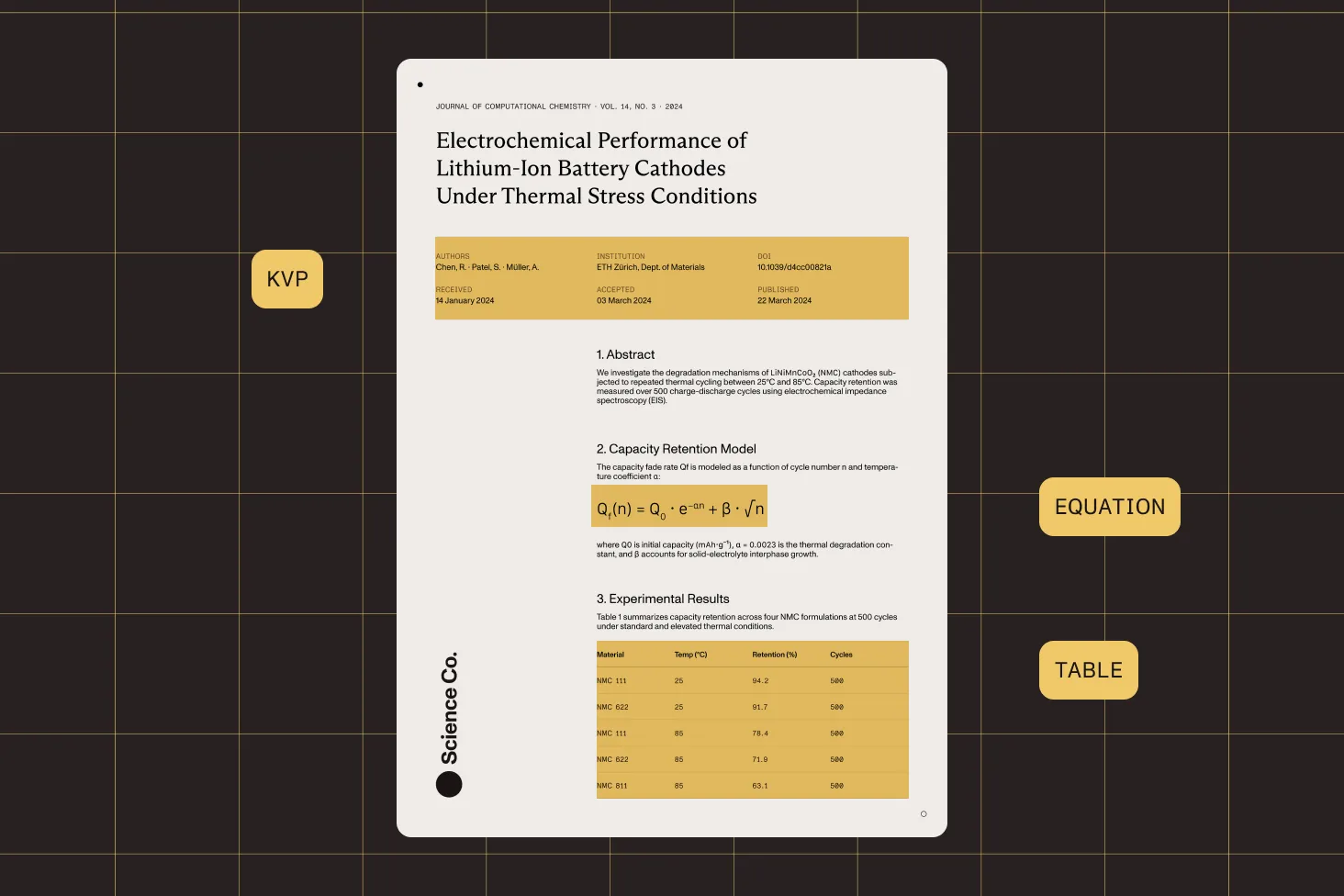
On-premises by default
OCR and ICR run entirely on your servers with zero external calls. Meets HIPAA, GDPR, and air-gapped requirements out of the box.
VLM-enhanced accuracy
Connect to Claude, OpenAI, or local models (Ollama, LM Studio, vLLM) for the highest accuracy on complex financial, legal, and medical documents.
Structured JSON output
Every extraction returns classified elements with bounding boxes, confidence scores, and hierarchical reading order. Ready for programmatic processing.
AI image descriptions
Generate WCAG-compliant alt text and contextual descriptions from document images. Choose your VLM provider based on privacy and accuracy needs.
Frequently asked questions
What can the Nutrient Java SDK do beyond data extraction?
The SDK covers the full document lifecycle. Beyond AI-powered extraction (OCR, ICR, VLM-enhanced), it includes document conversion between PDF, Word, Excel, PowerPoint, HTML, and Markdown. It provides PDF editing with annotations, form fields, digital signatures, and content redaction, and it supports template-based document generation from Word templates with accessible PDF/UA output. All capabilities work on-premises with a single dependency.
What document formats can I convert between?
The SDK converts Word (DOCX) to PDF and PDF to Word, Excel (XLSX) to PDF and PDF to Excel, PowerPoint (PPTX) to PDF and PDF to PowerPoint, Markdown to PDF, and PDF to HTML. It also supports Word-to-PDF/UA conversion for accessible document output. All conversions run locally without external services.
How does the AI extraction work? What are OCR, ICR, and VLM-enhanced ICR?
OCR is the fastest engine, extracting text with word-level bounding boxes. ICR (intelligent content recognition) is an AI-powered engine that runs on-premises — it detects tables, equations, key-value regions, and document structure without external API calls. VLM-enhanced ICR adds a vision language model (Claude, OpenAI, or local) on top for the highest accuracy on complex documents. All three return structured JSON output.
Can I process documents entirely on-premises?
Yes. All SDK capabilities — extraction, conversion, editing, and generation — run on your infrastructure. The OCR and ICR engines require zero external API calls. VLM-enhanced mode can also stay on-premises when connected to a local model server (Ollama, LM Studio, or vLLM). Document conversion, PDF editing, and template generation are entirely local with no cloud dependencies.
How does the SDK compare to Google Document AI and AWS Textract?
Google Document AI and AWS Textract are cloud-only extraction services — your documents must be uploaded to their servers. Nutrient Java SDK runs on your infrastructure by default and offers much more than extraction alone. It combines AI-powered data extraction with document conversion, PDF editing, digital signatures, redaction, and template generation in a single dependency. You get data sovereignty, predictable costs, and a complete document processing platform — not just an extraction API.
What PDF editing capabilities are included?
The SDK supports eight annotation types (text, free text, shapes, stamps, sticky notes, links, text markup, and redaction), form field creation and filling, visible and invisible digital signatures with advanced workflows, page management (reordering, merging, adding custom pages), and metadata editing. Redaction annotations permanently remove content from the document, supporting GDPR and HIPAA compliance.
Can I generate documents from templates?
Yes. The SDK processes Word, PowerPoint, and Excel templates with dynamic content injection, enabling you to generate reports, contracts, and other documents programmatically from data. Template output can be converted directly to accessible PDF/UA format for compliance workflows. This is useful for automated document generation pipelines where you need consistent formatting with variable data.
Which vision language model providers are supported for extraction?
VLM-enhanced ICR supports Anthropic Claude, OpenAI, and any OpenAI-compatible custom endpoint. The custom endpoint option works with Ollama, LM Studio, vLLM, and other local inference servers. You can switch providers with a single configuration change. Image description also supports all three provider types, giving you full control over accuracy, cost, and data privacy.
Is the SDK suitable for compliance-sensitive industries?
Yes. On-premises processing means documents never leave your servers. Content redaction permanently removes sensitive data. Digital signatures provide document integrity and authentication. PDF/UA output meets accessibility standards. The combination of on-premises extraction, redaction, and signatures makes the SDK suitable for healthcare (HIPAA), finance (SOC 2), legal, and government (air-gapped) environments.
How do I get started with Nutrient Java SDK?
Add Nutrient Java SDK as a dependency to your project and follow the getting started guide. All capabilities — extraction, conversion, editing, and generation — are available immediately. The documentation includes step-by-step guides for each feature area with working examples you can adapt for your use case.
Explore more
Also available for
More Java SDK capabilities