Introducing Nutrient Documents for Salesforce: Native document generation and signing

Table of contents
- Document workflows that leave Salesforce — copy to Word, email for review, upload for signature — create version confusion, compliance gaps, and a record that never reflects what actually happened.
- Nutrient Documents for Salesforce brings template building, document generation, editing, and signing into a single native flow, built on Lightning Web Components and Apex.
- Everything stays connected to the Salesforce record. No tool switching, no version fragmentation, no bolt-on signing platforms.
A sales rep closes a deal. Then the document work starts: Copy Salesforce data into Word, email it for review, upload it for signature, and hope the final version makes it back to the record.
Somewhere in that chain, something breaks. Does this sound familiar?
And it’s not just sales. The same pattern shows up anywhere Salesforce sits at the center of document-heavy work — legal reviews, onboarding packets, compliance files, service agreements, and case-driven approvals.
The problem isn’t Salesforce. It’s the handoffs. Every tool in the chain holds part of the context, and none of them share it.
The hidden cost of disconnected document workflows
Salesforce is where work gets recorded and governed, including customer context, approvals, account history, and the data organizations rely on to move decisions forward. And teams invest heavily to keep Salesforce current.
But when it’s time to create a document — a quote, a contract, a proposal, an NDA — the workflow typically leaves Salesforce behind. Documents get generated outside your Salesforce organization, edited in desktop applications, routed through email threads, signed in third-party platforms, and returned to a shared drive nobody owns. And the Salesforce record becomes a partial picture of what actually happened.
The result: manual data reentry, version confusion, compliance gaps, and a document lifecycle nobody can fully see.
And the tools teams reach for often make things worse. A template tool here. A PDF editor there. A signing solution bolted on top. Each adds its own login, its own data transfer, and its own place for things to break.
There’s a better way to run this.
Introducing Nutrient Documents for Salesforce
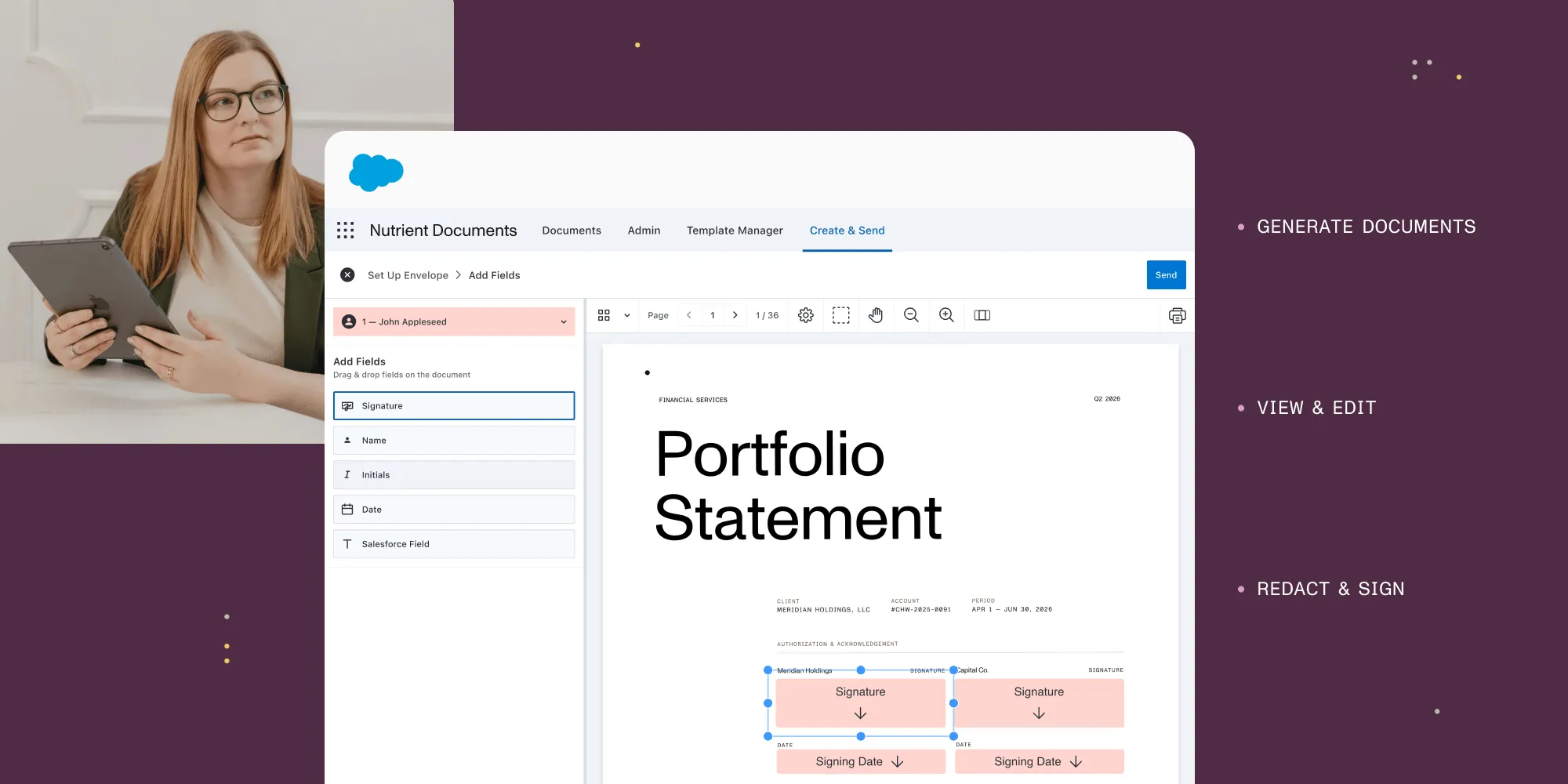
Today we’re launching Nutrient Documents for Salesforce — a native Salesforce application for document generation, editing, redaction, and eSignature, built entirely on Lightning Web Components and Apex. Teams can build templates, generate documents from any standard or custom Salesforce object using live record data, edit in a Salesforce-native experience, and finalize with legally binding signatures — all on the record.
When it’s time to finalize, signing is initiated and tracked natively in Salesforce, with a secure signing experience for external recipients.
Nutrient Documents for Salesforce is built entirely with Lightning Web Components and Apex, and it runs inside your instance without bolt-on experiences that feel like a different product. It looks and feels like the rest of your Salesforce setup, because it is part of your Salesforce setup.
Build
- Build and manage templates without writing queries
- Use merge fields, conditions, repeating sections, and related records
- Keep templates tied to Salesforce objects and record types
Generate
- Generate documents in a click from any Salesforce record
- Pull live data from any type of object — Opportunities, Accounts, Cases, or even custom objects
- Ensure output reflects the current state of work — not a stale snapshot
View and edit
- View documents directly in Salesforce (PDF and DOCX)
- Review merged content before it goes out
- Edit in a Salesforce-native WYSIWYG experience
- Add markup, comments, and collaboration cues
- Export final outputs to PDF or DOCX
Finalize
- Redact sensitive content before sharing
- Initiate legally binding signatures from Salesforce
- Track routing, reminders, and status on the record
- Keep the workflow moving while signing is handled securely as part of the broader process
Everything stays connected to the record. Everyone stays in Salesforce. You get native Salesforce document generation, editing, and eSignature in one application.
What this actually changes for your team
The individual capabilities matter, but the real value is in what they eliminate.
No more download-edit-upload cycles. The loop of exporting a file, editing it externally, and reattaching it to a record is gone. Editing happens inside Salesforce, on the document tied to the record.
No more stale data in documents. Because documents generate directly from Salesforce records using live data, what’s in the document reflects what’s in the CRM — not a snapshot from two days ago.
No more tool switching for signatures. The path from a generated document to a sent-and-tracked envelope happens in the same flow, in the same place. No reentering recipient information, and no rebuilding context in an external signing platform.
No more guessing where a document stands. Envelope status, approval state, and document history are visible on the Salesforce record. Not in an inbox. Not in a shared drive. On the record.
No more compliance blind spots. Nutrient is SOC 2 Type 2 audited, aligned with Salesforce permissions and enterprise controls, with audit-friendly workflows on the record.
Built for teams that live in Salesforce
Salesforce sits at the center of customer, case, and compliance work, but documents still get pushed into email threads, desktop tools, and disconnected signing platforms. Nutrient Documents for Salesforce keeps document workflows tied to the record, the approval chain, and the permissions model you already trust.
- Sales and RevOps — Generate quotes and proposals from live record data, refine them in Salesforce, and keep execution moving through signing.
- Legal and contracts — Standardize templates, update clauses without development cycles, redact sensitive content, and keep audit-friendly history on the record.
- Regulated teams — Run document workflows that demand tighter control: role-based access, record-level visibility, and redaction before files leave the record.
What’s next
Nutrient Documents for Salesforce is available now, and we’re ready to show you what it looks like inside your organization.
Talk to our team to see a live demo.
Frequently asked questions
Nutrient Documents for Salesforce is a native Salesforce application for document generation, editing, redaction, and eSignature. It’s built on Lightning Web Components and Apex, runs entirely inside the Salesforce organization, and is installed from the AppExchange.
Yes. It’s a native Salesforce application — built on Lightning Web Components and Apex, installed from the AppExchange, and integrated with Salesforce permissions, sharing rules, and audit history out of the box. Signing is initiated from the record and backed by Nutrient’s signing service via Named Credentials.
Four things, in one workflow:
- Build templates with merge fields, conditional logic, repeating sections, and related-record data.
- Generate PDF or DOCX documents from any Salesforce object using live record data.
- View and edit documents in a Salesforce-native WYSIWYG editor — including markup, comments, and redaction.
- Finalize with legally binding eSignatures, with routing, reminders, and status tracked on the record.
Yes. eSignature capabilities are built in and initiated from the Salesforce record. Envelope routing, reminders, and signing status stay on the record — no separate signing platform required.
Yes. Standard objects (including Opportunity, Account, Case, and Contact) and custom objects are all supported. Templates are tied to objects and record types, and merge data is pulled live at generation time.
PDF and DOCX are supported for both input templates and output. Documents can be exported in either format at any stage.
Yes. Nutrient is SOC 2 Type 2 audited, and Nutrient Documents for Salesforce is built to align with enterprise controls including role-based access, record-level visibility, and audit-friendly workflows.
DocuSign is primarily an eSignature platform with optional Salesforce integration. Conga and S-Docs are document generation tools that route signing to a separate service. Nutrient Documents for Salesforce combines template building, document generation, editing, redaction, and eSignature in a single native experience — no stack of bolt-on tools and no fragmented signing workflow.