Best document parser for RAG: LlamaParse vs. Unstructured vs. Reducto vs. Nutrient

Table of contents
- There’s no single “best” document parser for RAG — The real choice is open source and self-hostable (Docling, Unstructured’s OSS library) vs. managed cloud (LlamaParse, Reducto).
- Choose open source for local or air-gapped parsing and control over infrastructure. Choose managed when you want a hosted service. Compare accuracy on the same document set. Nutrient offers a managed Data Extraction API and local SDK options; confirm the required processing modes for each deployment.
- Treat vendor benchmarks as context, not verdicts — Reducto’s accuracy story rests on RD-TableBench — a real benchmark, but one it designed and runs itself.
- Nutrient offers managed extraction and local SDK options, a free API tier, and optional field citations with confidence and match labels. Source locations support viewer overlays when a value can be grounded in the document.
Nutrient, which publishes this post, makes one of the parsers compared here.
Structured output and optional field citations through the Nutrient Data Extraction API — free tier included.
For teams building RAG, the comparison that comes up first is Unstructured vs. LlamaParse vs. Reducto — LlamaParse being LlamaIndex’s parsing service — and increasingly Docling and Nutrient too. These tools turn messy PDFs, scans, and tables into clean, structured text an LLM can reason over. This post compares the leading document parsers for RAG on OCR and table fidelity, deployment, output formats, and cost model, and flags which accuracy claims are independent and which aren’t — the tradeoffs that determine the best PDF parser for RAG for a given pipeline.
What is the best document parser for RAG?
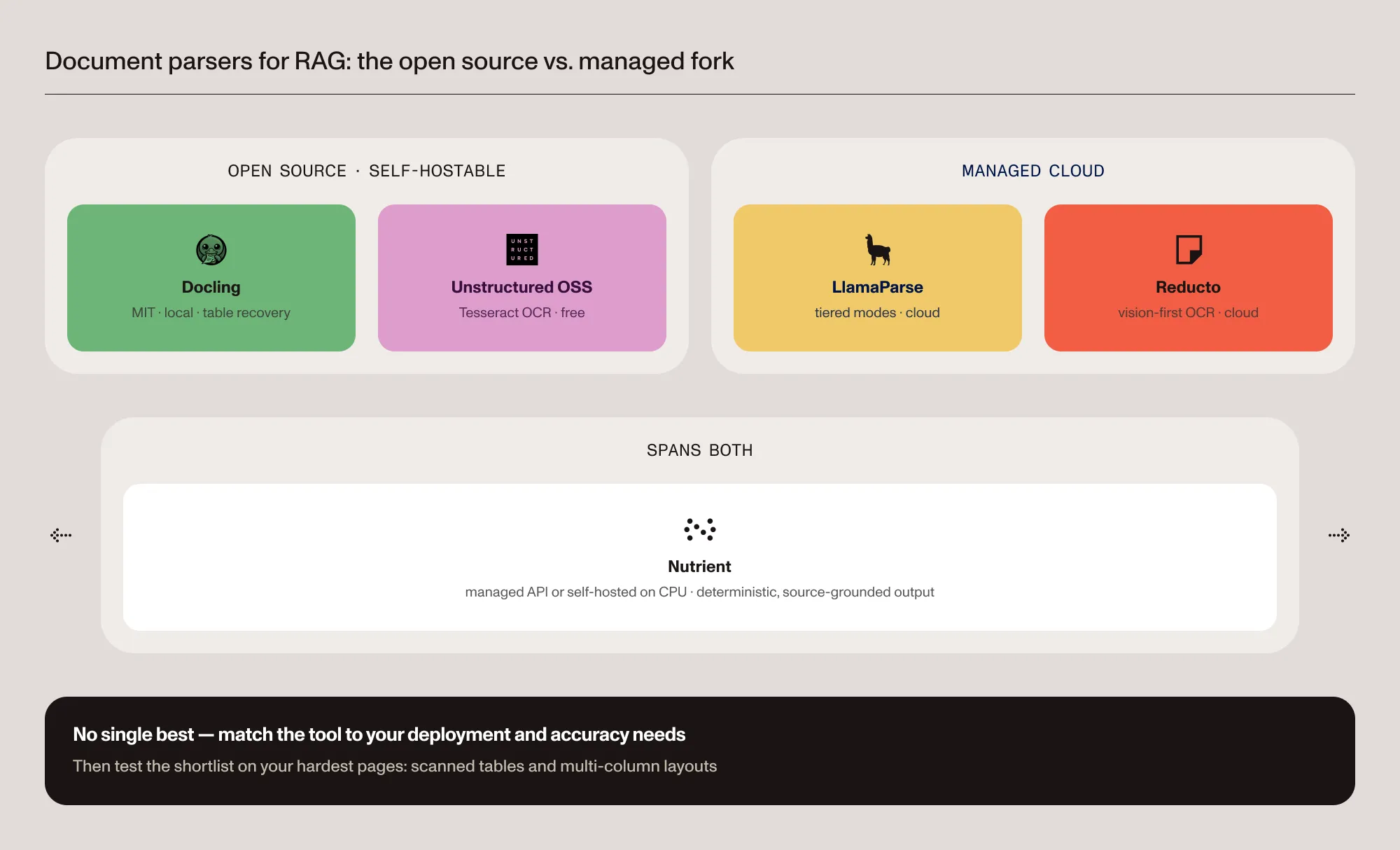
There’s no universal winner. The best document parser for RAG is whichever one accurately parses the pipeline’s hardest documents — scanned pages, multicolumn layouts, complex tables — within the deployment and cost constraints at hand. In practice, the choice comes down to two forks: open source and self-hostable (Docling, Unstructured’s OSS library) vs. managed cloud (LlamaParse, Reducto), with Nutrient spanning both. The sections below compare them on OCR, tables, deployment, output, and cost.
The parsers at a glance
| Parser | Type | Deployment | OCR and complex tables | Pricing model |
|---|---|---|---|---|
| LlamaParse (LlamaIndex) | Managed cloud | SaaS; enterprise VPC | Tiered (Cost-effective → Agentic Plus for dense tables/charts) | Usage-based credits; free monthly tier |
| Unstructured | OSS library + managed pipelines | Local (OSS) or SaaS/VPC (paid) | OSS uses Tesseract; vendor notes OSS underperforms its paid tiers on tables | OSS free; paid pipelines usage-based, with 10,000 free pages to start |
| Reducto | Managed cloud (closed source) | Cloud API; on-premises/VPC per vendor | Vision-first “agentic” OCR; table/handwriting focus | Usage-based credits (one-time free allocation) |
| Docling | Open source (MIT) | Local/air-gapped; optional API server | OCR + table-structure recovery built in | Free |
| Nutrient | Managed API + self-hostable SDK | Cloud or on-premises (CPU) | OCR; spatial output and optional schema-field citations | Usage-based; free monthly tier |
Open source vs. managed
This is the first fork. Docling (MIT-licensed, originally from IBM Research and now under the LF AI & Data Foundation) and Unstructured’s open source library (Apache-2.0) run locally and are free, which suits prototyping and environments where documents can’t leave the infrastructure. Compare accuracy for each configuration: Unstructured’s own documentation(opens in a new tab) states the OSS library has “significantly decreased performance on document and table extraction” compared to its paid tiers, which gate the VLM models and fine-tuned OCR.
LlamaParse and Reducto are managed cloud services. The trade is a hosted parsing workflow with less infrastructure to run, at a per-page cost and with documents going to a third party (LlamaParse offers enterprise VPC deployment; Reducto offers VPC or on-premises). Nutrient offers a managed Data Extraction API and local SDK options. Confirm supported modes, model dependencies, and interfaces for the deployment you choose.
Docling vs. Unstructured
Docling and Unstructured are both open source and self-hostable, so they’re the usual starting point when documents can’t leave the infrastructure — but they behave differently. Docling(opens in a new tab) (MIT) does layout analysis and table-structure recovery locally, emitting clean Markdown and a lossless JSON document model out of the box. Unstructured’s OSS library leans on Tesseract for OCR and, by the vendor’s own account, has weaker table extraction than its paid offerings. Evaluate Docling’s local table recovery and Unstructured’s file-type coverage and element-based JSON on the same files. Docling also provides confidence reports and page provenance; these signals aren’t exclusive to managed tools. If your team wants a commercial local extraction option, evaluate Nutrient AI Document Processing and confirm the supported platform and model dependencies.
OCR and complex tables
There are two broad approaches under the hood. Vision-first (agentic) parsers — Reducto and LlamaParse’s higher tiers — read a page like a person, using a vision-language model to recover layout and correct OCR. Heuristic layout engines — Unstructured and Docling — detect structure with rules and layout models. These approaches have different model, compute, and deployment requirements; neither guarantees better results for every document. Nutrient’s Data Extraction API includes AI-augmented understand and agentic modes. Spatial grounding supports auditing, but it isn’t a guarantee of identical output across repeated requests.
For clean, digital PDFs, most parsers do fine. The differences show up on scanned pages, multicolumn layouts, and complex tables. LlamaParse’s higher tiers (Agentic, Agentic Plus) target dense tables and charts; Reducto uses a vision-first, multipass OCR approach focused on tables and handwriting; Docling does layout analysis and table-structure recovery locally; Unstructured’s OSS path uses Tesseract, with stronger table handling reserved for its paid tiers. Start the evaluation with the tables your application needs to recover, and compare cell relationships, as well as recognized text.
Deployment and data residency
If documents can’t leave the environment (regulated data, sovereignty requirements, air-gapped systems), the options narrow to what runs locally: Docling, the Unstructured OSS library, or a supported local Nutrient SDK configuration. Managed-cloud parsers (LlamaParse, Reducto) advertise enterprise private-deployment options, but the default is cloud processing.
Compliance is often the deciding gate before accuracy even matters. For regulated finance, legal, and healthcare, look for zero-data-retention and controls, SOC 2 audit scope, and any required HIPAA agreements: Reducto advertises SOC 2 Type 2 and HIPAA compliance, with zero data retention available on its higher tiers. LlamaParse lists SOC 2 Type 2 and GDPR, with a HIPAA BAA on its Enterprise plan. Unstructured lists SOC 2 Type 2, HIPAA, ISO 27001, and FedRAMP High authorization. Nutrient is SOC 2 Type 2 audited and offers local SDK configurations for documents that must remain in your infrastructure. Confirm the controls and contractual requirements for the product you deploy.
Output formats for RAG
What the parser emits determines how clean the chunks are. LlamaParse outputs Markdown, JSON, and HTML tables; Unstructured emits structured “elements” as JSON; Reducto returns JSON/HTML with bounding boxes and citations; Docling produces Markdown, HTML, and a lossless JSON document model; Nutrient returns spatial JSON, Markdown, and schema-shaped JSON with per-field grounding. For RAG, the deciding factor is whether reading order and table structure survive. Flattened tables and scrambled order poison retrieval downstream.
Is Reducto better than LlamaParse?
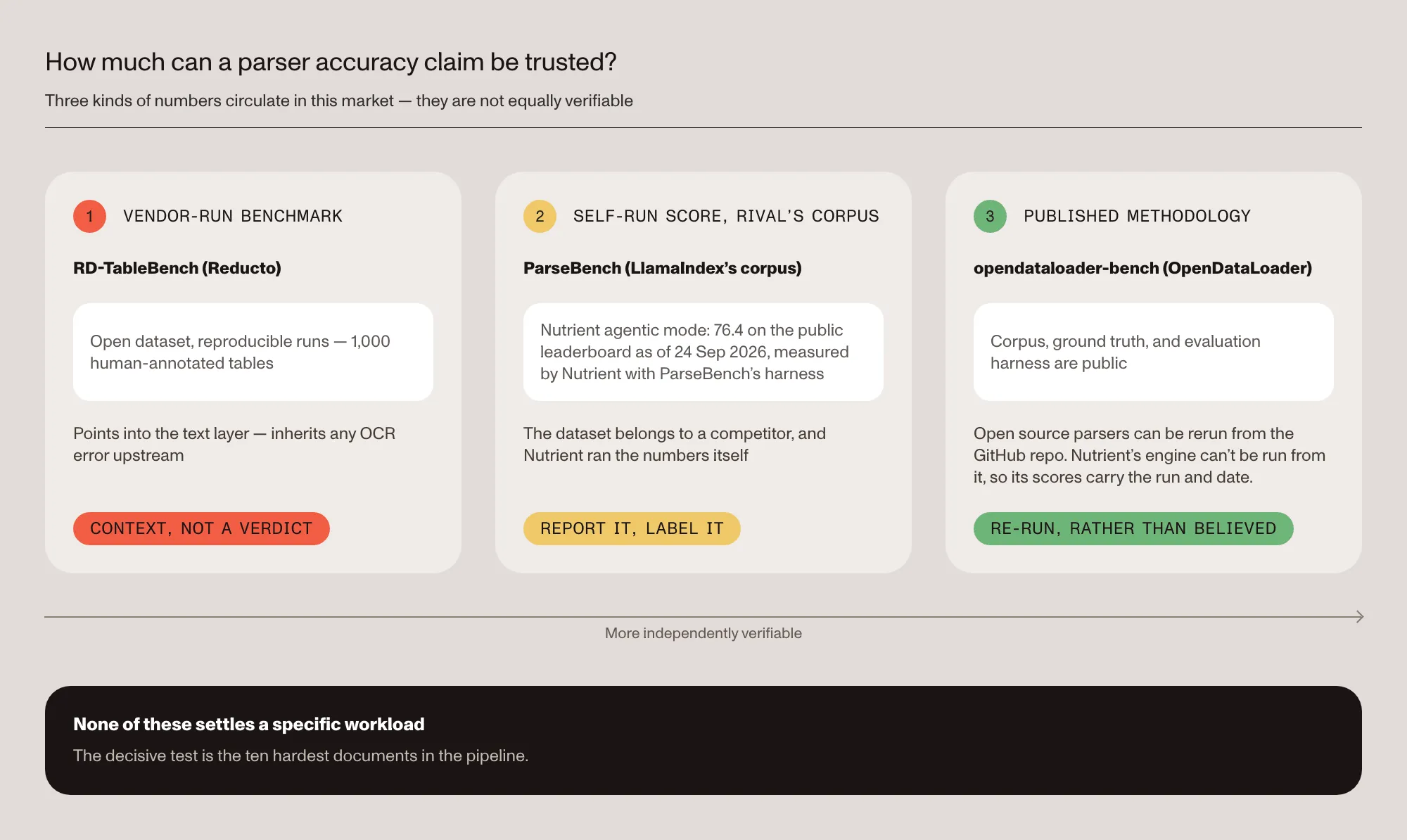
Reducto’s accuracy positioning rests on RD-TableBench(opens in a new tab) — a real, open benchmark with 1,000 human-annotated complex tables. But RD-TableBench is Reducto’s own benchmark, run by Reducto, against competitors it selected — so it’s a reproducible vendor benchmark, not an independent evaluation. It’s reasonable supporting context; it isn’t proof that Reducto beats LlamaParse on a given document set. Treat any single-vendor “X percent more accurate” headline — from any parser here — as a hypothesis to test on real data, not a settled result.
How to read accuracy claims in this market
Three kinds of numbers circulate, and they aren’t equally trustworthy:
- Vendor-run benchmarks (RD-TableBench above) are reproducible but designed by the vendor against competitors it selected. Context, not verdicts.
- A competitor’s corpus cuts the other way. ParseBench is published and maintained by LlamaIndex, the maker of LlamaParse. As of 24 September 2026, Nutrient DWS (Agentic) scores 76.4 out of 100 on the public leaderboard. Nutrient measured that row itself, with ParseBench’s own harness against the production API. Like our nightly runs, it’s a self-run number on someone else’s dataset: worth reporting because the corpus belongs to a competitor, and worth labeling for exactly the same reason. Current scores are on the benchmarks page.
- Published methodology is the strongest basis: Nutrient documents its extraction benchmark corpus and scoring, and the corpus and scoring code are public, so the open source parsers’ numbers can be rerun rather than believed. Nutrient’s own engine can’t be run from that repository, so its scores are labeled with the run and date. The same standard applies at the SDK layer — see the SDK benchmarks.
Reproduce the benchmark on GitHub
None of these settles a specific workload. The parsers diverge most on scanned tables and multicolumn layouts, so the decisive test remains the 10 hardest documents in the actual pipeline.
Quickstart: Parse a PDF with each tool
For the Python-native parsers, a minimal parse is only a few lines. Docling and Unstructured’s OSS library run locally; LlamaParse(opens in a new tab) and Reducto call the managed cloud with an API key.
Docling (local, open source):
from docling.document_converter import DocumentConverter
converter = DocumentConverter()doc = converter.convert("report.pdf").document  # local path or URLprint(doc.export_to_markdown())
Unstructured OSS (local):
from unstructured.partition.pdf import partition_pdf
elements = partition_pdf(filename="report.pdf")print("\n\n".join(str(el) for el in elements))
LlamaParse (managed cloud):
from llama_cloud import LlamaCloud
client = LlamaCloud()  # reads LLAMA_CLOUD_API_KEY ("llx-...")result = client.parsing.parse(    upload_file="report.pdf",    tier="agentic",    expand=["markdown"],)
Reducto (managed cloud):
import requests
response = requests.post(    "https://platform.reducto.ai/parse",    headers={"Authorization": "Bearer YOUR_API_KEY"},    json={"input": "https://example.com/report.pdf"},)print(response.json())
Nutrient (managed Data Extraction API):
import requests
response = requests.post(    "https://api.nutrient.io/extraction/parse",    headers={"Authorization": "Bearer YOUR_API_KEY"},    files={"file": open("document.pdf", "rb")},    data={"instructions": '{"mode":"understand","output":{"format":"spatial"}}'},)print(response.json())
The spatial response contains document elements with location and confidence metadata. It differs from the optional schema-field citations returned by the extract endpoint. Get a free API key(opens in a new tab) to run it. Then follow the RAG ingestion guide to wire the output into a pipeline.
Where Nutrient fits
Nutrient competes directly in this lane as a document extraction platform built for production document parsing — tables, key-value pairs, multicolumn layouts, and scans — with OCR built in and AI Document Processing on top. Four axes differentiate it for RAG ingestion:
- Deployment — Use the managed Data Extraction API or evaluate Nutrient’s local SDK options. Confirm platform support, processing modes, and model dependencies for your deployment rather than assuming the hosted endpoint and local SDK are interchangeable.
- Cost — Usage-based, with 5,000 free credits that renew every month. Reducto’s free credits are a one-time allocation; LlamaParse also renews 10,000 free credits a month.
- Confidence — Schema-based extraction can include optional citation metadata with confidence scores and match labels such as
id_match,fuzzy_match, andnot_found. Calibrate review thresholds on labeled documents; a score isn’t a guarantee that a value is correct. - Visual grounding — Grounded field citations can include a page location for a viewer overlay. A
not_foundresult has no source location and needs another review path. Compare both the returned metadata and the work required to connect it to your review UI.
Nutrient is SOC 2 Type 2 audited; the platform serves 3,000+ organizations, including 15 percent of Global 500 companies, and processes more than 1 billion document interactions annually. For a direct head-to-head with LlamaIndex’s parser, see the Nutrient vs. LlamaIndex comparison.
Other parsers worth knowing
The five parsers compared above come up most for RAG, but a few adjacent tools fit specific needs. PyMuPDF is a fast, local open source library (AGPL or commercial license) for straightforward text and basic table extraction from digital PDFs, though it leans on Tesseract for OCR. Azure AI Document Intelligence and AWS Textract are managed cloud services with strong OCR, form, and table models billed per page. Mistral OCR is a managed API that returns Markdown with bounding boxes and block classification, priced per page. For clean, digital documents, a lightweight library like PyMuPDF may be enough; the heavier services earn their cost on scans and complex layouts. Teams that would rather not stitch a library for simple documents to a second service for hard ones can run both through one extraction engine.
How to choose
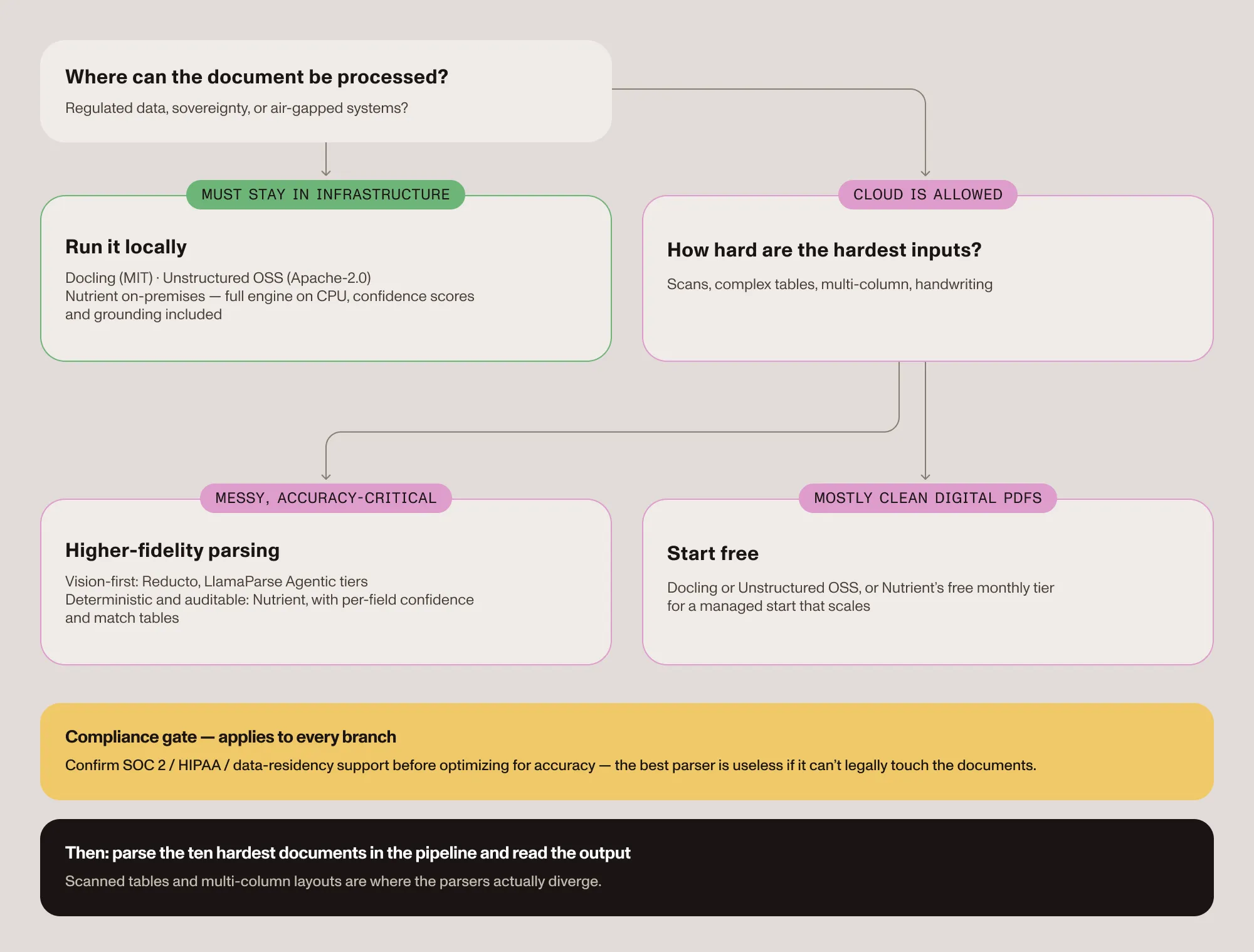
- Start from the hardest input, not the average — Scanned tables, multicolumn layouts, and handwriting are where parsers diverge, so parse the 10 worst documents and read the output.
- Complex or accuracy-critical documentation — A vision-first parser (Reducto, LlamaParse Agentic) or Nutrient’s AI-augmented extraction modes. Test the results and review metadata.
- Must stay in the infrastructure — Docling, the Unstructured OSS library, or Nutrient on-premises.
- Prototyping, cost-sensitive, mostly clean PDFs — Docling or Unstructured OSS, free — or Nutrient’s free monthly tier for a managed start that scales into production.
- Compliance is the gate — Confirm SOC 2/HIPAA/data residency support before optimizing for accuracy — the best parser is useless if it can’t legally touch the documents.
Try it on a document
The fastest way to settle the question is empirical: Get a free API key(opens in a new tab), run the Nutrient quickstart above on the pipeline’s 10 hardest documents, and read the output next to the open source results. The RAG ingestion guide covers wiring the extraction into an existing pipeline end to end.
Conclusion
The best document parser for RAG depends on three things: how complex the documents are, where they’re allowed to be processed, and whether running open source beats buying a managed service. Test the shortlist on the pipeline’s hardest pages — scanned tables and multicolumn layouts — because that’s where the parsers actually diverge, and where a single-vendor benchmark can’t answer the question.
Nutrient offers a managed API alongside local SDK options. Evaluate the relevant product’s deployment requirements and optional field citations, including how ungrounded values reach human review. Start with the free tier(opens in a new tab) and test it on the documents that matter.
FAQ
There isn’t one universal best — it depends on document complexity, deployment constraints, and budget. Docling and Unstructured’s open source library are strong free, self-hostable starting points; LlamaParse and Reducto are managed cloud services aimed at higher-fidelity parsing of complex layouts; Nutrient offers managed or on-premises extraction with spatial output and optional field citations. The right pick is whichever parses the hardest documents accurately within the deployment and cost constraints at hand.
LlamaParse is a managed cloud parser with tiered modes for complex tables and charts; Unstructured ships both a free open source library (Tesseract-based OCR, lower table accuracy by the vendor’s own account) and paid managed pipelines. Choose LlamaParse for managed, higher-fidelity parsing without infrastructure; choose Unstructured’s OSS library for free, local parsing, but validate quality on real documents first. Teams considering managed and on-premises options from one vendor can evaluate Nutrient’s API and SDK products; confirm feature support and integration differences for each.
No — Docling and LlamaIndex solve different jobs and are often used together. Docling is an open source document parser (Markdown/JSON output, OCR, table-structure recovery) that runs locally. LlamaIndex is a RAG framework for indexing and retrieval; its managed parser is LlamaParse. Documents parsed with Docling can feed straight into a LlamaIndex pipeline.
Nutrient provides a managed Data Extraction API and local SDK options. Compare its supported modes and dependencies against the deployment options offered by the other vendors. Optional schema-field citations include review signals; source locations are available when the value can be grounded, while not_found requires review without an overlay. Pricing is usage-based with a free monthly tier, and the platform is SOC 2 Type 2 audited.
Yes. Docling and Unstructured’s OSS library can run locally. Nutrient also offers local extraction through its SDK products. For an air-gapped deployment, verify the exact platform, model downloads, activation, and runtime dependencies before choosing a configuration. Hosted APIs and private-deployment offerings have separate requirements.