Document viewer for web apps: React, Vue, Angular (2026)

Table of contents

- Open source viewers (PDF.js(opens in a new tab), react-pdf(opens in a new tab)) handle basic PDF rendering but lack annotation creation, digital signatures, and Office format support.
- Commercial SDKs (Nutrient) let users annotate, sign, and fill forms without leaving the viewer and open Office files alongside PDFs — worth the cost if any of that’s part of your workflow.
- Nutrient also embeds AI Assistant in the viewer for document Q&A, summarization, and agentic editing, plus classification and extraction APIs on the processing side.
- Nutrient Web SDK integrates with React, Vue, Angular, and vanilla JavaScript through a single package:
@nutrient-sdk/viewer(opens in a new tab). - This guide includes working code for each framework and an SDK comparison table.
If you’re building a web app that handles documents, you need a viewer that works inside your UI framework — not a standalone tool that opens files in a new tab.
Framework choice affects integration:
- React — The viewer must respect component lifecycle and cleanup.
- Angular — The integration relies on standalone Angular components or module imports.
- Vue — The integration uses the Composition API and reactive template refs.
Many production apps also need annotations for review workflows, digital signatures for contracts, and form filling for intake processes.
This guide covers the main document viewer options for React, Vue, and Angular; compares commercial SDKs; and shows working integration code for each framework.
Prerequisites
You have:
- Working knowledge of at least one of React, Vue, Angular, or vanilla JavaScript.
- Node.js 18+ and npm (or pnpm/yarn) installed for the viewer packages.
- A PDF to test with — any file will do, or you can use this sample.
What to look for in a document viewer SDK
- Format support — PDF-only viewers work if that’s all your users upload. But if they share Word, Excel, or PowerPoint files, you need a viewer that renders Office formats without a separate conversion step. (Nutrient Document Engine covers 30+ formats in a single package.)
- Annotations — Legal teams redact documents. Healthcare teams annotate patient records. Finance teams highlight discrepancies in filings. If your users review documents inside your app, the viewer needs annotation tools — highlights, comments, stamps, freehand drawing — not just read-only rendering.
- Digital signatures — A drawn signature image isn’t a digital signature. Digital signatures use cryptographic keys and comply with standards like PAdES and ETSI. If your users sign contracts or compliance documents, use a viewer that supports them.
- Form filling — AcroForm support lets users complete PDF forms directly in the viewer. Without it, they download the PDF, fill it in Acrobat, and reupload it.
- Rendering performance — WebAssembly-based viewers compile the PDF engine to machine code in the browser, an approach that’s typically faster than pure JavaScript renderers for complex documents. Test with a 200-page PDF, not a two-page demo. Check time-to-first-render, scroll smoothness, and memory usage.
- Mobile behavior — Test on actual phones. Touch annotation, pinch zoom, and scroll performance on mobile Safari are where most viewers fall short. A resized desktop browser isn’t a real test. If browser-based mobile rendering hits limits for your use case, native iOS and Android SDKs are the fallback.
- AI features — Some viewers now embed AI directly: summarization, document Q&A, automated personally identifiable information (PII) redaction, and structured-data extraction. If your users ask documents questions, classify incoming files, or auto-redact sensitive fields, look for an SDK with a built-in large language model (LLM)-aware assistant (e.g. Nutrient AI Assistant) plus document-processing APIs for the pipeline side.
- License model — PDF.js is free and open source (Apache 2.0). Commercial SDKs use various licensing models — per-app, per-developer, or usage-based. Factor in support SLAs and maintenance, not just the license fee.
React PDF viewer options
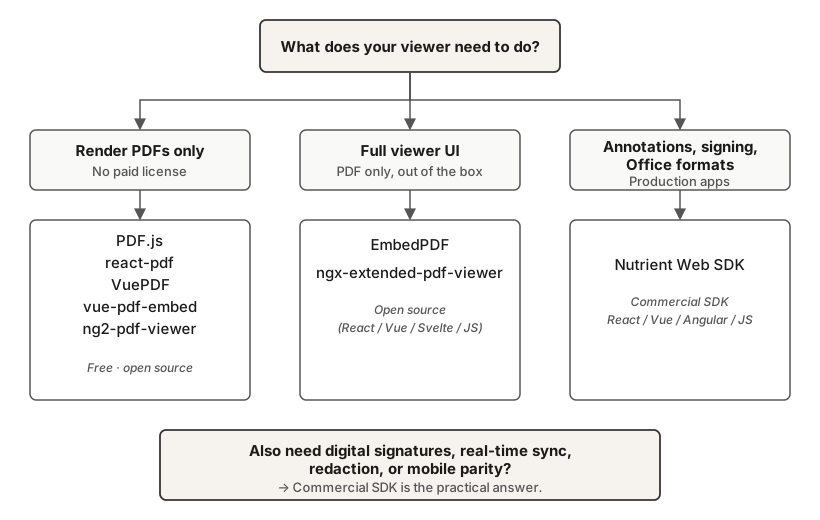
Three React-compatible options cover the spectrum: react-pdf for low-level PDF rendering as React components; EmbedPDF for an open source viewer with an optional drop-in UI; and Nutrient Web SDK for annotations, signing, form filling, and Office formats.
react-pdf
Best for: Displaying PDF pages as React components with custom rendering logic.
MIT · 4.1M weekly downloads · PDF.js wrapper
react-pdf(opens in a new tab) renders PDF pages as React components with text selection, annotation display, and custom page rendering. It doesn’t ship a full viewer UI, which means no toolbar, no annotation creation, no digital signatures, and no Office support.
EmbedPDF
Best for: React, Vue, or Svelte apps that want an open source viewer with an optional drop-in UI.
MIT · ~120K weekly downloads · PDFium/WebAssembly · framework-agnostic
EmbedPDF(opens in a new tab) ships a single @embedpdf/core package that powers React, Vue, Svelte, Preact, and vanilla JavaScript through dedicated adapter packages. You can drop in the styled UI or go headless. It fills the gap left by @react-pdf-viewer/core, which was archived in August 2024.
Nutrient Web SDK
Best for: React apps where users annotate, sign contracts, or upload Office files.
Reach for Nutrient Web SDK when your users do more than read PDFs. What they get:
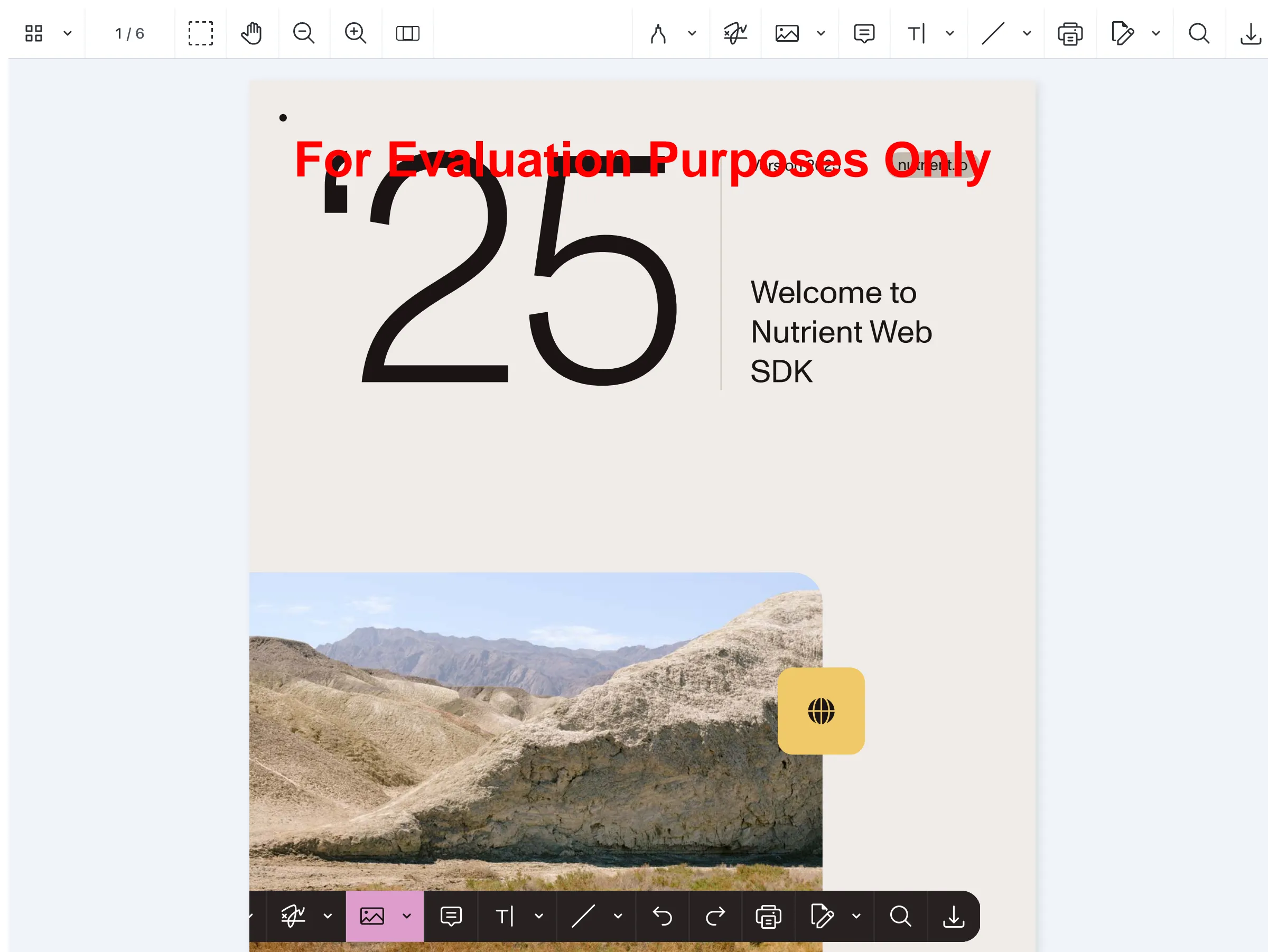
- Annotate — Highlight passages, drop sticky notes, stamp approvals, and draw freehand. Use 17+ annotation types that write back into the PDF and stay legible in Adobe Acrobat.
- Sign contracts in-viewer — Apply PAdES-compliant digital signatures that validate against the same standards finance and legal teams already audit for.
- Fill forms inline — AcroForm support means no roundtrip through Acrobat to complete an intake form.
- Open Office files — Word, Excel, and PowerPoint render in the same viewer (30+ file formats through Document Engine), with no conversion step in your pipeline.
- Use AI inside the viewer — AI Assistant handles document Q&A, summarization, translation, and agentic actions. Users ask in natural language; the assistant extracts data, fills forms, adds annotations, or redacts PII. It works with any LLM provider, on-premises or in the cloud.
Install and mount it as a React component:
npm install @nutrient-sdk/viewerimport { useEffect, useRef } from "react";
function App() { const containerRef = useRef(null);
useEffect(() => { const container = containerRef.current; let cleanup = () => {};
(async () => { const NutrientViewer = (await import("@nutrient-sdk/viewer")).default;
// Ensure there's only one `NutrientViewer` instance. NutrientViewer.unload(container);
if (container && NutrientViewer) { NutrientViewer.load({ container, // You can also specify a file in your public directory, for example `/nutrient-web-demo.pdf`. useCDN: true, document: "/downloads/nutrient-web-demo.pdf", }); }
cleanup = () => { NutrientViewer.unload(container); }; })();
return cleanup; }, []);
// Set the container height and width. return ( // Make sure to set the container height and width explicitly. <div ref={containerRef} style={{ height: "100vh", width: "100vw" }} /> );}
export default App;For a full walkthrough, see how to build a React PDF viewer. If you’re using Next.js, see how to build a Next.js PDF viewer.
Vue PDF viewer options
Vue 2 and Vue 3 apps have a few good viewer choices: VuePDF and vue-pdf-embed for basic PDF display; EmbedPDF for an open source viewer with a drop-in UI; and Nutrient Web SDK for annotations, signing, form filling, and Office formats.
VuePDF
Best for: Vue 3 projects that only need basic PDF display with zoom and page navigation.
MIT · Vue 3 · PDF.js wrapper · published as @tato30/vue-pdf
VuePDF(opens in a new tab) provides basic viewing with zoom and page navigation. It has no annotation tools and no Office support.
vue-pdf-embed
Best for: Vue 2 or Vue 3 dashboards that inline-embed PDFs with minimal configuration.
MIT · 178K weekly downloads · Vue 2 and Vue 3 · PDF.js
vue-pdf-embed(opens in a new tab) is a component for embedding PDFs with minimal setup. It works well for dashboards and previews where you inline PDFs.
EmbedPDF
Best for: Vue apps that want an open source viewer with headless or drop-in UI options.
MIT · PDFium/WebAssembly · dedicated Vue adapter
EmbedPDF(opens in a new tab) (covered in the React section) also ships a Vue adapter. It uses the same engine, license, and plugin architecture as the React version, which is useful for codebases spanning multiple frameworks.
Nutrient Web SDK
Best for: Vue apps where users annotate, sign contracts, or upload Office files.
The Vue integration uses the same @nutrient-sdk/viewer(opens in a new tab) package and capabilities as the React section. Mount it through Vue’s Composition API:
npm install @nutrient-sdk/viewer<script setup>import { onMounted, onUnmounted, useTemplateRef } from "vue";
const containerRef = useTemplateRef("container");let NutrientViewer;
onMounted(async () => { NutrientViewer = (await import("@nutrient-sdk/viewer")).default; NutrientViewer.load({ container: containerRef.value, document: "/document.pdf", useCDN: true, });});
onUnmounted(() => NutrientViewer?.unload(containerRef.value));</script>
<template> <div ref="container" style="height: 100vh; width: 100vw" /></template>For a full walkthrough, see how to build a Vue.js PDF viewer.
Angular PDF viewer options
Angular has two strong open source options and one commercial one: ngx-extended-pdf-viewer ships a prebuilt PDF.js toolbar with form filling; ng2-pdf-viewer exposes a configurable renderer for teams that want to build their own UI; and Nutrient Web SDK covers annotations, signing, and Office formats.
Do you need to view images and Office files in Angular too, not just PDFs? See our dedicated Angular file viewer guide.
ngx-extended-pdf-viewer
Best for: Angular apps that need PDF.js with a prebuilt toolbar and form filling.
Apache 2.0 · 180K weekly downloads · Angular · PDF.js · frequent releases
ngx-extended-pdf-viewer(opens in a new tab) covers more than most open source viewers: form filling, text selection, print, and basic annotation display. It still lacks annotation creation, digital signatures, and Office document support.
ng2-pdf-viewer
Best for: Angular apps that want a configurable PDF.js renderer and plan to build their own UI.
MIT · 302K weekly downloads · Angular · PDF.js
ng2-pdf-viewer(opens in a new tab) is the most-downloaded Angular PDF option. It exposes inputs like [src], [(page)], [zoom], and [render-text], along with events like (after-load-complete) and (page-rendered). There’s no built-in toolbar or sidebar, so you build those yourself.
The repo is active, but the npm release cadence has slowed (latest release December 2024), so check recent activity before committing to it. For a step-by-step walkthrough, see how to build an Angular PDF viewer with ng2-pdf-viewer.
Nutrient Web SDK
Best for: Angular apps where users annotate, sign contracts, or upload Office files.
Nutrient ships as a standalone Angular component. The Angular integration uses the same package and capabilities as the React section:
npm install @nutrient-sdk/viewerimport { Component, OnInit, OnDestroy } from "@angular/core";import NutrientViewer from "@nutrient-sdk/viewer";
@Component({ selector: "pdf-viewer", template: `<div id="viewer" style="width: 100%; height: 100vh"></div>`, standalone: true,})export class PdfViewerComponent implements OnInit, OnDestroy { ngOnInit(): void { NutrientViewer.load({ container: "#viewer", document: "/document.pdf", useCDN: true, }); }
ngOnDestroy(): void { NutrientViewer.unload("#viewer"); }}For a full walkthrough, see how to display PDFs using Angular.
Vanilla JavaScript document viewer
If you’re not using a framework — or you’re working with one that doesn’t have a dedicated wrapper — you can integrate directly with JavaScript.
PDF.js
Best for: Vanilla PDF rendering when you can’t add heavy dependencies or pay for a license.
Apache 2.0 · Mozilla · the open source reference
PDF.js(opens in a new tab) includes a built-in viewer UI with text selection, basic form display, search, and print. It powers most third-party wrappers (react-pdf, VuePDF, ngx-extended-pdf-viewer, and ng2-pdf-viewer). It doesn’t support annotation creation, digital signatures, or non-PDF formats.
Nutrient Web SDK
Best for: Any JavaScript app where users annotate, sign contracts, or upload Office files.
Nutrient works with any JavaScript setup — no framework required. It uses the same package and the same capabilities as the framework integrations above:
npm install @nutrient-sdk/viewer(async () => { const NutrientViewer = (await import("@nutrient-sdk/viewer")).default;
NutrientViewer.load({ container: "#viewer", document: "/document.pdf", useCDN: true, }) .then((instance) => { console.log("Viewer loaded", instance); }) .catch((error) => { console.error(error.message); });})();For framework-specific guides, see the Nutrient Web SDK documentation.
PDF viewer SDK comparison
The comparison below pits two baseline engines head-to-head: PDF.js (open source) vs. Nutrient (commercial). Most open source wrappers build on PDF.js, so you can map their capabilities to the PDF.js column. EmbedPDF is the exception (PDFium-based) but sits in the same feature bucket.
| PDF.js | Nutrient | |
|---|---|---|
| License | Open source (Apache 2.0) | Commercial |
| React/Vue/Angular | Via wrapper | ✅ |
| Annotation creation | ❌ | ✅ (17+ types) |
| Built-in digital signing | ❌ | ✅ (PAdES-compliant) |
| Office document rendering | ❌ | ✅ (30+ file formats) |
| Mobile SDK | ❌ | ✅ (iOS, Android) |
| In-viewer AI/LLM | ❌ | ✅ (AI Assistant) |
| AI document processing | ❌ | ✅ (classification, extraction, redaction) |
| Rendering engine | JavaScript (canvas) | WebAssembly |
- PDF.js fits projects that need basic PDF rendering without a paid license — mature, widely used, free. Its limits show up when you need annotation tools, signing workflows, or Office document support; at that point, you either build those features yourself or move to a commercial SDK.
- Nutrient — Beyond what the table shows, Nutrient adds real-time collaborative editing (Instant sync, part of the collaboration solution) and programmatic access control for per-user permissions. The processing pipeline extends the in-viewer AI with an AI redaction API and a Vision API (optical character recognition (OCR), intelligent character recognition (ICR), and vision language model (VLM)-enhanced extraction with bounding-box accuracy).
FAQ
It depends on what you’re building:
- Basic PDF rendering, no license cost — react-pdf (MIT, built on PDF.js).
- Prebuilt viewer UI, no license cost — EmbedPDF (MIT, built on PDFium) ships optional drop-in UI components.
- Annotations, signing, form filling, Office support, or in-viewer AI — Nutrient Web SDK covers all of these with a React-compatible integration.
See the comparison table above for details.
Install a viewer library via npm and mount it in a Vue component. With Nutrient Web SDK, run npm install @nutrient-sdk/viewer. Then call NutrientViewer.load() inside onMounted(). The viewer needs a container element with explicit width and height. See the Vue integration guide for a complete example.
PDF.js renders PDF files and provides text selection and basic form display. Commercial SDKs like Nutrient add annotation creation tools, digital signature support, Office document rendering, and dedicated technical support. Choose PDF.js if you only need to display PDFs. Choose a commercial SDK if your users annotate, sign, or fill forms inside your app.
Yes. Nutrient Web SDK integrates with React, Vue, Angular, Next.js, Svelte, and vanilla JavaScript through a single npm package (@nutrient-sdk/viewer). Each framework uses the same core API — NutrientViewer.load() — with framework-specific mounting patterns. See the getting started guide for framework-specific setup steps.
Yes, if it has an AI assistant integrated. Nutrient AI Assistant runs inside the viewer and handles:
- Document Q&A, summarization, and translation.
- Agentic actions — users describe a task in natural language; the assistant extracts data, fills forms, adds annotations, or redacts PII.
It works with any LLM provider (OpenAI, Anthropic, local models) and runs on-premises or in the cloud. For non-interactive pipelines, AI Document Processing handles classification and key-value extraction across 100+ document types.
Next steps
- Top JavaScript PDF viewers compared — Side-by-side comparison of open source and commercial JavaScript viewers.
- How to embed a PDF in your website — HTML embedding techniques (iframe, embed tag, object tag) for simpler use cases.
- Nutrient Web SDK documentation — Integration guides and API reference.