PaddleOCR in Python: Setup, PDF input, and production use

Table of contents
predict() API, read structured OCR results, and choose a deployment for your document workflow.
PaddleOCR is an Apache-2.0 optical character recognition (OCR) toolkit that accepts images and PDFs. This guide uses PaddleOCR 3.7.0, covers the separate PaddlePaddle runtime installation, and replaces the old ocr(img, cls=True) pattern with predict(). It also shows how to inspect recognized text, coordinates, and confidence scores, and how local OCR compares with Nutrient’s hosted document APIs.
Text recognition is only half of a document workflow. PaddleOCR reads PDFs and images and returns the recognized text, but the surrounding application still has to validate that text, produce the final output, and deliver records to another system. This guide starts with the OCR pipeline and then looks at the integration options.
What is PaddleOCR?
PaddleOCR is an open source toolkit built on the PaddlePaddle deep learning framework. This tutorial focuses on its general OCR pipeline, though the broader project also includes document parsing tools such as PP-StructureV3. When choosing between Tesseract and PaddleOCR, compare them on document types, languages, hardware, and required output; preprocessing isnt the only difference.
A single call runs a pipeline rather than one model:
- Text detection — Locates text regions and returns polygon boxes.
- Text line orientation classification (optional) — Corrects rotated lines.
- Text recognition — Reads the characters in each detected region.
Document-level orientation classification and unwarping are optional preprocessing stages, and the example below disables them explicitly. PP-OCRv5 also supports handwriting scenarios, but results vary, so test with real handwriting samples before relying on it or switching models. See the PaddleOCR model documentation(opens in a new tab) and our handwriting recognition guide.
Prerequisites
- Python supported by both the chosen PaddleOCR package and the PaddlePaddle wheel for your platform; check the installation guide(opens in a new tab) before creating the environment
- A virtual environment — PaddlePaddle pulls a large dependency tree and conflicts are common
- Disk space for the model set, which downloads on first run — size varies by the models selected
Installation
Install the inference runtime separately from PaddleOCR. PaddlePaddle CPU wheels are available on PyPI(opens in a new tab); the vendor also provides platform-specific CPU and CUDA package indexes. The commands below use PaddlePaddle 3.2.0, so confirm wheel availability and driver compatibility for the target operating system and Python version.
For a supported CPU environment, install the framework from its CPU index:
# CPUpython -m pip install paddlepaddle==3.2.0 -i https://www.paddlepaddle.org.cn/packages/stable/cpu/For an NVIDIA GPU environment, choose the wheel and package index for a supported CUDA runtime and driver combination. Follow PaddlePaddle’s installation instructions for any additional dependencies:
# GPU, CUDA 12.6python -m pip install paddlepaddle-gpu==3.2.0 -i https://www.paddlepaddle.org.cn/packages/stable/cu126/Install either the CPU or the GPU build, but never both into the same environment.
Then install PaddleOCR itself, which is a normal PyPI package:
python -m pip install paddleocr==3.7.0Verifying the installation
Check the imported package versions and whether PaddlePaddle was compiled with CUDA support:
import paddleimport paddleocr
print(f"PaddleOCR version: {paddleocr.__version__}")print(f"Paddle version: {paddle.__version__}")print(f"CUDA-enabled build: {paddle.is_compiled_with_cuda()}")
If import paddle fails, check that the runtime was installed in the same environment. A CUDA-enabled build doesn’t prove that a compatible GPU is available or used for inference. Check the driver and device configuration, and run a small prediction on the intended device.
Basic usage
The current API instantiates PaddleOCR and calls predict():
from paddleocr import PaddleOCR
ocr = PaddleOCR(    use_doc_orientation_classify=False,  # skip page-orientation detection    use_doc_unwarping=False,             # skip dewarping for photographed pages    use_textline_orientation=False,      # skip per-line rotation classification)
result = ocr.predict("./invoice.png")
for res in result:    res.print()    res.save_to_img("output")    res.save_to_json("output")
Each enabled preprocessing stage adds processing time, so start with all three disabled for clean, upright scans. Then compare the results with the stages enabled for photographed, rotated, or warped inputs.
To select English and a GPU explicitly, use the following configuration after verifying that the GPU runtime works:
ocr = PaddleOCR(lang="en", device="gpu")Model selection and language support vary by release. PaddleOCR 3.7.0 defaults to PP-OCRv6 when no model is specified. Its release documentation(opens in a new tab) describes a unified multilingual recognition model; other model families support additional languages. Check the language list for the chosen model and select PP-OCRv5 explicitly when appropriate:
ocr = PaddleOCR(lang="korean", ocr_version="PP-OCRv5")Replacing the deprecated OCR call
Older v2 examples may use the following call, which is incompatible with the v3 interface:
# Deprecated — do not useresult = ocr.ocr(img_path, cls=True)ocr() is a deprecated wrapper around predict() in the pinned release. It forwards keyword arguments, but predict() doesn’t accept cls, so passing cls=True can emit a deprecation warning and then raise TypeError. The constructor flag replaces cls=True:
ocr = PaddleOCR(use_textline_orientation=True)result = ocr.predict("./rotated.png")Reading the result
predict() returns a list of result objects, including one result per PDF page when a PDF is supplied. Each exposes recognized text, coordinates, and confidence scores. Save results in a structured form:
result = ocr.predict("./invoice.png")
for res in result:    res.print()                    # human-readable dump    res.save_to_json("output")     # structured output for downstream code    res.save_to_img("output")      # annotated image, useful for debugging detection
Use the result’s structured fields rather than parsing its printed representation:
for res in result: for text, score, box in zip( res["rec_texts"], res["rec_scores"], res["rec_polys"] ): print(text, float(score), box.tolist())rec_texts, rec_scores, and rec_polys describe recognized text and its matching scores and polygons. page_index identifies the PDF page when present. Keep the package and model versions with saved results; serialized JSON isn’t a guarantee of an unchanged schema across upgrades.
Reading PDFs directly
Pass a PDF path directly to the pipeline:
result = ocr.predict("./document.pdf")for res in result: res.save_to_json("output")PaddleOCR renders PDF pages internally for OCR, so no separate rasterizer is needed. The general OCR pipeline returns recognition results only; creating a searchable PDF text layer is a separate output step. For mixed digital and scanned archives, decide when existing text can be reused instead of running OCR.
Model versions
PaddleOCR 3.7.0 defaults to PP-OCRv6. Defaults differed in earlier v3 releases, so record the package release as well as the model family. Earlier model sets remain selectable:
ocr = PaddleOCR(ocr_version="PP-OCRv5")Server-side model variants trade speed for accuracy:
ocr = PaddleOCR( text_detection_model_name="PP-OCRv5_server_det", text_recognition_model_name="PP-OCRv5_server_rec",)Pin the version in production. Model defaults change between releases, and an unpinned upgrade shifts accuracy numbers with no change to the code.
Common errors
Most setup problems come from the separate runtime installation, leftover v2 code, or model downloads. The following sections cover each case.
PaddleOCR imports but the framework is missing
A missing runtime can produce this error:
ModuleNotFoundError: No module named 'paddle'PaddleOCR is installed but PaddlePaddle isn’t. Install paddlepaddle from the PaddlePaddle index as shown above.
The cls argument raises a TypeError
An older call signature can produce this error:
TypeError: PaddleOCR.predict() got an unexpected keyword argument 'cls'This indicates code written against the v2 API. Remove cls and set use_textline_orientation on the constructor instead.
First run hangs or times out
Models download on first use. On a slow or restricted network, this looks like a hang. Prewarm the cache during image build rather than at request time.
GPU build installed but inference runs on CPU
Use paddle.is_compiled_with_cuda() to identify whether the build supports CUDA. Then check device availability, driver compatibility, and the configured inference device. Keep CPU and GPU package variants out of the same environment.
Where PaddleOCR fits in a document pipeline
PaddleOCR suits teams that want local OCR and can manage the inference runtime. It accepts PDFs and images, returns coordinates and scores, and offers configurable recognition models. Its broader document parsing pipelines can produce richer structure, so evaluate the specific pipeline instead of assuming the project only converts images to text.
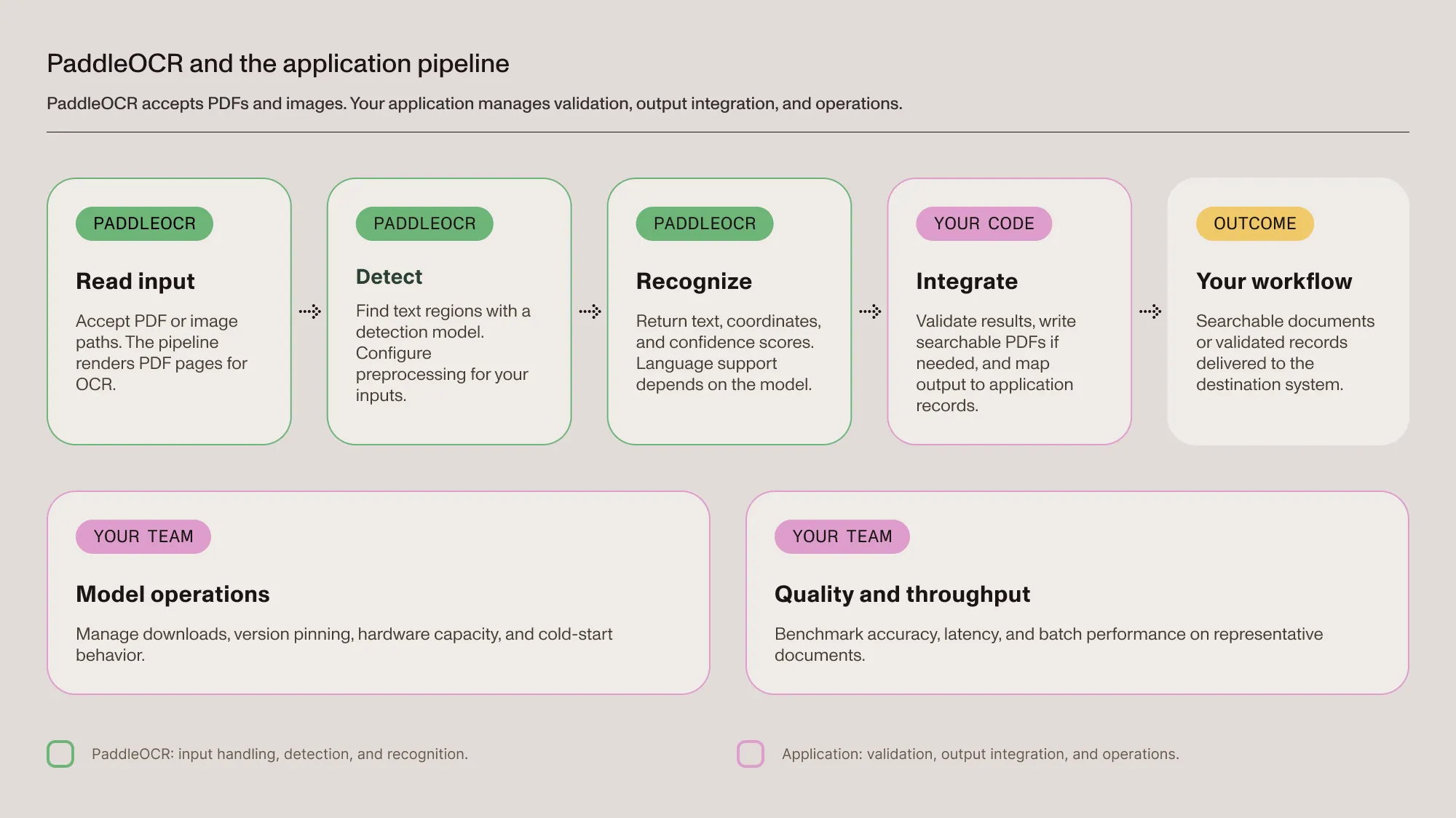
The application still needs to cover four areas:
- Input policy — Decide which pages need OCR and whether existing digital text should be reused.
- Output integration — Validate recognized values, map them to destination records, and add searchable-PDF generation if that’s the required output.
- Model operations — Prepare model resources, pin versions, size the hardware, and handle cold starts.
- Quality and throughput — Benchmark representative documents before choosing confidence thresholds or committing to batch windows.
The PDF data extraction guide explains how recognition fits into a broader workflow, and the requirements of each project determine how much application code is needed.
Reaching the same outcome with Nutrient
Nutrient provides hosted APIs for document processing without a local OCR runtime. Choose the endpoint by its output: The OCR API creates searchable PDFs, while the Data Extraction API returns structured document content. The application still handles validation, permissions, and delivery to the destination system.
The following request returns structured spatial elements from a PDF, but it doesn’t create a searchable PDF. Install requests, obtain a Data Extraction API key, and provide a local input file before running it:
import requests
with open("document.pdf", "rb") as document_file:    response = requests.post(        "https://api.nutrient.io/extraction/parse",        headers={"Authorization": "Bearer your_api_key_goes_here"},        files={"file": document_file},        data={            "instructions": '{"mode":"understand","output":{"format":"spatial"}}'        },        timeout=120,    )
response.raise_for_status()print(response.json())
This is a minimal synchronous example, so adjust timeouts and error handling for the workload. Spatial output includes detected elements and source coordinates; per-field match labels belong to the separate schema extraction and citation workflow. Refer to the Data Extraction API guide for request and response details.
Choose the Nutrient integration
| Required output or deployment | Nutrient option | What to validate |
|---|---|---|
| Searchable PDFs from scans | OCR API | Text-layer quality, language settings, and output files |
| Structured document elements and tables | Data Extraction API | Output schema, coordinates, confidence, and destination mapping |
| Processing within your infrastructure | Python SDK | Supported operations, local resources, licensing, and deployment requirements |
| Document interaction inside an application | Web, iOS, or Android SDK | Platform-specific features and integration behavior |
Hosted APIs remove local model deployment and hardware management, but they still require quality checks, error handling, and workload testing. Measure cost and throughput on the documents that will actually be processed, because delivery time and output can change across service updates.
The Python SDK is a separate integration for local processing; it doesn’t make the hosted HTTP endpoints run on-premises. For offline environments, confirm model preparation and license requirements before deployment.
Get searchable PDFs without running an OCR stackConclusion
PaddleOCR fits teams that want control over local OCR and its runtime. When a hosted service fits the deployment, Nutrient’s OCR API covers searchable PDFs and the Data Extraction API covers structured content. Either way, compare output quality, processing time, cost, and integration effort on the same representative files.
FAQ
Yes. PaddleOCR is released under the Apache 2.0 license, which permits commercial use. The operational cost is infrastructure and engineering time, not licensing.
pip install paddleocr not work on its own?For the PaddlePaddle-backed pipeline shown here, install the runtime separately from paddleocr. CPU wheels are available on PyPI and through the vendor’s package indexes. Choose a runtime build supported by your platform and driver configuration.
ocr(img, cls=True) raise a TypeError?ocr() is deprecated in favor of predict(), and predict() doesn’t accept a cls argument. Set use_textline_orientation=True on the PaddleOCR constructor instead.
A separate PaddleOCR deployment isn’t needed when a Nutrient API supplies the required OCR or extraction operation. Use the OCR API for searchable PDFs and the Data Extraction API for structured results. Evaluate the Python SDK separately if processing must run locally.
Yes. The general OCR pipeline accepts a PDF path and processes its pages internally. Its recognition output doesn’t automatically create a searchable PDF text layer, so that result needs a separate output step or a service built for it.
Language coverage depends on the model family and release. The project supports more than 100 languages across its models, while PP-OCRv6 has a smaller unified language set. Check the release-specific language list and select a compatible model with lang and ocr_version.