LangExtract vs. LlamaIndex: Structured data extraction compared

Table of contents
- Different layers, not rival tools. Google’s LangExtract is an open source Python library for grounded extraction from text. LlamaIndex’s LlamaExtract is a managed, schema-driven service for pulling structured fields out of documents.
- Pick LangExtract for a self-managed library with a bring-your-own large language model (LLM) and span-level grounding over existing text.
- Pick LlamaExtract for a hosted, schema-first extraction step inside a LlamaIndex or retrieval-augmented generation (RAG) stack, document parsing included.
- Pick Nutrient for production document extraction — scanned files, tables, and key-value pairs at volume. Output is deterministic and source-grounded, with per-field confidence so a wrong value is catchable, hosted or on-premises.
LangExtract vs. LlamaIndex isn’t a head-to-head: The two aren’t direct competitors. LangExtract (from Google) and LlamaExtract (from LlamaIndex) sit at different points in a structured-extraction pipeline, so “which is better” depends on what is being extracted and who runs the infrastructure.
One naming note first, since it causes most of the confusion: LlamaExtract is LlamaIndex’s extraction product. LangExtract, LlamaExtract, and LlamaIndex therefore describe two tools, not three — LangExtract on one side, and LlamaIndex’s extraction offering on the other.
This post covers what each tool does, where they overlap, and how to choose. It then shows where a purpose-built document extraction layer fits when neither library solves the part that breaks in production.
What is LangExtract?
LangExtract is an open source Python library(opens in a new tab) (Apache-2.0) from Google, launched in July 2025, for extracting structured information from unstructured text using LLMs. Its defining feature is source grounding: Every extracted value maps back to an exact character span in the source text, which makes outputs auditable. It’s bring-your-own-model — Gemini by default, with support for OpenAI and local open models via Ollama — and it runs wherever the caller deploys it.
What is LlamaExtract?
LlamaExtract is LlamaIndex’s managed structured-extraction product (part of LlamaCloud). A schema is defined with Pydantic or JSON Schema and pointed at documents; the service parses and extracts in one step, returning schema-validated output. It’s designed to slot into LlamaIndex-based RAG and agent pipelines without anyone operating the extraction infrastructure.
Text or documents: The split that decides it
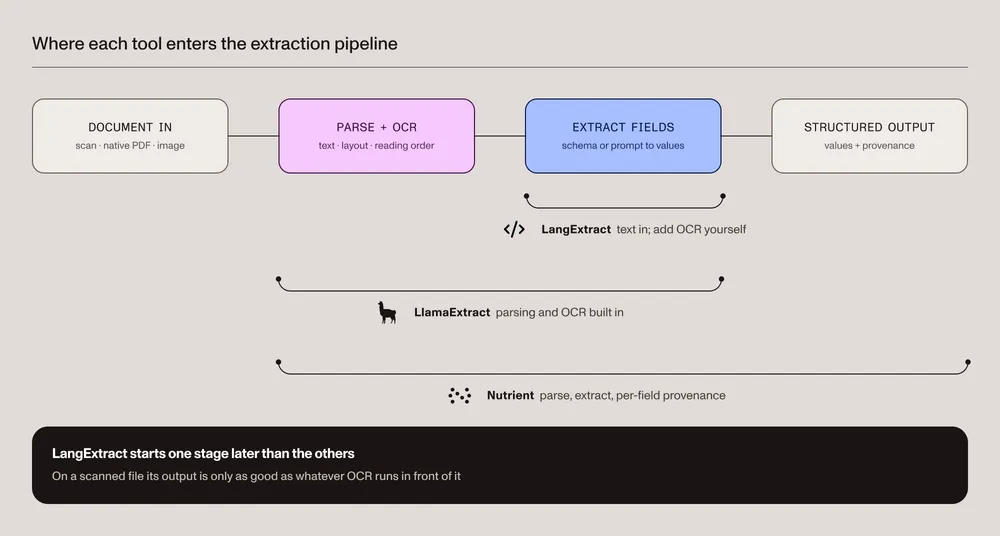
One difference determines most of this choice, and it isn’t accuracy. Extraction is two jobs, not one: turning a document into text, then turning that text into fields. The two tools start at different points in that sequence.
LangExtract is text-first. It has no OCR, so it operates on text that something else produced. Feed it a clean Markdown file and it works well. Feed it a scanned invoice and nothing happens until a parsing step runs in front — and whatever that step gets wrong is silently inherited, because LangExtract has no way to know the text it received isn’t what the page said.
LlamaExtract takes a document directly. Parsing and OCR are part of the service, built on LlamaParse, so a scanned PDF is a valid input rather than a prerequisite to solve first.
This is why the comparison is often misframed. A team evaluating both on clean text will find them close. The same team evaluating on scanned or multicolumn files is really evaluating two different things: one tool plus whatever OCR was bolted on, versus one tool end to end.
Nutrient runs parsing and OCR inside the extraction step for the same reason — see the document parsing guide for how it handles scanned and multicolumn input, and OCR data extraction for why this layer is usually the bottleneck.
LangExtract vs. LlamaIndex: Feature comparison
| Dimension | LangExtract (Google) | LlamaExtract (LlamaIndex) | Nutrient |
|---|---|---|---|
| Type | Open source Python library (Apache-2.0) | Managed service (LlamaCloud) | Managed API + self-hostable SDK |
| Primary input | Existing text | Documents (PDF, images) — parses them itself | PDFs, images, scans, Office files |
| Built-in OCR | No (text-first) | Yes (LlamaParse-based parsing) | Yes |
| Model | Bring-your-own LLM (Gemini default; OpenAI or local via Ollama) | Managed, tiered extraction modes | Nutrient AI Document Processing |
| Schema definition | Prompt + few-shot examples (a maintained, model-tuned set) | Pydantic or JSON Schema | Schema/template-based |
| Long documents | Chunking, multipass recall, parallelism — caller-configured | Handled by the service | Handled by the service or the SDK |
| Source grounding | Character-offset spans (core feature) | Citations + field-level confidence scores | Field-level provenance + match labels |
| Deployment | Self-managed library | Cloud; self-hosting/BYOC for enterprise | Cloud or on-premises (CPU) |
| Best for | Grounded extraction from text | Schema-driven document extraction in RAG stacks | Production document extraction at scale |
Source grounding compared
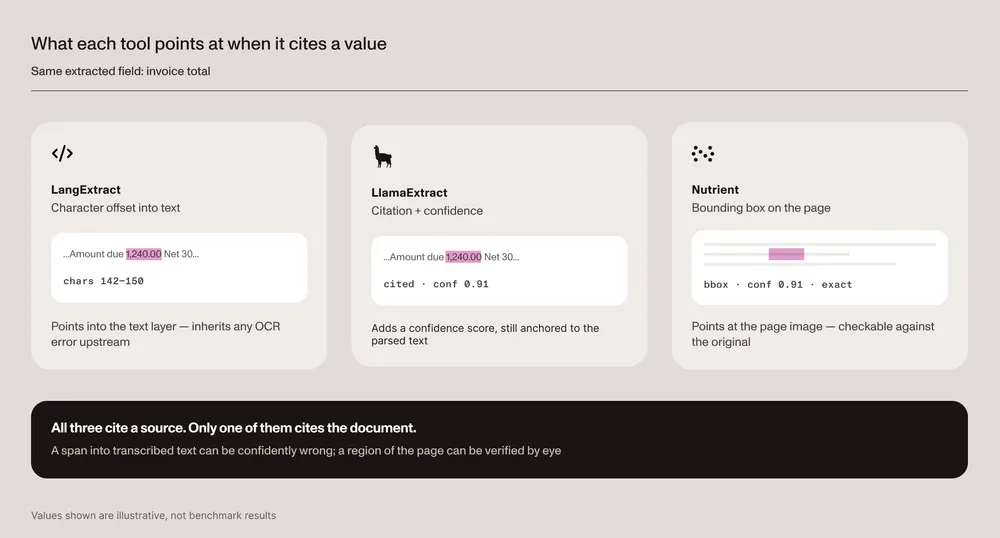
One note on accuracy before comparing mechanisms: Neither LangExtract nor LlamaExtract appears in any public document extraction benchmark, so a head-to-head accuracy table here would be an invented number. The grounding mechanism, on the other hand, is documented behavior — and the difference is categorical, not a matter of degree.
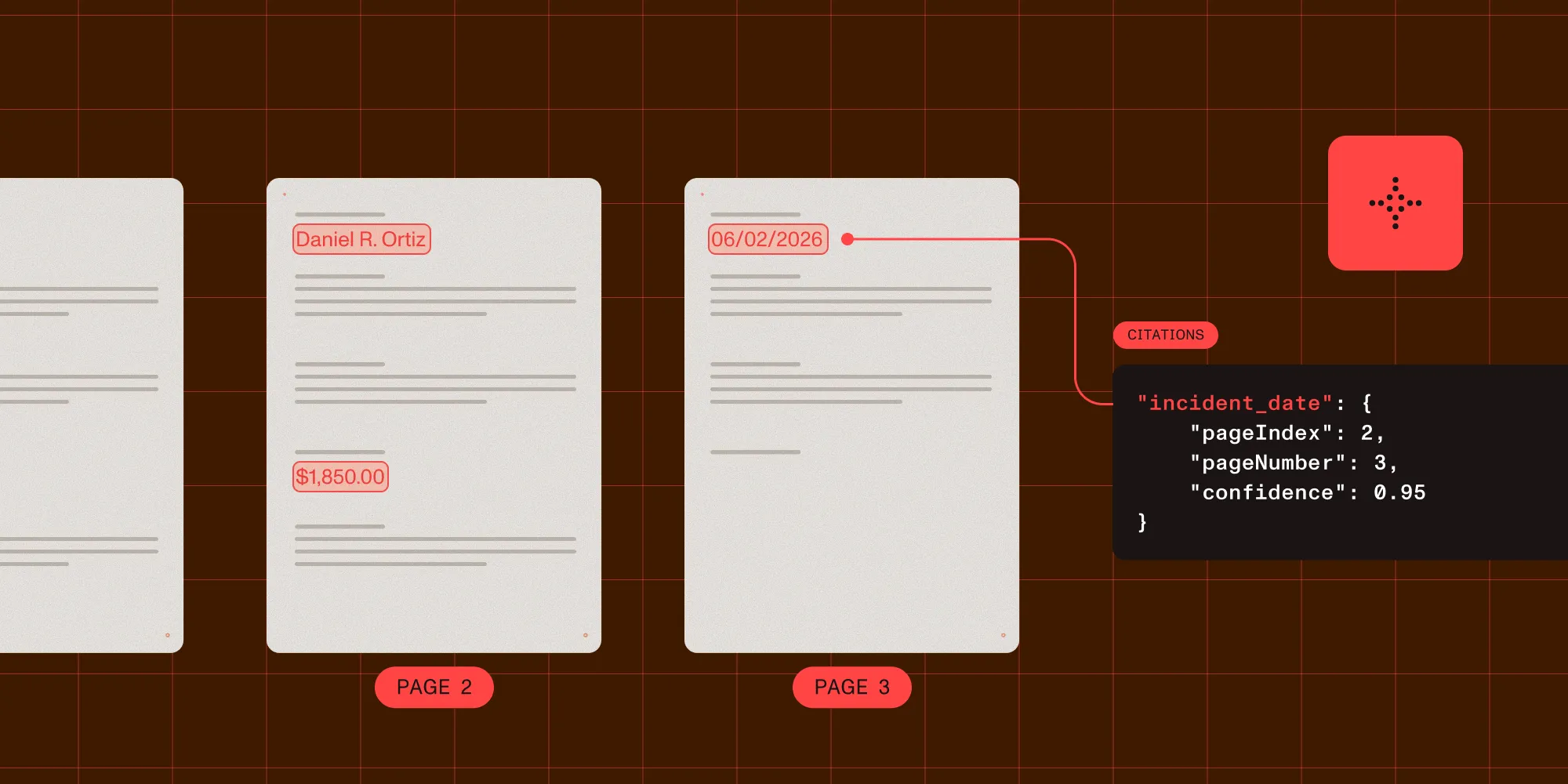
The distinction that matters is what the span points at. LangExtract grounds to a character offset in text, which presumes the text is already correct — so on a scanned document, the grounding is only as good as whatever OCR ran upstream, and a confidently cited value can still be wrong. Nutrient’s bounding box points at a region of the page image, so the claim can be checked against the document itself rather than against a transcription of it.
LangExtract also ships an interactive HTML visualization (lx.visualize()) that highlights each extraction in the source text, which is genuinely useful for spot-checking grounding by eye during development.
How to evaluate this on a real document set
The only accuracy figure worth acting on is one measured on the documents in question.
- Take 50–100 documents representative of the real distribution — including the scanned, multicolumn, and low-contrast cases, not just the clean ones.
- Define the fields that actually matter downstream, and hand-label them once.
- Run each candidate over the same set and score field-level exact match, plus how often a wrong value is returned with high confidence.
- Check grounding by sampling: Does the cited span or box point at the right place on the page?
That last measure — confidently wrong — is usually what decides production fitness, and it’s the one a vendor accuracy percentage never reports.
Setup and developer experience
LangExtract is pip install-and-run: The caller owns the model key, the prompt, the few-shot examples, and the runtime — full control and no hosting cost, in exchange for operating it.
LlamaExtract is the opposite trade. Define a schema, call the service, and schema-validated output comes back with no infrastructure to run. It fits teams already building on LlamaIndex that want extraction as a managed step rather than a component to maintain.
A minimal extraction in each shows the trade concretely. LangExtract is text-first and driven by few-shot examples over a supplied model:
import langextract as lx
examples = [    lx.data.ExampleData(        text="Patient takes lisinopril 10mg daily.",        extractions=[            lx.data.Extraction(                extraction_class="medication",                extraction_text="lisinopril",                attributes={"dose": "10mg", "frequency": "daily"},            ),        ],    )]
result = lx.extract(    text_or_documents="Patient is prescribed metformin 500mg twice daily.",    prompt_description="Extract medications with dose and frequency.",    examples=examples,    model_id="gemini-3.5-flash",)
Model IDs rotate, and Gemini versions carry published retirement dates — check the LangExtract repository(opens in a new tab) for the current recommended default before copying this across.
LlamaExtract is schema-first and managed — a schema and a file go in, and the service handles parsing and OCR:
from pydantic import BaseModelfrom llama_cloud_services import LlamaExtract
class Invoice(BaseModel):    invoice_number: str    total: float
extractor = LlamaExtract()  # set LLAMA_CLOUD_API_KEY.agent = extractor.create_agent(name="invoice-extractor", data_schema=Invoice)result = agent.extract("invoice.pdf")print(result.data)
Note what carries the accuracy in each. In LangExtract, it’s the few-shot examples: The extraction quality tracks how well the supplied examples represent the real documents. That set becomes a maintained artifact — it grows as edge cases appear, and it’s tuned against a specific model, so changing a model usually means revisiting it. In LlamaExtract, the schema carries the intent and the service handles the prompting, which removes that tuning work and the control that comes with it.
Running LangExtract at volume
LangExtract is built for long inputs rather than single passages, and three features matter once documents get large:
- Chunking splits long text into windows sized for the model’s context, and results are reassembled afterward.
- Multiple passes rerun extraction over the same input to improve recall, on the basis that one pass over a long document tends to miss entities.
- Parallel processing runs those chunks and passes concurrently, which is what makes multipass extraction practical rather than merely thorough.
These are real strengths and worth weighing against the managed alternative. They are also configuration the caller owns: chunk size, pass count, and concurrency all become tuning parameters, and they interact with the rate limits and cost of whichever model sits behind them.
Pricing and deployment
LangExtract is free (open source, Apache-2.0); the only cost is the LLM it calls plus the infrastructure it runs on — or nothing at all with a local model. LlamaExtract is a managed service with a usage-based credit model and free credits to start. Deployment often decides the choice before accuracy does, especially in regulated environments. The options differ in kind: LangExtract is a library to run anywhere, LlamaExtract is a hosted service with self-hosting and bring-your-own-cloud (BYOC) options available for enterprise, and a dedicated extraction engine can run entirely on-premises.
Is LangExtract better than LlamaIndex?
Neither is strictly “better”; they solve different problems. LangExtract fits a self-managed, grounded extraction library over text for teams comfortable supplying their own model. LlamaExtract fits hosted, schema-driven extraction with parsing included, wired into a LlamaIndex pipeline. A workload of production document extraction at scale (varied layouts, scanned input, tables and key-value pairs with auditable field-level provenance) is a different requirement than either tool is built for, and it’s where a dedicated extraction platform fits.
Where Nutrient fits
Neither tool above is the wrong choice — they’re simply built for a different problem. The case for a dedicated extraction layer arrives at a specific point: when documents are messy and arriving at volume, and when a wrong value has to be catchable rather than merely unlikely. That’s usually a compliance, finance, healthcare, or claims workload, where an extraction that’s right 97 percent of the time is only useful if the remaining 3 percent can be found.
Determinism is what makes that possible. For Nutrient, deterministic means the same document produces the same output on every run, so a result can be reproduced and defended months later. LLM-based extraction is probabilistic by construction: rerun it and the output can differ, which is workable for exploration and awkward when an auditor asks why a figure changed. Nutrient’s deterministic and optical character recognition (OCR)/intelligent character recognition (ICR) modes carry no model dependency at all, and AI-augmented modes are available where the flexibility is worth the trade.
Every value comes back with the information needed to decide whether to trust it — a bounding box, a confidence score, and an interpretable match label: id_match, id_match_multiblock, id_match_partial, fuzzy_match, and not_found. That combination is what turns review from a manual pass over everything into routing: send id_match and high-confidence values straight through, queue fuzzy_match and not_found for a human, and use the bounding box to check the flagged ones against the original page in the viewer rather than against a transcription. The difference at volume is reviewing a small fraction of fields instead of all of them.
It runs where the data already lives. The full extraction engine runs on-premises on CPU, which is a stronger claim than self-hostable — it means grounded extraction with no external model call, viable in air-gapped and data residency environments. Nutrient is SOC 2 Type 2 audited, and the hosted Data Extraction API covers the same capability for teams that would rather not operate it.
For context on the deployment track record rather than the extraction claim: Nutrient serves 3,000+ organizations, including 15 percent of Global 500 companies, and processes more than 1 billion document interactions annually.
Underneath, AI Document Processing and data extraction handle tables, key-value pairs, and full fields, with OCR for scanned input built in. For a capability-by-capability breakdown, see the full Nutrient vs. LlamaIndex comparison.
Nutrient publishes its extraction benchmark methodology — corpus, harness, and scoring — so its numbers can be checked rather than taken on faith. For this specific three-way comparison, the evaluation procedure above settles accuracy on the documents that actually matter.
Reproduce the benchmark on GitHub
Try it on a document
A free API key returns structured elements — each with a bounding box and confidence score — in a few lines:
import requests
response = requests.post(    "https://api.nutrient.io/extraction/parse",    headers={"Authorization": "Bearer YOUR_API_KEY"},    files={"file": open("document.pdf", "rb")},    data={"instructions": '{"mode":"understand","output":{"format":"spatial"}}'},)print(response.json())
Get a free API key(opens in a new tab). Then follow the RAG ingestion guide to wire Nutrient into an existing pipeline.
Conclusion
LangExtract vs. LlamaIndex (LlamaExtract) comes down to library vs. managed service and text vs. documents. Choose LangExtract for self-managed grounded extraction from text; choose LlamaExtract for hosted schema-driven extraction in a RAG stack. But if the workload is real-world documents at volume — scans, tables, fields that must be right and provably so — that’s a third problem, and Nutrient is built for exactly that. The fastest way to settle the question is the evaluation above, run on the documents in question.
Run Nutrient against your own documents
FAQ
LangExtract is an open source Python library from Google for extracting structured data from text, with character-level source grounding and a bring-your-own-LLM design. LlamaIndex’s LlamaExtract is a managed service that parses documents and extracts structured fields against a schema you define. LangExtract is a self-run library focused on text; LlamaExtract is a hosted service focused on documents.
LlamaIndex is the framework; LlamaExtract is its managed structured-extraction product, so what looks like a three-way comparison is a two-way one: LangExtract (Google’s library) versus LlamaIndex’s LlamaExtract service. LangExtract runs locally over text with bring-your-own-model grounding; LlamaExtract runs in the cloud, parses documents itself, and extracts against a Pydantic or JSON schema.
Not directly. LangExtract is text-first and has no built-in OCR, so a scanned PDF needs a parsing/OCR step in front of it. LlamaExtract parses documents (including scans) as part of the service. For image-heavy or degraded scans, the accuracy of the document extraction layer caps the whole pipeline — which is why production systems often use a dedicated extraction platform with built-in OCR.