How to build an AI agent for contract redlining against a compliance playbook

Table of contents
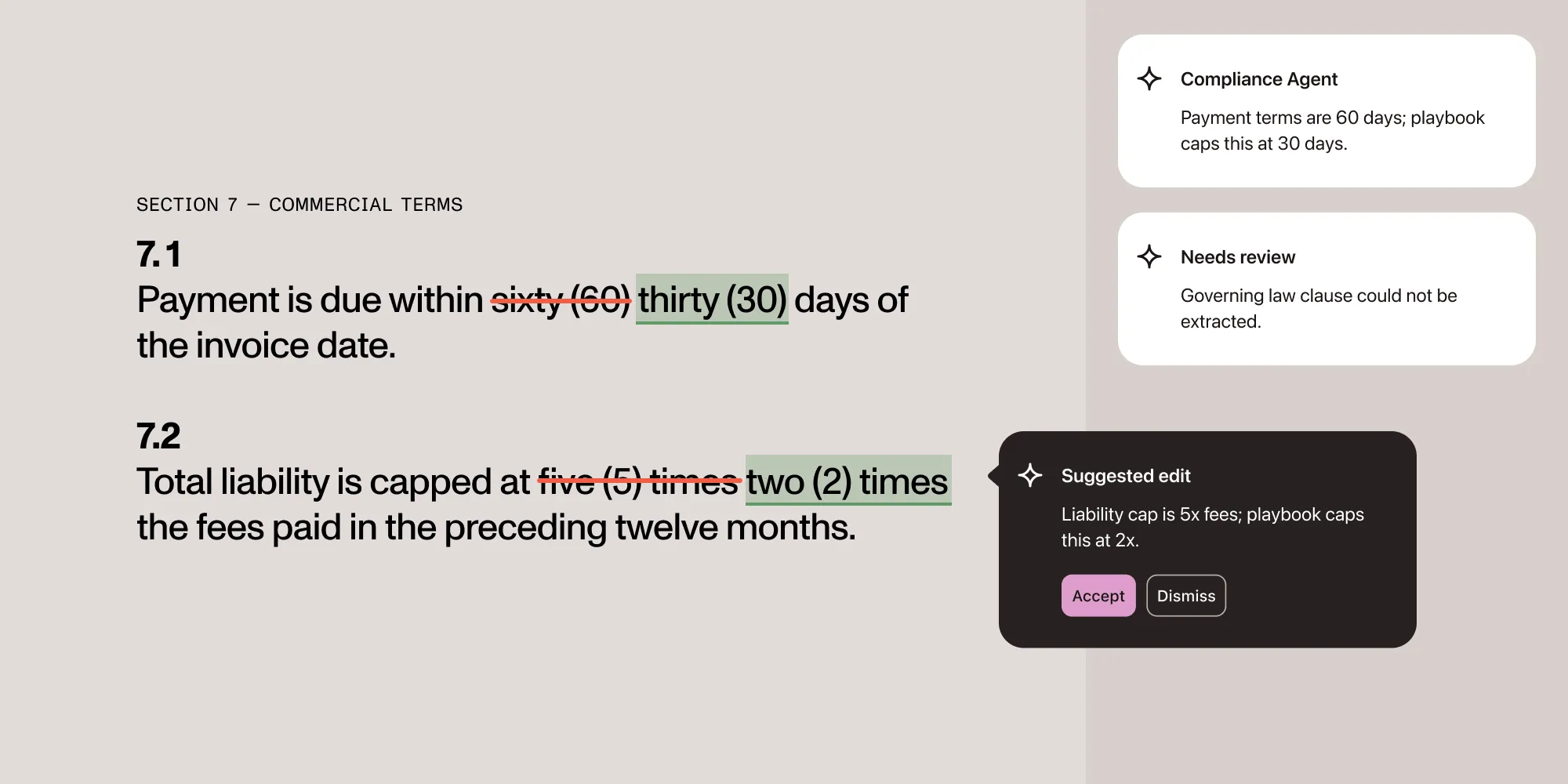
This builds an agent that checks a contract against a compliance playbook — a set of rules like “payment terms must be 30 days or less” — and drafts a redline for anything that fails:
- A playbook of constraints, not finished text. Each rule is a compliance check plus a plain-language constraint — not a fixed replacement sentence. The model still has to draft the actual replacement clause.
- Triage before authoring. A cheap extraction pass flags the clauses that violate the playbook before any contract ever opens in an editor, so a whole batch can be screened in one run.
- Drafted, then verified, then applied. The model drafts a replacement clause from the constraint. A second, independent model call reads the compliance-determining value back out of the finished draft, and deterministic code checks that value against the same rule triage used — a draft that doesn’t satisfy the constraint or is too ambiguous to confirm never reaches the document.
Explore Nutrient Document Authoring
How to build an AI legal assistant in an hour with Nutrient Document Authoring is a companion post to this one. It covers an AI assistant built with Document Authoring AI(opens in a new tab) that edits a contract on request, one tracked change at a time, through a chat box. This post covers a different but related job: checking a contract against a fixed set of AI contract redlining rules and drafting every violation as a redline before anyone opens the file. The rules are known upfront, so the agent runs once and reports what it found instead of waiting on a conversation.
What this builds
A small pipeline with two stages:
- Triage. A contract goes to the Nutrient DWS Data Extraction API with a schema built from the compliance playbook. The response says which clauses were found and flags the ones whose extracted text doesn’t meet the rule.
- Redline. Only the flagged contracts open in Nutrient Document Authoring. An agent locates each flagged clause in the live document, drafts a compliant replacement against the playbook’s constraint, validates that draft against the same rule, and applies it as a tracked change with a comment naming the rule it fixed.
Prerequisites
Required setup:
- A Nutrient DWS API key for the Data Extraction API. Sign up at nutrient.io/api(opens in a new tab) — the key starts with
pdf_live_. Add it to.env.localasNUTRIENT_DWS_API_KEY. - A Next.js app (
npx create-next-app@latest, App Router, TypeScript) for the redline stage. - An OpenAI API key in
.env.localasOPENAI_API_KEY, for the model that drafts each replacement clause. - A contract to test with, such as the Common Paper Mutual NDA(opens in a new tab) DOCX (CC BY 4.0), renamed to
sample.docxand dropped inpublic/.
1. Define the playbook
A playbook rule needs two things: a description of what to look for, so extraction can find it, and a compliance check, so triage can judge it. The playbook is expressed as a JSON Schema the extraction API can map the contract onto directly:
export const PLAYBOOK_SCHEMA = {  type: "object",  properties: {    payment_terms: {      type: "object",      description: "The clause stating how many days after invoice payment is due.",      properties: {        clause_text: { type: "string" },        due_days: {          type: "integer",          description: "Number of days after invoice that payment is due.",        },      },      required: ["clause_text", "due_days"],    },    liability_cap: {      type: "object",      description: "The clause capping total liability under the agreement.",      properties: {        clause_text: { type: "string" },        cap_multiple_of_fees: {          type: "number",          description: "The liability cap expressed as a multiple of fees paid under the agreement.",        },      },      required: ["clause_text", "cap_multiple_of_fees"],    },    governing_law: {      type: "object",      description: "The clause naming the jurisdiction whose law governs the agreement.",      properties: {        clause_text: { type: "string" },        jurisdiction: { type: "string" },      },      required: ["clause_text", "jurisdiction"],    },  },  required: ["payment_terms", "liability_cap", "governing_law"],};
export type PlaybookRule = {  field: keyof typeof PLAYBOOK_SCHEMA.properties;  valueField: string;  constraint: string;  check: (value: string) => boolean;  violationMessage: (extracted: any) => string;};
export const PLAYBOOK_RULES: PlaybookRule[] = [  {    field: "payment_terms",    valueField: "due_days",    constraint: "Payment must be due within 30 days of the invoice date.",    check: (value) => Number(value) <= 30,    violationMessage: (v) => `Payment terms are ${v.due_days} days; playbook caps this at 30 days.`,  },  {    field: "liability_cap",    valueField: "cap_multiple_of_fees",    constraint:      "Liability is capped at two (2) times the fees paid under the agreement in the twelve months preceding the claim.",    check: (value) => Number(value) <= 2,    violationMessage: (v) => `Liability cap is ${v.cap_multiple_of_fees}x fees; playbook caps this at 2x.`,  },  {    field: "governing_law",    valueField: "jurisdiction",    constraint: "The agreement is governed by the laws of the State of Delaware.",    check: (value) => value.toLowerCase().includes("delaware"),    violationMessage: (v) => `Governing law is ${v.jurisdiction}; playbook requires Delaware.`,  },];
Each rule pairs a check against a scalar value (a day count, a multiple, a jurisdiction name) with a constraint — the same rule stated in plain language, for the model to draft against. check runs twice: once in triage against the value extraction found, and again in the redline stage — this time against a value read back out of the model’s own completed draft by a second, independent model call, covered in step 6.
2. Triage: Extract and check every contract
Triage has to run on the server — it calls the extract endpoint with a secret API key. The browser uploads the contract to a small API route, which forwards it to the extract endpoint with the playbook schema and checks the response against the playbook rules:
import { PLAYBOOK_SCHEMA, PLAYBOOK_RULES } from "../../../lib/playbook";
const ENDPOINT = "https://api.nutrient.io/extraction/extract";
type TriageStatus = "compliant" | "violation" | "needs_review";
type TriageResult = {  field: string;  status: TriageStatus;  clauseText: string;  violationMessage: string;  constraint: string;};
export async function POST(req: Request) {  const incoming = await req.formData();  const file = incoming.get("file");  if (!(file instanceof Blob)) {    return Response.json({ error: "Missing file" }, { status: 400 });  }
  const form = new FormData();  form.append("file", file, "contract.docx");  form.append(    "instructions",    JSON.stringify({      schema: PLAYBOOK_SCHEMA,      parseConfig: { mode: "understand" },    }),  );
  const response = await fetch(ENDPOINT, {    method: "POST",    headers: { Authorization: `Bearer ${process.env.NUTRIENT_DWS_API_KEY}` },    body: form,  });  const result = await response.json();
  if (result.status !== 200) {    return Response.json({ error: result.errorMessage }, { status: 502 });  }
  const data = result.output.data;  const results: TriageResult[] = [];
  for (const rule of PLAYBOOK_RULES) {    const extracted = data[rule.field];    const value = extracted?.[rule.valueField];
    if (value == null) {      results.push({        field: rule.field,        status: "needs_review",        clauseText: "",        violationMessage: `Could not extract "${rule.field}" from the contract — route to manual review.`,        constraint: rule.constraint,      });      continue;    }
    if (rule.check(String(value))) {      results.push({        field: rule.field,        status: "compliant",        clauseText: extracted.clause_text,        violationMessage: "",        constraint: rule.constraint,      });      continue;    }
    results.push({      field: rule.field,      status: "violation",      clauseText: extracted.clause_text,      violationMessage: rule.violationMessage(extracted),      constraint: rule.constraint,    });  }
  return Response.json({ results });}
DOCX is a supported input file type for this endpoint. Each rule resolves to one of three states, not a compliant/violation Boolean: A missing field is needs_review, never silently treated as a pass, since extraction failing to find a clause isn’t the same as the clause being compliant. Only violation results feed the redline stage; needs_review results should route to a human even though no rule was technically broken.
The extract request bills a parse component — priced per page by the parseConfig.mode selected — plus a fixed 6-credit extract component per page. Triaging a batch of contracts before opening any of them in an editor only pays off when most of the batch turns out to be compliant; a high violation rate adds a full extraction call on top of every editor session triaging was meant to avoid. See the pricing guide.
3. Install the redline stage
The redline stage runs in a Next.js app and needs the Document Authoring toolkit, its AI helper package, and the Vercel AI SDK for the drafting and verification calls:
npm install @nutrient-sdk/document-authoring @nutrient-sdk/document-authoring-ai \ ai@^6 @ai-sdk/openai@^3 zodThe Vercel AI SDK is only used for the drafting and verification calls in steps 5 and 6 — plain structured-output requests, not a tool-calling chat loop, so @ai-sdk/react isn’t needed.
4. Locate each flagged clause in the live document
The triage step returns clause text, not a document element ID — element IDs only exist once the toolkit has looked at the live document. Import the DOCX and switch to Review mode. Then search for each flagged clause’s text directly with search_elements, the tool built for locating a specific paragraph or table without reading the whole document outline:
import {  createDocAuthSystem,  type DocAuthEditor,} from "@nutrient-sdk/document-authoring";import { getAiToolkit } from "@nutrient-sdk/document-authoring-ai/editor";
export async function openAndLocate(  host: HTMLElement,  docxUrl: string,  flaggedClauses: {    field: string;    clauseText: string;    violationMessage: string;    constraint: string;  }[],) {  const system = await createDocAuthSystem();  const document = await system.import(fetch(docxUrl), { fileName: "contract.docx" });  const editor: DocAuthEditor = await system.createEditor(host, { document });  editor.setEditorMode("review");  editor.setAuthor("Compliance Agent");
  const toolkit = getAiToolkit(editor);
  // We already know what we're looking for, so we search for it  // directly instead of asking the model to find it.  const located = [];  for (const clause of flaggedClauses) {    const searched = await toolkit.executeTool({      id: `locate-${clause.field}`,      name: "search_elements",      args: { query: clause.clauseText.slice(0, 60), kinds: ["paragraph"] },    });
    const matches = searched.result.matches as { element: { id: string }; score: number; snippets: string[] }[];    if (matches.length !== 1) {      throw new Error(        `Expected exactly one match for field "${clause.field}" in the live document, got ${matches.length}.`,      );    }
    located.push({ ...clause, elementId: matches[0].element.id });  }
  return { system, editor, toolkit, located };}
executeTool doesn’t care whether the caller is a model or app code — it validates the call against the tool’s schema either way. Since the playbook already specifies which clauses to look for, there’s no need to run a model turn just to search for them.
kinds is restricted to ["paragraph"] on purpose: Step 6 applies the redline with replace_paragraph, which only accepts paragraph IDs, so a table match here would locate correctly and then fail when applied. If a playbook rule targets a clause that could legitimately live in a table, either drop this restriction and route table matches to replace_text instead, or keep the two operations paired by kind.
Requiring exactly one match keeps this honest: If a clause’s text doesn’t map to a single paragraph in the live document — because extraction paraphrased it, or the clause spans multiple paragraphs — openAndLocate throws instead of guessing which element to edit. A single match isn’t proof it’s the right match, though — if two clauses happen to share the same opening text, search_elements can return exactly one match against the wrong paragraph. For higher-stakes playbooks, pass a longer or more distinctive slice of the clause text to reduce that risk.
5. Draft each redline with the model
The playbook doesn’t hand the model finished text — it hands the original clause and the constraint that clause is failing and asks the model to draft a replacement. This is a plain structured-output request — no document access, no tools, nothing agentic yet:
import { openai } from "@ai-sdk/openai";import { generateText, Output } from "ai";import { z } from "zod";
const DraftSchema = z.object({  draftedText: z.string(),});
export async function POST(req: Request) {  const { clauseText, constraint } = await req.json();
  const result = await generateText({    model: openai("gpt-5.4-mini"),    system: `Draft a replacement contract clause that satisfies the given constraint. Preserve the original clause's structure, defined terms, and tone wherever the constraint doesn't require a change.`,    prompt: `Original clause: "${clauseText}"\nConstraint: ${constraint}`,    output: Output.object({ schema: DraftSchema }),    temperature: 0.2,  });
return Response.json(result.output);}generateText(opens in a new tab) with Output.object(opens in a new tab) is the same structured-output pattern the Document Authoring AI workflows guide uses for proofreading and translation — it validates the model’s response against a schema before the route returns it, so a malformed response is a parse error the caller can catch, not a silent bad draft. Notably, the model isn’t asked to report whether its own draft is compliant — that would just move the trust problem this pipeline exists to avoid one step over. It only drafts text.
6. Verify the draft against the playbook, then apply it as a tracked change
A regex pulled straight out of the drafted text can’t tell the difference between the day count that governs payment and one that happens to sit nearby in the same clause — “disputes must be raised within 10 days; payment is due within 60 days” would wrongly parse as 10. Reading the value back out of the draft needs the same thing that decided the draft was needed in the first place: a model that understands what the text is actually saying.
So a second, independent call reads only the finished clause — not the original text, not the constraint’s target number, nothing about why this draft exists — and states the value that determines compliance with the constraint. It gets no more context than a reviewer skimming the paragraph would:
import { openai } from "@ai-sdk/openai";import { generateText, Output } from "ai";import { z } from "zod";
const VerifySchema = z.object({  value: z.string(),});
export async function POST(req: Request) {  const { draftedText, constraint } = await req.json();
  const result = await generateText({    model: openai("gpt-5.4-mini"),    system: `Read the following contract clause on its own. State the single value in the clause that determines compliance with the given constraint — nothing else.`,    prompt: `Clause: "${draftedText}"\nConstraint: ${constraint}`,    output: Output.object({ schema: VerifySchema }),    temperature: 0,  });
  return Response.json(result.output);}
The playbook’s check runs against whatever this call finds, the same function triage already used to decide the clause was non-compliant in the first place. Only a draft that passes reaches replace_paragraph.
That comparison assumes value comes back as a clean number, but VerifySchema types it as a bare string with no numeric constraint. The system prompt asks for the single value and nothing else, but nothing enforces that shape — a response like "30 days" instead of "30" makes Number(value) return NaN, and Number(value) <= 30 is always false for NaN, so a compliant draft would be wrongly rejected. Triage never hits this: Its input comes from a schema-constrained integer/number field, not free text. Tightening VerifySchema to match — or normalizing the string before parsing — closes the gap:
import type { AiToolkit } from "@nutrient-sdk/document-authoring-ai/editor";import { PLAYBOOK_RULES } from "../lib/playbook";
type LocatedClause = {  field: string;  elementId: string;  clauseText: string;  violationMessage: string;  constraint: string;};
export async function applyRedlines(toolkit: AiToolkit, located: LocatedClause[]) {  const results = [];
  for (const clause of located) {    const rule = PLAYBOOK_RULES.find((r) => r.field === clause.field);    if (!rule) continue;
    const draftResponse = await fetch("/api/draft", {      method: "POST",      headers: { "Content-Type": "application/json" },      body: JSON.stringify({ clauseText: clause.clauseText, constraint: clause.constraint }),    });    const { draftedText } = await draftResponse.json();
    const verifyResponse = await fetch("/api/verify-draft", {      method: "POST",      headers: { "Content-Type": "application/json" },      body: JSON.stringify({ draftedText, constraint: clause.constraint }),    });    const { value } = await verifyResponse.json();
    if (!rule.check(value)) {      // Either the independent read found a non-compliant value, or the      // draft was ambiguous enough that the two model calls disagree with      // what was intended. Either way, don't apply it — route to review.      results.push({ field: clause.field, applied: false, reason: "draft_failed_validation" as const });      continue;    }
    const executed = await toolkit.executeTool(      {        id: crypto.randomUUID(),        name: "replace_paragraph",        args: {          id: clause.elementId,          text: draftedText,          reviewComment: clause.violationMessage,        },      },      {        writeMode: "track_changes",        reviewComments: "create",      },    );    results.push({ field: clause.field, applied: true as const, executed });  }
  return results;}
This is stronger than a local parse, but it’s still model judgment, not a proof — the verification call could misread an unusual clause the same way a person skimming it too quickly could. That’s exactly why the write always lands as a tracked change instead of a direct edit: The redline is a proposal a person still accepts or rejects, never a finished, unreviewed action. executeTool only ever runs on a draft that a second, independent read already agreed satisfies the rule; the model that wrote the clause never gets to be the same model that clears it. That verification call only checks the single compliance-determining value, though — it doesn’t confirm the rest of the clause survived the redraft unchanged. The drafting prompt asks the model to preserve everything the constraint doesn’t touch, but nothing independently checks that it did.
Wire it together with the pieces from steps 2 and 4. This part runs entirely in the browser — it fetches the same DOCX the editor will open, uploads it to /api/triage, and only proceeds to the editor if triage found something to fix. That assumes docxUrl resolves to the same document both times it’s fetched; if the source could change between the triage call and the editor import, the clause triage located and the live document being edited could disagree:
import { openAndLocate } from "./locate-clauses";import { applyRedlines } from "./apply-redlines";
export async function runRedlinePass(host: HTMLElement, docxUrl: string) {  const docxBlob = await fetch(docxUrl).then((res) => res.blob());  const triageForm = new FormData();  triageForm.append("file", docxBlob, "contract.docx");
  const triageResponse = await fetch("/api/triage", { method: "POST", body: triageForm });  const { results: triageResults } = await triageResponse.json();  const flaggedClauses = triageResults.filter((r: { status: string }) => r.status === "violation");  const needsReview = triageResults.filter((r: { status: string }) => r.status === "needs_review");
  if (flaggedClauses.length === 0) {    // No violations doesn't mean "compliant" — a needs_review result means    // triage couldn't positively evaluate a rule at all, which still needs    // a human even though there's nothing to redline.    return { status: needsReview.length === 0 ? ("compliant" as const) : ("needs_review" as const), needsReview };  }
  const { toolkit, located } = await openAndLocate(host, docxUrl, flaggedClauses);  const redlineResults = await applyRedlines(toolkit, located);  return { status: "redlined" as const, results: redlineResults, needsReview };}
Open the editor, and every flagged clause that passed validation already shows its drafted tracked change and comment — no chat history to scroll through, and no draft reaches the document without being checked against the rule it was meant to fix. A needs_review result always comes back alongside whichever status describes the redline pass, so it’s never silently dropped just because there was nothing to redline.
Why triage before redlining
Extraction and Document Authoring solve different problems here. The extract endpoint judges structured values — day counts, multiples, jurisdiction names — against a rule, on any DOCX or PDF, without an editor. Document Authoring is where a redline actually becomes a reviewable, exportable Word document, but that requires the editor to be running.
Splitting the work this way means a batch of 100 contracts costs 100 extraction calls, and only the ones with violations pay the cost of opening in an editor at all. Running everything through the editor first would work too, but it means loading every compliant contract for nothing.
FAQ
No — they solve different jobs. The chat assistant handles requests that aren’t known in advance (“what does this NDA say about assignment?”). This pipeline handles a fixed rule set applied the same way every time. Both can run against the same document; nothing about Review mode or tracked changes conflicts between them.
openAndLocate throws when search_elements returns zero or more than one match. In production, catch it and route that clause to manual review instead of failing the whole pass — a mismatch between the extracted citation and the live document is a signal worth a human look anyway.
needs_review results?The redline stage only acts on violation results. needs_review results are always returned too, alongside whatever the overall status is — even when there’s nothing to redline. A contract with only needs_review results comes back with status: "needs_review", never "compliant". The example code returns these results but doesn’t render them anywhere. A production version needs a UI that surfaces them to a reviewer.
applyRedlines records it as applied: false and moves on — it never calls replace_paragraph for that clause. The example code above doesn’t retry or reprompt; a production version could ask the model to redraft once with the failure reason, and then fall back to manual review if the second draft still doesn’t pass.
/api/draft and /api/verify-draft safe to expose as-is?Not for production. /api/triage, /api/draft, and /api/verify-draft are all unauthenticated — none of them check who’s calling. /api/draft and /api/verify-draft proxy straight to OpenAI using a server-held key with no rate limit, making them the cheaper target: A real Data Extraction API call makes /api/triage more expensive to abuse, not blocked. Add authentication and rate limiting to all three before deploying.
Yes. Add a property to PLAYBOOK_SCHEMA and a matching entry to PLAYBOOK_RULES. Schemas are limited to 128 KB, 2,000 schema nodes, and five levels of nesting — see define a schema.
Yes. They’re written as standard DOCX tracked changes and comments, the same as the chat-based assistant’s edits, so a reviewer can open the exported file in Word and accept, reject, or reply to each one.
Not to try it. Without a license key, Document Authoring runs in evaluation mode — DOCX import and export, tracked changes and comments included — with a watermark and a time limit. DOCX support is a licensed capability, so production use requires adding a license key to createDocAuthSystem. Contact Sales for a key. The Data Extraction API is metered separately through a DWS account.
Where to go next
- Document Authoring AI workflows — For bounded, whole-document tasks like proofreading that don’t need per-clause targeting.
- Citations and confidence — Use extraction’s confidence scores to decide which triage results need a human look before they ever reach the redline stage.
- Review and approval — The full Edit, Review, and View mode policy this pipeline relies on.
- How to build an AI legal assistant in an hour with Nutrient Document Authoring — The chat-based assistant this pipeline complements.
Get started with Nutrient Document Authoring