One lock, many claimants: Faster Android PDF rendering

Table of contents
- Progressive rendering shows a heavy page as it parses, in steps, instead of making the user wait for the whole parse — and the parse can now be canceled midway.
- A render gate makes the page you’re looking at win the single per-document render lock, so background work (the thumbnail bar, adjacent-page prefetch, zoom) defers to it instead of blocking it.
- We instrumented the whole pipeline with Perfetto(opens in a new tab) traces. This post doubles as a guide: how the instrumentation works, how to capture a trace, and how to read the result.
Open a heavy PDF — a dense computer-aided design (CAD) drawing, a scanned engineering set — on a phone, and rendering one page can take tens of seconds. For most of that time, the app looks frozen: no page, no feedback, nothing to look at. Worse, while you wait for the page you’re on, the SDK is often busy rendering pages you aren’t looking at.
We spent an iteration fixing both halves of that: showing a page while it renders, and making sure the page you’re looking at is the one that gets rendered first. Here’s how, along with how we measured it.
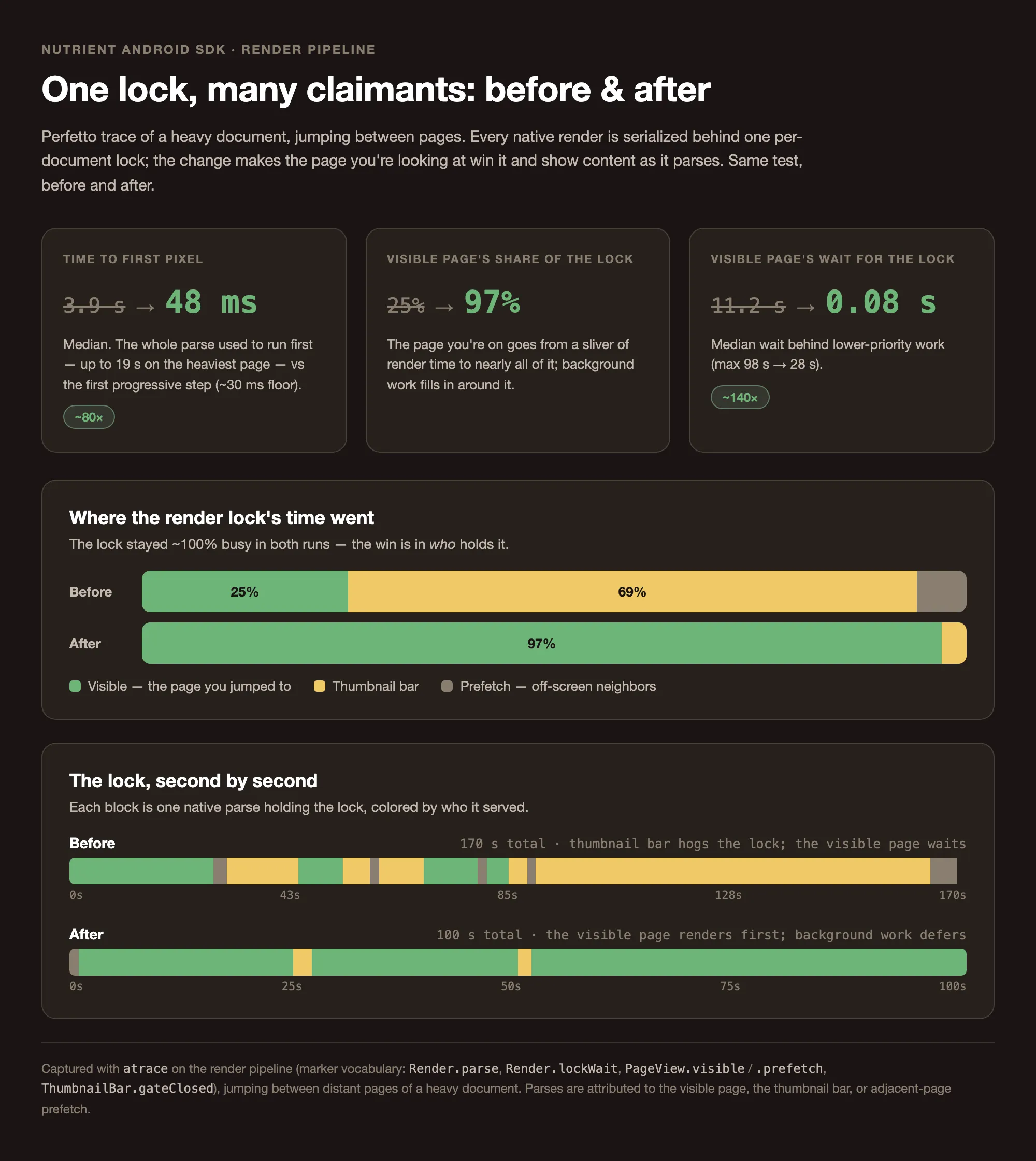
The payoff, up front: In a jump-heavy test, the visible page’s share of render-lock time went from ~25 percent to ~97 percent — it stopped waiting behind the thumbnail bar — and it began showing progressive content in tens of milliseconds instead of only after a full parse that could run to ~19 seconds on the heaviest pages.
The bottleneck: One lock, many claimants
PDFium — the engine underneath Nutrient Android SDK — isn’t safe for concurrent page access. Even two readers walking the same page’s object list can race, because rendering mutates internal state (image cache, font cache, lazy-parsing progress), so every native render on a document is serialized behind a single mutex:
/** * Single per-document mutex serializing every native render call. * * PDFium pages are not safe for concurrent access ... This lock guarantees that at * any moment only one of [renderToBitmapWithCache], [renderPageSubRegionToBitmap] or * [renderProgressively] is touching a native page on this document. */private val nativeRenderLock = ReentrantLock()The lock is priority-blind: It serves whoever asks first, not whoever matters most. And a lot of things ask. When you settle on a page, the SDK renders that page, prefetches its neighbors for smooth scrolling, fills the thumbnail bar, and rerenders detail when you zoom. On a light document, none of this is noticeable. On a heavy one, whichever parse grabs the lock first holds it for its full duration — and a 30-second parse of an offscreen page blocks the page you’re actually looking at for 30 seconds.
Two changes attack this: make the wait visible (progressive rendering), and make the visible page win the lock (gating).
Progressive rendering
A full-page render used to be one blocking call: parse the page, rasterize it, return a bitmap. Progressive rendering breaks that into steps with a fixed time budget, emitting the partially drawn bitmap after each step so the page fills in as it parses.
The native session exposes a continueRender call that runs for a bounded number of milliseconds and reports whether the bitmap changed and whether it’s done:
var response = session.continueRender(stepBudgetMs) // PROGRESSIVE_STEP_BUDGET_MS = 30 ms.while (!isCancelled() && (response.bitmapUpdated || response.status == NativeProgressiveRenderStatus.INPROGRESS)) { if (response.bitmapUpdated) onStep() // push the in-progress bitmap to the UI. response = session.continueRender(stepBudgetMs)}Each onStep hands the same bitmap back to Compose, which redraws it — so the user sees the page resolve in passes instead of staring at nothing. The step budget keeps any single step short enough that cancellation stays responsive.
That responsiveness matters because the second half of progressive rendering is cancellation. A render is now abortable at three points: before the native session starts (it was canceled while queued), between steps (the loop checks isCancelled()), and — the important one — mid-parse. The session carries a cancellation token; firing it from another thread aborts the in-flight parse inside PDFium and frees the lock:
// When the calling coroutine is canceled, fire the native cancel from the canceling thread.val cancelHandle = callerJob?.invokeOnCompletion(onCancelling = true, invokeImmediately = true) { cause -> if (cause != null) cancelProgressiveAsync(renderingHelper, renderConfig.pageIndex, token)}A canceled render reports CANCELLED (distinct from FAILEDOOM, which is a memory-pressure abort — a story of its own), and the page is left cleanly rerenderable. Cancellation throws away the partial parse — parses can’t resume — but that’s the point: a thrown-away render of a page you scrolled past is cheaper than making you wait for it.
Gating: The visible page wins the lock
Cancellation gives us a lever. Gating decides when to pull it.
The render pipeline tracks how many full-page renders are in flight, split by whether the page is visible:
fun markFullPageRenderStarted(isVisiblePage: Boolean): FullPageRenderHandle { _fullPageRendersInFlight.update { it + 1 } if (isVisiblePage) _visibleFullPageRendersInFlight.update { it + 1 } return FullPageRenderHandle(isVisiblePage)}Background work observes these counters and steps aside:
- Thumbnail bar. A thumbnail is cheap to show but expensive to produce — rendering a postage-stamp bitmap of a heavy page still parses the whole page. The bar’s render gate watches the in-flight count; while any full-page render is pending, it closes, canceling the in-flight thumbnail and holding the rest. It reopens after a short debounce, so back-to-back page renders during a scroll don’t cause cancel-and-restart thrash:
document.renderingHelper.fullPageRendersInFlight.collectLatest { inFlight -> if (inFlight > 0) { renderGateClosed = true yieldCurrentRenderToFullPage() // cancel the thumbnail holding the lock. } else { delay(RENDER_GATE_REOPEN_DEBOUNCE_MS) // 250 ms. renderGateClosed = false retryYieldedRenders() }}- Adjacent-page prefetch. When you settle on a page, the SDK prefetches neighbors so scrolling stays smooth. But a prefetch that grabs the lock first blocks the visible page, so a cache-missing prefetch waits until no visible-page render is pending, and if a visible render arrives while the prefetch is running, the prefetch yields — its parse is canceled, the lock frees, and it retries once the document is idle. If you scroll to the prefetched page while it waits, it’s promoted to visible and renders immediately.
- Zoom and pan. Viewport (detail) renders take the same lock, so they register on the same counter and the bar defers to them too.
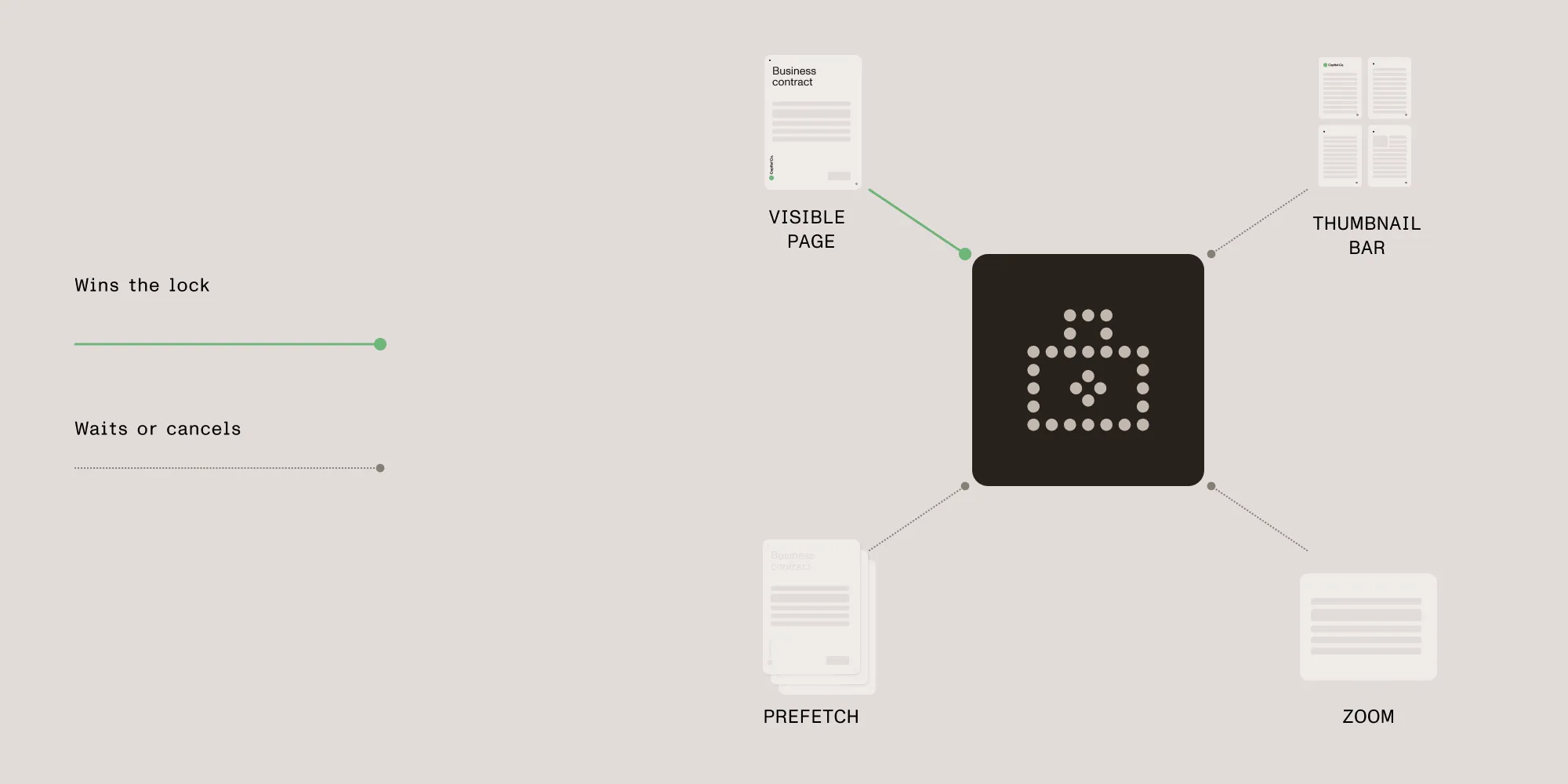
The result is a simple, enforced priority: The page you’re looking at renders first; everything else fills in around it.
Measuring it with Perfetto
None of this is provable from logs alone — the interactions are concurrent and timing-dependent, so we instrumented the pipeline with Perfetto(opens in a new tab) trace markers and read the result on a timeline. That instrumentation was a temporary harness rather than part of the shipped SDK: We added it to answer this question and to take the measurements further down, so the marker names below won’t appear in a trace of the released build. It’s small enough to be worth reproducing in any codebase with a concurrency question like this one, so here’s the whole setup.
The instrumentation
A thin wrapper over the platform android.os.Trace — no extra dependencies. The key detail is that markers are emitted only while a trace is actually recording, so the descriptive (allocating) section names are never built in normal use:
inline fun <T> section(name: () -> String, block: () -> T): T { val traced = isEnabled() // Build.VERSION.SDK_INT >= 29 && Trace.isEnabled(). if (traced) Trace.beginSection(name().take(MAX_SECTION_NAME)) try { return block() } finally { if (traced) Trace.endSection() }}With no trace running, that’s a couple of Boolean checks per render. There’s an asyncSection variant for spans that begin and end on different threads or that suspend (the gate windows). Everything emits one of a small, fixed vocabulary of names:
| Marker | What it means |
|---|---|
Render.lockWait <kind> p=<n> | Waiting to acquire the per-document render lock |
Render.parse <kind> p=<n> <w>x<h> | Holding the lock and parsing or rasterizing |
PageView.visible / PageView.prefetch / PageView.viewport | A full-page render, classified by why it ran |
Prefetch.deferred | A prefetch held off behind pending visible-page renders |
ThumbnailBar.gateClosed | The thumbnail bar blocked behind in-flight full-page renders |
Capturing a trace
The commands below are exactly what we ran against our own app; swap io.nutrient.app for your own application ID to reproduce this against any Trace.isEnabled()-gated build. The app has to be debuggable (the debug build variants are). Start a capture, reproduce the scenario, and stop it into a file:
# Start (clears any prior buffer), navigate the document, then stop into a file.adb shell atrace --async_start -b 40000 -a io.nutrient.app gfx view# …open a heavy PDF, jump between distant pages, scrub the thumbnail bar…adb exec-out atrace --async_stop -b 40000 > trace.txtThe -a <applicationId> flag is what enables the app’s own Trace sections. Drop sched from the category list for long captures so the buffer holds the whole session instead of wrapping. Open trace.txt at ui.perfetto.dev(opens in a new tab), or, for a richer capture, use Android Studio’s System Trace profiler.
Reading the dashboard
A few things to look for:
- Lock occupancy. Sum the
Render.parseslices over the capture. On a heavy document, this approaches 100 percent — the lock is the bottleneck, and priority only orders who starts next. - Who blocked the visible page. A long
Render.lockWaiton the page you’re on, sitting underneath aRender.parseof a different page, is the visible page waiting behind a stale parse. - Attribution. Match each
Render.parseslice to thePageView.*span covering it to tell whether a parse was the visible page’s content, its annotation (viewport) pass, or an offscreen prefetch. - Gate reopen latency. The gap between the last full-page render ending and a
ThumbnailBar.gateClosedwindow ending should be about the 250 ms debounce. Much longer is worth investigating.
What the numbers showed
The number that matters here isn’t how busy the render lock is — it’s how long the page you’re looking at waits to show anything. Lock occupancy barely moves either way: The lock stays saturated regardless (~99 percent busy across a jump-heavy session). What progressive rendering and gating change is who that busy time serves, and how soon the visible page gets its first pixels.
To isolate that, we profiled a heavy CAD document while jumping to non-adjacent pages — land on a cold page, wait for it to render, jump again — on a build from before this work and on one with progressive rendering and gating in place.
Those captures predate a later optimization: The region pass is now skipped entirely at rest on pages whose annotations are all drawn as overlay views. The shipped SDK therefore does strictly less render work than the numbers below record — treat them as a floor on the improvement rather than a ceiling.
Time to first pixel on the page you jumped to:
Before, that was two waits in sequence. The page first queued for the render lock behind lower-priority work — mostly the thumbnail bar rendering its own copies of the same heavy pages — and only then ran its own parse. Nothing reached the screen until both finished.
| Before | After | |
|---|---|---|
| Waiting for the render lock | ~11 s | Less than a second |
| Parsing the page | ~3.9 s | — |
| Total (median) | ~15 s | ~50 ms — the first progressive pass |
| Heaviest page (parse alone) | ~19 s | ~115 ms |
| Best case | — | ~30 ms — a single render step |
After, two things change. Gating lets the visible page preempt, so the queueing collapses to a fraction of a second. And progressive rendering paints a first pass at the render step budget (~30 ms) and keeps resolving while you watch, so there’s no longer a full parse to wait out at all. First content lands in tens of milliseconds, even on the pages that used to take tens of seconds — two orders of magnitude sooner.
The reordering shows up in how the lock’s time is split:
| Where the render lock’s time went | Before | After |
|---|---|---|
| Visible — the page you jumped to | ~25 percent | ~97 percent |
| Thumbnail bar | ~69 percent | ~3 percent |
| Prefetch — offscreen neighbors | ~5 percent | ~0 percent |
The priority flips: Before, the thumbnail bar owned roughly three-quarters of the lock, while the page you were actually looking at got a sliver; after, the visible page comes first and background work fills in around it.
Under jumping, the visible page pays for its own content parse — it lands cold, so nothing is cached — which is what the ~97 percent is. A page with annotations baked into it — rendered as part of the page’s own raster content, rather than as separate overlay views drawn on top of the bitmap — pays twice over: The progressive pass omits those annotations, so a region pass at zoom 1 has to add them. Both passes take the lock, and on a heavy page, both are expensive — which points straight at the next target: drawing annotations without reparsing the whole page.
Prefetch stays small under jumping, because a jump lands somewhere prefetch hasn’t reached, and whatever neighbor it had started is canceled the moment the next jump arrives. Swipe instead, and the profile inverts: Prefetch renders the pages ahead of you, so the content pass is a cache hit by the time you arrive, and prefetch is billed for it. An annotation-free page then costs the visible bucket nothing at all; one with baked-in annotations still pays for its region pass, since there’s no viewport cache to hit. Same pipeline, opposite profile.
The headline holds under either navigation style: The lock stays saturated, and gating reorders that contention so the page you’re looking at goes first — and, thanks to progressive rendering, it shows something almost immediately instead of only after the full parse.
Takeaways
Two ideas did most of the work. Progressive rendering turns a long opaque wait into visible progress and, crucially, makes a render cancelable. Gating uses that cancellation to enforce a priority the lock itself can’t: The page you’re looking at comes first. And a small, cheap Perfetto layer made the whole thing measurable — which is what let us trust the change instead of guessing at it.
If you’re chasing a concurrency problem of your own, the trace setup above is the part worth stealing: A dozen lines of android.os.Trace, gated behind Trace.isEnabled(), and a consistent vocabulary of marker names turn an invisible timing problem into a picture you can read.
These rendering improvements are available in Nutrient Android SDK 11.6. See the Android 11.6 release notes for the full details.