Nutrient iOS SDK 26.2 release notes
RSS13 November 2025
Nutrient iOS SDK 26.2 adds on-device AI Assistant using Foundation Models!
We shipped our first version of AI Assistant on iOS in Nutrient iOS SDK 14.6 in March this year. By connecting to our separate AI Assistant server product, AI Assistant lets users ask questions about documents with a natural language chat interface. When Apple announced Foundation Models(opens in a new tab) in June, we started an ambitious project to reimplement the AI pipeline of AI Assistant entirely on the device using the large language model from Foundation Models. However the large language model itself is only a small part of what’s needed to build AI-powered chat. We spent a lot of time handling the context window of Apple’s model so that this feature works in documents with huge numbers of pages.
We’re excited to have this feature out so you can try it. The best thing about on-device AI Assistant is how simply this feature can be added to your app. Just add AIAssistantButton (SwiftUI) or aiAssistantButtonItem (UIKit) to your toolbar.
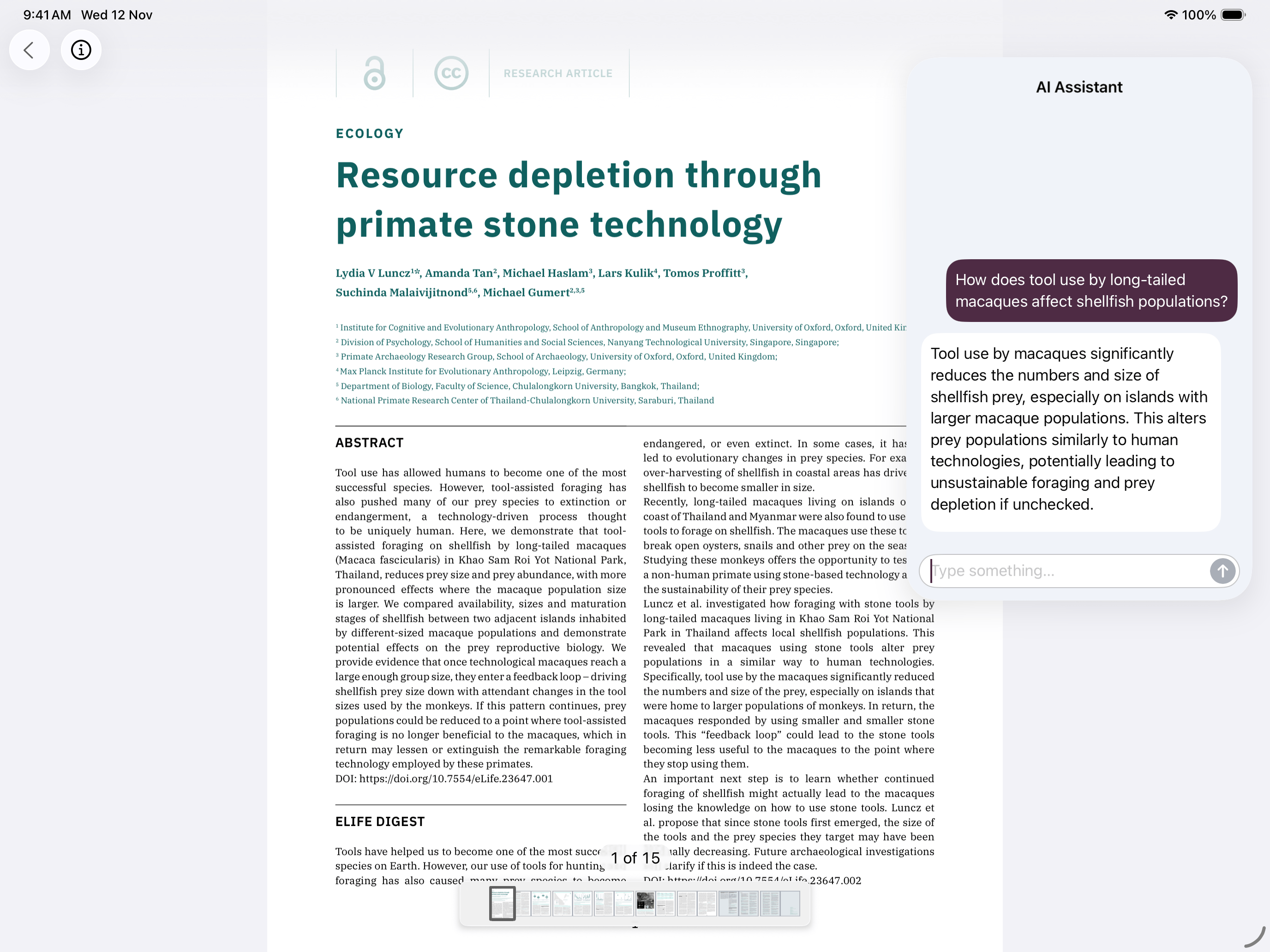
You don’t even need Xcode to take on-device AI Assistant for a spin, since it’s available in our PDF Viewer app on the App Store(opens in a new tab). (Make sure your device has Apple Intelligence enabled.)
You can read more in our on-device AI Assistant guide. We also have a guide comparing AI Assistant server and on-device AI Assistant to help you choose the best option for you. We’re continuing to invest heavily in AI Assistant server, as it provides the most advanced AI capabilities; however, on-device AI Assistant is a more streamlined version of this feature that’s easier to get started with.
On-device AI Assistant is a new license component for Nutrient iOS SDK. Get in touch(opens in a new tab) if you’d like to try this or have any questions. We really appreciate your feedback.
Migration notes
Nutrient iOS SDK 26.2 makes additional improvements to ensure our UI fits in with iOS 26’s new design. The floating buttons and labels showing things like the current page number now use Liquid Glass and a capsule shape. Some UI customization APIs don’t work well with the new design, so they’ve been deprecated. If you’re changing the blurEffectStyle or labelStyle properties of PDFLabelView, or the blurEffectStyle or buttonStyle properties of StyleButton, we recommend adopting a more standard look, but we’d like to hear how you’re using these APIs(opens in a new tab).
For the full list of changes, see the changelog.