Redacting PDFs programmatically on Android
You can create redactions programmatically via RedactionAnnotation. Use the setRects() method to set the regions that should be covered by the redaction annotation.
A redaction has two states. In the marked state, the redaction annotation is in the document and the content is intact. In the redacted state, the redaction has removed the content.
The marked state is the only state that accepts appearance changes. Because the redaction process also deletes the redaction annotation from the document, the appearance cannot change after that point.
These methods control the appearance of a redaction:
setOverlayText()sets the text that the redaction draws in the redacted area.setRepeatOverlayText()repeats the overlay text until it fills the redaction area. The default isfalse, which draws the overlay text one time, and the method has no effect when the annotation has no overlay text.setColor()sets the color of the overlay text, and has no effect when the annotation has no overlay text. The default isColor.RED(opens in a new tab).setFillColor()sets the background color of the redacted area. The redaction draws this color across every rect inrects. The default isColor.BLACK(opens in a new tab).setOutlineColor()sets the color of the redaction’s border in the marked state. The default isColor.RED(opens in a new tab).
val text = "Guide"val textPosition = document.getPageText(pageIndex).indexOf(text)if (textPosition == 0) {    return}val textRects = document.getPageTextRects(pageIndex, textPosition, text.length, false)
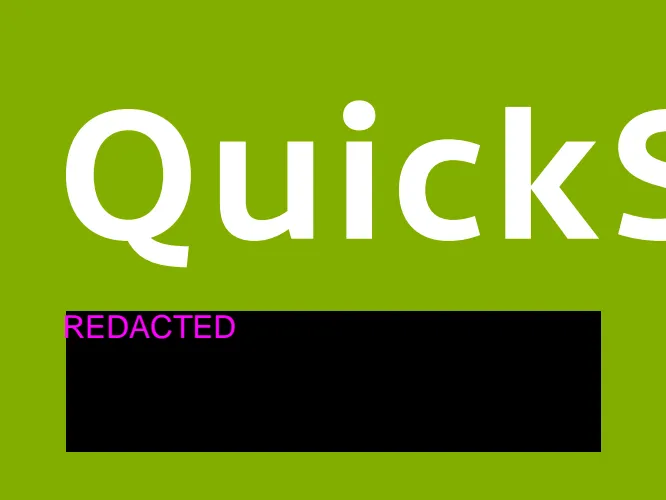
val redaction = RedactionAnnotation(0, textRects)redaction.color = Color.MAGENTAredaction.fillColor = Color.BLACKredaction.outlineColor = Color.YELLOWredaction.overlayText = "REDACTED"
pdfFragment.addAnnotationToPage(redaction, false)
String text = "Guide";final int textPosition = document.getPageText(pageIndex).indexOf(text);if (textPosition == 0) { return;}final List<RectF> textRects = document.getPageTextRects(pageIndex, textPosition, text.length(), false);
RedactionAnnotation redaction = new RedactionAnnotation(0, textRects);redaction.setColor(Color.MAGENTA);redaction.setFillColor(Color.BLACK);redaction.setOutlineColor(Color.YELLOW);redaction.setOverlayText("REDACTED");
getPdfFragment().addAnnotationToPage(redaction, false);The code above creates the redaction annotation shown below.
| Marked State | Redacted State |
|---|---|
 |  |
Applying redactions
Two options redact content programmatically, and they differ in what happens to the original document:
- Use
PdfProcessorTask. This creates a new document and leaves the original document, including its redaction annotations, untouched:
val outputFile: Fileval document: PdfDocumentval processorTask = PdfProcessorTask.fromDocument(document)    .applyRedactions()
PdfProcessor.processDocument(processorTask, outputFile)val redactedDocument = PdfDocumentLoader.openDocument(this, Uri.fromFile(outputFile))
File outputFile;PdfDocument document;PdfProcessorTask processorTask = PdfProcessorTask.fromDocument(document) .applyRedactions();
PdfProcessor.processDocument(processorTask, outputFile);PdfDocument redactedDocument = PdfDocumentLoader.openDocument(this, Uri.fromFile(outputFile));- Set
DocumentSaveOptions#setApplyRedactions(). Then save the document with any save method onPdfDocument. This overwrites the existing document and removes the content irreversibly:
val documentSaveOptions = DocumentSaveOptions(null, null, true, null);documentSaveOptions.setApplyRedactions(true)document.saveIfModified(documentSaveOptions)DocumentSaveOptions documentSaveOptions = new DocumentSaveOptions(null, null, false, null);documentSaveOptions.setApplyRedactions(true);document.saveIfModified(documentSaveOptions);Both options remove the redaction annotations when they redact the content.
Previewing redactions
The PdfFragment#setRedactionAnnotationPreviewEnabled() method shows how the redactions will look once they are applied, without removing any content from the document:
pdfFragment.isRedactionAnnotationPreviewEnabled = truepdfFragment.setRedactionAnnotationPreviewEnabled(true);