Customizing the Nutrient Web SDK UI
Nutrient Web SDK provides a slot-based API that gives you full control over every part of the viewer’s user interface. You can customize individual components, replace entire sections, or strip all default UI and build your own document experience from scratch.
Use cases include:
- Build headless document UIs — Use
preset: 'minimal'to hide all default UI and build your own interface on top of the rendering engine and Instance API. See the headless UI guide for product-like examples. - Fully replace a component — Replace the default comment thread, search panel, toolbars, or any other component with your own custom implementation.
- Partially customize a component — Insert a custom header, footer, or body into an existing component while keeping the rest of the default UI.
- Hide any component — Return
nullfrom a slot’srendermethod to hide it.
Building a custom UI on Baseline UI? Baseline UI is Nutrient’s design system. The Baseline UI MCP server provides AI assistants with its component props, icons, and theme tokens, keeping AI-generated UI consistent with the design system. It’s relevant only when building a custom interface from Baseline UI components — not for slot-level tweaks to the default viewer UI.
Slots
The UI customization API is built around slots. Pass them to the SDK as part of the load configuration using the ui property:
NutrientViewer.load({ // ... Your configuration ui: { // Configuration for UI customization. },});Slots are predefined placeholders in the Web SDK UI where you can place your own UI. A slot might have a default UI you can replace, or it might be empty for you to fill in.
For a complete list of all available slots, refer to the supported slots guide.
Grouped structure
Slots are organized by feature domain, not by presentation type. This means slot names describe what the feature does (e.g. annotations.actions) rather than how it’s rendered (e.g. annotationsPopover). This design allows the SDK to change the visual presentation without breaking your customization:
NutrientViewer.load({ ui: { // Grouped by feature domain. tools: { main: ..., // Always-visible tools (zoom, page nav, etc.). contextual: ..., // Mode-specific tools (annotation properties, etc.). }, annotations: { actions: ..., // Actions for selected annotations. deleteConfirm: ..., // Delete confirmation. link: ..., // Link annotation editor. // ...more }, signatures: { create: ..., // Electronic signature creation. list: ..., // Saved signatures picker. digitalSigning: ..., // Digital signing flow. digitalStatus: ..., // Validation status. }, // Standalone (single-feature) slots stay flat. search: ..., documentEditor: ..., loader: ..., // Document loading UI. passwordPrompt: ..., },});See the supported slots guide for the full inventory.
Preset
The preset key applies a baseline configuration. Use preset: 'minimal' to hide all UI, leaving only the page canvas. Individual slot overrides take precedence, so you can selectively restore components:
NutrientViewer.load({ ui: { preset: 'minimal', // Hides everything. search: (getInstance, id) => ({ render: () => { const div = document.createElement("div"); div.textContent = "Only search is visible"; return div; }, }), },});At runtime, you can apply or remove a preset via instance.setUI():
// Apply minimal preset:instance.setUI({ preset: 'minimal' });
// Reset to full default UI:instance.setUI({});
Customizing a slot
Consider the following example of the comment thread component.
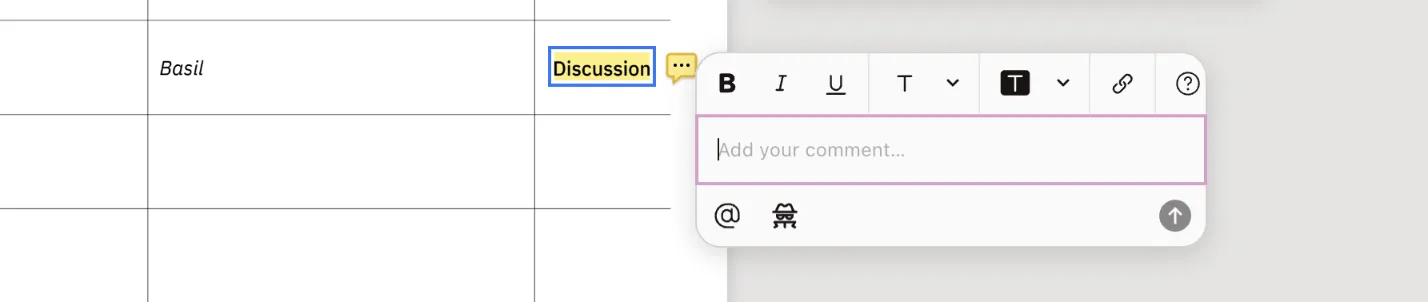
The comment thread component is a slot that can be fully replaced with a custom UI. It is also composed of nested slots that can be customized individually.
Concepts
Suppose you want to fully replace the comment thread UI with your own implementation. Specify the commentThread slot in the ui configuration:
NutrientViewer.load({ // ... Your configuration. ui: { commentThread: ... }});To provide a custom UI, a slot accepts a function that returns an object with a render method, and the render method should return a DOM Node:
NutrientViewer.load({  // ... Your configuration.  ui: {    commentThread: (getInstance, id) => {      return {        render: (params) => {          const div = document.createElement("div");          // Customize the div as needed.          // ...
          // Return a DOM Node.          return div;        },      };    },  },});
Here’s the signature of the function, which returns the render method:
type SlotHelpers = {  requestUpdate: () => void;};
type SlotConfigurationCallback = (  getInstance: () => Instance | null,  id: string,  helpers: SlotHelpers,) => {  render?: (params) => HTMLElement | null;};
The SDK internally calls the SlotConfigurationCallback function once as it prepares to render the associated component. You can think of it as an initialization phase for the slot. It receives three parameters: getInstance, id, and helpers.
getInstanceis a function that returns the current Nutrient Web SDK instance, ornullif it isn’t available yet. CallgetInstance()at the point of use (inside event handlers or lifecycle methods) to always read the latest value. See the section on accessing the SDK instance from a slot below for the details.idis a unique identifier for the specific component being rendered into the slot. A component, such as comment thread, can have multiple instances, and theidhelps to differentiate between them.idis a string value — for example,01K2HFFCTB5MZKY5H7P7XGYBGG, which refers to a comment thread ID.helperscontains utilities for coordinating with the SDK slot lifecycle. Currently, it exposesrequestUpdate(), which asks the SDK to call your slot’srendermethod again.
After the SlotConfigurationCallback function is called, the SDK stores a reference to the returned object containing the render method.
The SDK calls render for the initial render, when params change, when the SDK instance becomes available, and when you call helpers.requestUpdate(). render is called with the current params.
The following are important points to note:
- The returned DOM Node from
renderwill be placed into the specified slot. - If the specified slot is empty, the returned DOM Node will be appended to the slot DOM container.
- If the slot already has a DOM Node, it’ll be replaced with the returned DOM Node from
render. - If the slot already has a default UI, it’ll be replaced with the custom UI. For example, the comment thread UI has an
editorslot which renders the default editor UI. You may replace the UI in this slot with your own implementation. - If the slot has no default UI, the custom UI will be inserted into the slot. For example, the comment thread has a
headerslot, which is empty by default. You can insert your own custom UI into this slot.
render may be called multiple times, so you should treat it as a pure function and avoid side effects inside it. For example, avoid changing any preexisting variables or objects outside its scope.
Use render to return a DOM Node that represents the current state of the UI. For example, if render is called multiple times with the same params, write the logic so that it produces the same markup each time.
The params received by render contains properties related to the specific slot (such as id) that may be useful for constructing the UI. We’ll be adding more useful properties to params incrementally.
Requesting rerenders for external state
If your slot depends on application state outside the SDK, use helpers.requestUpdate() to ask the SDK to call render again. This is useful from asynchronous work, event handlers, subscriptions, and lifecycle methods. Don’t call requestUpdate() synchronously from inside render, because that can create a render loop.
NutrientViewer.load({  ui: {    commentThread: (getInstance, id, { requestUpdate }) => {      const root = document.createElement("div");      let unsubscribe = () => {};
      return {        render: () => {          root.textContent = getInstance() ? `Thread ${id}` : "Loading…";          return root;        },        onMount: () => {          unsubscribe = myStore.subscribe(requestUpdate);          root.addEventListener("click", requestUpdate);        },        onUnmount: () => {          unsubscribe();          root.removeEventListener("click", requestUpdate);        },      };    },  },});
Accessing the SDK instance from a slot
Slot callbacks receive getInstance, a function that returns the current SDK instance (or null if it isn’t ready yet). The rule is simple: Capture the getter, not its result. Call getInstance() inside event handlers, lifecycle methods, or near the start of render wherever you actually need the instance, rather than snapshotting it once during slot setup:
NutrientViewer.load({ ui: { tools: { main: (getInstance, id) => ({ render: () => { const button = document.createElement("button"); button.textContent = "Zoom in"; button.onclick = () => { // Call getInstance() at the point of use: const instance = getInstance(); if (!instance) return; instance.setViewState((viewState) => viewState.zoomBy(1.25)); }; return button; }, }), }, },});Why a live getter and not a snapshotted value? Some slots — passwordPrompt and loader — render before NutrientViewer.load() resolves, so the instance doesn’t exist yet at slot-setup time. The live getter lets pre-instance slots render immediately while post-load interactions still see the real instance. When the instance becomes available, the SDK calls render again so your UI can update from a loading state to an instance-backed state. For the loader specifically, you can use ui.loader with the built-in { type: "progress" } or { type: "skeleton" } modes, or provide your own slot callback for full control.
Don’t do this; it defeats the live-access design and can capture a permanent null:
tools: { main: (getInstance, id) => { const instance = getInstance(); // ❌ Snapshot taken during slot setup. return { render: () => { const button = document.createElement("button"); button.onclick = () => instance?.setViewState(/* ... */); // May be null forever. return button; }, }; },},The same rule applies inside render itself when you need synchronous access. Call getInstance() near the top of render and return early (or render a placeholder) when it’s null:
annotations: { actions: (getInstance, id) => ({ render: () => { const instance = getInstance(); if (!instance) return null; const selected = instance.getSelectedAnnotations(); // ... Build the UI with `instance` and `selected`. const div = document.createElement("div"); return div; }, }),},Fully customize a slot
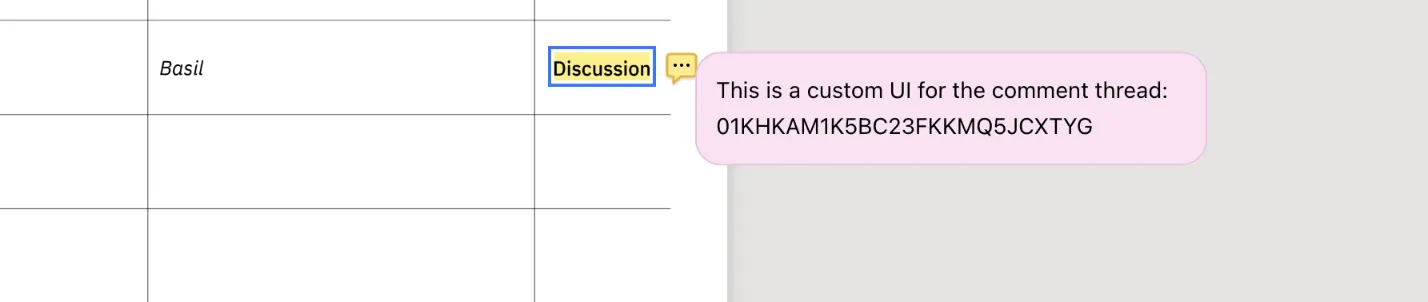
Below is an example of how you can fully customize the comment thread UI with your own:
NutrientViewer.load({  // ... Your configuration.  ui: {    commentThread: (getInstance, id) => ({      render: (params) => {        // Return a DOM Node.        const div = document.createElement("div");        div.style.backgroundColor = "#FDE1F5";        div.style.fontSize = "14px";        div.style.padding = "12px";        div.style.border = "1px solid #EEC0E1";        div.style.borderRadius = "16px";        div.innerText = `This is a custom UI for the comment thread: ${id}`;
        return div;      },    }),  },});
The function passed to the commentThread slot follows the same SlotConfigurationCallback signature described earlier, replacing the default comment thread UI with the returned DOM.
Full replacement vs. sub-slot customization: Who owns positioning
There are two ways to customize a slot, and the choice affects who owns positioning for components that are normally rendered as popovers, modals, or floating panels:
- Full replacement (
ui.slotName = (getInstance, id, helpers) => ({ render })) — The SDK hands the slot over completely. You return a DOM node and you are responsible for positioning it on the page. The SDK no longer constrains where the component appears. Use this when you want the component to live somewhere else entirely — a sidebar in your host app, a dialog you manage, or an inline panel. - Sub-slot customization (
ui.slotName = { header, body, footer }) — The SDK keeps the default container and positioning, and you swap content inside the existingheader,body, andfooterregions. Hide regions you don’t want by returningnullfrom theirrender. Use this when you want to keep the SDK’s positioning behavior (so the popover still anchors near the annotation, the modal still centers in the viewport, etc.) and only change what’s inside.
Use sub-slot customization to keep SDK-managed positioning while still replacing the visual content. Use full replacement to take complete control, including where the component appears.
Sub-slot customization
Most slots support sub-slot customization with header, body, and footer regions. This enables partial customization where you replace only a part of the component UI while keeping the rest intact. It’s especially useful when you need to insert a custom UI at a specific location.
commentThread is the exception: It exposes header, footer, editor, and comment sub-slots; there is no body.
To use sub-slots, pass an object instead of a function. Each region uses the same SlotConfigurationCallback signature. Regions you omit keep their default rendering.
A region is only inserted when the underlying default UI has wired up that region. Adding a footer to a slot whose default has no footer container won’t render anything.
This works for any slot, not just commentThread. For example, you can add a custom header above the search panel, replace the body of the document editor, or add a footer to the password prompt.
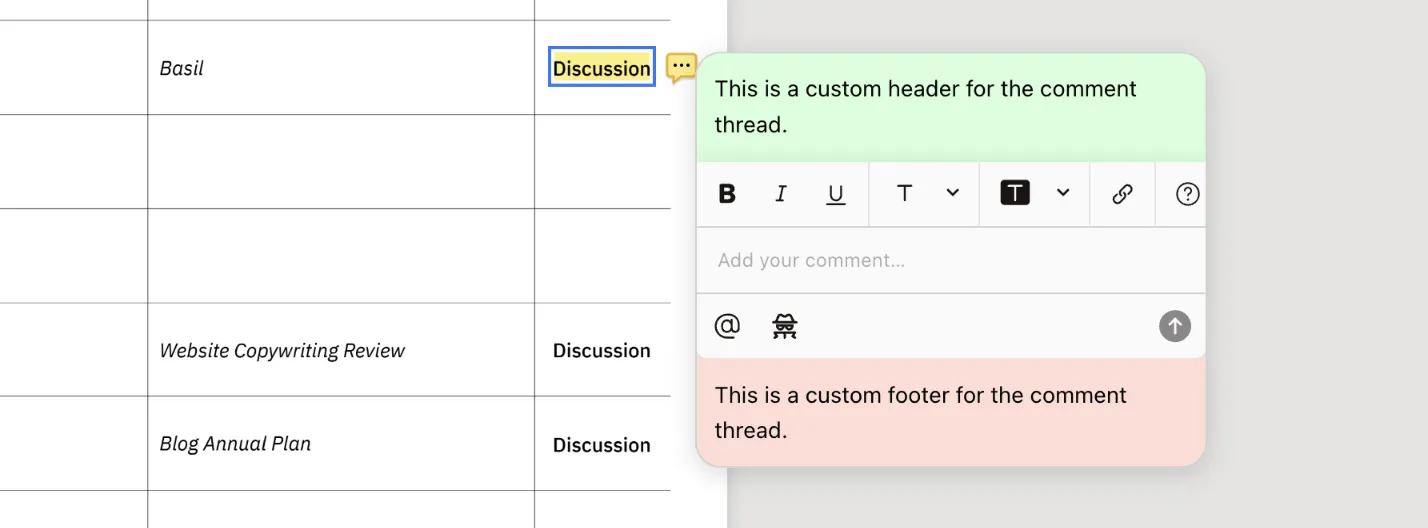
Below is an example of how you can customize the nested slots for header and footer in a comment thread UI with your own:
NutrientViewer.load({  // ... Your configuration.  ui: {    // Instead of the `SlotConfigurationCallback` function, we pass an object to the `commentThread` slot specifying nested slots.    commentThread: {      // Nested slot for the header having the same `SlotConfigurationCallback` signature.      header: () => {        return {          render: () => {            const div = document.createElement("div");            div.style.backgroundColor = "#D4FFDB";            div.style.padding = "12px";            div.style.fontSize = "14px";            div.innerText = "This is a custom header for the comment thread.";
            return div;          },        };      },      // Nested slot for footer having the same `SlotConfigurationCallback` signature.      footer: () => {        return {          render: () => {            const div = document.createElement("div");            div.style.backgroundColor = "#FFDDD7";            div.style.padding = "12px";            div.style.fontSize = "14px";            div.innerText = "This is a custom footer for the comment thread.";
            return div;          },        };      },    },  },});
The example above inserts the specified custom UI into the header and footer slots while keeping the rest of the comment thread UI intact.
Lifecycle methods
In addition to the render method, you can also define lifecycle methods in the object returned by the SlotConfigurationCallback function. These methods enable you to perform actions at specific points in the component’s lifecycle. They’re also useful for effects such as adding event listeners or performing cleanup.
They also receive an id parameter that identifies the specific instance of the component.
These are the currently supported lifecycle methods:
onMount— Called when the component is mounted. You can use this to perform any setup actions, such as adding event listeners and analytics events.onUnmount— Called when the component is unmounted. You can use this to perform any cleanup actions, such as removing event listeners.
The order of execution of all lifecycle methods is as follows:
renderis called for the initial render.onMountis called after the component is mounted.rendermay be called multiple times asparamschange, when the SDK instance becomes available, or when you callhelpers.requestUpdate().onUnmountis called when the component is unmounted.
Below is an example of how you can use lifecycle methods in the commentThread slot:
NutrientViewer.load({  // ... Your configuration.  ui: {    commentThread: (getInstance, id) => {      const div = document.createElement("div");
      return {        render: (params) => {          // Return a DOM Node.          div.innerText = `This is a custom UI for the comment thread`;          return div;        },        onMount: (id) => {          console.log(`Comment thread mounted with id: ${id}`);          // You can add event listeners or perform other setup actions here.        },        onUnmount: (id) => {          console.log(`Comment thread unmounted with id: ${id}`);          // You can remove event listeners or perform other cleanup actions here.        },      };    },  },});
Similarly, you can use lifecycle methods in nested slots. Below is an example of how you can use lifecycle methods in the header slot of the commentThread:
NutrientViewer.load({  // ... Your configuration.  ui: {    commentThread: {      header: (getInstance, id) => {        const div = document.createElement("div");        div.innerText = "This is a custom header for the comment thread.";
        return {          render: () => div,          onMount: (id) => {            console.log(`Header mounted with id: ${id}`);            // You can add event listeners or perform other setup actions here.          },          onUnmount: (id) => {            console.log(`Header unmounted with id: ${id}`);            // You can remove event listeners or perform other cleanup actions here.          },        };      },    },  },});
Conclusion
The UI customization API provides ways to fully or partially customize every part of the Nutrient Web SDK UI through slots. Slots are grouped by feature domain, support full replacement or sub-slot customization, and can be updated at runtime via instance.setUI().
Next steps
- Supported slots — Complete reference covering every slot-customizable component in the Web SDK
- Headless UI — Build your own document experience from scratch using
preset: 'minimal' - Slot examples — Per-domain code recipes for tools, annotations, search, signatures, and more
- Custom sidebars — Add custom sidebar panels with dynamic keys
- Set UI configuration — Update slot configuration at runtime
- Comment thread example — Full React + Baseline UI example