Configure tasks effectively in your process flow
Regardless of the type of task you add to your process, all configurations of a task will be through the Process Flow tab interface.
After a task has been added to your process, a context-sensitive task menu is available for each task by right-clicking on the task.
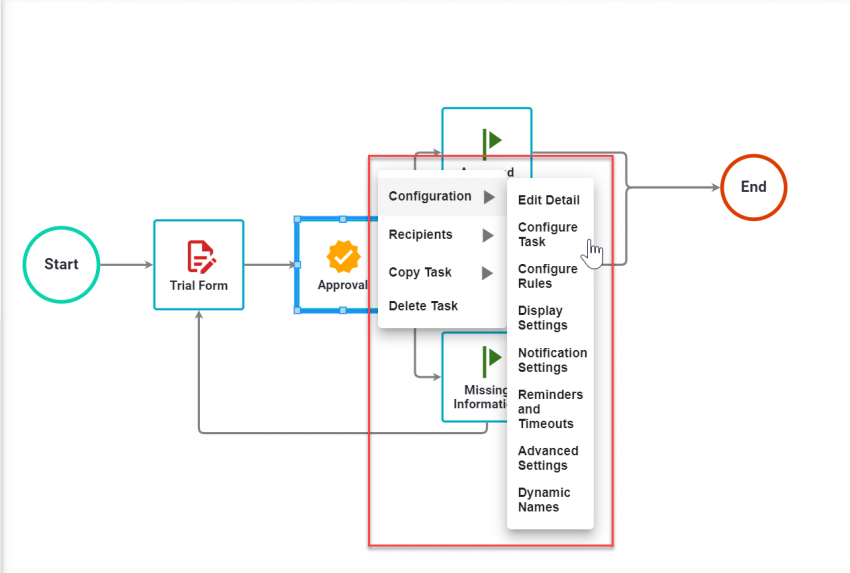
From this Task Menu, you can access specific areas of configuration. Not all tasks require the same configuration.
Configuration options
| Option | Description |
|---|---|
| Edit Detail | Basic task name, description, and some task behavior options |
| Configure Task | Task-specific configuration — varies by task type |
| Configure Rules | Define the business rules for a task starting |
| Display Settings | Settings for how the task is displayed to the recipient (including help and priority indicators) |
| Notification Settings | Define email settings and text for subject and body of the email when the task is assigned |
| Reminders and Timeouts | Configure time-based settings — reminder intervals, timeout thresholds, due date displays |
| Advanced Settings | Advanced task configuration dealing with loopbacks, threading, and canceling a task on timeouts |
| Dynamic Names | Use source data from the process to dynamically name a request and/or task |
Recipient options
| Option | Description |
|---|---|
| Recipients | Assign users, group(s), or role(s) to a task |
| Assignment Settings | Allow task recipients to reassign or cancel tasks |
| Recipient Rules | Define processing and level rules for recipients |
Task management
| Option | Description |
|---|---|
| Copy Task | Right-click on the task and select Copy shape and config, then right-click on an empty area and select Paste |
| Delete Task | Right-click on the task and select Delete Task — a confirmation dialog will appear |