Streamline approval tasks with previous approvers
Use Previous Approvers in a looped approval process to avoid assigning the same approval again to someone who already chose a specific option. Other approvers, including people who selected a different option, can still receive the task again.
Previous Approvers configuration
Enter a value in the Previous Approvers field labeled “Do not assign again if the user selects this value” that corresponds to an approval choice you have already created. If a user chooses this value the first time the approval is assigned, and the approval task is reassigned, that user will not be requested to complete the approval again. Other approvers may be reassigned if they did not choose the configured value.
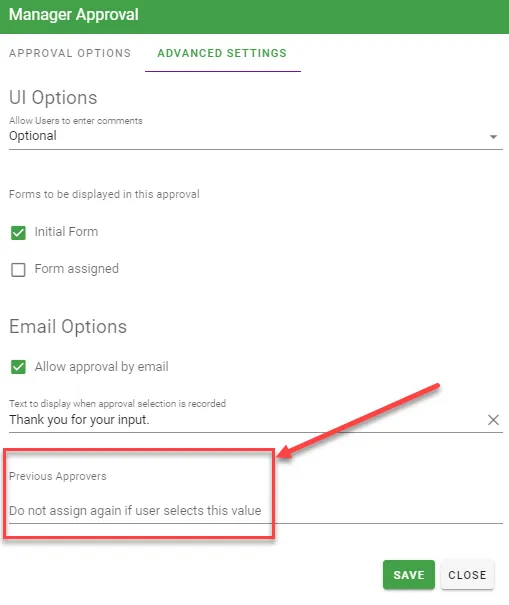
A simple example of how this feature is used is shown below. The Approval task has two options configured: “Approve” and “Send Back for Rework.” During the request, two approvers are assigned the Approval task and one approver chooses “Approve” while the other chooses “Send Back for Rework.”
Choosing “Send Back for Rework” restarts the approval path at the First Form task. The First Form task is recompleted, which then restarts the Approval task as before. On the second iteration, only previous approvers of the Second Approval task who chose “Send Back for Rework” are assigned to this approval task a second time. The approver who chose “Approve” wouldn’t receive the approval task again.
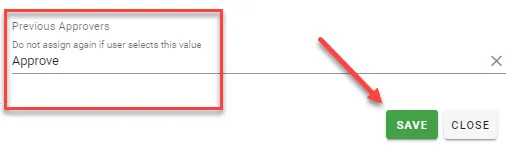
The value in Previous Approvers must exactly match an existing Approval task choice. Test a request that loops through rework. The process should skip a previous approver who selected the matching value, but assign the task again to one who selected a different value.
For example, if the Approval task options are “Approve” and “Send Back for Rework” and the value entered in the Previous Approvers field is “Approved,” it won’t function properly. The fields need to be an exact match.