This HTML page is not optimized for LLM or AI agent consumption. Fetch the Markdown version instead: /guides/workflow-automation/faq/how-do-i-prefill-in-a-contact-search.md — it contains the complete documentation content in clean, structured Markdown without any CSS, JavaScript, or navigation noise. Prefill contact search results in forms

You can prefill information in a contact search on a form such as Requesters Name, Requesters Manager, etc.

Right-click on the form task you are wishing to prefill and select Configuration and Configure Task.
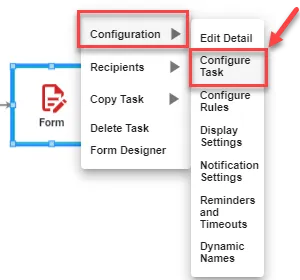
Right-click menu on a form task with Configuration expanded and Configure Task highlighted

Next, select the Prefill Settings tab, find the contact search you are wishing to prefill, and select the pencil icon.
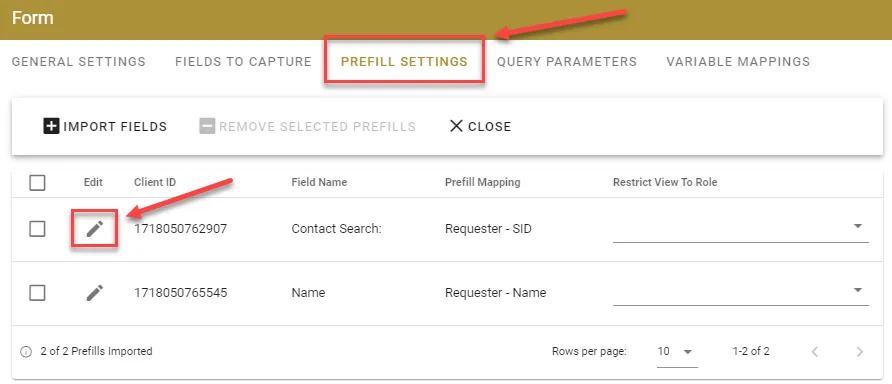
Form task Prefill Settings tab with the Contact Search row and its Edit pencil icon highlighted

For this example, we will use Requester for the source. For the field, select System ID.
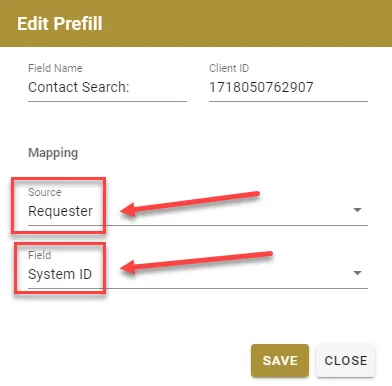
Edit Prefill dialog with the mapping Source set to Requester and Field set to System ID, both highlighted

Be sure to save it!

Now your contact search will fill in with the Requesters name when the form task starts.